microsoft 365 groups
790 Topics
No labs for MB-500 in skillable and xtreme labs (for all MB series)
Hi, From past few months, we are unable to find the labs for MB-500. It's causing us trouble to do the trainings. Skillable and Xtreme labs providers are saying there is a problem from Microsoft end only. Kindly advise us when can we get the labs available.16Views0likes0CommentsCan't add Viva Engage community calendar to Outlook
We would like to experiment with using the SharePoint Online Web part that allows you to display a group calendar on a SharePoint Online page. Our idea is to use a Viva Engage community as a means to create that group calendar so that the features of a community can also be used for this scenario. I assumed that it worked similarly to Microsoft Teams whereas along as the "HiddenFromExchangeClientsEnabled" property is FALSE for the connected group, that either all community admins/members would see the group calendar show up in Outlook automatically OR you could manually add the calendar in your calendar lists in Outlook. Neither seem to be the case. What's interesting about the group that connects to a Viva Engage community is the ""HiddenFromExchangeClientsEnabled" property is FALSE by default. However, the group calendar does not appear in Outlook. As a community admin, I tried to manually add the calendar and I get an error message "Couldn't add [group]. You may not have permissions". Does anyone know why I'm running into that error and/or why the group mailbox is not showing up in Outlook by default since the property states that it is not hidden? Is it not possible to view Viva Engage group calendars in Outlook? Thanks!1.1KViews1like3Comments
Integrating Microsoft Groups and Team Channels
We have a Shared Inbox called mailto:email address removed for privacy reasons that is shared with me and a member of the company. I'd like to convert this into a Microsoft Group to use it internally in Teams Chat and receive emails in Outlook under the Groups section. I'd also like to create a channel where all the files we want to share are available inside Teams. So, is there a way to integrate a group as a channel in Teams, or is there a different approach?94Views0likes1CommentOutlook is sending duplicated mails
Hello dear Microsoft Community I've got following problem: With one of our clients there is an issue with Outlook/Mailing The mailbox is IMAP If he sends Mails to someone they'll recieve the sent message, for like 20 times. the only suspicous thing is, that we can see 3 duplicates of that mail in the 'sent' folder. but regardless it was recieved alot more than 3 times, either way. Do you have an idea ? I already updatet Microsoft Windows & Microsoft Office 365 made a new profile checked for Add-Ins or antivirus applications I also looked it up on our firewall we also checked the log on the mailserver greetings and im looking forward to recieve some help from YOU218KViews1like6Comments
Rule Mgnt.: Move "Sent Item" reply from e-mails in Specific Folders to the Specific Folder
In a previous version, I was able to create a rule to move my "Sent Items" to the folder containing the e-mail I responded to (or from, if forwarding), therefore eliminating the need to drag my "Sent Items" replies/fwds. to the folder containing the originating e-mail. How can I do that in Outlook 365?1KViews0likes3Comments
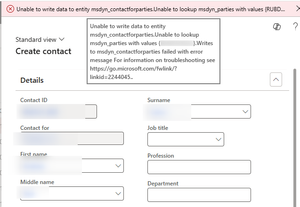
D365 F&O: dual write error
Hi all, I hope this is the right place where to ask my question. We have set up a dual write solution between D365 F&O and CRM Sales. In D365 we have an error when we create a new contact, it seems that the dual write is not correctly sincronizing for first the global addressbook table. How can we setup the dual write assigning priorities or syncronization sequences? Thanks in advance for your help. Andrea102Views0likes1Comment
Unified Company Calendar for Mixed Microsoft 365 and Non-365 Users – 2025
Seeking a Shared Calendar Solution for Mixed Microsoft 365 and Non-365 Users I’m working on a solution to create a shared company calendar that everyone in our organization can view, while keeping editing permissions limited to a few selected individuals. The challenge: Some of our team members do not use Microsoft 365, and I’d like them to still be able to subscribe to or view the calendar and receive updates. Ideally, this should work without requiring full Microsoft accounts. I initially considered using an ICS-based calendar, but it seems Microsoft 365 Group calendars don’t support sharing via ICS links. I also explored creating a Group calendar as suggested in other threads, but ran into issues making it accessible to external users or those without 365 accounts. For context, I’m a Global Admin, so I have full access to configure settings in the Microsoft 365 Admin Center and Exchange if needed. We’re a small business, and our main goal is to have a centralized calendar for vacation schedules and company-wide events. It should be simple to access and maintain, with a focus on collaboration and accessibility across the board. What I’m looking for: A calendar that’s viewable by all, including non-M365 users Editable only by a few delegated team members Compatible with Microsoft 365, but not dependent on it for basic access Any tools, workarounds, or best practices that have worked for others in similar hybrid environments119Views0likes2Comments
Sharing a Planner Plan 1 plan with a guest user
Hi there, Looking for advice on what settings may be required to ensure that a guest user from another tenant can access a Planner Plan 1 plan which has been shared via a user in my tenant. Any assistance would be greatly appreciated! Guest user error message: "You do not have access to this plan. Ask any member to add you to the plan." Microsoft Planner Plan 1 user cannot share plan with guest user from another tenant Both users have Planner Plan 1 license assigned, the guest user has it assigned to their guest account on my tenant The Plan is shared in a Microsoft Team, of which both users are members The guest user has been added to the Plan The guest user has also tried opening the Plan directly via the Plan URL which was shared by the creator The guest user gets error message: You do not have access to this plan. Ask any member to add you to the plan." Other non-guest users from my tenant are able to access the Plan without any issues The guest user has selected their guest account from my tenant within their Teams app from their own laptop, and upon signing into the guest account, no Planner tab is listed for the user, and there is no ability to add it132Views0likes1CommentOneDrive vs SharePoint
In the world of Microsoft 365, both OneDrive and SharePoint serve as robust platforms for file storage and collaboration. Yet, understanding which one fits your specific needs can be challenging. This blog explores their key differences, practical use cases, and offers guidance to help you make the right choice. What Is OneDrive? OneDrive for Business functions as a user-specific cloud repository within the Microsoft 365 framework, optimized for individual file storage, synchronization, and personal document management. What Is SharePoint? SharePoint Online operates as a collaborative content management and intranet platform within Microsoft 365, engineered for structured data handling, enterprise-level document sharing, and workflow automation across teams and departments.201Views0likes2Comments