microsoft 365 apps
1200 Topics
What's going on with office.com / web apps?
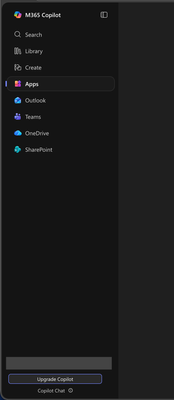
I'm aware that Microsoft had already chosen to upend usability once by changing office.com into 😡m365.cloud.microsoft😡 and make accessing web apps more difficult. This week I found they're hidding applications even further by burying them at the bottom of the page behind another menu - even when "pinned". Below are two screenshots of the 😡m365.cloud.microsoft😡 portal from different accounts that were created on the same day and accessed from the same computer and web browser via admin priveledges. I have observed this discrepency more than once with various accounts. Can someone explain the rational for Microsoft continuing to further bury office applications from users? Am I unaware of a new portal to access the Office applications our users rely upon every day?33Views0likes1Comment
Has Your Organization Set Up a Viva Engage Community for Microsoft 365 Collaboration?
Hi everyone! As a trainer, I often get great questions during my Microsoft 365 sessions. While I share answers live, only the attendees benefit—leaving many others without that valuable info. I’ve already set up a Microsoft Learning Pathways SharePoint site as a resource, but I’m exploring ways to extend knowledge-sharing beyond the classroom.Has anyone created or participated in a Viva Engage community to share tips, answer questions, and collaborate around daily Microsoft 365 tools? I’d love to hear about your experiences, best practices, or ideas on how to maximize impact and reach across your organizations. Thanks in advance for sharing! Let’s empower everyone to get more from Microsoft 365.😃99Views1like3Comments
Organisation bookings and pass through data in MS Bookings
Hi All, I thought this was possible, but it doesn't seem to be working so hoping for some pointers.. When using Microsoft Bookings for a shared service, for the use of those internal to my organisation, is it possible for the person making the booking to have their details automatically populate the form (i.e. name, email address)? I'd have thought this was basic, but it looks like it's purely designed for external bookings, regardless to the audience. Many thanks, Dayna77Views0likes1CommentSharePoint sync issues when opening from File Explorer
Hi there, Some users in my company are having issues with files not syncing with SharePoint when they save them and are also unable to concurrently edit files. They open the files via File Explorer and the 'autosave' functionality is disabled. Enabling autosave prompts them to save as a new copy. These users have recently switched to a new laptop running Windows 11 (previous laptop was Windows 10) and had no sync issues when using the old laptop. If the user first opens Excel/Word and then uses the File menu to open the document then the autosave is enabled and the file syncs with SharePoint. Here are some of the troubleshooting steps I've tried: stopping the sync and starting it again unlinking the pc and re-syncing the SharePoint site uninstalling and re-installing OneDrive Has anyone come across this issue or know of a fix that I haven't tried yet? Regards, Steve418Views0likes5Comments
PowerPoint: Restore “Align” and “Distribute” tools in PP for iPad (v2.103)
Dears, I am reporting a critical regression in PowerPoint for iPad. In the current release (version 2.103), the essential Align and Distribute tools appear to have been completely removed from the UI. These features were part of the full ribbon in previous versions and are fundamental for precise, professional, efficient, effective, and smooth slide layout. Without them, basic layout tasks can no longer be performed smoothly on the iPad. The removal of core layout tools feels like an unexpected downgrade. This change significantly reduces the usability of PowerPoint on this platform and may even force users to switch to lower-tier apps such as Keynote and others for very basic editing tasks. I am fully aware that iPadOS is often perceived as a lightweight or “consumer-first” environment. Ironically, it is precisely the professional quality of Microsoft’s applications that has made the iPad a serious productivity device for many of us. Please keep this standard high – it is the reason why the iPad can function as a genuine professional workstation rather than a creative toy. I kindly request that Microsoft restores the full ribbon or provides an option to access these tools again. Thank you very much, Marco66Views0likes1CommentReplying to emails from M365 Outlook group
A problem I am stumped with, so I am reaching out for some help/guidance. One group wants to not have the emails going into their own inbox but manage and reply only from the group inbox itself (so they know the email has been processed by deleting it once replied). It worked OK to begin with and then some users couldn't reply, then more. Some still can. I have tried reindexing local copy, using browser instead of app & changing the send on behalf of permissions. Owner or member of group doesn't seem to make a difference. Error messages include "This message can't be sent because it no longer exists. It can only be discarded. Make sure you copy the contents of the message before you discard if you want to use them later." and "Couldn't send this message". Please see screenshots attached. My questions: 1: Is Outlook on M365 designed to allow users to reply from the group either as the "group" or as themselves? Information I found isn't clear. 2: If it is / can be - what can I do to make it work for all users? Thanks!252Views0likes2CommentsPublisher replacement ideas
Hey All, Looks like Microsoft won't be supporting Publisher after Oct. I have many hundreds of pages documenting the restoration of our land that I created in Publisher. I know I'll need to convert them to another publishing app. I'm wondering what others in this situation are choosing to do especially since Publisher doesn't convert to Designer. My needs are for an easy to use app as Publisher was and not something complicated. Any thoughts or ideas would be most welcomed! MarciSolved6KViews0likes11CommentsM365 Copilot Android Application Not Working
I am using a Samsung S24 FE phone, and the Microsoft Copilot app is not working. When I open the app, I only see a black screen. I cannot open any menus. I cannot create or search for anything. There is only an empty home screen with dead buttons. I cannot sign out of my current account, nor can I figure out which account I am signed into (it logs in automatically). Here’s what I have already tried, but the issue persists: Enabled all permissions in the app settings. Deleted and reinstalled the app. Cleared the app cache and reopened it. Cleared the app data and reopened it.538Views0likes3Comments