admin
6383 Topics
Name Manager using for create name which is contain atleast two name.
Hello. I creating somthing in excel with tables. These tables has thier own name, and can be dynamic or not. Any way. I using list in cell to select each data from a tables column. For that I created names with the content of a column. Unfortunatly i had to make a kind of name which is contain atleast 2 columns. These can grow dynamicly. So I think a plus helper tabel is not the right sollution for that. I think about 3 kind of solution. 1. =UNIQUE( VSTACK( INDEX(Tabla1[#Data];0;MATCH("Type_name";Tabla1[#Headers];0)); INDEX(Tabla2[#Data];0;MATCH("Column_name";Tabla2[#Headers];0)) ) output #name? 2. =UNIQUE(VSTACK(Lista_A; Lista_B)) lista_A as a name output #name? 3. created a helper table with the existing names. Created another name and use the table in it. output was the elements contained by the helper tabel, and the lista_A and lista_B tables each dedicated column. So How can i create list for a cell or cells from two column which are dynamicly growing, without a user needs to touch the core modell? Best Balázs58Views1like2Comments
Best Practice guide for stretched HA farm?
Hi, Im planning a SharePoint Subscription farm over 2 data centers. Should be pretty simple. Farm will consist of: dc 1: 1 spfe, 1 spapp, 1 sql dc 2: 1 spfe, 1 spapp, 1 sql Sql servers will be AlwaysOn. Im not sure how to set up the sp servers. Is there a preferred way to set it up, with how to? Our domains have 10gb connections so should be more than sufficient for stretched and HA. Can CA site be hosted from multiple servers? How are IPs/DNS/certs handled? What else do I need to get my head around? Thanks. Swan8Views0likes0Comments
schedule recurring Out of Office
Hi All I want to schedule recurring out of office every day. i have shared mailbox and i want to set out of office for shared mailbox for every email which is received from 9PM to 6AM as the users who have access to this shard mailbox works from 6AM to 9PM. Is this possible to set on exchange as OWA is disabled in my environment. Please guide me on thisSolved6.9KViews1like3Comments
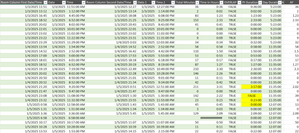
Finding time duration between a start date & time with end date & time
Hi all! I'm looking for any formula or power query to calculate a total time duration within a day, given the start date, start time, end date, end time. Most of the dates will equal the same but there are some with the end date being the next day. I'd like to be able to exclude any overlaps as well. Currently, I have a large embedded IF formula: =IF(AND($G4=$O4,$H4<$H5,$P4>=$H5,$P4<$P5,$H4<$H3),$P4-$H4,IF(AND($G4=$O4,$G4>$G3,$H4<$H3,$P4<$P3,$H4<$P3,$P4<$P5),$P4-$H4,IF(AND($G4=$O4,$H4>$H3,$H4>=$P3,$P4>$P3),$P4-$H4,IF(AND($G4=$O4,$H4=$P4),0,IF(AND($G4=$O4,$H4<$P3,$P4<=$P3),0,IF(AND($G4<$O4,$H4<$P3,$P4>$H4),($P4+1)-$P3,IF(AND($G4=$O4,$O4<$G5,$O4<$O5,$H4<$P3,$P4>$P3),$P4-$P3,IF(AND($G4=$O4,$G4>$G3,$H4>$H3,$P4>$P3,$H4>$P3),$P4-$H4,IF(AND($G4=$O4,$G4<$O5,$P4>$P3,$P4>$H5,$H4>$H3,$H4<$H5),0,IF(AND($G4=$O4,$O4=$G5,$H4<$P3,$P4>$H5,$P4>$P3,$P4>$P5,$P2>$P3),$P4-$P2,IF(AND($G4=$O4,$H4<$P3,$P4>$P3,$P4>$P5),$P4-$P3,IF(AND($G4=$O4,$H4<$P3,$P4>$P3,$H4<$H5,$P4<$P5),$P4-$P3,IF(AND($G4=$O4,$H4<$H5,$H4<$P3,$P4>$P3,$P4>$P5),$P4-$P3,IF(AND($G4=$O4,$O4=$G5,$H4<$P3,$P4>$H5,$P4>$P3),$P4-$P2,IF(AND(ISBLANK($O4),ISBLANK($P4)),0,IF(AND($G4<$O4,$H4<$P3,$P4<$H4),($P4+1)-$P3)))))))))))))))) This seems to work for the most part but there are a few that I just can't get. I also pulled up my query and started to enter in the time durations manually and it couldnt come up with anything automatic for me. There must be an easier way for me to do this other than trying to create an IF formula for each answer that turns up incorrect. I have a screen shot below.74Views0likes2CommentsUnusual behaviour on my PC. Access to all Microsoft services blocked.
One Drive does not connect. Microsoft.com loads on Chrome & Firefox but the link to the Microsoft account login page is dead. Outlook.com does not load at all. Connect to VPN (same country) and access to all Microsoft services reappears. Disconnect from VPN, connect to mobile hotspot (different ISP) and problem appears again. Reinstalled windows and problem persists. Wiped HDD and installed Linux and the unusual behaviour continues on Firefox and Chromium. Weird! All other devices on broadband and mobile internet are behaving normally. Any ideas? Curse? Nation-State?57Views0likes2CommentsSharePoint Online Content Security Policy (CSP): Enforcement Dates and Guidance
Content Security Policy (CSP) is a critical browser security feature designed to protect web applications. SharePoint Online is rolling out CSP enforcement for all tenants starting March 1, 2026.2.4KViews0likes10CommentsData Pulling
I'm trying to figure out the best way to pull data together from multiple tabs within an excel file. The file is made so that it can track issues within reports that are discovered. I'll try to break it down the best I can to explain what I have and what I'm trying to do. Within the file there are 5 tabs that are considered locations and they are named: LX, LV, CR, HR, FL Each tab is set up the same way with the only real important information in these columns of a table Column A - PCR Date Column C - PCR Owner Column G, I, K, M - Modification Category (1-4) these fields are actually drop down options from the Category Master List Within the file there is a 6th tab that has at able in it that is called Category Master List. Column A - Options for the dropdown in the above tab Modification Category columns Column B - Breakdown into one of three main categories (Billing, Compliance, Quality) Now this is what I'm trying to do: Fiscal Year Data (September 2025-August 2026) - I need to see how many times each of the dropdown options within the Master List show up in column G, I, K, M for each of the 5 location tabs. Monthly Data - I need to see how many times each of the dropdown options within the Master List show up in column G, I, K, M for each of the 5 location tabs along with how many times there is an entry with a date within that month. I would like to try and figure out how to put everything into one data table/chart type thing so it's easier to see and compare. Currently, everything needed is across a few different pivot tables and I would really like the data to pull itself automatically instead of me having to go in and copy all the data from one spot into another just to get the pivot results. Below is what I'm having to look at currently.116Views1like2Comments
add user to SharePoint group via PowerShell error
Hi, I'm trying to use PowerShell to add a user to an existing SharePoint group. I ran the following to connect to the SharePoint site: Connect-SPOService -Url https://site1-admin.sharepoint.com This prompts me to login, password and MFA code. Afterwards I type in the following to add a user: Add-SPOUser -Site https://site1-admin.sharepoint.com/sites/company -Group "Company Info Members" -LoginName mailto:email address removed for privacy reasons There is a SharePoint group with the name "Company Info Members", which I want to add mailto:email address removed for privacy reasons to. But I get the following error: Add-SPOUser : Unknown Error At line:1 char:1 + Add-SPOUser -Site https://site1-admin.sharepoint.com/s ... + ~~~~~~~~~~~~~~~~~~~~~~~~~~~~~~~~~~~~~~~~~~~~~~~~~~~~~~~~~~~~~~~~~~~~~ + CategoryInfo : NotSpecified: (:) [Add-SPOUser], ServerException + FullyQualifiedErrorId : Microsoft.SharePoint.Client.ServerException,Microsoft.Online.SharePoint.PowerShell.AddSP OUser I was wondering what could be causing this error. I searched for the error on Copilot and it suggested I use "PnP.PowerShell". But I'm having some issues installing this app. I was wondering if there are any suggestions I could do? Thanks! Jason88Views0likes3Comments
SharePoint Online global storage limits
Does anyone know the maximum total storage limit I can have by adding up user licenses that include the SharePoint service? I've looked at the limits page, but it only shows the maximum limit per site, not the total. Another way to ask the question is, what is the maximum storage I can get by increasing it by 10GB for each license I purchase?83Views0likes4CommentsCan't Login to Authenticator App
I am unable to login to my Microsoft 365 Business account, because I'm unable to login to my Authenticator App. I am also the only administrator on my business account, so no one in my organization can help me. Microsoft online support and phone support just keep sending me in circles. The only way I see to create a support ticket is to login, but my issue is that I can't login. Help, please!132Views1like3Comments