soar
104 Topics
Understand New Sentinel Pricing Model with Sentinel Data Lake Tier
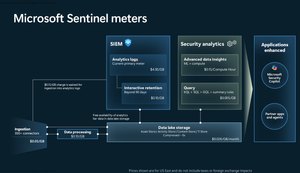
Introduction on Sentinel and its New Pricing Model Microsoft Sentinel is a cloud-native Security Information and Event Management (SIEM) and Security Orchestration, Automation, and Response (SOAR) platform that collects, analyzes, and correlates security data from across your environment to detect threats and automate response. Traditionally, Sentinel stored all ingested data in the Analytics tier (Log Analytics workspace), which is powerful but expensive for high-volume logs. To reduce cost and enable customers to retain all security data without compromise, Microsoft introduced a new dual-tier pricing model consisting of the Analytics tier and the Data Lake tier. The Analytics tier continues to support fast, real-time querying and analytics for core security scenarios, while the new Data Lake tier provides very low-cost storage for long-term retention and high-volume datasets. Customers can now choose where each data type lands—analytics for high-value detections and investigations, and data lake for large or archival types—allowing organizations to significantly lower cost while still retaining all their security data for analytics, compliance, and hunting. Please flow diagram depicts new sentinel pricing model: Now let's understand this new pricing model with below scenarios: Scenario 1A (PAY GO) Scenario 1B (Usage Commitment) Scenario 2 (Data Lake Tier Only) Scenario 1A (PAY GO) Requirement Suppose you need to ingest 10 GB of data per day, and you must retain that data for 2 years. However, you will only frequently use, query, and analyze the data for the first 6 months. Solution To optimize cost, you can ingest the data into the Analytics tier and retain it there for the first 6 months, where active querying and investigation happen. After that period, the remaining 18 months of retention can be shifted to the Data Lake tier, which provides low-cost storage for compliance and auditing needs. But you will be charged separately for data lake tier querying and analytics which depicted as Compute (D) in pricing flow diagram. Pricing Flow / Notes The first 10 GB/day ingested into the Analytics tier is free for 31 days under the Analytics logs plan. All data ingested into the Analytics tier is automatically mirrored to the Data Lake tier at no additional ingestion or retention cost. For the first 6 months, you pay only for Analytics tier ingestion and retention, excluding any free capacity. For the next 18 months, you pay only for Data Lake tier retention, which is significantly cheaper. Azure Pricing Calculator Equivalent Assuming no data is queried or analyzed during the 18-month Data Lake tier retention period: Although the Analytics tier retention is set to 6 months, the first 3 months of retention fall under the free retention limit, so retention charges apply only for the remaining 3 months of the analytics retention window. Azure pricing calculator will adjust accordingly. Scenario 1B (Usage Commitment) Now, suppose you are ingesting 100 GB per day. If you follow the same pay-as-you-go pricing model described above, your estimated cost would be approximately $15,204 per month. However, you can reduce this cost by choosing a Commitment Tier, where Analytics tier ingestion is billed at a discounted rate. Note that the discount applies only to Analytics tier ingestion—it does not apply to Analytics tier retention costs or to any Data Lake tier–related charges. Please refer to the pricing flow and the equivalent pricing calculator results shown below. Monthly cost savings: $15,204 – $11,184 = $4,020 per month Now the question is: What happens if your usage reaches 150 GB per day? Will the additional 50 GB be billed at the Pay-As-You-Go rate? No. The entire 150 GB/day will still be billed at the discounted rate associated with the 100 GB/day commitment tier bucket. Azure Pricing Calculator Equivalent (100 GB/ Day) Azure Pricing Calculator Equivalent (150 GB/ Day) Scenario 2 (Data Lake Tier Only) Requirement Suppose you need to store certain audit or compliance logs amounting to 10 GB per day. These logs are not used for querying, analytics, or investigations on a regular basis, but must be retained for 2 years as per your organization’s compliance or forensic policies. Solution Since these logs are not actively analyzed, you should avoid ingesting them into the Analytics tier, which is more expensive and optimized for active querying. Instead, send them directly to the Data Lake tier, where they can be retained cost-effectively for future audit, compliance, or forensic needs. Pricing Flow Because the data is ingested directly into the Data Lake tier, you pay both ingestion and retention costs there for the entire 2-year period. If, at any point in the future, you need to perform advanced analytics, querying, or search, you will incur additional compute charges, based on actual usage. Even with occasional compute charges, the cost remains significantly lower than storing the same data in the Analytics tier. Realized Savings Scenario Cost per Month Scenario 1: 10 GB/day in Analytics tier $1,520.40 Scenario 2: 10 GB/day directly into Data Lake tier $202.20 (without compute) $257.20 (with sample compute price) Savings with no compute activity: $1,520.40 – $202.20 = $1,318.20 per month Savings with some compute activity (sample value): $1,520.40 – $257.20 = $1,263.20 per month Azure calculator equivalent without compute Azure calculator equivalent with Sample Compute Conclusion The combination of the Analytics tier and the Data Lake tier in Microsoft Sentinel enables organizations to optimize cost based on how their security data is used. High-value logs that require frequent querying, real-time analytics, and investigation can be stored in the Analytics tier, which provides powerful search performance and built-in detection capabilities. At the same time, large-volume or infrequently accessed logs—such as audit, compliance, or long-term retention data—can be directed to the Data Lake tier, which offers dramatically lower storage and ingestion costs. Because all Analytics tier data is automatically mirrored to the Data Lake tier at no extra cost, customers can use the Analytics tier only for the period they actively query data, and rely on the Data Lake tier for the remaining retention. This tiered model allows different scenarios—active investigation, archival storage, compliance retention, or large-scale telemetry ingestion—to be handled at the most cost-effective layer, ultimately delivering substantial savings without sacrificing visibility, retention, or future analytical capabilities.961Views0likes0Comments
Update content package Metadata
Hello Sentinel community and Microsoft. Ive been working on a script where i use this command: https://learn.microsoft.com/en-us/rest/api/securityinsights/content-package/install?view=rest-securityinsights-2024-09-01&tabs=HTTP Ive managed to successfully create everything from retrieving whats installed, uninstalling, reinstalling and lastly updating (updating needed to be "list, delete, install" however :'), there was no flag for "update available"). However, now to my issue. As this work like a charm through powershell, the metadata and hyperlinking is not being deployed - at all. So i have my 40 content packages successfully installed through the REST-api, but then i have to visit the content hub in sentinel in the GUI, filter for "installed" and mark them all, then press "install". When i do this the metadata and hyperlinking is created. (Its most noticeable that the analytic rules for the content hubs are not available under analytic rules -> Rule templates after installing through the rest api). But once you press install button in the GUI, they appear. So i looked in to the request that is made when pressing the button. It uses another API version, fine, i can add that to my script. But it also uses 2 variables that are not documented and encrypted-data. they are called c and t: Im also located in EU and it makes a request to SentinelUS. im OK with that, also as mentioned, another API version (2020-06-01) while the REST APi to install content packages above has 2024-09-01. NP. But i can not simulate this last request as the variables are encrypted and not available through the install rest api. They are also not possible to simulate. it ONLY works in the GUI when pressing install. Lastly i get another API version back when it successfully ran through install in GUI, so in total its 3 api versions. Here is my code snippet i tried (it is basically a mimic of the post request in the network tab of the browser then pressing "install" on the package in content hub, after i successfully installed it through the official rest api). function Refresh-WorkspaceMetadata { param ( [Parameter(Mandatory = $true)] [string]$SubscriptionId, [Parameter(Mandatory = $true)] [string]$ResourceGroup, [Parameter(Mandatory = $true)] [string]$WorkspaceName, [Parameter(Mandatory = $true)] [string]$AccessToken ) # Use the API version from the portal sample $apiVeri = "?api-version=" $RefreshapiVersion = "2020-06-01" # Build the batch endpoint URL with the query string on the batch URI $batchUri = "https://management.azure.com/\$batch$apiVeri$RefreshapiVersion" # Construct a relative URL for the workspace resource. # Append dummy t and c parameters to mimic the portal's request. $workspaceUrl = "/subscriptions/$SubscriptionId/resourceGroups/$ResourceGroup/providers/Microsoft.OperationalInsights/workspaces/$WorkspaceName$apiVeri$RefreshapiVersion&t=123456789&c=dummy" # Create a batch payload with several GET requests $requests = @() for ($i = 0; $i -lt 5; $i++) { $requests += @{ httpMethod = "GET" name = [guid]::NewGuid().ToString() requestHeaderDetails = @{ commandName = "Microsoft_Azure_SentinelUS.ContenthubWorkspaceClient/get" } url = $workspaceUrl } } $body = @{ requests = $requests } | ConvertTo-Json -Depth 5 try { $response = Invoke-RestMethod -Uri $batchUri -Method Post -Headers @{ "Authorization" = "Bearer $AccessToken" "Content-Type" = "application/json" } -Body $body Write-Host "[+] Workspace metadata refresh triggered successfully." -ForegroundColor Green } catch { Write-Host "[!] Failed to trigger workspace metadata refresh. Error: $_" -ForegroundColor Red } } Refresh-WorkspaceMetadata -SubscriptionId $subscriptionId -ResourceGroup $resourceGroup -WorkspaceName $workspaceName -AccessToken $accessToken (note: i have variables higher up in my script for subscriptionid, resourcegroup, workspacename and token etc). Ive tried with and without mimicing the T and C variable. none works. So for me, currently, installing content hub packages for sentinel is always: Install through script to get all 40 packages Visit webpage, filter for 'Installed', mark them and press 'Install' You now have all metadata and hyperlinking available to you in your Sentinel (such as hunting rules, analytic rules, workbooks, playbooks -templates). Anyone else manage to get around this or is it "GUI" gated ? Greatly appreciated.Solved454Views1like6CommentsMulti-trigger Playbooks & Renamed Triggers
Hello Sentinel enthusiasts, In some cases, deploying a playbook with multiple triggers is a much easier solution than having 9 playbooks which do the same thing. In the specific example I'm going for I have developed a playbook which requires the user to change their password within a certain amount of time. We want to have the ability to have three triggers for the playbook - incident, entity and http (for external orchestration platforms) - then we also want to have the option for it to be instant, or within a configurable number of days/hours (1day, 7days). In this situation the native way would be to have 9 playbooks in total - seems like a big amount for a simple action. I attempted to initially develop these playbooks with all three triggers in a base template which is deployed using bicep - success. But what do you know, at first, I could only see the playbook in the automation playbook list saying "Sentinel Action" but I couldn't trigger it from an actual incident or entity. Turns out this was because I had given the trigger a different display name than the default. This specific case seems a bit odd to me because the underlying data is the same, nonetheless - not a huge issue, change the display name to the default and voila. My next surprise was when I realised that the Sentinel UI will only pick up the first trigger to run a playbook. i.e. if I define an entity trigger first then an incident trigger, I cannot see it appear to trigger for an incident and vice versa. So, I set on a mission and was able to create a chromium extension which will modify the resource response - to duplicate a playbook once for every trigger it has (only in the azure portal PWA) and what do I know - everything works perfectly as if it was fully supported. It would be great if these UI bugs could be fixed as they seem pretty trivial and don't seem to require a major change, considering it is solely a frontend bug - especially if I can create an extension which resolves the issue. Obviously, this is not an ideal scenario in production. Garnering some support to have this rectified would be great and it would also be cool to hear people's opinions on this ~Seb73Views0likes0Comments
Error when running playbook Block-AADUser-Alert
Hello, I have personal account and I am trying Microsoft Sentinel. My senario is when user account (not admin) changes his authentication method, an alert is triggered and then I run built-in playbook Block-AADUser-Alert to disable this account. I get following error when running this playbook: { "error": { "code": "Request_ResourceNotFound", "message": "Resource '[\"leloc@hoahung353.onmicrosoft.com\"]' does not exist or one of its queried reference-property objects are not present.", "innerError": { "date": "2022-05-13T03:06:46", "request-id": "84bab933-eb79-4352-9bdf-e6d5444a1798", "client-request-id": "84bab933-eb79-4352-9bdf-e6d5444a1798" } } } I have tried to assign all required permissions (User.Read.All, User.ReadWrite.All, Directory.Read.All, Directory.ReadWrite.All), authorized api connection,.. but it can not solve the issue. Would anyone help advise how to solve ? Is it because of personal account ? Best Regards, AnSolved6.7KViews0likes30Comments
Microsoft Sentinel - Alert suppression
Hello Tech Community, Working with Microsoft Sentinel, sometimes, we have to suppress alerts based on information about UPN, IP, hostname, and other. Let's imagine we need to suppress 20 combinations of UPN, IP hostname. Sometimes, sometimes, the suppressions fields should be empty or should be wildcarded (meaning it can be any value in the log that should be suppressed). What is the best way to suppress alerts? - Automation rules - seems not flexible and works only with entities. - Watchlist with "join" or "where" operator - good option, but doesn't support * (wildcard) - Hardcoded in KQL - not flexible, especially when you have SDLC processes Please, your ideas and advice.414Views0likes2Comments
Logic app - Escaped Characters and Formatting Problems in KQL Run query and list results V2 action
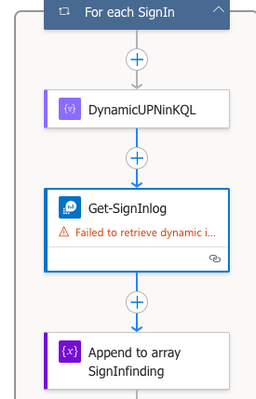
I’m building a Logic App to detect sign-ins from suspicious IP addresses. The logic includes: Retrieving IPs from incident entities in Microsoft Sentinel. Enriching each IP using an external API. Filtering malicious IPs based on their score and risk level. Storing those IPs in an array variable (MaliciousIPs). Creating a dynamic KQL query to check if any of the malicious IPs were used in sign-ins, using the in~ operator. Problem: When I use a Select and Join action to build the list of IPs (e.g., "ip1", "ip2"), the Logic App automatically escapes the quotes. As a result, the KQL query is built like this: IPAddress in~ ([{"body":"{\"\":\"\\\"X.X.X.X\\\"\"}"}]) Instead of the expected format: IPAddress in~ ("X.X.X.X", "another.ip") This causes a parsing error when the Run Query and List Results V2 action is executed against Log Analytics. ------------------------ Here's the For Each action loop who contain the following issue: Dynamic compose to formulate the KQL query in a concat, since it's containing the dynamic value above : concat('SigninLogs | where TimeGenerated > ago(3d) | where UserPrincipalName == \"',variables('CurrentUPN'),'\" | where IPAddress in~ (',outputs('Join_MaliciousIPs_KQL'),') | project TimeGenerated, IPAddress, DeviceDetail, AppDisplayName, Status') The Current UPN is working as expected, using the same format in a Initialize/Set variable above (Array/String(for IP's)). The rest of the loop : Note: Even if i have a "failed to retrieve" error on the picture don't bother with that, it's just about the dynamic value about the Subscription, I've entered it manually, it's working fine. What I’ve tried: Using concat('\"', item()?['ip'], '\"') inside Select (causes extra escaping). Removing quotes and relying on Logic App formatting (resulted in object wrapping). Flattening the array using a secondary Select to extract only values. Using Compose to debug outputs. Despite these attempts, the query string is always malformed due to extra escaping or nested JSON structure. I would like to know if someone has encountered or have the solution to this annoying problem ? Best regardsSolved225Views0likes1CommentSentinel incident playbook - get alert entities
Hi! My main task is to get all alerts (alerts, not incidents) from sentinel (analytics rules and Defender XDR) to external case management. For different reasons we need to do this on alert level. Alert trigger by design works perfectly, but this does not trigger on Defender alerts on Sentinel, only analytic rules. When using Sentinel incident trigger, then i'm not able to extract entities related to alerts, only incident releated entities. Final output is sent with HTTP post to our external system using logic app. Any ideas how to get in logic app all alerts with their entities?460Views1like5Comments
Tips on how to process firewall URL/DNS alerts
Greetings I've been tossing this around ever since I've started using Sentinel, or Defender XDR rather, a few years ago. How to process events from our firewalls. Specifically all the URL and DNS block alerts generated. I don't want to tune them out completely because they might be an indication of something bigger but as the situation is now it's almost impossible to process them. All alerts are created by an NDR rule that processes CommonSecurityLog entires based on syslog data and creates incidents with entities for the incident. The way Defender XDR then process these Sentinel incidents seems to be to create "mega incidents" where it dumps all incidents for a specific time. I can understand the logic behind this thinking where Defender XDR tries to piece together differenct incidents and alerts that have common elements, users, mitre attributes or any combination. But it becomes unmanagable. I would like some input from the community, or references to best practicies.267Views1like4Comments
Behavior Analytics, investigation Priority
Hello, Regarding the field investigation Priority in the Behavior Analytics table, what would be the value that Microsoft considers to be high/critical to look into the user's account? By analyzing the logs i would say, 7 or higher, if someone could tell me, and thank you in advance.211Views1like1Comment
AMPLS Restrictions Preventing Outbound API Calls in Logic Apps – Any Workarounds?
Hi everyone, I’m encountering an issue where Azure Monitor Private Link Scope (AMPLS) restrictions are preventing Azure Logic Apps from making any outbound API calls, even to Microsoft-owned outbound IP addresses. One specific problem is that when running KQL queries inside a Logic App, the Azure Monitor connector fails because it attempts to access Microsoft outbound IPs, which are blocked by AMPLS restrictions. Since this is happening within Logic Apps itself, I don’t have direct control over these outbound calls. Has anyone found a workaround to allow Logic Apps to function correctly while keeping AMPLS in place? Would Private Endpoints, VNET Integration, or any other configuration help resolve this? Any insights or solutions would be greatly appreciated!177Views0likes3Comments