azure
155 Topics
I'm stuck!
Logically, I'm not sure how\if I can do this. I want to monitor for EntraID Group additions - I can get this to work for a single entry using this: AuditLogs | where TimeGenerated > ago(7d) | where OperationName == "Add member to group" | where TargetResources[0].type == "User" | extend GroupName = tostring(parse_json(tostring(parse_json(tostring(TargetResources[0].modifiedProperties))[1].newValue))) | where GroupName == "NameOfGroup" <-- This returns the single entry | extend User = tostring(TargetResources[0].userPrincipalName) | summarize ['Count of Users Added']=dcount(User), ['List of Users Added']=make_set(User) by GroupName | sort by GroupName asc However, I have a list of 20 Priv groups that I need to monitor. I can do this using: let PrivGroups = dynamic[('name1','name2','name3'}); and then call that like this: blahblah | where TargetResources[0].type == "User" | extend GroupName = tostring(parse_json(tostring(parse_json(tostring(TargetResources[0].modifiedProperties))[1].newValue))) | where GroupName has_any (PrivGroup) But that's a bit dirty to update - I wanted to call a watchlist. I've tried defining with: let PrivGroup = (_GetWatchlist('TestList')); and tried calling like: blahblah | where TargetResources[0].type == "User" | extend GroupName = tostring(parse_json(tostring(parse_json(tostring(TargetResources[0].modifiedProperties))[1].newValue))) | where GroupName has_any ('PrivGroup') I've tried dropping the let and attempted to lookup the watchlist directly: | where GroupName has_any (_GetWatchlist('TestList')) The query runs but doesn't return any results (Obvs I know the result exists) - How do I lookup that extracted value on a Watchlist. Any ideas or pointers why I'm wrong would be appreciated! Many thanksSolved84Views0likes2Comments
Understand New Sentinel Pricing Model with Sentinel Data Lake Tier
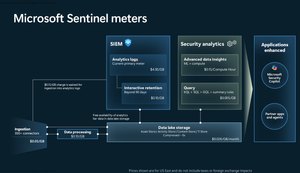
Introduction on Sentinel and its New Pricing Model Microsoft Sentinel is a cloud-native Security Information and Event Management (SIEM) and Security Orchestration, Automation, and Response (SOAR) platform that collects, analyzes, and correlates security data from across your environment to detect threats and automate response. Traditionally, Sentinel stored all ingested data in the Analytics tier (Log Analytics workspace), which is powerful but expensive for high-volume logs. To reduce cost and enable customers to retain all security data without compromise, Microsoft introduced a new dual-tier pricing model consisting of the Analytics tier and the Data Lake tier. The Analytics tier continues to support fast, real-time querying and analytics for core security scenarios, while the new Data Lake tier provides very low-cost storage for long-term retention and high-volume datasets. Customers can now choose where each data type lands—analytics for high-value detections and investigations, and data lake for large or archival types—allowing organizations to significantly lower cost while still retaining all their security data for analytics, compliance, and hunting. Please flow diagram depicts new sentinel pricing model: Now let's understand this new pricing model with below scenarios: Scenario 1A (PAY GO) Scenario 1B (Usage Commitment) Scenario 2 (Data Lake Tier Only) Scenario 1A (PAY GO) Requirement Suppose you need to ingest 10 GB of data per day, and you must retain that data for 2 years. However, you will only frequently use, query, and analyze the data for the first 6 months. Solution To optimize cost, you can ingest the data into the Analytics tier and retain it there for the first 6 months, where active querying and investigation happen. After that period, the remaining 18 months of retention can be shifted to the Data Lake tier, which provides low-cost storage for compliance and auditing needs. But you will be charged separately for data lake tier querying and analytics which depicted as Compute (D) in pricing flow diagram. Pricing Flow / Notes The first 10 GB/day ingested into the Analytics tier is free for 31 days under the Analytics logs plan. All data ingested into the Analytics tier is automatically mirrored to the Data Lake tier at no additional ingestion or retention cost. For the first 6 months, you pay only for Analytics tier ingestion and retention, excluding any free capacity. For the next 18 months, you pay only for Data Lake tier retention, which is significantly cheaper. Azure Pricing Calculator Equivalent Assuming no data is queried or analyzed during the 18-month Data Lake tier retention period: Although the Analytics tier retention is set to 6 months, the first 3 months of retention fall under the free retention limit, so retention charges apply only for the remaining 3 months of the analytics retention window. Azure pricing calculator will adjust accordingly. Scenario 1B (Usage Commitment) Now, suppose you are ingesting 100 GB per day. If you follow the same pay-as-you-go pricing model described above, your estimated cost would be approximately $15,204 per month. However, you can reduce this cost by choosing a Commitment Tier, where Analytics tier ingestion is billed at a discounted rate. Note that the discount applies only to Analytics tier ingestion—it does not apply to Analytics tier retention costs or to any Data Lake tier–related charges. Please refer to the pricing flow and the equivalent pricing calculator results shown below. Monthly cost savings: $15,204 – $11,184 = $4,020 per month Now the question is: What happens if your usage reaches 150 GB per day? Will the additional 50 GB be billed at the Pay-As-You-Go rate? No. The entire 150 GB/day will still be billed at the discounted rate associated with the 100 GB/day commitment tier bucket. Azure Pricing Calculator Equivalent (100 GB/ Day) Azure Pricing Calculator Equivalent (150 GB/ Day) Scenario 2 (Data Lake Tier Only) Requirement Suppose you need to store certain audit or compliance logs amounting to 10 GB per day. These logs are not used for querying, analytics, or investigations on a regular basis, but must be retained for 2 years as per your organization’s compliance or forensic policies. Solution Since these logs are not actively analyzed, you should avoid ingesting them into the Analytics tier, which is more expensive and optimized for active querying. Instead, send them directly to the Data Lake tier, where they can be retained cost-effectively for future audit, compliance, or forensic needs. Pricing Flow Because the data is ingested directly into the Data Lake tier, you pay both ingestion and retention costs there for the entire 2-year period. If, at any point in the future, you need to perform advanced analytics, querying, or search, you will incur additional compute charges, based on actual usage. Even with occasional compute charges, the cost remains significantly lower than storing the same data in the Analytics tier. Realized Savings Scenario Cost per Month Scenario 1: 10 GB/day in Analytics tier $1,520.40 Scenario 2: 10 GB/day directly into Data Lake tier $202.20 (without compute) $257.20 (with sample compute price) Savings with no compute activity: $1,520.40 – $202.20 = $1,318.20 per month Savings with some compute activity (sample value): $1,520.40 – $257.20 = $1,263.20 per month Azure calculator equivalent without compute Azure calculator equivalent with Sample Compute Conclusion The combination of the Analytics tier and the Data Lake tier in Microsoft Sentinel enables organizations to optimize cost based on how their security data is used. High-value logs that require frequent querying, real-time analytics, and investigation can be stored in the Analytics tier, which provides powerful search performance and built-in detection capabilities. At the same time, large-volume or infrequently accessed logs—such as audit, compliance, or long-term retention data—can be directed to the Data Lake tier, which offers dramatically lower storage and ingestion costs. Because all Analytics tier data is automatically mirrored to the Data Lake tier at no extra cost, customers can use the Analytics tier only for the period they actively query data, and rely on the Data Lake tier for the remaining retention. This tiered model allows different scenarios—active investigation, archival storage, compliance retention, or large-scale telemetry ingestion—to be handled at the most cost-effective layer, ultimately delivering substantial savings without sacrificing visibility, retention, or future analytical capabilities.960Views0likes0Comments
need to create monitoring queries to track the health status of data connectors
I'm working with Microsoft Sentinel and need to create monitoring queries to track the health status of data connectors. Specifically, I want to: Identify unhealthy or disconnected data connectors, Determine when a data connector last lost connection Get historical connection status information What I'm looking for: A KQL query that can be run in the Sentinel workspace to check connector status OR a PowerShell script/command that can retrieve this information Ideally, something that can be automated for regular monitoring Looking at the SentinelHealth table, but unsure about the exact schema,connector, etc Checking if there are specific tables that track connector status changes Using Azure Resource Graph or management APIs Ive Tried multiple approaches (KQL, PowerShell, Resource Graph) however I somehow cannot get the information I'm looking to obtain. Please assist with this, for example i see this microsoft docs page, https://learn.microsoft.com/en-us/azure/sentinel/monitor-data-connector-health#supported-data-connectors however I would like my query to state data such as - Last ingestion of tables? How much data has been ingested by specific tables and connectors? What connectors are currently connected? The health of my connectors? Please help314Views2likes3Comments
Issue when ingesting Defender XDR table in Sentinel
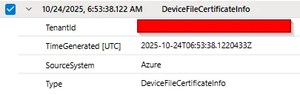
Hello, We are migrating our on-premises SIEM solution to Microsoft Sentinel since we have E5 licences for all our users. The integration between Defender XDR and Sentinel convinced us to make the move. We have a limited budget for Sentinel, and we found out that the Auxiliary/Data Lake feature is sufficient for verbose log sources such as network logs. We would like to retain Defender XDR data for more than 30 days (the default retention period). We implemented the solution described in this blog post: https://jeffreyappel.nl/how-to-store-defender-xdr-data-for-years-in-sentinel-data-lake-without-expensive-ingestion-cost/ However, we are facing an issue with 2 tables: DeviceImageLoadEvents and DeviceFileCertificateInfo. The table forwarded by Defender to Sentinel are empty like this row: We created a support ticket but so far, we haven't received any solution. If anyone has experienced this issue, we would appreciate your feedback. Lucas65Views0likes0Comments
Log Ingestion Delay in all Data connectors
Hi, I have integrated multiple log sources in sentinel and all the log sources are ingesting logs between 7:00 pm to 2:00 am I want the log ingestion in real time. I have integrated Azure WAF, syslog, Fortinet, Windows servers. For evidence I am attaching a screenshots. I am totally clueless if anyone can help I will be very thankful!155Views0likes1Comment
Codeless Connect Framework (CCF) Template Help
As the title suggests, I'm trying to finalize the template for a Sentinel Data Connector that utilizes the CCF. Unfortunately, I'm getting hung up on some parameter related issues with the polling config. The API endpoint I need to call utilizes a date range to determine the events to return and then pages within that result set. The issue is around the requirements for that date range and how CCF is processing my config. The API expects an HTTP GET verb and the query string should contain two instances of a parameter called EventDates among other params. For example, a valid query string may look something like: ../path/to/api/myEndpoint?EventDates=2025-08-25T15%3A46%3A36.091Z&EventDates=2025-08-25T16%3A46%3A36.091Z&PageSize=200&PageNumber=1 I've tried a few approaches in the polling config to accomplish this, but none have worked. The current config is as follows and has a bunch of extra stuff and names that aren't recognized by my API endpoint but are there simply to demonstrate different things: "queryParameters": { "EventDates.Array": [ "{_QueryWindowStartTime}", "{_QueryWindowEndTime}" ], "EventDates.Start": "{_QueryWindowStartTime}", "EventDates.End": "{_QueryWindowEndTime}", "EventDates.Same": "{_QueryWindowStartTime}", "EventDates.Same": "{_QueryWindowEndTime}", "Pagination.PageSize": 200 } This yields the following URL / query string: ../path/to/api/myEndpoint?EventDates.Array=%7B_QueryWindowStartTime%7D&EventDates.Array=%7B_QueryWindowEndTime%7D&EventDates.Start=2025-08-25T15%3A46%3A36.091Z&EventDates.End=2025-08-25T16%3A46%3A36.091Z&EventDates.Same=2025-08-25T16%3A46%3A36.091Z&Pagination.PageSize=200 There are few things to note here: The query param that is configured as an array (EventDates.Array) does indeed show up twice in the query string and with distinct values. The issue is, of course, that CCF doesn't seem to do the variable substitution for values nested in an array the way it does for standard string attributes / values. The query params that have distinct names (EventDates.Start and .End) both show up AND both have the actual timestamps substituted properly. Unfortunately, this doesn't match the API expectations since the names differ. The query params that are repeated with the same name (EventDates.Same) only show once and it seems to use the value from which comes last in the config (so last one overwrites the rest). Again, this doesn't meet the requirements of the API since we need both. I also tried a few other things ... Just sticking the query params and placeholders directly in the request.apiEndpoint polling config attribute. No surprise, it doesn't do the variable substitution there. Utilizing queryParametersTemplate instead of queryParameters. https://learn.microsoft.com/en-us/azure/sentinel/data-connector-connection-rules-referenceindicates this is a string parameter that expects a JSON string. I tried this with various approaches to the structure of the JSON. In ALL instances, the values here seemed to be completely ignored. All other examples from Azure-Sentinel repository utilize the POST verb. Perhaps that attribute isn't even interpreted on a GET request??? And because some AI agents suggested it and ... sure, why not??? ... I tried queryParametersTemplate as an actual query string template, so "EventDates={_QueryWindowStartTime}&EventDates={_QueryWindowEndTime}". Just as with previous attempts to use this attribute, it was completely ignored. I'm willing to try anything at this point, so if you have suggestions, I'll give it a shot! Thanks for any input you may have!231Views0likes4Comments
Zoom logs into Sentinel
Hi I am reaching out to community member because facing a hustle while integrating the Zoom with Sentinel. while following the document provided inside the Zoom data connector, deployed an App over the zoom extracted the required information, create function app on Azure and provided the account ID, client ID, Client secret everything but facing one error that the account has not audio conference plan function app is running successfully but in the invocation logs its showing this audio conference plan to make sure we have purchased the zoom audio conference plan but still its giving us the same error. If anyone has done this please please share your experience with us how did you integrate zoom with sentinel because from last two months we are struggle with it.302Views0likes6CommentsMulti-trigger Playbooks & Renamed Triggers
Hello Sentinel enthusiasts, In some cases, deploying a playbook with multiple triggers is a much easier solution than having 9 playbooks which do the same thing. In the specific example I'm going for I have developed a playbook which requires the user to change their password within a certain amount of time. We want to have the ability to have three triggers for the playbook - incident, entity and http (for external orchestration platforms) - then we also want to have the option for it to be instant, or within a configurable number of days/hours (1day, 7days). In this situation the native way would be to have 9 playbooks in total - seems like a big amount for a simple action. I attempted to initially develop these playbooks with all three triggers in a base template which is deployed using bicep - success. But what do you know, at first, I could only see the playbook in the automation playbook list saying "Sentinel Action" but I couldn't trigger it from an actual incident or entity. Turns out this was because I had given the trigger a different display name than the default. This specific case seems a bit odd to me because the underlying data is the same, nonetheless - not a huge issue, change the display name to the default and voila. My next surprise was when I realised that the Sentinel UI will only pick up the first trigger to run a playbook. i.e. if I define an entity trigger first then an incident trigger, I cannot see it appear to trigger for an incident and vice versa. So, I set on a mission and was able to create a chromium extension which will modify the resource response - to duplicate a playbook once for every trigger it has (only in the azure portal PWA) and what do I know - everything works perfectly as if it was fully supported. It would be great if these UI bugs could be fixed as they seem pretty trivial and don't seem to require a major change, considering it is solely a frontend bug - especially if I can create an extension which resolves the issue. Obviously, this is not an ideal scenario in production. Garnering some support to have this rectified would be great and it would also be cool to hear people's opinions on this ~Seb73Views0likes0Comments