outlook
2071 Topics
Has Your Organization Set Up a Viva Engage Community for Microsoft 365 Collaboration?
Hi everyone! As a trainer, I often get great questions during my Microsoft 365 sessions. While I share answers live, only the attendees benefit—leaving many others without that valuable info. I’ve already set up a Microsoft Learning Pathways SharePoint site as a resource, but I’m exploring ways to extend knowledge-sharing beyond the classroom.Has anyone created or participated in a Viva Engage community to share tips, answer questions, and collaborate around daily Microsoft 365 tools? I’d love to hear about your experiences, best practices, or ideas on how to maximize impact and reach across your organizations. Thanks in advance for sharing! Let’s empower everyone to get more from Microsoft 365.😃99Views1like3Comments
Outlook Web App - Move to no longer moves focus to the search box
Hi, I'm requesting a change back to a previous behavior in Outlook Web App for the "Move to" button. Previously, I could click this button and the small search box was selected as text focus. This means I could click once and then type the name of a folder to which I could move that email. Now, clicking the "Move to" button shows the list of recent folders, but does not move the cursor into the search box. Thus, it requires an additional click to search for a folder. The previous workflow is more efficient and please consider reverting to that behavior! -MMSolved1.9KViews5likes6CommentsExchange database dismounted due to NTFS file extent limit reached – unexpected outage
Hi everyone, We experienced a serious outage on our Exchange 2016 server recently, and I wanted to share what we found during the root cause analysis – in case it helps someone else avoid the same scenario. Summary: After digging deep, we discovered that the issue was caused by the NTFS file system hitting its internal file extent limit on the .edb file. Once this threshold was reached, the database could no longer grow, and the system dismounted the database unexpectedly. No prior warning, just service interruption. Details: The .edb was around 1.2 TB in size. This isn’t a limit on database size itself — it’s about how fragmented the file is on disk. Once NTFS couldn’t track any more extents, the database stopped working. Microsoft doesn’t publish a clear fix for this; only scattered references to similar behavior in past cases. What we did: Created a fresh, clean database. Manually moved user mailboxes into the new DB. The old database couldn't be mounted anymore, so we brought the system live without historical mail – just to maintain continuity. We're now working on extracting data from the unmounted .edb using third-party tools. Looking for thoughts: Has anyone else hit the NTFS extent wall with Exchange? How do you monitor extent growth proactively? Did switching to ReFS solve this for you long-term? Open to any input or similar experiences – appreciate it in advance. Thanks!103Views1like3Comments
Outlook MacOS - Email-section display issue
Since the latest Outlook update for MacOS - Version 16.105 (25120324) - there is a display error in the email-section. There is a large empty space between the "Search"-Header and the "Email"- Header This issue only occurs in the email section. All other areas (Calendar, Contacts, etc.) are looking normal:121Views0likes3Comments
Manged Home Screen: Outlook
We are running into issues with the Managed Home Screen and Outlook. Once the user has logged into the Managed Home Screen and tries to access Outlook, it gets stuck in an authentication loop. Loops: Discovering Accounts -> Accounts Found -> Back to Discovering accounts. This is affecting multiple devices/accounts. This only affects416Views1like9Comments
OL client in-app link for getting OL for iOS or Android not working
Hello! Redirected to this forum from here: https://learn.microsoft.com/en-us/answers/questions/5617563/ol-desktop-link-broken-file-get-ol-app-for-ios-and See error description and attempt to solve it by following the link. For some reason, Windows clients in our organization can not follow the Outlook desktop client in-app link for getting Outlook for iOS or Android. (hybrid, no mailboxes in MS-cloud, only on prem) The link for getting the Outlook app for iOS and Android under File when logged into Outlook app does not seem to work. Clicking on it seems to send user to the URL: go.microsoft.com/fwlink/?LinkId=2112779 but quickly redirects and ends up with https://w2.outlook.com/l/mobile?WT.mc_id=Backstage**Win32**All**Hyperlink** https://learn-attachment.microsoft.com/api/attachments/cb7d456f-ac6e-4566-a4ef-ffa912500423?platform=QnAhttps://learn-attachment.microsoft.com/api/attachments/cb7d456f-ac6e-4566-a4ef-ffa912500423?platform=QnA We haven't been able to figure out why, but since the same two different accounts mentioned in the thread above works on a private device on a private home network, is seems like something in our environment is the cause.61Views0likes1Comment
Outlook failure
Since yesterday, December 6th, for some unknown reason I can no longer access Outlook from either the desktop or Start Bar I can only open it through Edge or some other similar sites. I have gone through the repair mode - still nothing. Any ideas as to why and how to get back to normal. Rgds, Dave R.63Views0likes1CommentDoes MC1189663 Impact Standard Power Automate Approvals?
Hi everyone After reviewing the change described in MC1189663 (retirement of external access tokens for actionable messages), I'm unsure wheter this also affect the out-of-the-box Standard Approval action in Power Automate. My question is specifically about the default "Start and wait for an approval" / "Standard Approval" action with no special configuration. Does this change impact approval emails or actionable messages generated by the Standard Approval action for internal usage (mails to internal accounts), or will those continue to work without modification? Thanks in advance for any clarification.34Views0likes0CommentsBloated, clunky and slow
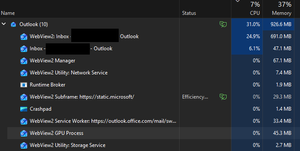
From the title I guess you could assume I'm talking about any of the 365 products.. but specifically I'm just about at the end of my patience with outlook. I'd be happy if MS offered a stripped down featureless 365 office suite, specifically an email program that is just an email program. I have a 12 Gen i7 210Mhz 12 core processor with 64Gig RAM and RTX 4070Ti GPU and all solid state drives. Outlook email feels like I'm using a remote desktop on the other side of the world kind of lag, stuttering. Deleting emails is an exercise in patience, it gets confused about read and unread, it generally feels like its just barely holding on. If I wasn't a gamer I'd switch to linux today. This crap is really not worth the thousands of dollars I've paid for. Pretty sure MS just vibe coded the entire 365 suite, it has that kind of feel to it.69Views0likes2Comments