office 365
20420 TopicsNon-Consecutive Cell Referencing
Hi, folks. I'm attempting to create a spreadsheet that contains links from consecutive cells to consecutive cells in another worksheet that are separated by 5 intervening cells. I'll call the original consecutive spreadsheet "Orig" (for original). So, I know that if I put "='Orig'!A3" in cell B3 and then copy that down, it will update the relative formula consecutively, i.e. B3='Orig'!A3, B4='Orig'!A4, B5='Orig'!A5, B6='Orig'!A6.... that much I get. What I need to do is find a way to do the same thing, but to increase the resulting link.....so that if I copied the formula down column B I would get: B3='Orig'!A3, B8=Orig'!A4, B13='Orig'!A6', etc so that the new worksheet is moving down 5 cells relative to the Orig sheet consecutive order. I've read where someone used a formula using the INDIRECT function but that's beyond my beginner level. Many thanks, and merry Xmas to all!29Views0likes2Comments
Logical test for same text string existing anywhere in both ranges.
Hello. I have a Table of film credits, including the names of directors and writers. Some films have multiple directors (up to 3 individuals), whose names are in columns F, G and H. The writers' names (up to 4 individuals) are in columns J, K, L and M. I want to test for whether the film has a writer/director - e.g, one of the director names in the range F:H is the same as one of the writer names in the range J:M. I have created a column O to contain a formula with a logical test returning Y if there is a writer/director present. I tried =IF(Table4[@[Wri1]:[Wri4]]=[@Dir1]:[Dir3],Y,N) but this returns a spill error. Can anyone help?Solved108Views1like8Comments
Finding time duration between a start date & time with end date & time
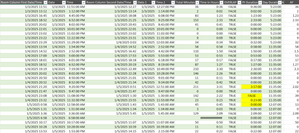
Hi all! I'm looking for any formula or power query to calculate a total time duration within a day, given the start date, start time, end date, end time. Most of the dates will equal the same but there are some with the end date being the next day. I'd like to be able to exclude any overlaps as well. Currently, I have a large embedded IF formula: =IF(AND($G4=$O4,$H4<$H5,$P4>=$H5,$P4<$P5,$H4<$H3),$P4-$H4,IF(AND($G4=$O4,$G4>$G3,$H4<$H3,$P4<$P3,$H4<$P3,$P4<$P5),$P4-$H4,IF(AND($G4=$O4,$H4>$H3,$H4>=$P3,$P4>$P3),$P4-$H4,IF(AND($G4=$O4,$H4=$P4),0,IF(AND($G4=$O4,$H4<$P3,$P4<=$P3),0,IF(AND($G4<$O4,$H4<$P3,$P4>$H4),($P4+1)-$P3,IF(AND($G4=$O4,$O4<$G5,$O4<$O5,$H4<$P3,$P4>$P3),$P4-$P3,IF(AND($G4=$O4,$G4>$G3,$H4>$H3,$P4>$P3,$H4>$P3),$P4-$H4,IF(AND($G4=$O4,$G4<$O5,$P4>$P3,$P4>$H5,$H4>$H3,$H4<$H5),0,IF(AND($G4=$O4,$O4=$G5,$H4<$P3,$P4>$H5,$P4>$P3,$P4>$P5,$P2>$P3),$P4-$P2,IF(AND($G4=$O4,$H4<$P3,$P4>$P3,$P4>$P5),$P4-$P3,IF(AND($G4=$O4,$H4<$P3,$P4>$P3,$H4<$H5,$P4<$P5),$P4-$P3,IF(AND($G4=$O4,$H4<$H5,$H4<$P3,$P4>$P3,$P4>$P5),$P4-$P3,IF(AND($G4=$O4,$O4=$G5,$H4<$P3,$P4>$H5,$P4>$P3),$P4-$P2,IF(AND(ISBLANK($O4),ISBLANK($P4)),0,IF(AND($G4<$O4,$H4<$P3,$P4<$H4),($P4+1)-$P3)))))))))))))))) This seems to work for the most part but there are a few that I just can't get. I also pulled up my query and started to enter in the time durations manually and it couldnt come up with anything automatic for me. There must be an easier way for me to do this other than trying to create an IF formula for each answer that turns up incorrect. I have a screen shot below.118Views0likes3Comments
Excel formula help... again!
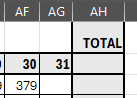
I have different tabs for each month. I need the total of the last day of month to start in the opening balance on the next tab in the beginning of the month. but some months obviously has 30 days and some 31 and then there's Feb too doing whatever it wants ;-) the total here in AH has to be the last day of the month - here it's the 30th and 379 the opening balance for the next tab (yellow block) has to be whatever the previous month's closing total was. I don't know how to create a formula to choose the last day's total and pull it to the new sheet in the opening balance. Thanks so much54Views0likes2CommentsName Manager using for create name which is contain atleast two name.
Hello. I creating somthing in excel with tables. These tables has thier own name, and can be dynamic or not. Any way. I using list in cell to select each data from a tables column. For that I created names with the content of a column. Unfortunatly i had to make a kind of name which is contain atleast 2 columns. These can grow dynamicly. So I think a plus helper tabel is not the right sollution for that. I think about 3 kind of solution. 1. =UNIQUE( VSTACK( INDEX(Tabla1[#Data];0;MATCH("Type_name";Tabla1[#Headers];0)); INDEX(Tabla2[#Data];0;MATCH("Column_name";Tabla2[#Headers];0)) ) output #name? 2. =UNIQUE(VSTACK(Lista_A; Lista_B)) lista_A as a name output #name? 3. created a helper table with the existing names. Created another name and use the table in it. output was the elements contained by the helper tabel, and the lista_A and lista_B tables each dedicated column. So How can i create list for a cell or cells from two column which are dynamicly growing, without a user needs to touch the core modell? Best Balázs65Views1like2Comments
What's going on with office.com / web apps?
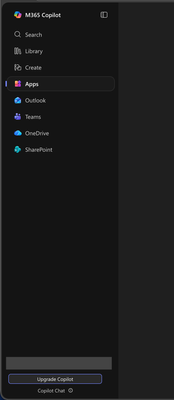
I'm aware that Microsoft had already chosen to upend usability once by changing office.com into 😡m365.cloud.microsoft😡 and make accessing web apps more difficult. This week I found they're hidding applications even further by burying them at the bottom of the page behind another menu - even when "pinned". Below are two screenshots of the 😡m365.cloud.microsoft😡 portal from different accounts that were created on the same day and accessed from the same computer and web browser via admin priveledges. I have observed this discrepency more than once with various accounts. Can someone explain the rational for Microsoft continuing to further bury office applications from users? Am I unaware of a new portal to access the Office applications our users rely upon every day?37Views0likes1Comment
schedule recurring Out of Office
Hi All I want to schedule recurring out of office every day. i have shared mailbox and i want to set out of office for shared mailbox for every email which is received from 9PM to 6AM as the users who have access to this shard mailbox works from 6AM to 9PM. Is this possible to set on exchange as OWA is disabled in my environment. Please guide me on thisSolved6.9KViews1like3Comments
Group policy for Outlook 2016 to set default font
hi, We have a client where multiple users have changes their font within Outlook and we're wanting to keep it set to default for all users, Calibri (Body) font size 11. Looking to set Group policy across the site to get default font for all users. I have installed Outlook 2016 ADM files but there's no option for font within settings, there is for excel but not Outlook. Any idea's how I'd accomplish this? Thanks, Steven122KViews0likes7Comments