microsoft 365 copilot
193 Topics
CoPilot Agents - Word Tables
Hi, We have been trying to create a CoPilot agent within the business that can read data in a referenced folder within SharePoint and output a summary. Now the prompt I'm using works perfectly when using the "Researcher" agent within CoPilot, but when I use it in the agent the output is very different. For added context. I have made a SharePoint site which has a folder for each project and then all the docs relating to that project within. The user says to the agent, "give me a project overview for QXXXX", what should happen is, the agent finds that folder, which it's seemingly doing and it provides all the info in the layout I've mentioned in the prompt. So it can find the right folder, and it gives a good overview of the project. But any information that's within a table in word, it doesn't retrieve, I've even told it what document has the content in the table it should be bringing back and it says it can't read tables in Word. When I've researched this it seems to be the way CoPilot interprets the data is different depending whether you upload the file or just reference it like my agent is doing. Then in Researcher alternatively, I copy and paste the prompt into the text box, attach cloud files and select the project folder and the output is perfect. It retrieves all the content, dates etc and it's exactly what we need. My aim was to make an agent that can do the same but doesn't require the user to attach the folder, they can just give it the project number and it does it's thing. I'm still pretty new to agents, and appreciate it's still slightly new, but it doesn't feel like it should be doing that. Would anyone with some expertise in agents be able to assist in me fixing this? And if possible, be available via email for me to ask some further questions? Happy to provide any further information if needed. Thanks14Views1like2CommentsAgent «Workflows (Frontier)» is not available - one solution
Perhaps this solution, which I developed together with Microsoft 365 Copilot GTP-5.2 Deep Analysis, will help someone else. All the usual solutions failed. Link to the support documents. The Edge browser has a developer mode. That was the right solution. English: «Workflows is not available Something went wrong. Contact your administrator to keep your environment up to date before using this agent. Environment ID: Default-XXXXXXXXXXX»28Views0likes1Comment
Disable Agent Creation for Select Users
When will we be able to allow declarative agent use but disable creation for some users? We want only selected users to be able to create agents. We currently have not way to restrict this. If users can use agents, then they get the Create and agent option.1.7KViews3likes7CommentsWhat’s new in Copilot Chat quality roadmap — December
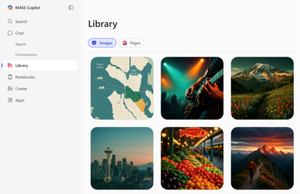
We’re building Copilot Chat in the open. Every month we publish a quality roadmap that turns what we learn from customer feedback into improvements that make Copilot Chat’s responses more accurate, complete, relevant, and useful. Features shown here are available at no additional cost to users with a qualifying Microsoft 365 or Office 365 license. December Highlights: What’s New and What’s Next? 🚀 Discover What’s New: Try the latest quality features today Microsoft 365 Copilot Library: View your Copilot‑generated images and Pages in one place for easy access. Try this: After creating an image or Page, open the Library and find it. Expandable input box: Expand or collapse to write comfortably without scrolling; view everything at once. Try this: Expand the input box before typing a long, detailed prompt. Temporary chat mode: Ask sensitive questions without saving to memory. Try this: In the upper-right corner, select the drop-down arrow next “Start new chat” icon” and switch to temporary chat and ask, “Give me best practices for this sensitive scenario?” 🚧 What’s Next: Explore upcoming quality features in development Search chats from main navigation: Find past conversations quickly from the navigation pane 📌 Bookmark the monthly Copilot Chat quality roadmap and tell us what you want to see next: https://aka.ms/copilotchatroadmap148Views0likes0CommentsCopilot — ошибка генерации изображений (Windows/Web)
Здравствуйте, коллеги. При генерации изображений в Copilot результат часто отсутствует, даже при простых промптах. Вместо картинки возвращается пустой ответ. Ожидаемое поведение: Изображение должно быть создано либо должен появиться отчёт о причине сбоя. Фактическое поведение: Изображение не создаётся, возвращается пустой ответ. Предложение: Если изображение не сгенерировано из‑за ошибки, нужно указывать причину и предлагать решение. Например: Если модель не поняла формулировку промпта. Если формулировки вступают в конфликт друг с другом. В таких случаях пользователь должен быть информирован и получить подсказку, как исправить запрос. Это позволит экономить время и использовать Copilot в профессиональных сценариях11Views0likes0Comments
Not able to continue editing in Outlook
Hi all, I start interacting with M365 Copilot Chat and then I want to proceed editing in Outlook. When trying to edit I get the following message in outlook. (sorry in Spanish, but basically says i don't have Copilot). I checked admin configuration and not sure what´s wrong. I have the paid licence, etc. Any help is appreciated. Thanks99Views1like2CommentsOverview of Copilot solutions and Key Benefits
Copilot isn’t one-size-fits-all. Each solution addresses different organizational needs. Here’s what they do—and why they matter. Microsoft 365 Copilot Chat is a conversational experience on web and mobile that delivers quick, context-aware answers from organizational data. It provides quick, context-aware answers from organizational data, improving responsiveness across departments while supporting mobile work scenarios. Microsoft 365 Copilot is an AI assistant built into Word, Excel, PowerPoint, Outlook, and Teams. It accelerates document creation, data analysis, and presentations and helps you catch up on meetings and messages. Copilot uses the context you already have in Microsoft 365—files, emails, chats, and calendars—through Microsoft Graph and respects the same permissions, security, and compliance your organization relies on. Microsoft Copilot Studio is a platform for extensibility and customization. It lets you build custom copilots and extend existing ones without writing code. Copilot Studio allows businesses to tailor AI to unique workflows without heavy development investment, accelerating innovation. Key benefits for organizations Copilot delivers three core benefits that impact the entire organization: Benefit How benefit achieved Example scenario Boost productivity by automating repetitive tasks. Copilot automates repetitive tasks and accelerates content creation across teams. A marketing team might use Copilot in Word to draft campaign briefs based on brand guidelines, reducing turnaround time from days to hours. Improve decision quality with data-driven insights. Copilot provides fast, data-driven insights, enabling better decisions at every level. An operations team might use Copilot in Excel to analyze supply chain data and identify cost-saving opportunities before quarterly reviews. Strengthen governance with enterprise-grade compliance. Copilot respects enterprise security and compliance standards, ensuring sensitive data stays protected. When legal teams draft contracts, Copilot uses only authorized organizational data through Microsoft Graph, maintaining compliance with internal policies and regulatory requirements.287Views0likes2CommentsPitch deck for power platform and copilot
Hey everyone, i am looking for the pitch deck for power platform and copilot, also i would appreciate if anyone can guide me about it.my major concern is about the data governance in the banking industries using copilot, will appreciate if anyone can help me out. thank you.8Views0likes0Comments
Proposal: Exploring User-Centric Improvements for Copilot
Please note that I do not speak English, and this text was written with the help of Microsoft Copilot. Hello, I would like to share some feedback about Microsoft 365 Copilot. I believe Copilot could be improved by making it more user‑centric. For example, it would be helpful if Copilot could adapt its responses to reflect the user’s writing style, adjust its tone depending on context, and provide answers that feel more personalized. Such improvements would make Copilot not only more effective but also more natural to use in different scenarios. Is there any plan to explore these kinds of user‑focused enhancements in future updates? Thank you!18Views0likes0Comments
Feature Request: Add Search Functionality in Copilot Chat History
Hi everyone, I’d like to suggest a feature for Microsoft Copilot that I believe would significantly improve usability and productivity: searching within chat history. Currently, users cannot search past conversations inside Copilot. This makes it difficult to retrieve previous answers, references, or technical instructions—especially in long or complex chats. Adding a search bar or keyword filter would allow users to quickly locate relevant messages without scrolling manually. This feature would be especially helpful for developers, IT professionals, and anyone using Copilot for technical troubleshooting or documentation. It would also reduce repeated questions and improve continuity across sessions. Please consider adding this capability in future updates. If others agree, feel free to upvote or share your use cases. Thanks!60Views0likes1Comment