office 365
6235 Topics
Finding time duration between a start date & time with end date & time
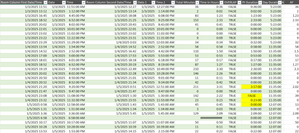
Hi all! I'm looking for any formula or power query to calculate a total time duration within a day, given the start date, start time, end date, end time. Most of the dates will equal the same but there are some with the end date being the next day. I'd like to be able to exclude any overlaps as well. Currently, I have a large embedded IF formula: =IF(AND($G4=$O4,$H4<$H5,$P4>=$H5,$P4<$P5,$H4<$H3),$P4-$H4,IF(AND($G4=$O4,$G4>$G3,$H4<$H3,$P4<$P3,$H4<$P3,$P4<$P5),$P4-$H4,IF(AND($G4=$O4,$H4>$H3,$H4>=$P3,$P4>$P3),$P4-$H4,IF(AND($G4=$O4,$H4=$P4),0,IF(AND($G4=$O4,$H4<$P3,$P4<=$P3),0,IF(AND($G4<$O4,$H4<$P3,$P4>$H4),($P4+1)-$P3,IF(AND($G4=$O4,$O4<$G5,$O4<$O5,$H4<$P3,$P4>$P3),$P4-$P3,IF(AND($G4=$O4,$G4>$G3,$H4>$H3,$P4>$P3,$H4>$P3),$P4-$H4,IF(AND($G4=$O4,$G4<$O5,$P4>$P3,$P4>$H5,$H4>$H3,$H4<$H5),0,IF(AND($G4=$O4,$O4=$G5,$H4<$P3,$P4>$H5,$P4>$P3,$P4>$P5,$P2>$P3),$P4-$P2,IF(AND($G4=$O4,$H4<$P3,$P4>$P3,$P4>$P5),$P4-$P3,IF(AND($G4=$O4,$H4<$P3,$P4>$P3,$H4<$H5,$P4<$P5),$P4-$P3,IF(AND($G4=$O4,$H4<$H5,$H4<$P3,$P4>$P3,$P4>$P5),$P4-$P3,IF(AND($G4=$O4,$O4=$G5,$H4<$P3,$P4>$H5,$P4>$P3),$P4-$P2,IF(AND(ISBLANK($O4),ISBLANK($P4)),0,IF(AND($G4<$O4,$H4<$P3,$P4<$H4),($P4+1)-$P3)))))))))))))))) This seems to work for the most part but there are a few that I just can't get. I also pulled up my query and started to enter in the time durations manually and it couldnt come up with anything automatic for me. There must be an easier way for me to do this other than trying to create an IF formula for each answer that turns up incorrect. I have a screen shot below.82Views0likes3Comments
Excel formula help... again!
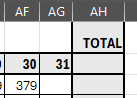
I have different tabs for each month. I need the total of the last day of month to start in the opening balance on the next tab in the beginning of the month. but some months obviously has 30 days and some 31 and then there's Feb too doing whatever it wants ;-) the total here in AH has to be the last day of the month - here it's the 30th and 379 the opening balance for the next tab (yellow block) has to be whatever the previous month's closing total was. I don't know how to create a formula to choose the last day's total and pull it to the new sheet in the opening balance. Thanks so much28Views0likes2Comments
Logical test for same text string existing anywhere in both ranges.
Hello. I have a Table of film credits, including the names of directors and writers. Some films have multiple directors (up to 3 individuals), whose names are in columns F, G and H. The writers' names (up to 4 individuals) are in columns J, K, L and M. I want to test for whether the film has a writer/director - e.g, one of the director names in the range F:H is the same as one of the writer names in the range J:M. I have created a column O to contain a formula with a logical test returning Y if there is a writer/director present. I tried =IF(Table4[@[Wri1]:[Wri4]]=[@Dir1]:[Dir3],Y,N) but this returns a spill error. Can anyone help?Solved77Views1like5CommentsNon-Consecutive Cell Referencing
Hi, folks. I'm attempting to create a spreadsheet that contains links from consecutive cells to consecutive cells in another worksheet that are separated by 5 intervening cells. I'll call the original consecutive spreadsheet "Orig" (for original). So, I know that if I put "='Orig'!A3" in cell B3 and then copy that down, it will update the relative formula consecutively, i.e. B3='Orig'!A3, B4='Orig'!A4, B5='Orig'!A5, B6='Orig'!A6.... that much I get. What I need to do is find a way to do the same thing, but to increase the resulting link.....so that if I copied the formula down column B I would get: B3='Orig'!A3, B8=Orig'!A4, B13='Orig'!A6', etc so that the new worksheet is moving down 5 cells relative to the Orig sheet consecutive order. I've read where someone used a formula using the INDIRECT function but that's beyond my beginner level. Many thanks, and merry Xmas to all!4Views0likes0CommentsName Manager using for create name which is contain atleast two name.
Hello. I creating somthing in excel with tables. These tables has thier own name, and can be dynamic or not. Any way. I using list in cell to select each data from a tables column. For that I created names with the content of a column. Unfortunatly i had to make a kind of name which is contain atleast 2 columns. These can grow dynamicly. So I think a plus helper tabel is not the right sollution for that. I think about 3 kind of solution. 1. =UNIQUE( VSTACK( INDEX(Tabla1[#Data];0;MATCH("Type_name";Tabla1[#Headers];0)); INDEX(Tabla2[#Data];0;MATCH("Column_name";Tabla2[#Headers];0)) ) output #name? 2. =UNIQUE(VSTACK(Lista_A; Lista_B)) lista_A as a name output #name? 3. created a helper table with the existing names. Created another name and use the table in it. output was the elements contained by the helper tabel, and the lista_A and lista_B tables each dedicated column. So How can i create list for a cell or cells from two column which are dynamicly growing, without a user needs to touch the core modell? Best Balázs63Views1like2CommentsFormula to retrieve data from several sheets and return values from given criteria.
I am trying to get data from each of our areas of the school staff timetables EY MY LY and summaries what days each staff member works where to another sheet, as staff move around. I would appreciate some help please. This is how far I got: =IFERROR(VLOOKUP(A10,EY!$C$3:$G$33, 2, FALSE), IFERROR(VLOOKUP(A10,MY!$C$3:$G$33, 2, FALSE), "Not Found")) This just returns; I tried to add in the same formula for LY but it is saying too many arguments, this is why Michelle is Not Found. Will I also be able to return the area they are in on each of the days ? Any assistance would be very much appreciated.193Views0likes4Comments
TOCOL/TOROW Treat Thunks as Errors
I just reported a bug to Excel in which the TOROW and TOCOL functions, if asked to delete errors, will also delete valid thunks. ISERROR returns FALSE when presented with a thunk, so, arguably, TOCOL shouldn't treat it as an error either. I'm running Office 365 on Windows 11 on a Samsung Yoga laptop. Steps to reproduce: Paste this into a single cell in a spreadsheet: =LET(th, VSTACK(LAMBDA(4)), (@TOCOL(th,2))()) Expected behavior: should return 4. (Delete the ",2" and it does exactly that.) Actual behavior: #CALC error Impact: Breaks workflows for SCAN, MAP, BYCOL, and BYROW Workaround: Use FILTER and ISERROR Details: An Excel "thunk" is a degenerate LAMBDA with no parameters. So if we used LET to make f equal to LAMBDA(4), then f() would always return 4. If a thunk is the final result of a function, it generates a #CALC error, but it's fine for intermediate results. This seems useless, but it's the only way to get functions like SCAN, MAP, and BYROW/COL to return anything but a scalar. For example, I have a piece of code where I need to repeatedly square a large matrix and save the values for further processing. If I get a zero value, I can save a lot of processing by "aborting" the operation. Since you can't abort a SCAN, I just return #NA. Then I'd like to use TOCOL(result, 2) to strip off the unnecessary values. But TOCOL discards everything. I can work around this by using a combination of ISERROR and FILTER, but I shouldn't have to.92Views2likes2CommentsPivot Table Setting Won't Appear
This is Excel 365, the online version. When I create a pivot table the field table pane pops up so I can select what columns I want. When I go to "show settings" for the pivot table they don't show up and then cause the field table pane to also not show up. This happens on all my documents, new and old, multiple devices and web browsers. I've used the pivot table settings on other documents but on Wednesday 11/19/2025 is just stopped working. I didn't change any of my settings. This seems to be a Microsoft glitch but their tech support's only solution to me was to use the desktop version but the point of me using the online version is so that everyone in my Organization can use these shared docs. I'm having a ton of other issues with Microsoft but this one is preventing me from being able to the basic tasks of my job.237Views1like4CommentsLong Date Format Text Wrapping
I need my dates to be in the long date format: Monday, December 8, 2025 However, I also want that text to wrap. I do not want an really wide column for that date. I would like it to wrap at whatever point it wrap at when I adjust the column width. Simply choosing "wrap text" in the alignment section does not work. Any column width shorter than the amount of space needed for the entire date turns the date in that cell to pound signs. Heck, I'd be happy if I could even just shorten the column width and see only the beginning of the date. Though I would prefer it just adjusting like it does in every other column. I have tried work arounds like a custom date format where you force the second line to be part of the date - which it will do but the column width still must be as long as if it were in one long line or it still goes to pound signs. Is there a workaround that I can't find? Is this something that Microsoft could work on fixing in an upcoming app update? Because I have been suffering through this problem for years and would love for it to be fixed. (Also - I do not want to change the column to "text" - I want to be able to type in 12/9 and have it automatically change to Tuesday, December 9, 2025 for me. I am often changing dates or inserting dates and need it to be dynamic and not manually entered each time. (Thus the whole point of having the date format to begin with.)56Views0likes1Comment