edge
651 Topics
Edge pdf text addition = massive file size increase
As of today, when I add just a small amount of text (20-30 characters) to a pdf and save, the file size increases from 66KB to 55,000KB ... never happened before. I've reported to Microsoft but they have no solutions. Any ideas to get around? Saving as a separate file has same result. Thanks3.6KViews18likes27Comments
New Tab search UI (Ctrl + Shift + A) has changed - how to revert to previous behavior ?
Since the latest Microsoft Edge update, the Tab Search panel opened with Ctrl + Shift + A has changed. It now opens on the side instead of the center, and arrow key navigation no longer works. Only Tab navigation works now. this makes it much harder to use quickly. Is there any way to restore the previous centered Tab Search UI, or re-enable up and down arrow navigation, or undo this specific UI change ? The old version worked perfectly for my workflow. The new version slows everything down. Thanks Michael26Views1like0CommentsVideo Super Resolution Missing Options in Setting
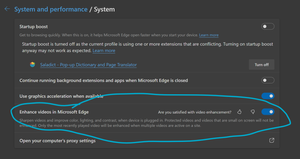
Enhance videos in Microsoft Edge (Flag: #edge-video-super-resolution) is missing critical options in setting, making it impossible to function properly. In Version 136.0.3240.29 (Official build) beta (64-bit), as well as the previous beta build, it is missing the option to choose from three methods of video enhancement, as shown in screenshot. Here is the setting from latest beta build: This is how it is supposed to look: Thus, beta build defaults to Microsoft Super Resolution and I can't find a way to use graphics driver enhancement like RTX Super Resolution, which is critical to my experience. Also, HDR is no longer supported when video enhancement is enabled, which I believe is a limitation of Microsoft Super Resolution.Solved9.4KViews23likes25Comments
[Wayland] PWAs no longer appear as separate app windows — all group under main Edge icon
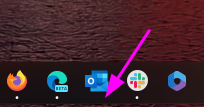
Hi, Since around 2025-09-07 to 2025-09-10, I’ve noticed that on GNOME (Wayland) all installed PWAs (even across different profiles) now appear grouped under the main Edge browser icon in the GNOME Shell dash/taskbar. Previously, each PWA would open in its own window group with its own icon. This is still the behavior in Chromium/Brave/Chrome, and can be restored there by editing the PWA’s .desktop file to set: StartupWMClass=<same value as Icon> However, Edge now seems to ignore StartupWMClass completely on Wayland, breaking workspace separation and making task switching hard. Environment: Ubuntu 25.04 GNOME 48.0 / Mutter (Wayland) Kernel 6.14.0-29 Intel Iris Xe GPU Edge (latest stable, observed post 2025-09-13) Repro steps: Install any PWA (e.g. Outlook, Teams, Spotify) from Edge Launch it (from any profile) Observe that it appears grouped under the main Edge browser icon Expected: PWA shows under its own icon and window group like in Chromium-based browsers Actual: All PWAs are bundled into the main Edge window group Editing StartupWMClass in the .desktop file no longer helps This regression makes PWAs much harder to manage on Wayland. Please route to the Linux/Wayland team if possible. Thanks!1.1KViews10likes16Comments
Bug: Empty bar at bottom of screen on Android 14 Honor 70 / MagicOS 8.0
After updating Microsoft Edge to version 142.0.3595.66 on Android 14 with MagicOS 8.0 on an Honor 70 smartphone, a permanent empty strip appears at the bottom of the screen when using gesture navigation. This issue was not present in previous versions, such as 141.0.3537.99. Disabling the "Edge-to-edge Everywhere" or "Edge-to-edge Tablet" flags does not resolve the problem. It seems to be related to the new edge-to-edge design introduced in the latest update. Please fix this issue or add an option to disable the bottom padding. Thank you.175Views0likes2Comments
Ability to Manager or Delete single autocomplete form data in Edge browser (new for 2025)
Someone has asked exactly this question before, in 2023, asking if the feature could be added, when maybe the feature already existed and the OP didn't know. Three months after the post, the OP wrote that they'd found the method and marked it as solved. It involved a few simple key strokes. See here https://techcommunity.microsoft.com/discussions/edgeinsiderdiscussions/ability-to-manager-or-delete-single-autocomplete-form-data-in-edge-browser-/3984284 This old post has attracted a few extra comments in the time since it was marked as solved, as the method described has been removed in more recent builds of Edge. I find the removal of this method frustrating, and I believe it invites security issues. For example, more than once, I've accidentally put a password in a username box. Now when I visit the site and try to log in, it shows my password in plain text on screen. Users have to search through autocomplete data to correct it, instead of being able to resolve the issue with one click (as I believe it is in Chrome) or the old Edge method of arrowing down to the suggestion and pressing delete while holding shift. Please could this feature be brought back in a future Edge build? Because I think it is a valuable component of old Edge, and I miss its ease of use very much, the sooner the better please.39Views0likes0CommentsPWA shortcuts don't keep asociated with window - Linux
I recently upgraded to version140.0.3485.14 (Official build) beta (64-bit) and noticed that my PWA, even if they open correctly in a independent window, don't show the "running window counter" on the taskbar. So, for example, if a open Outlook, the window open and loads the app, but if a I click the icon again, it opens another window, wich is a little annoying. I tried removing the PWA from Edge, rebooting, and installing again, but didn't work. Because the only change I made is updating Edge, I think is related to this build. (too lazy to go back or install the stable release)985Views9likes8Comments
Edge Dev CreateProcess bug
I'm using Edge Dev Version 143.0.3638.1 (Official build) dev (64-bit) downloaded from https://msedge.sf.dl.delivery.mp.microsoft.com/filestreamingservice/files/3b9b41d3-7038-420a-bb07-66fe54926f0f/MicrosoftEdgeDevEnterpriseX64.msi Opening a new Edge instance by using the code: BOOL bRet = ::CreateProcess((LPCTSTR)L"C:\\Program Files (x86)\\Microsoft\\Edge Dev\\Application\\msedge.exe", (LPWSTR)L" --new-window www.bing.com", NULL, NULL, FALSE, CREATE_DEFAULT_ERROR_MODE, NULL, NULL, &si, &pi); is no longer working. I can see the process starting and then terminating quickly. It works though when using Edge Version 141.0.3537.99 (Official build) (64-bit). Is this the correct place to report & track the bug?35Views0likes0CommentsExtension ID: gdndpilddmlahjjcfmknlmindbklnbel Meeting Scheduler
Meeting Scheduler The extension is flagged with a warning that it contains malware. I am not aware how it got installed although The source of the extension is the "Microsoft Edge Add-ons Store but not able to find it on store. Can someone help with the triage how it could have got installed and what is this extension81Views1like0CommentsMicrosoft Edge PDF Reader - signature validation warning for official signatures
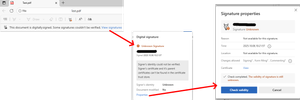
Since the last edge update we are running into the following issue, which triggers support tickets on our side. It seems that the edge internal PDF Reader now supports validation of digital PDF signatures. This new feature however is incomplete and causes a lot of confusion for edge users. "Official" signatures are labeled as "Unknown Signature" and "The validity of the signature is still unknown": "Official signatures" means qualified signatures from members of the EUTL - the European trust list as defined in ETSI TS 119 612 („Trusted Lists“): [...] the European Commission publishes a central list with links to the locations where the national trusted lists are published as notified by Member States. This central list, called the List Of Trusted Lists (LOTL), is available in both a human readable format and in a format suitable for automated (machine) processing XML. Parts of the edge PDF reader seems to come from *dobe itself which adds additional confusion since in their products (*dobe reader, acrobat etc) the signatures are correctly verified. They support this list for several years now (next to their own AATL list). I tried to find out whether this feature is 'work-in-progress' or it is a bug however the last published roadmap is quite old and doesn't give helpful information regarding this aspect. So my question is: Is full support of PDF signature validation including support of the EUTL planned and if so when?90Views0likes0Comments