Forum Widgets
Latest Discussions
Removing Retention Holds from Exchange Mailboxes
A new Exchange Online feature allows administrators to remove multiple types of holds from mailboxes (usually inactive mailboxes). It’s a great way to release holds that might be keeping inactive mailboxes lingering in a tenant. The feature doesn’t remove holds used to retain items required for eDiscovery or other compliance purposes. Even so, this is definitely a feature that needs to be carefully tested. https://office365itpros.com/2025/12/18/remove-retention-holds/14Views0likes0Comments
Exchange SE - forest functional level
According to this: https://learn.microsoft.com/en-us/exchange/plan-and-deploy/supportability-matrix Exchange SE doesn't yet support the Server 2025 functional level. Is there any indication of when this will arrive? With CU1? ThanksDavidYorkshireDec 17, 2025Iron Contributor67Views0likes2CommentsOlder Versions of Exchange ActiveSync Clients Get the Bullet
Exchange Online will require email clients to use Exchange ActiveSync (EAS) V16.1 to connect from March 1, 2026. Email clients that use older versions of EAS won’t be able to synchronize with Exchange Online to upload outbound messages or download messages, attachments, and calendar items. There should be relatively few clients using an old version of EAS, but it’s wise to check. https://office365itpros.com/2025/12/16/exchange-activesync-161/24Views0likes0Comments
o365 public folder migration
Hi All, I have began a migration from on-prem exchange 2010 to o365 using minimal hybrid method I need to consider how i'm going to migrate public folders. I refer to two MS docs links below The first article suggests this method should be used when using a cutover or staged method https://docs.microsoft.com/en-us/exchange/collaboration-exo/public-folders/batch-migration-of-legacy-public-folders The second article references a hybrid setup but fails to mention if this includes the minimal hybrid option https://docs.microsoft.com/en-us/exchange/collaboration-exo/public-folders/set-up-legacy-hybrid-public-folders Can anyone clarify? Kind regardsSeanK2140Dec 16, 2025Copper Contributor1.8KViews0likes2CommentsExchange Server SE Licensing, Part II
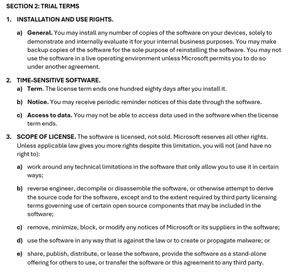
Since posting my previous article about licensing and product keys in Exchange Server SE, I’ve received a ton of follow-up questions. Many of them were public, and I answered them publicly. Many were sent privately and answered privately, but I wanted to publicly share that information because I think it may generally be helpful. Discrepancies on Microsoft’s web site There were questions were about Microsoft’s https://www.microsoft.com/en-us/microsoft-365/exchange/microsoft-exchange-server-licensing-licensing-overview, which talks about Server licenses and Client Access Licenses (CALs), but doesn’t mention anything about a subscription, or Software Assurance (SA), or cloud subscription licenses. If you look at the https://web.archive.org/web/20250309171415/https:/www.microsoft.com/en-us/microsoft-365/exchange/microsoft-exchange-server-licensing-licensing-overview of that page (before Exchange Server SE was released) you’ll notice that the SE version is simply a copy and paste of Exchange Server 2019 version. I’ve said and written many times that licensing for Exchange Server SE is the same as it was for Exchange Server 2019, and that is a true statement. There were also questions about Microsoft’s https://www.microsoft.com/en-us/microsoft-365/exchange/microsoft-exchange-licensing-faq-email-for-business, which still talks about Exchange Server 2019 licensing, and also fails to mention subscriptions or SA. So, how does my article reconcile with the information on Microsoft’s licensing pages? The answer is that, while Microsoft’s licensing pages are accurate, they are also incomplete because they don’t mention anything about a subscription, SA, or cloud licenses. The good news is that I’m told by Microsoft that they will be updating those pages with complete information (and perhaps consolidating them). I don’t have a timeline to share, but updates to those pages are coming. But I’m not sure those pages actually matter, given that the source of licensing truth is https://www.microsoft.com/licensing/terms/, which has three main areas: Product Terms that describe the license terms and Use Rights of Products and Services for VL programs; Other Documents related legal materials referenced in the Product Terms; and Licensing Resources, which are links to additional information. You can (and should) also review Microsoft’s https://www.microsoft.com/licensing/terms/product/ForallSoftware/all#clause-705-h3-1 (ULTs), which apply to all software products licensed through Microsoft Volume Licensing. Note that these may not be your only rights and the only terms to which you are bound. For example, SA grants additional rights and comes with additional terms. And your VL agreement may include additional rights and terms. One of the “code changes” in Exchange Server SE RTM was the updating of a rich text file that ships with Exchange Server. This file contains the Microsoft Software License Terms (MSLT), to which you must agree in order to install Exchange Server. The MSLT is displayed, however, only when using the GUI version of Setup. But you don’t need to run Setup to view the MSLT; the file—License.rtf—is localized in several languages in the Setup files under \Setup\ServerRoles\Common\Eula\<language>. Using the Trial Edition Beyond 180 days There were several questions about using a Trial Edition beyond 180 days after installing it. Microsoft’s ULTs explicitly https://www.microsoft.com/licensing/terms/product/ForallSoftware/all#clause-723-h3-1 that “An assigned product key is required for licensed use of the software.” It also talks about technical measures that Microsoft may use to enforce these terms, but as I mentioned in my previous article, Exchange Server implements product keys, but it does not implement any activation or validation of the software. The MSLT for Exchange Server SE states “If you do not have a product key, then Section 2 (Trial) applies to you.” Some (but not all) of Section 2 is shown below. Paragraph 2 of Section 2 makes it clear that the software rights are time-sensitive and limited to 180 days after installation (2a), that you may receive periodic reminders about this time limit (2b), and that you may not be able to access data when the license term ends (2c). The language in Section 2 is used in the MSLT for multiple products. In the case of Exchange Server SE, an admin will see a message in the Exchange admin center when the Trial period ends (as described in 2b), but the product remains fully functional, and data is fully accessible, contrary to the statements in 2c. More on License Terms Paragraphs 6 and 7 on Section 2 are also worth noting: Paragraph 6 states that Microsoft is not obligated to provide support for Trial Edition deployments. While Microsoft has no obligation to provide support, they will do so, even for Trial Editions. In fact, they likely won’t ask about licensing or product keys unless its germane to the support case (for example, you can’t mount more than 5 databases on a server because it is a Trial or Standard Edition). Paragraph 7 discusses software updates, which in the case of Exchange Server SE, includes CUs, SUs, HUs, and IUs. Exchange Server SE does not check for updates, does not download updates, and does not install updates. It does include the optional Exchange Emergency Mitigation service, but that applies mitigations and does not download updates. Exchange Server SE also includes Feature Flighting which will be used by Microsoft in the future to enable features or changes present in an update, but it won’t download or install those updates automatically. Windows Server has the ability to check for and install updates, and an Exchange admin can opt into these automatic updates which include Exchange Server SUs; however, it’s a best practice to control updates to Exchange Server by installing them manually or using controlled automation. If you do install an SU manually using the GUI, then you’ll see additional License Terms, as shown below, that state the license requirements for installing the SU. Based on the above License Terms, if you don’t have a valid license for Exchange Server SE, then you don’t have the right to install the SU. Again, though, Exchange Server uses the honor system, and there is nothing that blocks the install. Client Access Licenses and Management Licenses One of the three ways to allow users or devices to legally access Exchange Server SE is by using CAL or ML equivalency licenses (the other two ways are L+SA or Exchange Online licenses). CALs are used by a user or a device, and MLs are licenses that are used by management software. “Licensing software with CALs and MLs can be complicated due to the technical nature of server products and networks.” That’s a direct quote from Microsoft’s https://www.microsoft.com/en-us/licensing/product-licensing/client-access-license#tab-overview, and it’s very true. Microsoft has user CALs, device CALs, External Connector licenses, Server MLs for managing server operating systems (OSEs), OSE client MLs, user client MLs, and core-based licensing. Exchange Server SE (like SharePoint Server SE and Skype for Business Server SE) use the Server+CAL model (which is what the aforementioned Microsoft’s licensing pages are trying to convey). Microsoft also offers what are called CAL Suites, which is a single license that covers multiple products (e.g., one CAL that covers Exchange Server, SharePoint Server, Skype for Business Server, Windows Server, etc.). There is a Core CAL Suite and an Enterprise CAL Suite, and the Enterprise CAL Suite also includes licenses for online services such as Exchange Online Archiving for Exchange Server and Exchange Online Protection. If you have deployed on-premises and you do want to move to the cloud, Microsoft also offers CAL Suite Bridges, which is a subscription-based licensing path that moves you from L+SA to cloud subscription licenses. This is where things can get tricky when comparing licensing costs between on-premises and the cloud. Remember, cloud licensing is deployment-agnostic, so you can purchase cloud licenses and deploy solely on-premises. Ultimately, the most economical approach will depend on what you are buying and how much.Scott_SchnollDec 15, 2025Copper Contributor24Views0likes0CommentsExchange SE Transport Rule Query
I'm trying to use a transport rule to send a notification to an audit mailbox with a note of the names of all attachments being sent externally with From, To, CC, BCC details. It sort of works. Rule If message has an attachment that's larger than or equal to 0 bytes Do the following Set audit severity level to 'Not specified' and send the incident report to <audit mailbox>, include these message properties in the report: sender, recipients, subject, cc'd recipients, bcc'd recipients, severity, sender override information, matching rules, false positive reports, detected data classifications, matching content. If I send a message to: 'email address removed for privacy reasons', cc: 'email address removed for privacy reasons', bcc:'email address removed for privacy reasons' with 2 attachments the report includes the following: Sender: <sender> Recipient: To & CC Attachments: Only 1 attachment name i.e. Missing an attachment name and the BCC entry Is this a bug or a feature? I presume it is just flagging the first attachment greater than 0 bytes which is annoying but that wouldn't explain the missing BCC entry.NeillDec 15, 2025Brass Contributor41Views0likes1CommentTEST-OAuthConnectivity | The remote server returned an error: (403) Forbidden
Hello Exchange Tech Community, I have setup a lab environment of Exchange Server 2016 in Hybrid Configuration. I can successfully onboard and offboard mailboxes. OnPrem Exchange Server is I have a Microsoft 365 Business Basic subscription for Exchange Online. Entra ID Sync is working seamlessly. Email flow between OnPrem and EXO and vice versa work perfectly. When I am testing OAuth functionality from OnPrem to EXO, I am getting this error highlighted in yellow Do I need assign any role to synchronized user in Entra ID ? Currently, they are just MEU in EXO. When OAuth is test from EXO to OnPrem, I am getting this error Please advise.aleemsyed12Dec 15, 2025Copper Contributor60Views0likes1Comment
Hybrid Configuration Wizard fails to run – manifest download error on all machines
Hello, I am unable to run the Exchange Hybrid Configuration Wizard (HCW) for our Exchange 2016 environment. The issue occurs on multiple machines and networks, so it does not appear to be a local configuration problem. Environment: Exchange Server: 2016 CU23 Windows versions tested: Windows Server 2016, Windows 10 (all fully updated) .NET Framework: 4.8 (Release 528040 / 4.8.03761) TLS: TLS 1.2 enabled, SSL 3.0/TLS 1.0/1.1 disabled Network: No proxy, firewall, or other network restrictions; internet access available Problem: When attempting to run HCW via https://aka.ms/HybridWizard, the wizard fails to start. I have also tried to run HCW offline by downloading Microsoft.Online.CSE.Hybrid.Client.application, but it immediately fails. The error log shows the following repeated messages: Downloading file:///C:/Users/.../Application Files/Microsoft.Online.CSE.Hybrid.Client_17_1_3902_0/Microsoft.Online.CSE.Hybrid.Client.exe.manifest did not succeed. Could not find a part of the path 'C:\Users\...\Application Files\Microsoft.Online.CSE.Hybrid.Client_17_1_3902_0\Microsoft.Online.CSE.Hybrid.Client.exe.manifest' This occurs on all tested machines (three PCs across three different networks). ClickOnce cache has been cleared, root certificates are up-to-date, .NET is 4.8, and TLS 1.2 is active. Attempts to resolve: Ensured TLS 1.2 is enabled and default in .NET and OS Verified .NET 4.8 installation Cleared ClickOnce cache (rundll32 dfshim CleanOnlineAppCache) Updated root certificates Tried multiple machines and networks Tried to run offline using .application file and local copy of Application Files Result: HCW fails immediately with DeploymentDownloadException / DirectoryNotFoundException for the manifest. The issue is reproducible on all tested machines. Request: Please advise if there is an official offline installation method for HCW or a way to obtain a working manifest. If this is a temporary issue with the hosted distribution, please confirm expected resolution or workaround. Thank you for your assistance.havelkarDec 15, 2025Copper Contributor25Views0likes0CommentsRe-locate ost-files
Hi everybody, we have a customer with a default ost-file location to the Homedrive of the user because they used Citrix in the past and now using AVD. They now want to migrate to OneDrive and disable the homedrive. In that case we want to move the ost-files back to the default location within the profile because now the profile is re-located by fslogix. As far as I know a re-location of existing ost-files is not possible and the only way to change this is to create a new Outlook profile. https://learn.microsoft.com/en-us/outlook/troubleshoot/data-files/cannot-change-the-location-of-ost-file Does anyone have a better idea to solve that issue without less effort? Thanks in advance GuidoGuidoNeubeckerDec 12, 2025Copper Contributor3.5KViews0likes6Comments
Exchange 2016 Mail Flow is Not Working
We had issues with updating to a latest Cumulative Update and messed up our EMS and some Web Config. It seems our Exchange Server is totally bricked. So, we decided to boot our Exchange Server from backup. The backup was dated September 2025. Unfortunately, after booting up the September 2025 backup, we noticed that the internal and external mail flow is not working (our Exchange 2016 is Exchange hybrid configured). The outgoing emails are stuck in Draft folder. The following troubleshooting steps have been done to no avail: -Checked if the port 25 is open -> This port is opened -Check the network settings if the Preferred DNS Address points to the correct DNS Server --> It points to the correct DNS Server -Modified the DNS lookup under Exchange Admin Center > Servers > DNS Lookups > Internal DNS Lookups --> Added the IP Address of the DNS Server -Modified the hosts file under System32 > drivers > etc --> Pointed the IP Address of the Exchange Server to the FQDN of the Exchange Server Currently, are not sure of the next steps to do in order to fix the issue. Any advice?Ross_123Dec 11, 2025Copper Contributor117Views0likes3Comments



Resources
Tags
- exchange online2,582 Topics
- Exchange Server2,353 Topics
- office 3651,254 Topics
- hybrid906 Topics
- outlook781 Topics
- 2016761 Topics
- admin686 Topics
- 2013279 Topics
- 2010160 Topics
- 201982 Topics