

Forum Widgets
Latest Discussions
Advanced Excel Formula discussion - Problem with dynamic range
Let's assume I want to rent a house. For each house, if the landlord has an agent, I'll contact the agent; If not, I contact the landlord directly. As below: Landlord Agent House Landlord James Mary W James Linda Michael X David Y Linda Z James Column F: =IFERROR(XLOOKUP(E2:E5,A:A,B:B,E2:E5),E2:E5) This is correct Column G: =XLOOKUP(E2:E5,A:A,B:B,E2:E5) #VALUE! for X-David Column H: =XLOOKUP(E2:E5,A:A,B:B,CHOOSECOLS(E2:E5,1)) Wrong value for X-David, because it returned the first value in range of XLOOKUP([if_not_found]) field My question is: the only difference between G and H is CHOOSECOLS(). If I put =CHOOSECOLS(E2:E5,1) or =E2:E5 in a separate cell, it gives me same result. However, in XLOOKUP, they are recognized differently. What is the logic behind this? Thank you for spending time on reading this.qazzzlytDec 13, 2025Brass Contributor87Views0likes4Comments 180Views1like6Comments
Issues With PowerQuery Using 2 Tables with different Data Sets
Im having issues using power query when I try to use 2 tables to make a pivot table. I am using a sheet that pulls information from a system I use for maintenance. The first screenshot is a subset that breaks down sub items for a main "work order". The next 2 screenshots are from a separate table that show the main "work order" and has an "Equipment Pool" that shows who owns the vehicle in question. When trying to create a pivot table, a lot of information shows as blank. (see bottom screenshot) I am wondering what I am doing wrong for it not to be able to pull the "Equipment Pool" when it aligns to the "Asset ID". Any help is appreciated. (For security reasons I have not put all information from the tables, only the relevant ones)LoganidkDec 13, 2025Occasional Reader35Views0likes1Comment"Getting Name" bug on my worksheet
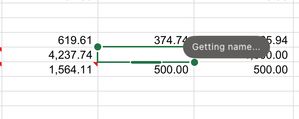
One of the cells in my worksheet has a "Getting Name" bug on my worksheet - I have no idea what this is referring to - I've never seen this in my 40-years of using Excel - there are no Range Names nor Links in this workbook. What is it and how do I get rid of it?Tahoe24x7Dec 13, 2025Copper Contributor191Views1like10CommentsHow should I write this Process?
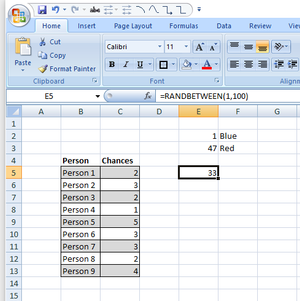
I am not sure how to do this in function for without going through a long chain of manual brute force steps and hope I'm in the right discussion group for this. I have hunted the help hits on my search engine, but I'm not even sure if I am asking the right question so I am getting frustrated. The picture below shows where I am now. I want to set up a Function the will roll a d100 x number of times (with individual rolls reported, not added together) with x equaling the row's Chances cell (an assigned value). The 1 and 47 are the established Red/Blue cut offs for a different cell to process (outside this question, but will take suggestions if you have them). Ideally they would display as "81, 28, 42" etc. but I am interested in the function lay out. When it comes to Functions, my knowledge is limited the very basic ones and I am using baby talk when I do use them, so please be kind. Is this even possible or I am I just being crazy/unrealistic?dwarseckDec 12, 2025Copper Contributor131Views0likes6Comments
Small Business
Hello Surya Narayana, first thank you for responding to my question. I still have a problem with the formulas. The original formula still returns the wrong entry such as (JAN-00), the second formula returns an entry (#VALUE!) I've tried to change the date format in every way but, the result is the same. Thank youmiraciDec 12, 2025Copper Contributor23Views0likes0CommentsFormula help
I have the following formula that partially works. It processes this formula and returns the 1st match based on the formula criteria. =IFERROR( LET( KeyTypes,FILTER('Key Log'!$F$4:$F$309,(TRIM('Key Log'!$A$4:$A$309)=TRIM($D$6))*(TRIM('Key Log'!$C$4:$C$309)=TRIM($K$15))), KeyNums,FILTER('Key Log'!$K$4:$K$309,(TRIM('Key Log'!$A$4:$A$309)=TRIM($D$6))*(TRIM('Key Log'!$C$4:$C$309)=TRIM($K$15))), IF(INDEX(KeyTypes,ROW(A1))="Hard Key","V"&INDEX(KeyNums,ROW(A1)),INDEX(KeyNums,ROW(A1))) ),"") This formula resides in cells A8:A18 which is designed to return a key number, whether the key be a swipe key or a hard key. Cells B8:B18 are for descriptions of the key identified in cells A8:A18. This formula is supposed to find the 1st match on the key log and then find any other matches and place them in cells A8:A18. There is another formula for defining the description based on criteria. I need this formula to search out all transactions on the key log that match the ID number on the Key Issue Form in cell D6 with the cells in column A on the ID number and to also match the room number from K15 on the Key Issue Form with the room number in column C on the key log. There is something missing from this formula that is not allowing the other transactions to be found and listed on the Key Issue Form. Can anyone help me complete this formula? This is the formula for B8:B18 =IF(A8="","", LET( FilteredRows,FILTER(SEQUENCE(ROWS('Key Log'!$A$4:$A$309)),('Key Log'!$A$4:$A$309=$D$6)*('Key Log'!$C$4:$C$309=$K$15)), RowNum,INDEX(FilteredRows,ROW(A1)), Room,INDEX('Key Log'!$C$4:$C$309,RowNum), Status,INDEX('Key Log'!$E$4:$E$309,RowNum), Type,INDEX('Key Log'!$F$4:$F$309,RowNum), DateVal,INDEX('Key Log'!$D$4:$D$309,RowNum), IsAB,OR(RIGHT(Room,1)="A",RIGHT(Room,1)="B"), DoorDesc,IF(IsAB,"Combined Main & Room Door","Main Door"), KeyDesc,IF(Type="Swipe Key","Swipe Key","Hard Key"), DoorDesc & " " Can someone help me figure this out? CarlCarl_61Dec 12, 2025Iron Contributor232Views0likes7CommentsMicrosoft Excel ODBC connection has stopped working
Since Microsoft rolled out the new Office 365 patch (19426.20186), the ODBC connection in Excel has stopped working. Neither existing queries nor new queries are functioning anymore. I kindly ask for your assistance.Mario1111Dec 12, 2025Copper Contributor56Views0likes1CommentLearning Macro Control Buttons
My goal is to embed two control buttons that pop up when a certain range of cells is selected. I have two columns (C:D) that have numeric entries for quantities of items. I want to be able to select a cell in this range and have two buttons appear next to active cell, one to add by an input value and one to subtract by an input value. I was able to create Form Control Buttons that can do the task but I can't figure out how to align them to the active cell and hide them if the active cell is outside of the desired range. Any suggestions? Do I need to use ActiveX buttons instead of Form Control?UserOfExcelDec 12, 2025Copper Contributor58Views1like1Comment
Data Pulling
I'm trying to figure out the best way to pull data together from multiple tabs within an excel file. The file is made so that it can track issues within reports that are discovered. I'll try to break it down the best I can to explain what I have and what I'm trying to do. Within the file there are 5 tabs that are considered locations and they are named: LX, LV, CR, HR, FL Each tab is set up the same way with the only real important information in these columns of a table Column A - PCR Date Column C - PCR Owner Column G, I, K, M - Modification Category (1-4) these fields are actually drop down options from the Category Master List Within the file there is a 6th tab that has at able in it that is called Category Master List. Column A - Options for the dropdown in the above tab Modification Category columns Column B - Breakdown into one of three main categories (Billing, Compliance, Quality) Now this is what I'm trying to do: Fiscal Year Data (September 2025-August 2026) - I need to see how many times each of the dropdown options within the Master List show up in column G, I, K, M for each of the 5 location tabs. Monthly Data - I need to see how many times each of the dropdown options within the Master List show up in column G, I, K, M for each of the 5 location tabs along with how many times there is an entry with a date within that month. I would like to try and figure out how to put everything into one data table/chart type thing so it's easier to see and compare. Currently, everything needed is across a few different pivot tables and I would really like the data to pull itself automatically instead of me having to go in and copy all the data from one spot into another just to get the pivot results. Below is what I'm having to look at currently.tapster91Dec 12, 2025Copper Contributor50Views1like1Comment





Resources
Tags
- excel43,440 Topics
- Formulas and Functions25,179 Topics
- Macros and VBA6,520 Topics
- office 3656,228 Topics
- Excel on Mac2,702 Topics
- BI & Data Analysis2,447 Topics
- Excel for web1,982 Topics
- Formulas & Functions1,716 Topics
- Need Help1,703 Topics
- Charting1,679 Topics