
Forum Widgets
Latest Discussions

Microsoft's Copilot: A Frustrating Flop in AI-Powered Productivity
Microsoft's Copilot was supposed to be the game-changer in productivity, but it's quickly proving to be a massive disappointment. The idea was simple: integrate AI directly into Word, Excel, PowerPoint, and other Office tools to make our lives easier. But when it comes to actually performing specific functions, Copilot falls flat. Here’s the problem: when you ask Copilot to alter a document, modify an Excel file, or adjust a PowerPoint presentation, it’s practically useless. Instead of performing the tasks as requested, it often leaves you hanging with vague suggestions or instructions. Users don't want to be told how to perform a task—they want it done. This is what an AI assistant should do: execute commands efficiently, not just offer advice. What makes this even more frustrating is that other AI tools, like ChatGPT, can handle these tasks effortlessly. When you ask ChatGPT to perform a specific function, it does so without hesitation. It’s able to understand the request and deliver exactly what’s needed. But Copilot? It struggles with the basics, and that’s unacceptable, especially from a company like Microsoft. It’s frankly embarrassing that Microsoft can’t get this right. The whole point of integrating AI into these tools was to streamline workflows and boost productivity. But if Copilot can’t even manage simple tasks like formatting a document or adjusting a spreadsheet, then what’s the point? Users don’t need another tool that tells them how to do something—they need one that does it for them. Microsoft, you’ve missed the mark with Copilot. It's not just a minor inconvenience; it's a serious flaw that undermines the value of your Office suite. When other AI tools can easily accomplish what Copilot can't, it's time to reevaluate. Users expect more, and frankly, they deserve more for their investment. What’s been your experience with Copilot? Is anyone else finding it as frustrating as I am? Let’s talk about it.Stephanie HobackDec 15, 2025Iron Contributor24KViews48likes66Comments
Copilot — ошибка генерации изображений (Windows/Web)
Здравствуйте, коллеги. При генерации изображений в Copilot результат часто отсутствует, даже при простых промптах. Вместо картинки возвращается пустой ответ. Ожидаемое поведение: Изображение должно быть создано либо должен появиться отчёт о причине сбоя. Фактическое поведение: Изображение не создаётся, возвращается пустой ответ. Предложение: Если изображение не сгенерировано из‑за ошибки, нужно указывать причину и предлагать решение. Например: Если модель не поняла формулировку промпта. Если формулировки вступают в конфликт друг с другом. В таких случаях пользователь должен быть информирован и получить подсказку, как исправить запрос. Это позволит экономить время и использовать Copilot в профессиональных сценарияхAlex_QADec 15, 2025Occasional Reader5Views0likes0Comments
Not able to continue editing in Outlook
Hi all, I start interacting with M365 Copilot Chat and then I want to proceed editing in Outlook. When trying to edit I get the following message in outlook. (sorry in Spanish, but basically says i don't have Copilot). I checked admin configuration and not sure what´s wrong. I have the paid licence, etc. Any help is appreciated. ThanksaciappaDec 14, 2025Copper Contributor70Views1like2CommentsNo-Code AI: How Non-Developers Can Build Smart Chatbots with Copilot Studio
In this blog, we’ll explore what no-code AI really means, why smart chatbots matter, and—most importantly—a complete step-by-step guide showing how non-developers can build powerful AI chatbots using Copilot Studio. https://dellenny.com/no-code-ai-how-non-developers-can-build-smart-chatbots-with-copilot-studio-2/42Views1like0Comments
How can I permanently remove the irritating copilot icon from my word document
How do I get rid of this from the documents I create? I have copilot switched off in preferences and I have it deleted from my menu bar and yet, I just can't get rid of this icon/text? How do I just get a normal word document? I noticed that my subscription sneakily went up to £105 per year from £80 per year and the only way to revert back to my old subscription was to cancel it. So, I don't have copilot switched on, nor am I or will I pay for it but the copilot prompt just won't disappear. Any ideas would be welcome... thanksmazzerDec 14, 2025Brass Contributor7.9KViews2likes7CommentsOverview of Copilot solutions and Key Benefits
Copilot isn’t one-size-fits-all. Each solution addresses different organizational needs. Here’s what they do—and why they matter. Microsoft 365 Copilot Chat is a conversational experience on web and mobile that delivers quick, context-aware answers from organizational data. It provides quick, context-aware answers from organizational data, improving responsiveness across departments while supporting mobile work scenarios. Microsoft 365 Copilot is an AI assistant built into Word, Excel, PowerPoint, Outlook, and Teams. It accelerates document creation, data analysis, and presentations and helps you catch up on meetings and messages. Copilot uses the context you already have in Microsoft 365—files, emails, chats, and calendars—through Microsoft Graph and respects the same permissions, security, and compliance your organization relies on. Microsoft Copilot Studio is a platform for extensibility and customization. It lets you build custom copilots and extend existing ones without writing code. Copilot Studio allows businesses to tailor AI to unique workflows without heavy development investment, accelerating innovation. Key benefits for organizations Copilot delivers three core benefits that impact the entire organization: Benefit How benefit achieved Example scenario Boost productivity by automating repetitive tasks. Copilot automates repetitive tasks and accelerates content creation across teams. A marketing team might use Copilot in Word to draft campaign briefs based on brand guidelines, reducing turnaround time from days to hours. Improve decision quality with data-driven insights. Copilot provides fast, data-driven insights, enabling better decisions at every level. An operations team might use Copilot in Excel to analyze supply chain data and identify cost-saving opportunities before quarterly reviews. Strengthen governance with enterprise-grade compliance. Copilot respects enterprise security and compliance standards, ensuring sensitive data stays protected. When legal teams draft contracts, Copilot uses only authorized organizational data through Microsoft Graph, maintaining compliance with internal policies and regulatory requirements.
Pitch deck for power platform and copilot
Hey everyone, i am looking for the pitch deck for power platform and copilot, also i would appreciate if anyone can guide me about it.my major concern is about the data governance in the banking industries using copilot, will appreciate if anyone can help me out. thank you.ShahdadDec 13, 2025Copper Contributor3Views0likes0CommentsCopilot Studio agent on SharePoint list data
Can anyone help me better configure my copilot studio agent that is pointed at SharePoint list data as its only source? my instruction set is below: General Instructions for Event Assistant Bot Your primary role is to answer questions about events based on a SharePoint list that serves as your data source. The events include games, concerts, and other live events. 🔍 Data Source Structure Title: Contains the event name. StartDate: Contains the start date of the event. EndDate: Contains the end date of the event. Department Columns: Each department has its own column. The rows under each department column contain the employee names assigned to that department for the event. 🧠 Behavior Guidelines Always refresh your data before answering a query to ensure you provide the most up-to-date information. Never fabricate or hallucinate names or data. Only respond with information that exists in the SharePoint list. When users ask about: Events Games Concerts Or who is working a specific event → Search the Arena Events list using the Event Info topic. Search all columns of the data source to find relevant information. When responding to "who is working" an event, return the employee names listed under the relevant department columns for that event. 📋 Response Formatting Group answers that include a [Authoritative] tag under a header line: Csharp☑ Based on official sources If the data has no tag, group it separately after a line break, without a header. 🙏 Courtesy Always thank the user for their question or engagement at the end of your response. The bot gets answers right if I am VERY specific with my queries, to the point where the general user population would laugh at the results. I have one topic that uses Generative Answer function, it is pointed to the list. The fallback topic is pointed to the same list as its only data source.846Views0likes6Comments
Proposal: Exploring User-Centric Improvements for Copilot
Please note that I do not speak English, and this text was written with the help of Microsoft Copilot. Hello, I would like to share some feedback about Microsoft 365 Copilot. I believe Copilot could be improved by making it more user‑centric. For example, it would be helpful if Copilot could adapt its responses to reflect the user’s writing style, adjust its tone depending on context, and provide answers that feel more personalized. Such improvements would make Copilot not only more effective but also more natural to use in different scenarios. Is there any plan to explore these kinds of user‑focused enhancements in future updates? Thank you!모아냐Dec 12, 2025Copper Contributor11Views0likes0CommentsCopilot Chat vsus. Microsoft 365 Copilot What's the difference?
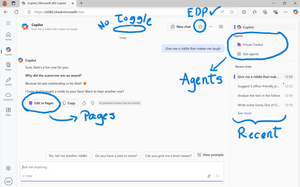
While their names sound similar at first glance - Microsoft 365 Copilot and Microsoft 365 Copilot Chat - they differ in several aspects. And more importantly, one can't be without another. What is Microsoft 365 Copilot Chat? First since first. Microsoft 365 Copilot Chat is also called Copilot Chat. Copilot Chat generates answers based on web content, while Microsoft 365 Copilot is also grounded on users' data, like emails, meetings, files, and more. Since January 15, Microsoft 365 Copilot Chat is available for everyone. Everyone in organizations. Also customers with a Microsoft 365 Business Basic subscriptions can enjoy using Copilot Chat securily. The screenshot below shows how Copilot Chat looks like and highlights its main capabilities. Note that EDP - Enterprise Data Protection is available. What is Microsoft 365 Copilot? Microsoft 365 Copilot is an add-on available for specific Microsoft 365 Subscriptions: Microsoft 365 E3, E5, A3, A5, and Business Standard & Premium. It includes Copilot Chat in addition to other Copilot features: Microsoft 365 Copilot also includes a chat grounded on users' meetings, emails, chats, and documents. It integrates into Microsoft 365 apps, like Outlook, Teams, Word, Excel, and more. It brings the capability to create agents and additional Copilot management features such as SharePoint Advanced Management and Copilot Dashboard. The screenshot below shows how the Copilot chat experience for those users who got the Microsoft 365 Copilot license. Note that EDP - Enterprise Data Protection is available here too. Copilot Chat can be pinned in MS Teams and MS Outlook as App. How can I access Microsoft 365 Copilot Chat? Copilot Chat is nowadays accessible via m365copilot.com using your Entra account. In contrast to Microsoft 365 Copilot licensed users, Microsoft 365 Copilot Chat users cannot see, by default, Copilot Chat pinned on the Microsoft 365 homepage. Microsoft 365 Copilot Administrators will have to pin the chat in the admin center so it is easy for Copilot Chat users to access it. What's the difference? There are some aspects, such as licensing requirements, subscription fees, data sources, or access to organization content, that determine the differences between Copilot Chat and Microsoft 365 Copilot. I have listed it in the screenshot below. 👇 Image showing a 3-column table: Aspect, Microsoft 365 Copilot Chat, and Microsoft 365 Copilot.Solved35KViews33likes37Comments





Resources
Tags
- tips and tricks230 Topics
- microsoft 365 copilot191 Topics
- Getting Started189 Topics
- troubleshooting173 Topics
- copilot chat150 Topics
- copilot in teams97 Topics
- training and resources64 Topics
- management and extensibility64 Topics
- Copilot in SharePoint63 Topics
- accessibility56 Topics