
Forum Widgets
Latest Discussions
How To Use The Microsoft Teams Milestones App
This Microsoft Teams Tutorial will demonstrate how to use the Microsoft Teams Milestones sample app. The Milestones app is a lightweight project tracking tool that provides a simple visual interface that illustrates the progress to completing project work. A sample app is one built on the Power Platform to demonstrate the extensibility of Teams when using Powerapps and Power Automate to augment it with custom solutions. Note that this app is not a full fledged project management app and more importantly it doesn't integrate with Tasks By Planner and To Do out of the box. You could build flows in Power Automate to create that integration however. https://youtu.be/uPUJTuYGiQw What are your thoughts about this app?LuiIacobellisDec 18, 2025Iron Contributor95KViews0likes27CommentsTeams Messaging Gets Autocorrect
The addition of Autocorrect for messaging is a small but important change for Teams messaging brings Teams up to speed with the other Office applications. It’s taken Teams a little longer than it perhaps should have to support Autocorrect and the implementation is not as functional as it is in Outlook, but that’s not a reason to overlook the update. https://office365itpros.com/2025/12/10/teams-autocorrect-messaging/63Views0likes1Comment
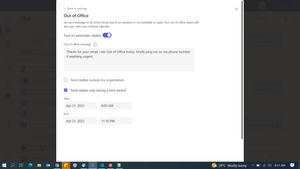
Out of Office is Scheduled for today but my status shows online. Could you resolve this please?
Hi, I had scheduled out of Office today (April 21 2023) from 8.00 AM to 11.30 PM and it was saved without any issues. But as I open the teams application today, my status does not reflect out of office and shows me Online. I have tried to sign out and sign in and clear the teams cache as well but with no success. Could you please help to resolve this issue.Swati97Dec 17, 2025Copper Contributor453Views0likes1Comment
Communications Credits for GCC
Microsoft has stated that after November 1, 2025, Teams resource accounts (Auto Attendants/Call Queues) making outbound PSTN calls will require Pay-As-You-Go (PAYG) licensing or Communication Credits instead of Calling Plans. For GCC tenants, where exactly are Communication Credits configured and assigned? In commercial tenants this is typically done through the Microsoft 365 admin center under Billing > Communication credits, but I’m not seeing equivalent options in GCC. Has anyone successfully set this up in GCC, or is PAYG handled differently for government tenants?barryallenDec 16, 2025Copper Contributor7Views0likes0CommentsSay Goodbye to "Can You Hear Me?" with Teams New Mic Volume Indicator
In this video, we explore the latest feature coming to Microsoft Teams: the Mic Volume Indicator! This new addition provides users with real-time visual feedback on their audio levels during meetings, ensuring you never have to ask, "Can you hear me?" again. Designed to minimize interruptions and boost user confidence, this feature is set to enhance meeting effectiveness significantly. #Teams #MicrosoftTeams #Tool #MVPbuzz #Productivity540Views2likes1CommentTeams auto attendant holiday call flow problems
I have a holiday schedule applied to an auto attendant. That schedule contains all of our annual holidays. In the auto attendant holiday call flow routing options, I have it play an audio file and I specify menu options to redirect to voicemail or to search by name. What I want to do is just change the audio file that's played for the greeting to be appropriate for the holiday (we'll be closed for Christmas, New Year, etc.). But when I delete the current audio file and upload a new one, the Save option is greyed out. I thought perhaps it was just auto-saved, so go out to the list of auto attendants, then back into that attendant and check to see what audio file is listed. It's the one I just uploaded. Ok, cool. I refresh the browser tab and check again. Now it's the previous greeting. The only way I have found to save that new audio file, is to make some other change to the call flow (change Directory search option) which makes the Save button available. I save it and it takes me out of the holiday call flow setting, so I go back in (my new greeting is now saved) and change the Directory search option back to what it was previously and save again. There's got to be an easier way, right?tonywallDec 16, 2025Copper Contributor9Views0likes0Comments
No longer able to add Teams link in invite from shared calendar in browser
Since one or two weeks I am no longer able to add a Teams link to an invite that I send from a shared emailaccount/calendar when I am using the browser link instead of the Outlook app. My situation: I am a contractor, working remotely for a company on my personal laptop. I have a personal company account (mailbox/calendar/Teams etc.). I support a specific team that meets regularly. I take care of organizing all the team meetings, and because I am not working every minute of the day, we decided to send invites for the whole team from the shared mailbox of the team, so that if I am not around immediately, others can adjust the invites as well. This worked perfectly for years. But since one or two weeks I am no longer able to add a Teams link when I access the account throught the browser (same for my colleagues). My colleagues can still add a Teams link when they use the Outlook app, however, since I am working on a personal laptop I cannot install the app and have to work from the browser. I reached out to internal IT support of course, but they can't help me unfortunately. First they stated that this never worked (which is not true, because I have been doing this for years) and later they stated that it is a change from the Microsoft end so they cannot solve it. Is this correct? And if so, what other ways of working would be available to reach the goal we are after (me setting up all initial meetings but others being able to adjust the invites as well when needed)? I also tried adding one colleague as a co-organizor, but it turned out that this colleague can still not change the meeting details..... Anyone here can help/advise?YvonneS78Dec 15, 2025Copper Contributor72Views0likes2CommentsRemote participants can't hear me when they speak
Hi, I've been trying to solve this problem for a long time. We're using Windows 11 (previously Windows 10) with all the latest updates. We have a Jabra 810 connected to our computer. Everything works fine. But when the other person starts talking, he stops hearing us (or our voice is so quiet they don't notice). As soon as he stops talking, he starts hearing us normally again. What could be the cause, and how can I fix this? Best regards, DmitryDmitry2440Dec 15, 2025Copper Contributor84Views0likes4Comments




Resources
Tags
- microsoft teams13,431 Topics
- How-to2,930 Topics
- Administrator2,635 Topics
- meetings2,548 Topics
- Settings2,284 Topics
- User Interface1,643 Topics
- tips & tricks1,483 Topics
- calling1,245 Topics
- teams1,036 Topics
- best practices986 Topics