youtube
61 TopicsSQL developer tools at SQL Modernization Day
SQL developers can now do most of their database work without leaving VS Code. The MSSQL extension ships updates every month, GitHub Copilot understands your schema, and the Microsoft SQL drivers keep pace with SQL Server 2025. And new Microsoft SQL skills, now in public preview, let your coding agent assess and migrate SQL Server to Azure SQL. Here's what's new across the toolchain, and where to see it in action at SQL Modernization Day on October 20. What's new in the MSSQL extension for VS Code The MSSQL extension connects to SQL Server, Azure SQL and SQL database in Fabric from the editor you already use. It now covers far more than connecting and running queries. Versions 1.40 and 1.41 added the following. Generally available Database management. Backup and restore, plus dialogs to create, rename and drop databases. View and edit data directly in the table view. DACPAC and BACPAC extract, deploy, import and export for moving databases between environments. Fabric integration to browse workspaces and provision SQL databases in Fabric. SQL database projects with a publish dialog and code analysis. Azure Data Studio migration toolkit that brings over your connections, settings and key bindings. Public preview Query Profiler for real-time activity monitoring with Extended Events. Flat file import to turn a CSV or TXT file into a new table. Database object search across tables, views, stored procedures and more, with scripting options. SQL Notebooks that mix SQL and Python kernels in one notebook. Schema Designer and data API design with GitHub Copilot, plus an application quickstart. Need a local database? The extension can spin up a SQL Server 2025 container in a few clicks. It checks prerequisites, sets up the container and adds the connection to Object Explorer for you. Build with GitHub Copilot and your schema GitHub Copilot is built into the MSSQL extension. In agent mode it reads your actual tables, columns and relationships, along with your workspace and open files. It uses the same connection and permissions as the extension, and it asks you to approve tool actions before they run. Here's some of what you can hand off: Chat with the mssql participant for SQL guidance, or let agent mode connect, list servers and run queries. Generate tables and relationships, then review them as a diff before anything reaches the database. Write T-SQL or ORM queries from plain language, and get explanations of stored procedures, views and complex joins. Generate realistic test data from your current schema. Configure Data API builder in natural language to expose tables as REST, GraphQL or MCP endpoints. Try it: from idea to an AI-ready app The library app sample walks through a full build in three steps: Spin it up. Create a local SQL Server 2025 container from the extension and seed the database. Wire it up. Have Copilot turn hardcoded app data into new tables and relationships, generate test data, and stand up a read-only REST API with Data API builder. Light it up. Add a native VECTOR column, generate embeddings, and use VECTOR_DISTANCE for semantic search behind a RAG chatbot. The repo includes a PRD and GitHub Copilot custom instructions, so Copilot follows your naming conventions and targets SQL Server without repeating yourself in every prompt. Coming next: Azure SQL Developer runs the Azure SQL Database engine locally for development, so you can build in your inner loop and deploy to Azure with no code changes. It's in gated preview, and you can sign up at aka.ms/azuresql-developer. Assess and migrate with Microsoft SQL skills Microsoft SQL skills, now in public preview, bring SQL Server migration expertise to the coding agent you already use. Skills are packaged instructions and scripts that an agent loads when a task calls for them. You ask for an assessment or a migration in plain language, and the agent picks the right skill for each step. The skills live in one central library, so they work the same way in GitHub Copilot, VS Code, Claude and Cursor. They cover the whole journey: Assess readiness, blockers and dependencies. Recommend a target, SKU and cost. Plan prerequisites and remediation. Migrate with BACPAC, or with Log Replay Service (LRS) and managed identity. Validate with post-move checks and guided fixes. You stay in control the whole way. The agent asks before it runs commands, and you approve its recommendation before anything moves. An assessment you can act on The assessment skills look at your estate through four lenses and turn discovery data into an Azure SQL recommendation you can defend. Lens Question What it checks Compatibility Can the workload move? Feature support, breaking changes, blockers and the remediation path Assessability Is there enough evidence? Inventory coverage, assessment status, data freshness and confidence gaps Sizing What capacity does it need? CPU, memory, I/O and storage demand, mapped to a compute tier with headroom Pricing What will it cost? SKU and service tier, region, licensing including Azure Hybrid Benefit, and a monthly estimate Here's how that plays out. Ask GitHub Copilot in VS Code to assess a SQL Server 2016 instance for Azure SQL Database Hyperscale. The agent checks that the Azure CLI and its data migration extension are installed, runs the assessment and reports readiness database by database. A database that uses Service Broker gets flagged, since Azure SQL Database doesn't support it, along with the fix. You also get an HTML report that compares Hyperscale, Azure SQL Managed Instance and SQL Server on Azure VMs, with a monthly cost estimate and a SKU recommendation for each database. A migration that picks up where it left off Next, ask the agent to migrate one of those databases. It confirms SqlPackage is installed, checks that the source is online and builds a migration plan. The plan names the source and target servers and the method, an offline BACPAC export and import. It creates a new database and never overwrites an existing one, and the source isn't modified. If the export fails, the agent saves a checkpoint and diagnostics. Once you fix the source, it retries only the failed step instead of starting over, then validates the result. Explore the skills at aka.ms/microsoftsql-skills. For the full set of migration tools, including Azure Migrate, Azure Database Migration Service and migration through Azure Arc, see the database migration guide. Microsoft SQL skills are in public preview. Preview features are provided without a service level agreement and aren't recommended for production workloads. Put your database under source control with SQL projects SDK-style SQL projects (Microsoft.Build.Sql) treat your database like any other codebase. A build produces a .dacpac you can deploy to new or existing databases across SQL Server, Azure SQL and SQL database in Fabric. You can work with SQL projects in VS Code, SSMS and Visual Studio. Cross-platform builds with plain dotnet build. Every .sql file in the folder is included by default. Code analysis on build with 14 default rules. Add custom rule sets as package references, and promote any rule to a build error. Package references for shared objects and cross-database references, so objects that rarely change don't slow down every build. Extract an existing database into a SQL project with SqlPackage, installed as a dotnet tool. Schema compare across databases, SQL projects and .dacpac files. A typical pipeline looks like this: A developer proposes a change in a pull request. CI builds the project and runs code analysis. The team approves and merges to main. The pipeline calculates a deployment plan against staging or production. Someone reviews the plan as a script or deploy report and approves the release. GitHub environments and Azure DevOps approvals handle that last gate. SQL projects also help as AI agents write more of your code. Every database change lands as a reviewable diff, and changes from several agents or teammates merge like any other code. Get started at aka.ms/sqlprojects or work through the SQL DevOps workshop. What's new in the Microsoft SQL drivers The Microsoft SQL drivers all shipped new releases, including several of the fixes the community asked for most. Driver Release Highlights Microsoft.Data.SqlClient (.NET) 7.0 The core package drops its Azure dependencies. Entra auth moves to Microsoft.Data.SqlClient.Extensions.Azure with no code changes. New pluggable SSPI auth, .NET 10 support, and ActiveDirectoryPassword marked obsolete. JDBC 13.4 FLOAT16 vector support for embeddings, a new performance logger, Java 25 LTS and SQL Server 2025 support. mssql-python 1.4 A public bulk copy API with a Rust-powered core, spatial types, and type hints for mypy and Pyright. mssql-django 1.7 Django 6.0 and Python 3.14, composite primary keys, SQL Server 2025, and ODBC Driver 18 as the default. PHP (sqlsrv, pdo_sqlsrv) 5.13 PHP 8.4 and 8.5, SQL Server 2025, newer Linux and macOS platforms, and a fix for a Fabric connectivity crash. New to the Python driver? Start with the mssql-python quickstart. See it live at SQL Modernization Day Amit Khandelwal's session, Migrate to Azure SQL. Then Build Something New., puts these tools together at 10:00 AM PT on Tuesday, October 20. He covers the path off on-premises SQL Server, then builds on Azure SQL Database with VS Code, GitHub Copilot, the latest drivers and the SQL MCP Server. Expect demos of the developer workflow, not only the migration. SQL Modernization Day is a free livestream on Microsoft Reactor with eight sessions from the Microsoft SQL team. Register at aka.ms/SQLModernizationDay2026.Introducing Inside Microsoft Foundry: Quickstart 🎬
Discover Inside Microsoft Foundry: Quickstart, a new video series for developers building AI agents. Starting with "What does it really take to ship an AI agent?", the series explores real-world challenges such as model selection, grounding agents in data, evaluation, deployment, observability, and governance. Follow along as we show how the Microsoft Foundry ecosystem helps developers move from prototype to production, with new episodes released in the coming weeks.Building Autonomous Agents with Microsoft Agent Framework and GitHub Copilot SDK Part 2/5
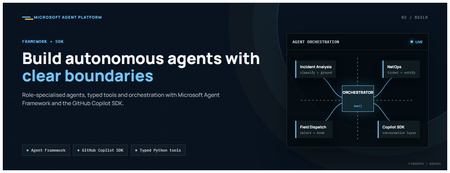
This is the second post in our series on the Microsoft agent platform. Here we dive deep into building autonomous agents, the development experience, the Microsoft Agent Framework, tool design patterns, and how the GitHub Copilot SDK brings conversational AI to your agent system. All examples reference the FibreOps repository, an autonomous fibre outage response system demonstrated at Microsoft Build BRK241. The Microsoft Agent Framework The Microsoft Agent Framework (now GA) provides a unified programming model for building agents. It supports multiple backends through a single .run() contract: Hosted — FoundryAgent connected to a Prompt Agent published to Microsoft Foundry Agent Service. Foundry — Agent + FoundryChatClient with the definition resolved locally (ideal for prompt iteration). Local — Deterministic LocalAgent for offline development and testing. This design means your orchestration code never changes regardless of where the agent runs. The factory pattern in FibreOps selects the backend at startup: # src/fibreops/agents/factory.py — simplified from agent_framework_foundry import FoundryAgent from agent_framework import Agent, FoundryChatClient def build_agent(role: str, backend: str, config: Config): if backend == "hosted": return FoundryAgent(agent_id=config.foundry_agents[role]) elif backend == "foundry": return Agent( instructions=get_instructions(role), chat_client=FoundryChatClient(endpoint=config.endpoint), tools=get_tools(role), ) else: return LocalAgent(role=role) Set FIBREOPS_AGENT_BACKEND to override the backend, or leave it as auto for intelligent detection. Designing Role-Specialised Agents FibreOps demonstrates a key pattern: role specialisation. Rather than one monolithic agent, the system uses three focused agents, each with a clear responsibility boundary: Agent Role Tools Available IncidentAnalysisAgent Classify severity, find root cause, retrieve SOP Knowledge (SOPs + topology), Web IQ, Work IQ NetOpsCoordinatorAgent File D365 incident, post Teams notice Ticketing, Teams, Memory FieldDispatchAgent Select engineer, book resource, update team Dispatch, Teams, Voice Why Role Specialisation? Focused system prompts — Each agent has a tightly scoped instruction set, reducing hallucination and improving reliability. Independent evaluation — You can score each agent separately against role-specific criteria. Parallel development — Teams can iterate on agents independently. Selective upgrade — Swap one agent's model or implementation without touching others. Tool Design: Typed Python Functions Tools in the Microsoft Agent Framework are typed Python functions that the runtime supplies to the hosted agent definition. FibreOps demonstrates several tool categories: Knowledge Tools # src/fibreops/tools/knowledge.py — simplified def sop_lookup(node_id: str, signal_type: str) -> dict: """Retrieve the Standard Operating Procedure for a given signal type. Args: node_id: The fibre node identifier (e.g., FN-LDN-001) signal_type: The type of signal (loss_of_light, high_ber, signal_degradation) Returns: SOP with steps, escalation path, and estimated resolution time. """ # Load from local markdown SOPs or Foundry IQ ... def web_iq_search(query: str, *, limit: int = 5) -> list[dict]: """Search public web for context relevant to the incident. Grounding against roadworks, weather, power outages, splice guidance. Falls back to deterministic fixtures when endpoint is unset. """ ... def work_iq_search(query: str, *, limit: int = 5) -> list[dict]: """Search enterprise knowledge for context relevant to the incident. Site surveys, SLA tiers, competency matrix, MTTR trends. """ ... Integration Tools # src/fibreops/tools/teams.py — simplified def post_outage_notice( incident_id: str, node_id: str, severity: str, summary: str, engineer: str | None = None, ) -> dict: """Post an Adaptive Card outage notice to the configured Teams channel. If TEAMS_WEBHOOK_URL is not set, appends to state/teams_outbox.jsonl for offline review. """ card = build_adaptive_card(incident_id, node_id, severity, summary, engineer) if config.teams_webhook_url: requests.post(config.teams_webhook_url, json=card) else: append_to_outbox(card) return {"status": "posted", "incident_id": incident_id} Design Principles for Agent Tools Typed parameters with docstrings — The runtime uses type hints and docstrings to generate the tool schema for the LLM. Graceful degradation — Every tool works offline by falling back to local fixtures or file-based state. Idempotent where possible — Tools that create resources return existing records if called with the same parameters. Observable — Every tool invocation emits an OpenTelemetry span for tracing and debugging. The Orchestrator Pattern The orchestrator drives signals through the agent pipeline. It is deliberately simple — a linear flow with error handling: # src/fibreops/orchestrator.py — simplified async def handle_signal(signal: TelemetrySignal) -> RunResult: """Process a telemetry signal through the agent pipeline.""" # Stage 1: Incident Analysis analysis = await incident_agent.run( f"Analyse this signal: {signal.model_dump_json()}" ) # Stage 2: NetOps Coordination coordination = await netops_agent.run( f"Coordinate response for: {analysis.summary}" ) # Stage 3: Field Dispatch dispatch = await dispatch_agent.run( f"Dispatch engineer for incident: {coordination.incident_id}" ) return RunResult( signal=signal, analysis=analysis, coordination=coordination, dispatch=dispatch, ) The orchestrator honours the same contract regardless of backend — hosted , foundry , or local — because all backends implement await agent.run(prompt) . GitHub Copilot SDK Integration (GA) The GitHub Copilot SDK enables conversational interaction with your agent system. FibreOps implements FibreOpsCopilotClient with the same interface as github/copilot-sdk : # src/fibreops/sdk/__init__.py — simplified from fibreops.sdk.client import FibreOpsCopilotClient client = FibreOpsCopilotClient() session = client.create_session() # Query agent status response = session.send_and_wait("status") print(response.text) # Human-readable summary print(response.data) # Structured JSON # Inject a telemetry signal via conversation response = session.send_and_wait(json.dumps({ "signal_id": "sig-demo", "node_id": "FN-LDN-001", "signal_type": "loss_of_light", "severity": "critical" })) The adapter routes prompts by shape: JSON signal-shaped dicts — Forwarded to the orchestrator for processing. Free-form text — Answered by a deterministic responder ( help , status , nodes , engineers , optimiser , dispatch ). Drive it from the terminal: python -m fibreops.demo chat "help" python -m fibreops.demo chat "status" python -m fibreops.demo chat '{"signal_id":"sig-demo","node_id":"FN-LDN-001","signal_type":"loss_of_light","severity":"critical"}' Or hit the embedded HTTP endpoint when the NOC console is running: Invoke-RestMethod -Method Post http://127.0.0.1:8800/sdk/chat -Body '{"prompt":"status"}' -ContentType application/json Development Workflow with Foundry Toolkit for VS Code The Foundry Toolkit for VS Code provides an integrated development experience: Author prompts — Edit system instructions with live preview and token counting. Test locally — Run against the foundry backend with FoundryChatClient pointing at your development model. Iterate fast — The foundry backend resolves definitions locally, so prompt changes take effect immediately without republishing. Publish when ready — python -m fibreops.demo publish creates hosted Prompt Agents in Foundry. Multi-Model Support The Microsoft Agent Framework supports multiple models. FibreOps defaults to gpt-4.1-mini (the model available in most demo Foundry accounts), but any chat-completions deployment works: # .env AZURE_AI_MODEL_DEPLOYMENT=gpt-4.1-mini # or gpt-4o-mini, gpt-4o, gpt-4.1 The framework also supports Claude Code connectors and Magentic-One for multi-agent collaboration scenarios. Testing Strategy FibreOps demonstrates a layered testing approach: Unit tests — Test tools in isolation with mocked dependencies. Local backend tests — Run the full pipeline with LocalAgent for deterministic assertions. Integration tests — Run against real Foundry agents with pytest -q . Rubric evaluation — The optimizer scores every run against defined criteria. # Run the test suite .\.venv\Scripts\python.exe -m pytest -q Key Takeaways The Microsoft Agent Framework provides a unified .run() contract across hosted, foundry, and local backends. Role specialisation keeps agents focused, testable, and independently evolvable. Tools are typed Python functions with docstrings — the runtime generates schemas automatically. The GitHub Copilot SDK (GA) enables conversational interaction with any agent system. Graceful degradation means the entire system works offline for development. The factory pattern lets you switch backends without changing orchestration code. Next Steps Clone the FibreOps repository and run python -m fibreops.demo --signals 3 Microsoft Agent Framework documentation Next in this series: Running Hosted Agents in Microsoft Foundry Agent Service
Picture-in-Picture seek controls bypass MediaSession ad restrictions on YouTube
In Microsoft Edge, the Picture-in-Picture overlay exposes functional +10s/-10s seek controls during YouTube ad playback. The seek action advances the ad playhead even when YouTube has declared the seekforward action as unavailable via the Media Session API. Repro: InPrivate window, logged out of YouTube Play any video on youtube.com When pre-roll ad starts, click the in-player PiP icon Press +10s seek-forward on the PiP overlay Observed: a non-skippable NPCI ad followed by a Maggi ad were both bypassed in ~10 seconds of wall-clock time. The main <video> element briefly buffers during seek, consistent with HTMLMediaElement.currentTime being mutated directly rather than dispatched through the page's registered MediaSession action handlers. Cross-browser: verified the same flow in Google Chrome on the same Windows install. Seek-forward during ad playback does NOT advance the playhead, confirming YouTube's MediaSession setup is correct and isolating the issue to Edge's PiP implementation. Impact: affects any site using the Media Session API to restrict seek — live streams, DRM-protected content, ad-bound playback. Not YouTube-specific. Environment: Edge version: latest stable channel OS: Windows 11 - Chrome compared: latest stable channel128Views0likes0CommentsAnnouncing the IQ Series: Foundry IQ
AI agents are rapidly becoming a new way to build applications. But for agents to be truly useful, they need access to the knowledge and context that helps them reason about the world they operate in. That’s where Foundry IQ comes in. Today we’re announcing the IQ Series: Foundry IQ, a new set of developer-focused episodes exploring how to build knowledge-centric AI systems using Foundry IQ. The series focuses on the core ideas behind how modern AI systems work with knowledge, how they retrieve information, reason across sources, synthesize answers, and orchestrate multi-step interactions. Instead of treating retrieval as a single step in a pipeline, Foundry IQ approaches knowledge as something that AI systems actively work with throughout the reasoning process. The IQ Series breaks down these concepts and shows how they come together when building real AI applications. You can explore the series and all the accompanying samples here: 👉 https://aka.ms/iq-series What is Foundry IQ? Foundry IQ helps AI systems work with knowledge in a more structured and intentional way. Rather than wiring retrieval logic directly into every application, developers can define knowledge bases that connect to documents, data sources, and other information systems. AI agents can then query these knowledge bases to gather the context they need to generate responses, make decisions, or complete tasks. This model allows knowledge to be organized, reused, and combined across applications, instead of being rebuilt for each new scenario. What's covered in the IQ Series? The Foundry IQ episodes in the IQ Series explore the key building blocks behind knowledge-driven AI systems from how knowledge enters the system to how agents ultimately query and use it. The series is released as three weekly episodes: Foundry IQ: Unlocking Knowledge for Your Agents — March 18, 2026: Introduces Foundry IQ and the core ideas behind it. The episode explains how AI agents work with knowledge and walks through the main components of the Foundry IQ that support knowledge-driven applications. Foundry IQ: Building the Data Pipeline with Knowledge Sources — March 25, 2026: Focuses on Knowledge Sources and how different types of content flow into Foundry IQ. It explores how systems such as SharePoint, Fabric, OneLake, Azure Blob Storage, Azure AI Search, and the web contribute information that AI systems can later retrieve and use. Foundry IQ: Querying the Multi-Source AI Knowledge Bases — April 1, 2026: Dives into the Knowledge Bases and how multiple knowledge sources can be organized behind a single endpoint. The episode demonstrates how AI systems query across these sources and synthesize information to answer complex questions. Each episode includes a short executive introduction, a tech talk exploring the topic in depth, and a visual recap with doodle summaries of the key ideas. Alongside the episodes, the GitHub repository provides cookbooks with sample code, summary of the episodes, and additinal learning resources, so developers can explore the concepts and apply them in their own projects. Explore the Repo All episodes and supporting materials live in the IQ Series repository: 👉 https://aka.ms/iq-series Inside the repository you’ll find: The Foundry IQ episode links Cookbooks for each episode Links to documentation and additional resources If you're building AI agents or exploring how AI systems can work with knowledge, the IQ Series is a great place to start. Watch the episodes and explore the cookbooks! We’re excited to see what you build and welcome your feedback & ideas as the series evolves.From Prototype to Production: Building a Hosted Agent with AI Toolkit & Microsoft Foundry
From Prototype to Production: Building a Hosted Agent with AI Toolkit & Microsoft Foundry Agentic AI is no longer a future concept — it’s quickly becoming the backbone of intelligent, action-oriented applications. But while it’s easy to prototype an AI agent, taking it all the way to production requires much more than a clever prompt. In this blog post - and the accompanying video tutorial - we walk through the end-to-end journey of an AI engineer building, testing, and operationalizing a hosted AI agent using AI Toolkit in Visual Studio Code and Microsoft Foundry. The goal is to show not just how to build an agent, but how to do it in a way that’s scalable, testable, and production ready. The scenario: a retail agent for sales and inventory insights To make things concrete, the demo uses a fictional DIY and home‑improvement retailer called Zava. The objective is to build an AI agent that can assist the internal team in: Analyzing sales data (e.g. reason over a product catalog, identify top‑selling categories, etc.) Managing inventory (e.g. Detect products running low on stock, trigger restock actions, etc.) Chapter 1 (min 00:00 – 01:20): Model selection with GitHub Copilot and AI Toolkit The journey starts in Visual Studio Code, using GitHub Copilot together with the AI Toolkit. Instead of picking a model arbitrarily, we: Describe the business scenario in natural language Ask Copilot to perform a comparative analysis between two candidate models Define explicit evaluation criteria (reasoning quality, tool support, suitability for analytics) Copilot leverages AI Toolkit skills to explain why one model is a better fit than the other — turning model selection into a transparent, repeatable decision. To go deeper, we explore the AI Toolkit Model Catalog, which lets you: Browse hundreds of models Filter by hosting platform (GitHub, Microsoft Foundry, local) Filter by publisher (open‑source and proprietary) Once the right model is identified, we deploy it to Microsoft Foundry with a single click and validate it with test prompts. Chapter 2 (min 01:20 – 02:48): Rapid agent prototyping with Agent Builder UI With the model ready, it’s time to build the agent. Using the Agent Builder UI, we configure: The agent’s identity (name, role, responsibilities) Instructions that define tone, behavior, and scope The model the agent runs on The tools and data sources it can access For this scenario, we add: File search, grounded on uploaded sales logs and a product catalog Code interpreter, enabling the agent to compute metrics, generate charts, and write reports We can then test the agent in the right-side playground by asking business questions like: “What were the top three selling categories in 2025?” The response is not generic — it’s grounded in the retailer’s data, and you can inspect which tools and data were used to produce the answer. The Agent Builder also provides local evaluation and tracing functionalities. Chapter 3 (min 02:48 – 04:04): From UI prototype to hosted agent code UI-based prototyping is powerful, but real solutions often require custom logic. This is where we transition from prototype to production by using a built-in workflow to migrate from UI to a hosted agent template The result is a production-ready scaffold that includes: Agent code (built with Microsoft Agent Framework; you can choose between Python or C#) A YAML-based agent definition Container configuration files From here, we extend the agent with custom functions — for example, to create and manage restock orders. GitHub Copilot helps accelerate this step by adapting the template to the Zava business scenario. Chapter 4 (min 04:04 – 05:12): Local debugging and cloud deployment Before deploying, we test the agent locally: Ask it to identify products running out of stock Trigger a restock action using the custom function Debug the full tool‑calling flow end to end Once validated, we deploy the agent to Microsoft Foundry. By deploying the agent to the Cloud, we don’t just get compute power, but a whole set of built-in features to operationalize our solution and maintain it in production. Chapter 5 (min 05:12 – 08:04): Evaluation, safety, and monitoring in Foundry Production readiness doesn’t stop at deployment. In the Foundry portal, we explore: Evaluation runs, using both real and synthetic datasets LLM‑based judges that score responses across multiple metrics, with explanations Red teaming, where an adversarial agent probes for unsafe or undesired behavior Monitoring dashboards, tracking usage, latency, regressions, and cost across the agent fleet These capabilities make it possible to move from ad‑hoc testing to continuous quality and safety assessment. Why this workflow matters This end-to-end flow demonstrates a key idea: Agentic AI isn’t just about building agents — it’s about operating them responsibly at scale. By combining AI Toolkit in VS Code with Microsoft Foundry, you get: A smooth developer experience Clear separation between experimentation and production Built‑in evaluation, safety, and observability Resources Demo Sample: GitHub Repo Foundry tutorials: Inside Microsoft Foundry - YouTubeAgents League: Two Weeks, Three Tracks, One Challenge
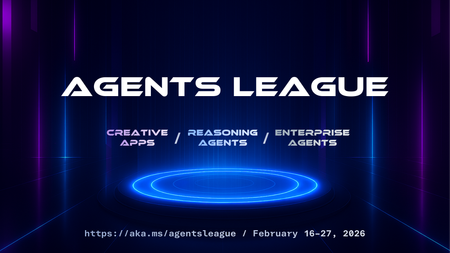
We're inviting all developers to join Agents League, running February 16-27. It's a two-week challenge where you'll build AI agents using production-ready tools, learn from live coding sessions, and get feedback directly from Microsoft product teams. We've put together starter kits for each track to help you get up and running quickly that also includes requirements and guidelines. Whether you want to explore what GitHub Copilot can do beyond autocomplete, build reasoning agents on Microsoft Foundry, or create enterprise integrations for Microsoft 365 Copilot, we have a track for you. Important: Register first to be eligible for prizes and your digital badge. Without registration, you won't qualify for awards or receive a badge when you submit. What Is Agents League? It's a 2-week competition that combines learning with building: 📽️ Live coding battles – Watch Product teams, MVPs and community members tackle challenges in real-time on Microsoft Reactor 💻 Async challenges – Build at your own pace, on your schedule 💬 Discord community – Connect with other participants, join AMAs, and get help when you need it 🏆 Prizes – $500 per track winner, plus GitHub Copilot Pro subscriptions for top picks The Three Tracks 🎨 Creative Apps — Build with GitHub Copilot (Chat, CLI, or SDK) 🧠 Reasoning Agents — Build with Microsoft Foundry 💼 Enterprise Agents — Build with M365 Agents Toolkit (or Copilot Studio) More details on each track below, or jump straight to the starter kits. The Schedule Agents League starts on February 16th and runs through Feburary 27th. Within 2 weeks, we host live battles on Reactor and AMA sessions on Discord. Week 1: Live Battles (Feb 17-19) We're kicking off with live coding battles streamed on Microsoft Reactor. Watch experienced developers compete in real-time, explaining their approach and architectural decisions as they go. Tue Feb 17, 9 AM PT — 🎨 Creative Apps battle Wed Feb 18, 9 AM PT — 🧠 Reasoning Agents battle Thu Feb 19, 9 AM PT — 💼 Enterprise Agents battle All sessions are recorded, so you can watch on your own schedule. Week 2: Build + AMAs (Feb 24-26) This is your time to build and ask questions on Discord. The async format means you work when it suits you, evenings, weekends, whatever fits your schedule. We're also hosting AMAs on Discord where you can ask questions directly to Microsoft experts and product teams: Tue Feb 24, 9 AM PT — 🎨 Creative Apps AMA Wed Feb 25, 9 AM PT — 🧠 Reasoning Agents AMA Thu Feb 26, 9 AM PT — 💼 Enterprise Agents AMA Bring your questions, get help when you're stuck, and share what you're building with the community. Pick Your Track We've created a starter kit for each track with setup guides, project ideas, and example scenarios to help you get started quickly. 🎨 Creative Apps Tool: GitHub Copilot (Chat, CLI, or SDK) Build innovative, imaginative applications that showcase the potential of AI-assisted development. All application types are welcome, web apps, CLI tools, games, mobile apps, desktop applications, and more. The starter kit walks you through GitHub Copilot's different modes and provides prompting tips to get the best results. View the Creative Apps starter kit. 🧠 Reasoning Agents Tool: Microsoft Foundry (UI or SDK) and/or Microsoft Agent Framework Build a multi-agent system that leverages advanced reasoning capabilities to solve complex problems. This track focuses on agents that can plan, reason through multi-step problems, and collaborate. The starter kit includes architecture patterns, reasoning strategies (planner-executor, critic/verifier, self-reflection), and integration guides for tools and MCP servers. View the Reasoning Agents starter kit. 💼 Enterprise Agents Tool: M365 Agents Toolkit or Copilot Studio Create intelligent agents that extend Microsoft 365 Copilot to address real-world enterprise scenarios. Your agent must work on Microsoft 365 Copilot Chat. Bonus points for: MCP server integration, OAuth security, Adaptive Cards UI, connected agents (multi-agent architecture). View the Enterprise Agents starter kit. Prizes & Recognition To be eligible for prizes and your digital badge, you must register before submitting your project. Category Winners ($500 each): 🎨 Creative Apps winner 🧠 Reasoning Agents winner 💼 Enterprise Agents winner GitHub Copilot Pro subscriptions: Community Favorite (voted by participants on Discord) Product Team Picks (selected by Microsoft product teams) Everyone who registers and submits a project wins: A digital badge to showcase their participation. Beyond the prizes, every participant gets feedback from the teams who built these tools, a valuable opportunity to learn and improve your approach to AI agent development. How to Get Started Register first — This is required to be eligible for prizes and to receive your digital badge. Without registration, your submission won't qualify for awards or a badge. Pick a track — Choose one track. Explore the starter kits to help you decide. Watch the battles — See how experienced developers approach these challenges. Great for learning even if you're still deciding whether to compete. Build your project — You have until Feb 27. Work on your own schedule. Submit via GitHub — Open an issue using the project submission template. Join us on Discord — Get help, share your progress, and vote for your favorite projects on Discord. Links Register: https://aka.ms/agentsleague/register Starter Kits: https://github.com/microsoft/agentsleague/starter-kits Discord: https://aka.ms/agentsleague/discord Live Battles: https://aka.ms/agentsleague/battles Submit Project: Project submission template
Video Super Resolution Missing Options in Setting
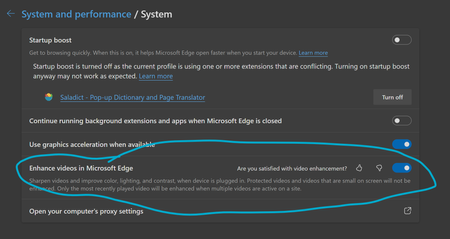
Enhance videos in Microsoft Edge (Flag: #edge-video-super-resolution) is missing critical options in setting, making it impossible to function properly. In Version 136.0.3240.29 (Official build) beta (64-bit), as well as the previous beta build, it is missing the option to choose from three methods of video enhancement, as shown in screenshot. Here is the setting from latest beta build: This is how it is supposed to look: Thus, beta build defaults to Microsoft Super Resolution and I can't find a way to use graphics driver enhancement like RTX Super Resolution, which is critical to my experience. Also, HDR is no longer supported when video enhancement is enabled, which I believe is a limitation of Microsoft Super Resolution.Solved14KViews23likes25CommentsLevel up your Python Gen AI Skills from our free nine-part YouTube series!
Want to learn how to use generative AI models in your Python applications? We're putting on a series of nine live streams, in both English and Spanish, all about generative AI. We'll cover large language models, embedding models, vision models, introduce techniques like RAG, function calling, and structured outputs, and show you how to build Agents and MCP servers. Plus we'll talk about AI safety and evaluations, to make sure all your models and applications are producing safe outputs. 🔗 Register for the entire series. In addition to the live streams, you can also join a weekly office hours in our AI Discord to ask any questions that don't get answered in the chat. You can also scroll down to learn about each live stream and register for individual sessions. See you in the streams! 👋🏻 Large Language Models 7 October, 2025 | 5:00 PM - 6:00 PM (UTC) Coordinated Universal Time Register for the stream on Reactor Join us for the first session in our Python + AI series! In this session, we'll talk about Large Language Models (LLMs), the models that power ChatGPT and GitHub Copilot. We'll use Python to interact with LLMs using popular packages like the OpenAI SDK and Langchain. We'll experiment with prompt engineering and few-shot examples to improve our outputs. We'll also show how to build a full stack app powered by LLMs, and explain the importance of concurrency and streaming for user-facing AI apps. Vector embeddings 8 October, 2025 | 5:00 PM - 6:00 PM (UTC) Coordinated Universal Time Register for the stream on Reactor In our second session of the Python + AI series, we'll dive into a different kind of model: the vector embedding model. A vector embedding is a way to encode a text or image as an array of floating point numbers. Vector embeddings make it possible to perform similarity search on many kinds of content. In this session, we'll explore different vector embedding models, like the OpenAI text-embedding-3 series, with both visualizations and Python code. We'll compare distance metrics, use quantization to reduce vector size, and try out multimodal embedding models. Retrieval Augmented Generation 9 October, 2025 | 5:00 PM - 6:00 PM (UTC) Coordinated Universal Time Register for the stream on Reactor In our fourth Python + AI session, we'll explore one of the most popular techniques used with LLMs: Retrieval Augmented Generation. RAG is an approach that sends context to the LLM so that it can provide well-grounded answers for a particular domain. The RAG approach can be used with many kinds of data sources like CSVs, webpages, documents, databases. In this session, we'll walk through RAG flows in Python, starting with a simple flow and culminating in a full-stack RAG application based on Azure AI Search. Vision models 14 October, 2025 | 5:00 PM - 6:00 PM (UTC) Coordinated Universal Time Register for the stream on Reactor Our third stream in the Python + AI series is all about vision models! Vision models are LLMs that can accept both text and images, like GPT 4o and 4o-mini. You can use those models for image captioning, data extraction, question-answering, classification, and more! We'll use Python to send images to vision models, build a basic chat-on-images app, and build a multimodal search engine. Structured outputs 15 October, 2025 | 5:00 PM - 6:00 PM (UTC) Coordinated Universal Time Register for the stream on Reactor In our fifth stream of the Python + AI series, we'll discover how to get LLMs to output structured responses that adhere to a schema. In Python, all we need to do is define a @dataclass or a Pydantic BaseModel, and we get validated output that meets our needs perfectly. We'll focus on the structured outputs mode available in OpenAI models, but you can use similar techniques with other model providers. Our examples will demonstrate the many ways you can use structured responses, like entity extraction, classification, and agentic workflows. Quality and safety 16 October, 2025 | 5:00 PM - 6:00 PM (UTC) Coordinated Universal Time Register for the stream on Reactor Now that we're more than halfway through our Python + AI series, we're covering a crucial topic: how to use AI safely, and how to evaluate the quality of AI outputs. There are multiple mitigation layers when working with LLMs: the model itself, a safety system on top, the prompting and context, and the application user experience. Our focus will be on Azure tools that make it easier to put safe AI systems into production. We'll show how to configure the Azure AI Content Safety system when working with Azure AI models, and how to handle those errors in Python code. Then we'll use the Azure AI Evaluation SDK to evaluate the safety and quality of the output from our LLM. Tool calling 21 October, 2025 | 5:00 PM - 6:00 PM (UTC) Coordinated Universal Time Register for the stream on Reactor Now that we're more than halfway through our Python + AI series, we're covering a crucial topic: how to use AI safely, and how to evaluate the quality of AI outputs. There are multiple mitigation layers when working with LLMs: the model itself, a safety system on top, the prompting and context, and the application user experience. Our focus will be on Azure tools that make it easier to put safe AI systems into production. We'll show how to configure the Azure AI Content Safety system when working with Azure AI models, and how to handle those errors in Python code. Then we'll use the Azure AI Evaluation SDK to evaluate the safety and quality of the output from our LLM. AI agents 22 October, 2025 | 5:00 PM - 6:00 PM (UTC) Coordinated Universal Time Register for the stream on Reactor For the penultimate session of our Python + AI series, we're building AI agents! We'll use many of the most popular Python AI agent frameworks: Langgraph, Semantic Kernel, Autogen, Pydantic AI, and more. Our agents will start simple and then ramp up in complexity, demonstrating different architectures like hand-offs, round-robin, supervisor, graphs, and ReAct. Model Context Protocol 23 October, 2025 | 5:00 PM - 6:00 PM (UTC) Coordinated Universal Time Register for the stream on Reactor In the final session of our Python + AI series, we're diving into the hottest technology of 2025: MCP, Model Context Protocol. This open protocol makes it easy to extend AI agents and chatbots with custom functionality, to make them more powerful and flexible. We'll show how to use the official Python FastMCP SDK to build an MCP server running locally and consume that server from chatbots like GitHub Copilot. Then we'll build our own MCP client to consume the server. Finally, we'll discover how easy it is to point popular AI agent frameworks like Langgraph, Pydantic AI, and Semantic Kernel at MCP servers. With great power comes great responsibility, so we will briefly discuss the many security risks that come with MCP, both as a user and developer.Foundry Fridays: Your Front-Row Seat to Azure AI Innovation
🔥 Foundry Fridays: Your Front-Row Seat to Azure AI Innovation Are you ready to go beyond the blog posts and docs and get your questions answered directly by the minds behind Azure AI? Then mark your calendars for Foundry Fridays a weekly Ask Me Anything (AMA) series hosted on the Azure AI Foundry Discord. Every Friday at 1:30 PM ET, the Azure AI team opens the floor to developers, researchers, and enthusiasts for a 30-minute live AMA with the experts building the future of AI at Microsoft. Whether you're curious about model fine-tuning, local inference, agentic workflows, or the latest in open-source tooling—Foundry Fridays is where the real-time insights happen. 🎙️ Why Join Foundry Fridays? Direct Access to Experts: Ask your questions live to Principal PMs, researchers, and engineers from the Azure AI Foundry team. Fresh Topics Weekly: Each session spotlights a new theme from model routing and MCP registries to SAMBA architectures and AI agent security. Community-Driven: These aren’t lectures—they’re conversations. Bring your curiosity, share your feedback, and help shape the future of Azure AI. No Slides, Just Substance: It’s raw, real, and refreshingly unscripted. You’ll hear what’s working, what’s coming, and what’s still being figured out. Episode is hosted by community leaders like Nitya Narasimhan and Lee Stott, who guide the conversation and ensure your questions get the spotlight they deserve you can watch all the Monday Model Series on Demand at https://aka.ms/model-mondays and get ready for Season 3 of Model Mondays every Monday at 1.30pm ET. 📈 Why It Matters Foundry Fridays isn’t just another event it’s a community catalyst. Join our communty hear from experts and share your experiences of using Azure AI Tools and Services. 🚀 How to Join Join the Discord: aka.ms/model-mondays/discord Find the AMA: Head to the Events #community-calls and #model-mondays channel or check the pinned events. Ask Anything: Come with questions, ideas, or just listen in. No registration required. Want a sneak peek at what’s coming? Check the Foundry Fridays schedule or follow the Azure AI Foundry Blog for recaps and resources. 💬 Final Thoughts Whether you're building with Azure AI, exploring open-source models, or just curious about what’s next—Foundry Fridays is your chance to connect, learn, and grow with the community. So grab your headphones, fire up Discord, and let’s build the future of AI—together. 🗓️ Fridays | 1:30 PM ET 📍 Azure AI Foundry Discord 🔗 Join Now