xamarin.forms
36 Topics
Build Reliable AI Agents with Monitoring, Tool Integration, and Responsible AI in Microsoft Foundry
Build Reliable AI Agents with Monitoring, Tool Integration, and Responsible AI in Microsoft Foundry Introduction AI agents are becoming an important part of modern business applications. They can answer customer questions, automate repetitive tasks, retrieve information, and interact with external services. However, building an AI agent that works correctly in a development environment does not always mean it will perform reliably in production and https://geometrydasshapk.com/ As applications grow, agents must handle more complex requests, unexpected user inputs, changing data, and different operational conditions. Without proper monitoring and evaluation, it can become difficult to understand why an agent produces incorrect responses or fails to complete a task. Microsoft Foundry provides tools and capabilities that help development teams build, test, monitor, and improve AI-powered applications. By combining structured tool integration, evaluation workflows, observability, and responsible AI practices, teams can create agents that are easier to maintain and more dependable. This article explores a practical approach to building reliable AI agents using Microsoft Foundry. 1. Understand the Architecture of an AI Agent Before developing an AI agent, it is important to understand how its main components work together. A typical agent application includes several components: User interface: Receives questions and displays responses. Language model: Understands requests and generates responses. Instructions: Define the agent's role, limitations, and expected behavior. Tools: Allow the agent to interact with APIs, databases, and other services. Evaluation system: Measures response quality and task completion. Monitoring: Tracks errors, performance, and resource consumption. These components work together to process user requests and deliver useful results. For example, consider a customer support agent that helps users check their order status. The agent receives a question, identifies the required information, calls an order-management tool, and returns the result. A well-designed architecture should ensure that the agent does not invent order information or report an action as completed without confirmation from the relevant system. 2. Configure Agent Instructions and Responsibilities Agent instructions are an important part of application development. They explain what the agent should do, how it should communicate, and which actions it is allowed to perform. Poor instructions can lead to inconsistent responses, unnecessary tool calls, or unsupported claims. A practical instruction structure should include: Role definition Describe the agent's primary responsibility. Task boundaries Explain which requests the agent can handle and which requests require additional support. Tool usage Define when the agent should call available tools and what information it needs before doing so. Response requirements Specify how the agent should present results, errors, and incomplete operations. For example, an order support agent might follow these rules: Role: You are a customer order support assistant. Responsibilities: - Help users check order information. - Retrieve order details using approved tools. - Explain order status in simple language. Rules: - Never invent an order number or delivery date. - Verify information before reporting a completed action. - Ask for missing information when necessary. - Do not expose private customer information. - Explain tool errors clearly. These instructions establish a predictable foundation for the agent. 3. Connect AI Agents with External Tools An AI agent becomes more useful when it can interact with external systems. For example, an agent may need access to: Customer support platforms. Product information databases. Order management systems. Internal business APIs. Document repositories. Reporting services. Tool integration should follow a clearly defined contract. Each tool should have a specific purpose, expected input parameters, and a predictable output format. Consider an illustrative order lookup tool: def get_order_status(order_id): if not order_id: return { "success": False, "error": "Order ID is required" } order = find_order(order_id) if order is None: return { "success": False, "error": "Order not found" } return { "success": True, "order_id": order_id, "status": order.status } This example demonstrates the expected structure rather than a built-in Microsoft Foundry API. When integrating tools into an agent, developers should also consider authentication, authorization, input validation, API timeouts, and error handling. A tool should only have access to the resources required for its assigned task. 4. Evaluate Agent Responses Before Production Testing an AI agent is not limited to checking whether it produces grammatically correct answers. A response can sound convincing while containing incorrect information. Evaluation should measure multiple aspects of agent performance: Evaluation area What to measure Accuracy Does the response contain correct information? Groundedness Is the response supported by available data? Task completion Did the agent successfully complete the request? Tool selection Did it select the correct tool? Safety Did it follow security and privacy requirements? Consistency Does it behave reliably across similar requests? Microsoft Foundry provides evaluation capabilities that can help teams assess AI application performance. A useful evaluation dataset should contain representative user requests, expected outcomes, and relevant supporting information. For an order support agent, test cases might include: A valid order number. An invalid order number. A missing order number. An order with a pending delivery. An unavailable external service. A request containing instructions that attempt to override the agent's rules. Testing these scenarios helps developers identify weaknesses before releasing the application. 5. Monitor Performance and Identify Errors After deployment, monitoring becomes essential. Real users often submit requests that developers did not consider during initial testing. Monitoring helps teams understand how the agent behaves under actual operating conditions. Important metrics include: Request volume. Response latency. Tool execution time. Failed tool calls. Model token consumption. Evaluation scores. Application exceptions. Microsoft Foundry can be integrated with monitoring and observability services such as Azure Application Insights. Development teams can use monitoring information to identify recurring failures and investigate the underlying causes. For example, if an agent begins responding slowly, developers should investigate whether the issue comes from model processing, external API latency, database queries, or network connectivity. It is important to distinguish infrastructure problems from problems in the agent's instructions or configuration. 6. Implement Responsible AI and Security Controls Reliability also depends on how an AI agent handles sensitive information and potentially harmful requests. Developers should establish security controls before allowing an agent to interact with production systems. Important considerations include: Data protection: Avoid exposing personal or confidential information in responses and logs. Access control: Use appropriate identity and permission mechanisms to restrict access to external resources. Input validation: Validate information received from users before passing it to external tools. Prompt injection protection: Treat retrieved documents, user-provided content, and external tool outputs as untrusted data. Human oversight: Require human approval for sensitive operations such as financial transactions or account changes. Auditability: Maintain appropriate records of important agent actions and failures. Responsible AI practices should be included throughout development rather than added only after deployment. 7. Improve Agent Performance Through Continuous Testing An AI agent should not be considered a finished product after its first successful deployment. Models, instructions, tools, and user requirements can change over time. These changes may improve performance, but they can also introduce unexpected problems. A continuous improvement process can include: Collect representative production traces. Identify frequently occurring errors. Review failed interactions. Update instructions or tool descriptions. Run evaluation tests against the updated configuration. Compare the new results with the previous baseline. Deploy changes only after they pass the required checks. For example, if an order support agent frequently reports incorrect delivery information, developers should investigate whether the issue comes from outdated data, incorrect tool selection, or unsupported response generation. The appropriate fix should address the underlying cause rather than simply changing the wording of the agent's response. 8. Establish a Production Release Checklist Before releasing an AI agent, development teams should verify that the application meets its operational requirements. A practical release checklist includes: Agent instructions have been reviewed. All external tools have defined input and output contracts. Authentication and authorization are configured. Evaluation datasets cover important user scenarios. Critical safety tests have passed. Monitoring and error reporting are enabled. API failures and timeouts are handled correctly. Sensitive operations have appropriate approval controls. A rollback strategy is available. Production performance has been reviewed. These checks help reduce deployment risks and make ongoing maintenance easier. Conclusion Building reliable AI agents requires more than selecting a language model and writing a set of instructions. Developers must consider the entire application lifecycle, including architecture, tool integration, evaluation, monitoring, security, and continuous improvement. Microsoft Foundry offers a platform for developing and evaluating AI applications, while integrations with Azure services can help teams monitor and manage production workloads. By establishing clear agent responsibilities, testing different scenarios, monitoring actual performance, and reviewing every important configuration change, development teams can build AI applications that are more reliable, secure, and maintainable. The most effective approach is to treat AI agent development as an ongoing engineering process rather than a one-time deployment. Next Steps If you are developing AI-powered applications, consider exploring these areas: Microsoft Foundry documentation and agent development. Azure Application Insights for application monitoring. AI evaluation techniques for measuring response quality. Responsible AI principles for production applications. Automated testing and deployment workflows. Start with a small use case, establish measurable performance requirements, and gradually expand your agent's capabilities as your evaluation results improve.19Views0likes0Comments
MAUI Android API 35: Action Bar still visible despite NavBarIsVisible=False
Before API 35 it was ok. I am using .NET 9, Android API 35, using Shell, etc. I have tried: Shell.NavBarIsVisible, NavigationPage.HasNavigationBar, theme tweaks, etc. What’s still happening: Title bar remains visible on Android.246Views0likes0CommentsMaui How to upload a file to web API in .NET 9
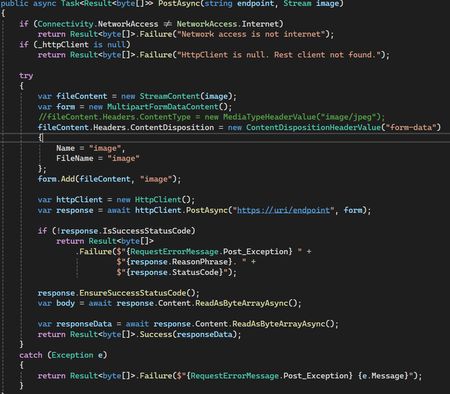
Hi, everyone I'm trying to upload an image to an API from a maui project. But when I send the file, the response is always BadRequest. However the API works if I use Postman. I create a client in a console project and it worked. So I don't know why the same code in .NET MAUI it doesn't work. Problem is not in URI or something. I hope you could help me. Reegrets. Victor Cueto API throws the next exception: Microsoft.AspNetCore.Http.BadHttpRequestException: Required parameter "IFormFile image" was not provided from form file. at lambda_method3(Closure, Object, HttpContext, Object) at Microsoft.AspNetCore.Http.RequestDelegateFactory.<>c__DisplayClass103_2.<<HandleRequestBodyAndCompileRequestDelegateForForm>b__2>d.MoveNext() --- End of stack trace from previous location --- at Microsoft.AspNetCore.Diagnostics.DeveloperExceptionPageMiddlewareImpl.Invoke(HttpContext context) code Minimal API: error:313Views0likes0CommentsBuilding OSS projects with C# and .NET
Register: https://developer.microsoft.com/reactor/eventregistration/register/14996 Join us on Thursday December 2nd for an engaging discussion with contributors to open-source software (OSS) projects being built and maintained in C# and .NET. Led by Claire Novotny, our event host and Senior Program Manager on the .NET team at Microsoft, this conversation-style event will feature contributors from two OSS projects: Andres Pineda from Uno Platform and David Paquette from Humanitarian Toolbox. https://github.com/unoplatform https://github.com/htbox You’ll learn about the goals and status of these OSS projects, dive into the technology used to build and maintain them while relying on a distributed team of developers, and discover some lessons learned from experiences contributing to the creation of open-source software. Do you have any questions for the group to address during this conversation? Please use this form to submit your questions before midnight PT on Tuesday November 30: https://aka.ms/OSSQuestions Speakers: Claire Novotny, Senior Program Manager at Microsoft Andres Pineda, Senior Software Engineer at Shopify Andres is a Software Developer with a passion for Mobile Technologies. He is part of different developer communities where he collaborates in different ways (coding, mentoring, hosting events, speaking, etc). In his free time, he enjoys working out, playing a video game, or just chilling out watching a tv show. David Paquette, Senior Software Engineer at Microsoft3.6KViews0likes0Comments
MAUI APP does not run, android-API34 issue ?
Hi everyone, i'm facing a problem using dotnet 8.0 and Maui. I read that an android api is automatically associated to a dotnet version. So for .Net 8.0 the android api is 34.0 I installed the Maui workload and created a new project, then i ran(build) it without any modifications and all the necessay packages installed without issues But when i go to the generated bin folder and run windows app it does'nt even show up, For android part i installed the signed-apk in virtual device and here is what i get : I found somewhere that this was the api 34 issue, i tried to install .Net 7.0-API 33 and .Net 9.0-API 35.0 but facing the same problem. What should i do now... please help me THNKS!!!908Views0likes2Comments
Synchronizing Photos and Data with Xamarin, Asp.Net Core, and MSSQL
Good day! I am in the process of developing an internal application for merchandising purposes, intended not for the general user base. However, I'm encountering an issue: our employees often find themselves in locations with either no internet connection or a very poor one, which hinders their ability to upload necessary photos for their tasks. The development is utilizing Xamarin, Asp.Net Core for the API and MSSQL as the database. My question to the community is: how can we implement functionality that would allow employees to collect the required data throughout the day and upload it at the touch of a "Upload" button at the end of the day when internet access becomes available? Are there proven approaches or tools that could facilitate the implementation of such a solution? Your advice and experience would be incredibly valuable in overcoming this challenge.325Views0likes0CommentsHow can I publish my Xamarin App to the App Store?
Hello everyone, I tried to publish my application in the App Store, but during this process I've faced an issue. I already prepared everything I need for the distrubution. I have a certificate, an identifier with the same bundleID like my application and a provisioning profile. Anytime I try to build my application, everything worked fine until the distribution process. I already defined the build options of my IOS project, I selected the distribution certificate and the provisioning profile I generated and I included the property list file (info.plist) into the build options. So anytime I try to publish the application through the visual studio assistant it gets to the point, an .ipa file gets generated and afterwards it complains with the message "unable to validate archive". My next try was opening the created archive file with XCode and trying to publish the application with XCode itself. Even there anything worked without issues, until I had to choose a provisioning profile for the distribution. After selecting the created provisioning profile XCode complained about missing entitlements inside the provision profile, although I already defined them inside the property list file of my Xamarin IOS project. Inside my Apple Development account I don't have the opportunity to set any entitlements like in the property list. I also tried to contact the Apple Development Support, whether they can give me a permission to edit those entitlements inside the provisioning profile. But they rejected my request, due to the fact that I use a thrid party plattform (visual studio) for the distribution. Now my question is, how can I solve the conflict between the missing entitlements inside the provisioning profile and the property list I've already included into my build options? Or is there another possibility to add such entitlements inside the provisioning profile? If anyone knows how to solve that issue or knows what I could have missed during this process, please let me know. Thanks in advance.712Views0likes0CommentsMigrating Xamarin app to MAUI Startup Much Slower
I am migrating a Xamarin iOS / Android app to MAUI. When I start the MAUI app using Visual Studio for Mac on either Android or iOS, the startup time is about 12 seconds longer. This is near the beginning soon after loading all of the debug DLLs. I initially show a LoadingPage that is a simple ContentPage by setting App.MainPage = new LoadingPage(). I then pause for about 1 second to allow that to finish loading and set App.MainPage = new MainPage(). MainPage is also a ContentPage and has many views as children. One of its children is ContentView called MainView. These are all XAML files with simple code behind and then ViewModels to implement all binding. When starting up the MAUI version of my app, there are about 12 additional seconds where the screen is just blank between the loading page and the main page. I am not asking here for someone to know the answer without all my code. I am asking here for suggestions on where to look and how to diagnose this startup issue...635Views0likes0CommentsMAUI project iOS simulator startup failed MT7091
onnxruntime.xcframework/ios-arm64_x86_64-simulator/onnxruntime.framework/onnxruntime File format not recognized I have a MAUI project. When I tried to start using the iOS emulator, an error occurred. VS was able to connect to the MAC machine normally, but the emulator failed to start. The error is as follows I tried to search for related errors on the internet, but I couldn't find a similar situation, and I couldn't find any relevant information about MT7091 either。 My VS version is as follows:586Views0likes0Comments