workflow
47 Topics
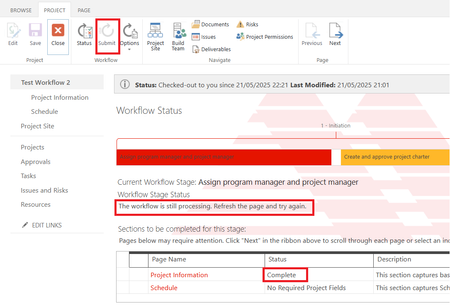
Project Online 'Submit' button is greyed out and the workflow is stuck at processing stage.
I created Project Online workflow using SharePoint Designer 2013 and published it. The workflow contains no errors as validated on SP Designer 2013. I create a project using the EPT that is linked to the published workflow, and updated all the mandatory fields. However the workflow submit button is greyed out even after I saved, published and checked in the project. the workflow is stuck at processing stage and it still the same even after I restarted it few times. Please advise how to make Submit button to active.576Views0likes9Comments
Workflow-webhook not tied to user
Hello! We are developing applications in AWS (sorry, guys), and some workloads require posting to Teams channels using webhooks via Workflows (the new webhook way). We are also using webhooks to notify in Teams when Github actions finish or need interactions. However, when creating the webhook in Workflows it only seems possible to tie the webhook to a regular user. Are there any ways to use a Service Account / Service principal as the webhook/workflow owner? Using a regular user account as the webhook owner is a major drawback, eg. the need to rewrite all webhooks if the user quits the company and is disabled in Entra ID. Regards globus68347Views0likes0Comments
Can you edit a posted message in a channel that was made by Workflow?
Trying to edit a posted message a few weeks back that was done via Workflow (Recurrence > Post message in a chat or channel) and unable to see an way to modify it. I know you can edit the message in the Workflow, but not after it is published to my knowledge453Views0likes0CommentsUsing PowerShell to Post Channel Messages with Teams Workflows
The incoming webhook connector is a popular method to post information to Teams channels, but Microsoft seems set on retiring the Office connectors. The Teams post to channel workflow when a webhook request is received seems like is a possible replacement, but it’s not just a matter of switching mechanisms. Some PowerShell magic is needed to create a suitable adaptive card to post to the channel, which is exactly what we explain how to do here. https://office365itpros.com/2024/06/17/teams-post-to-channel-workflow/6.4KViews1like0CommentsUnable to edit Sharepoint Design Workflows in Sharepoint Designer 2013
We have been migrating to the power automate platform - and doing it in a pace that works for our organisation. We started seeing some issues a few weeks ago with some legacy workflows in Sharepoint. But, when trying to review and see what these legacy workflows are doing, we are unable to open them - which is going to be a pain as we need to see what they actually were doing to replace them with new powerautomate solutions. Is there any way we can access them in the Sharepoint designer? Some workflows appear there, but, workflows that appear to be tied to a list, we are unable to edit/open. Sharepoint just "hyperlinks" to a dead end.. Thanks!761Views0likes1Commenthttps://collabtools.sharepoint.com/:u:/r/sites/ITSS-SharePointWorkshop/SitePages/Home.aspx?csf=1&web
The action for Microsoft Forms is limited to the Q and A results. It needs to mimic and include the data columns created when "Export to Excel" link is used in the survey or quiz. Especially in the quiz, the additional fields pertaining to submitter info and Total Points is a must. I am completely crippled by the action only containing the test question data elements. Does anyone else agree?MVC 5 web app and SharePoint Approval workflow
We have a custom MVC web application and would like to use the SharePoint Approval workflow to take care of signatures/approvals. Any starting guidance on how to even start with the integration? We're using SharePoint on-premise.664Views0likes0Comments
Want to automate email population when specific list item details updated
I've created trackers using SharePoint lists. I want to be able to automate the population of emails to specific people to include specific column details from a SP list item to send at times when a specific column's drop down selection changes to a specific selection, or when certain fields are populated for the first time. Is this possible? If so, how do I do that? I've looked through the Alerts and Workflow instructions and it is all way too basic to meet my needs because it only sends an alert when anything in the item is updated, not when specific updates are made. Also, neither seems to auto populate the email with specific details pulled from the list item that is being updated. I don't know if this is possible, or if I maybe need another program or plug-in to work with it. I'm sure I can get my IT to give me permission to download and use additional programs or plug-ins, but I don't know what I need right now or if my vision is even possible. I think we are using SharePoint 2016, but I am not sure how to confirm that. Looking for help from anyone who has successfully put something like this together! Thanks!1KViews0likes0Comments