workflow
47 Topics
SharePoint Workflow URL Encoding %2520
I recently got this error on my SharePoint online environment. Whenever I initiate the workflow, it bring up the form with URL: https://site url/_layouts/15/IniWrkflIP.aspx?List={...}&ItemGuid={...}&TemplateID={}&Source=DocumentURLPath The problem is document URL path is encoded as %2520 when there is a space in Document Library name, for example: "Share Documents" will be encoded as "Share%2520Document". When you hit Cancel button on the form, it does not bring you back to the document location because the path is not found. I only experience this problem in the last 2 weeks? Any thought? Is that because SP Online change the way it handle % and #? How can I fix this issue?Solved29KViews0likes11Comments
Document Lookup Column Link
Hi, all, In SharePoint Online I have a doc library (Reference Docs) and a list (Projects). The goal is for users to choose a doc from a lookup drop-down in Projects, which, when clicked, will directly open the chosen document stored in Reference Docs. So, in Reference Docs I created a workflow that sets the value of the Title field with the Name field. In Projects I created a lookup column referencing the Title field in Reference Docs All works fine, except the link opens the document properties, not the document itself. This should be simple, but I just can figure out what is incorrect. Any help will be appreciated.16KViews0likes13Comments
Overdue task reminder workflow error
Dear All. First of all, sorry for the long post. :-) I would like to ask for your help regarding SharePoint overdue task reminder. I’d like to use the build-in task app for assign monthly tasks with important due date. Requirements: Send a mail to assigned person, 2 days before overdue date. Do not send mail at the moment of the task assign, because we would like to assign monthly tasks for a year ahead and I do not want to send 12 mails within 2 minutes. Do not send the mail at midnight because it could be annoying for clients. I tried to solve the problem in many various way, but each of them seemed wrong. I do not know where is the problem exactly (in SharePoint Designer Workflow algorithm or SharePoint site settings?) My (wrong) solving method: WORKFLOW If Current Item:Task Status not equals Completed Add -2 days to Current Item:Due Date (Output to Variable:RightDate) then Pause until Variable:RightDate then Email Carl, Johnson Type: List Workflow Associated List: Tasks Platform type: SharePoint 2010 Workflow Start Options Allow this workflow to be manually started Start workflow automatically when an item is created SHAREPOINT SITE Columns: Task Name, Due Date (Date and Time type, Date + Time edition (with hours…)) Assigned To, Information Management Policy Settings: Enabled Retention with the following settings: This stage is based off a date property on the item Time Period: Due Date + 0 days Action: When this stage is triggered, perform the following action: Start a workflow Start this workflow {Name of the workflow} My overdue reminder workflow does not work in order (vid. requirements). I would be pleased if somebody could help me. Thank you very much in advance, AdamSolved7KViews0likes5Commentstrackpad gestures in edge: next tab, next page, random, save pdf, etc.
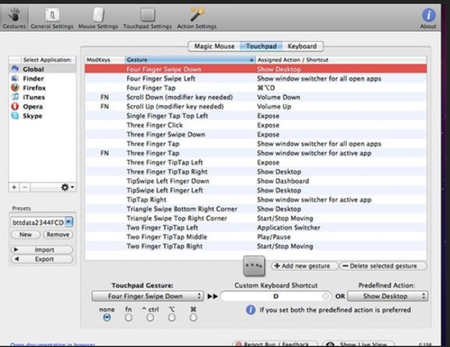
We have discussed the 2x to close tabs last time. i think that using browsers without the need to use the keyboard is the best browsing experience we can get. this means to use only trackpad and the mac display. At the moment on ghostbrowser i use gestures like 3 tap go to next tab; extensions to go back, next tab, merge windows, etc. i think you should implement something like better touch tool (there are different gestures example) in edge. examples: -drag a tab with 2 finder down = reopen the main page (this mean if i visit a then b ... to z, you open again a)* - 4 finder tap: save pdf - spread fingers to open a random page or to open multiple random pages* (example if the website has a link like xxx.com/xxx/page=1 you open page 35, 46, 87). we configure such things (like how many tabs, the exact interval for each website) inside setting. - circle with 1 finger to search selected text in pubmed, with 2 finders in edge store .... other example (that i don't use at all, because i don't like it) are for what would we use gesture? save/download go next/previous page (from page 3 to 4) previous/next tab merge windows search open tabs (random, or open page 1,2,3,4,5,6,7,8,9,10 at the same time, then other 10, so 11,12,...,20)* go to the first page you opened* copy/share urls etc. * this can be added inside edge without gestures too, because at the moment is not possible (except via extensions). PRIORITY IN MY OPINION: 5 in a scala 1 (low) - 10 (high) You can find this suggestion on Chromium too: CHECKLATER* --------------- All my other suggestions are here: https://link.ws/edgesuggestions Suggestions I liked from other user here: https://link.ws/othersuggestions Chromium suggestions list 1: https://link.ws/chrome1 and 2: https://link.ws/chrome2 From end 2020-10 all suggestions are written on both Edge and Chrome at the same time, suggestions before 2020-10 are available only on Chrome. *to avoid a ban from Google, I submit only limited post pro week.6.8KViews0likes0CommentsUsing PowerShell to Post Channel Messages with Teams Workflows
The incoming webhook connector is a popular method to post information to Teams channels, but Microsoft seems set on retiring the Office connectors. The Teams post to channel workflow when a webhook request is received seems like is a possible replacement, but it’s not just a matter of switching mechanisms. Some PowerShell magic is needed to create a suitable adaptive card to post to the channel, which is exactly what we explain how to do here. https://office365itpros.com/2024/06/17/teams-post-to-channel-workflow/6.4KViews1like0Comments
How to Disable Automatic Workflow Cleanup
We set up a workflow on one of our SharePoint pages to both approve and keep track of vacation time for our team. We have been confused for a while now how (and why) items mysteriously get deleted. I found all kinds of references online that items in SharePoint’s workflows are deleted after 60 days. Unfortunately, my SharePoint admin said that wasn't applicable to SharePoint Online (the article was for SharePoint v2010) and he wasn't aware of any settings to disable workflow items being deleted. However, it is odd that there are thousands of references to workflows in older SharePoints removing items after 60 days and this is EXACTLY what is happening for me. I have over 50 documented occurrences and they all happened EXACTLY 60 days after they were created. I inserted a pic below. I have been looking everywhere, but can't seem to find a setting to stop this. I have been been manually re sending items thur the workflow to ensure everyone's vacation appears, but this is not a good long-term solution. Has anyone ever come accross this? I inserted a pic below. Thanks! - DanSolved6.3KViews0likes6Commentsoptional suggestion: new menu bar app for mac
i wish i could launch one of my edge profile (no matter from which edge) directly in the menu bar. so you create a profile launcher.app and then i can search a profile installed on my 4 browser, without need to launch a browser. at the moment we can do similar things once the browser is launched using the dock icon or using the sync icon or using the menu bar option inside edge. but there is still the limit that we can do it for one browser. we cannot search profiles installed on all 4 browser. plus every time you launch the browser, you open the last used profile. so we first need to close and then switch (which requires time). profile switching is slower in edge compared to google. now with this new app you would simply launch a profile inside an edge app, without launching the previous profile.5.1KViews2likes10CommentsSS11: Datahoarding Suggestions - Save PDF, Save Page, Save Images, One Drive, Web Archive, etc.
Suggestion (SS): 11 Classification: DATAHOARDING BACKUP PRIORITY IN MY OPINION: 5-6 in a scala 1 (low) - 10 (high) Hello there, i finish my list with some other suggestions related to the datahoarding activity. Various suggestions about download/save in easily way were already reported before. For Datahoarders coming from https://old.reddit.com/r/DataHoarder/ or https://old.reddit.com/r/appledatahoarding/ here my label about datahoarding, where you can find previous suggestions related to hoarding: https://link.ws/edgedatahoarding or here about onedrive https://link.ws/onedrivehoarding If i forgot something, just add a comment (login is necessary). Remember that suggestions related to download etc. has been submitted previously. Here additional suggestions: 1) remember to add save as pdf in menubar PRIORITY 10 2) remember to add save as pdf as a button PRIORITY 9 3) remember to add export page as a button PRIORITY 9 4) improve integration with onedrive, this means: 4a) i told you about overlay button over photos etc to save it. remember to add even a onedrive integration 4b) add a setting where we can define some onedrive path, and then we can click save photo, movie, pdf to such path inside right click menu, menu bar, via extension button or using a shortcut. 4c) add a way to save pages as pdf in one drive. in batch mode would be cool too, for example i tell you "every reddit link, save as pdf in onedrive in background" 4d) same but export the whole page in onedrive. automatically too. 5) webarchive integration. show links in webarchive or faster way to save pages to webarchive 6) inside bing, an overlay over the picture to save it in onedrive, without need to open full image or full page (this mean directly on the small image). 7) a way to backup automatically all bookmarks as pdf and as whole page in onedrive 😎a way that if i select some links in history you do 7) too 9) same as 8 with collections 10) same as 9 with links that i select, for example if i see in wikipedia a text with 5 links, i select this and click save as pdf 11) batch save multiple tab as pdf in onedrive and to mac too. 12) same but with export webpage 12b) same as 11,12 for the whole window 13) better integration of onedrive during various workflow, this means quick access via an extension or something other 14) dragdrop zone in eagle style/dropmark, this means i dragdrop x images to this drop zone and then i can select save to onedrive or to mac (with option to select optionally which folder). PRIORITY 7 15) backup history to onedrive 16) backup collections to onedrive 17) backup bookmarks to onedrive PRIORITY 8 18) for 15-17 remember to add safety folder, this means if i delete links or other, i still see it somewhere (= keep all versions!) 19) ability to backup setting of edge to onedrive 20) ability to save bookmarks page (or some folder) to webarchive in batch 21) same as 20 for selected links in history 22) same as 21 for whole tabs or windows. 23) ability to save a screenshot in onedrive with background process. 24) ability to save all submitted files to feedback center in my onedrive (in case we need it for other situation). this is not my case, because i use external cloud, but maybe for other users. 25) or integration of onedrive with feedback, instead of posting links 26) ability to play quickly videos from onedrive (without need to visit page/bookmarks). so something like shortcuts i wrote last time <od or via a button extension. maybe even add a random play mode and a remember what i watched last time, so that once i write <od oc you play last episode of occalifornia, from the exact position. instead if i write $$<od or something similar you play a random episode (check https://link.ws/edgess7) 27) ability to generate bookmarks from a onedrive folder. this mean if i have video 1-20 inside folder a, you create a folder a in bookmark with url 1-20 28) ability to save files offline, in netflix style, where you delete it after 5 days for example. so this is not about using the button "download". you save it inside a temporary edge folder. 29) drag drop from one drive to tab doesn't work 30) same if i drag photo from tab 1 to tab 2 and i release this in onedrive 31) if i select x file in onedrive, no option to choose "open in tabs" 32) check the drag drop option to onedrive web (no matter if i do it from collection, bookmarks, history) PS: generally all suggestions should implement both save to onedrive and save to mac option. same for save as pdf and export webpage. would be better if different thing can be done automatically in background and maybe with closed tabs (like saving pages to webarchive). would be cool if you can support save pdf/page from a logged account, so avoid to save as public webpage (because in such case we see "please login"... optionally we can integrate archive.is support, but at the end webarchive is the main used. to integrate 2 different services can maybe be complex for developers. i still think at least one should be available. Edge Dev, please check https://link.ws/edgeonedrive too, maybe some user wrote directly in the other post. Now i made some suggestions about onedrive web too: https://link.ws/onedriveweb you can vote these here too https://link.ws/voteonedriveweb You can find this suggestion on Chromium too: CHECKLATER* --------------- All my other suggestions are here: https://link.ws/edgesuggestions Suggestions I liked from other user here: https://link.ws/othersuggestions Chromium suggestions list 1: https://link.ws/chrome1 2: https://link.ws/chrome2 From end 2020-10 all suggestions are written on both Edge and Chrome at the same time, suggestions before 2020-10 are available only on Chrome. *to avoid a ban from Google, I submit only limited post pro week.4.6KViews0likes2Comments
Unable to edit or open Workflows
I am trying to see and edit workflows on our SP Online site (backend SP 2013) but all I can see is that they exist. When I try to open them up in SharePoint Designer 2013 I get this: I am using 64 bit SP Designer 2013. I can't seem to install any patches because it says it effects nothing installed on my machine yet I clearly have it installed and I clearly have issues addressed in the patches. I have already seen a post like this (and others on the web) about the patch but apparently I can't use that. Is there another fix? How else can I edit these workflows?4.3KViews0likes3CommentsSS46: Hey Edge - voice control
Suggestion (SS): 46 Classification: VOICE CONTROL PRIORITY IN MY OPINION: 2-3 on a scale from 1 (low) to 10 (high) Bing already has some integration of voice control, Firefox too. Now i think it's time for Hey Edge function. Examples of tasks Hey Edge should be able to do: -Hey Edge, move tabs to the right to another window, hide it in macos, save PDF and add all links to bookmark folder IMPORT for all tabs in this new window; once done close the window. - Hey Edge, reload all techcommunity.microsoft - Hey Edge, change to Bing as default - Hey Edge, mute all - Hey Edge, volume 50% - Hey Edge, go to minute 3.45 - Hey Edge, loop mode - Hey Edge, loop from x to y - Hey Edge, set download path to configuration 1 - Hey Edge, search this with %s1 %s2 ... at the same time - Hey Edge, open %s settings - Hey Edge, add this search to %s and use abbreviation <ed - Hey Edge, duplicate 5 tabs from this - Hey Edge, change my profile image now - Hey Edge, launch xxx (an extension) - Hey Edge, quit Edge in 10 minutes - Hey Edge, open random website from folder XXX - Hey Edge, disable all extensions for 5 seconds. - Hey Edge, random open my most visited youtube links - Hey Edge, write new instagram post (by opening a 3. app for posting) - Hey Edge, activate all disabled extensions. - Hey Edge, reopen last closed session - Hey Edge, reopen last 7 tabs - Hey Edge, move tab to first - Hey Edge, color tab to red - Hey Edge, go back to the source (example when you open webpage a then b ... to z, go back to a) - Hey Edge, pipmode - Hey Edge, go to next video - Hey Edge, save to collections (last used) - Hey Edge, close tabs to left - Hey Edge, merge windows - Hey Edge, quit - Hey Edge, open flags - Hey Edge, activate flag xx - Hey Edge, restart - Hey Edge, share this page to xxx - Hey Edge, new mail to xxx - Hey Edge, install xxx - Hey Edge, create new profile for account mailto:a@a.com - Hey Edge, delete this profile - Hey Edge, activate vpn now (once integrated) - Hey Edge, change background new tab pictures from onedrive folder AA to BB - Hey Edge, open all links inside folder XXX - Hey Edge, download all images that i click in the future, stop it once i say stop - Hey Edge, launch beta profile xxx - Hey Edge, show me when i visited this page in the past - Hey Edge, add this page to bookmarks (using recent folder) as shortcut <emis - Hey Edge open 6x incognito pages with url http://www.... - Hey Edge, ban all selected email from outlook - Hey Edge, start new chat support session - Hey Edge, new feedback - Hey Edge, share this file (in onedrive = this mean you copy directly the url) - Hey Edge, save all picture to onedrive - Hey Edge, open word - Hey Edge, find similar websites - Hey Edge, show me my IP - Hey Edge, export this image as png - Hey Edge, save this files to xxx and rename it as yyy - Hey Edge, open Missy Edge profile - Hey Edge, run workspace 4 now - Hey Edge, run highlight mode now (once integrated) - Hey Edge, save next selected texts to collections - Hey Edge, search hello in youtube as playlist - Hey Edge, disable notifications from all future visited pages - Hey Edge, activate flash always - Hey Edge, open all selected urls in edge dev profile 3 (if we use canary for example) - Hey Edge, copy all urls from tabs - Hey Edge, add selected tabs to my vertical favorite tabs (once integrated) - Hey Edge, open with profile 2 .... (once container is integrated) - Hey Edge, download all images from tabs - Hey Edge, create merge all tab groups and move to new window by hiding it in macos - Hey Edge, download all files in this website with torrent (once integrated) - Hey Edge, open in tabs selected links - Hey Edge, export bookmarks every 5 minutes to my mac - Hey Edge, reverse search this image - Hey Edge, show me social accounts of this person (from a video/photo) - Hey Edge, create new outlook alias mailto:b@.... - Hey Edge, change outlook recovery email to .... - Hey Edge, ban all social accounts for 4 hours - Hey Edge, add label xxx to this page (for history panel, once integrated) - Hey Edge export last 7 days of history to my desktop folder xxx - Hey Edge, activate kids mode - Hey Edge, create new rule for this email and use setting 1 (example forward to 3 emails ...) - etc. If we can run such multiple rules without Hey Edge would be cool too, so something in keyboard maestro style. Obviously first we need to support a better way to run such actions and similar actions without Hey Edge, but once this is done, different action can be implemented in Hey Edge too. Then it depends, sometimes is much faster to do manually instead of saying Hey Edge... (and maybe Hey Edge doesn't understand what we say too...., like Bing does) To be more faster instead of saying "Hey Edge, save pdf for all tabs to the right" or similar, we just say "Hey Edge, pdf right". The same for all other examples You can even integrate a smart Hey Edge, where i can combine my manual and Hey Edge actions. Example: i'm reading a pdf. at the same time i say "Hey Edge, pdf right once i say NOW". then i read pdf on tab 2, 3, 4, 5. Once done i say "NOW" and you export all pdf to the right (based on the tabs where i requested this rule). This means in the same time i can close and open new tabs, you do the action only once i say "NOW". Such "NOW" actions can be implemented in so many workflows and would be a great productivity boost.3.3KViews0likes4Comments