windows server
2930 TopicsAZ-800 Study Guide: Administering Windows Server Hybrid Core Infrastructure
In this exam guide you’ll see which MS Learn modules map against exam functional groups and which docs.microsoft.com articles map against specific exam objective items for the AZ-800 Administering Windows Server Hybrid Core Infrastructure exam. This exam is required for the Windows Server Hybrid Administrator Associate certification.86KViews24likes18CommentsHow to run a Windows 11 VM on Hyper-V
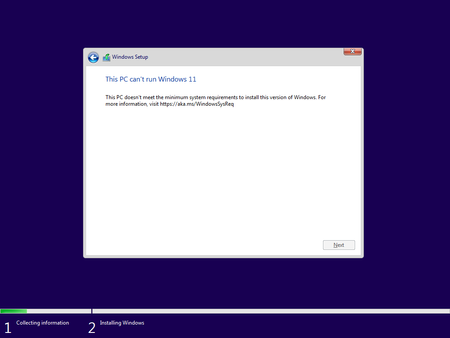
Happy new year everyone! Last month, before the holidays I wanted to run a Windows 11 VM on Hyper-V to run a few tests on Windows containers in a different environment than my local machine. However, it took me some time to get that VM up and running, simply because I forgot about the new hardware requirements for Windows 11 and that I had to get them configured before I installed the new OS in it. This blog post is my contribution so you don’t have to go through the same!263KViews17likes14CommentsAnnouncing Native NVMe in Windows Server 2025: Ushering in a New Era of Storage Performance
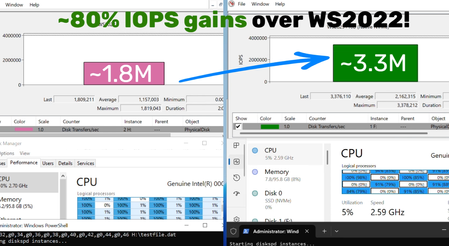
We’re thrilled to announce the arrival of Native NVMe support in Windows Server 2025—a leap forward in storage innovation that will redefine what’s possible for your most demanding workloads. Modern NVMe (Non-Volatile Memory Express) SSDs now operate more efficiently with Windows Server. This improvement comes from a redesigned Windows storage stack that no longer treats all storage devices as SCSI (Small Computer System Interface) devices—a method traditionally used for older, slower drives. By eliminating the need to convert NVMe commands into SCSI commands, Windows Server reduces processing overhead and latency. Additionally, the whole I/O processing workflow is redesigned for extreme performance. This release is the result of close collaboration between our engineering teams and hardware partners, and it serves as a cornerstone in modernizing our storage stack. Native NVMe is now generally available (GA) with an opt-in model (disabled by default as of October’s latest cumulative update for WS2025). Switch onto Native NVMe as soon as possible or you are leaving performance gains on the table! Stay tuned for more updates from our team as we transition to a dramatically faster, more efficient storage future. Why Native NVMe and why now? Modern NVMe devices—like PCIe Gen5 enterprise SSDs capable of 3.3 million IOPS, or HBAs delivering over 10 million IOPS on a single disk—are pushing the boundaries of what storage can do. SCSI-based I/O processing can’t keep up because it uses a single-queue model, originally designed for rotational disks, where protocols like SATA support just one queue with up to 32 commands. In contrast, NVMe was designed from the ground up for flash storage and supports up to 64,000 queues, with each queue capable of handling up to 64,000 commands simultaneously. With Native NVMe in Windows Server 2025, the storage stack is purpose-built for modern hardware—eliminating translation layers and legacy constraints. Here’s what that means for you: Massive IOPS Gains: Direct, multi-queue access to NVMe devices means you can finally reach the true limits of your hardware. Lower Latency: Traditional SCSI-based stacks rely on shared locks and synchronization mechanisms in the kernel I/O path to manage resources. Native NVMe enables streamlined, lock-free I/O paths that slash round-trip times for every operation. CPU Efficiency: A leaner, optimized stack frees up compute for your workloads instead of storage overhead. Future-Ready Features: Native support for advanced NVMe capabilities like multi-queue and direct submission ensures you’re ready for next-gen storage innovation. Performance Data Using DiskSpd.exe, basic performance testing shows that with Native NVMe enabled, WS2025 systems can deliver up to ~80% more IOPS and a ~45% savings in CPU cycles per I/O on 4K random read workloads on NTFS volumes when compared to WS2022. This test ran on a host with Intel Dual Socket CPU (208 logical processors, 128GB RAM) and a Solidigm SB5PH27X038T 3.5TB NVMe device. The test can be recreated by running "diskspd.exe -b4k -r -Su -t8 -L -o32 -W10 -d30 testfile1.dat > output.dat" and modifying the parameters as desired. Results may vary. Top Use Cases: Where You’ll See the Difference Try Native NVMe on servers running your enterprise applications. These gains are not just for synthetic benchmarks—they translate directly to faster database transactions, quicker VM operations, and more responsive file and analytics workloads. SQL Server and OLTP: Shorter transaction times, higher IOPS, and lower tail latency under mixed read/write workloads. Hyper‑V and virtualization: Faster VM boot, checkpoint operations, and live migration with reduced storage contention. High‑performance file servers: Faster large‑file reads/writes and quicker metadata operations (copy, backup, restore). AI/ML and analytics: Low‑latency access to large datasets and faster ETL, shuffle, and cache/scratch I/O. How to Get Started Check your hardware: Ensure you have NVMe-capable devices that are currently using the Windows NVMe driver (StorNVMe.sys). Note that some NVMe device vendors provide their own drivers, so unless using the in-box Windows NVMe driver, you will not notice any differences. Enable Native NVMe: After applying the 2510-B Latest Cumulative Update (or most recent), add the registry key with the following PowerShell command: reg add HKEY_LOCAL_MACHINE\SYSTEM\CurrentControlSet\Policies\Microsoft\FeatureManagement\Overrides /v 1176759950 /t REG_DWORD /d 1 /f Alternatively, use this Group Policy MSI to add the policy that controls the feature then run the local Group Policy Editor to enable the policy (found under Local Computer Policy > Computer Configuration > Administrative Templates > KB5066835 251014_21251 Feature Preview > Windows 11, version 24H2, 25H2). Once Native NVMe is enabled, open Device Manager and ensure that all attached NVMe devices are displayed under the “Storage disks” section. Monitor and Validate: Use Performance Monitor and Windows Admin Center to see the gains for yourself. Or try DiskSpd.exe yourself to measure microbenchmarks in your own environment! A quick way to measure IOPS in Performance Monitor is to set up a histogram chart and add a counter for Physical Disk>Disk Transfers/sec (where the selected instance is a drive that corresponds to one of your attached NVMe devices) then run a synthetic workload with DiskSpd. Compare the numbers before and after enabling Native NVMe to see the realized difference in your real environment! Join the Storage Revolution This is more than just a feature—it’s a new foundation for Windows Server storage, built for the future. We can’t wait for you to experience the difference. Share your feedback, ask questions, and join the conversation. Let’s build the future of high-performance Windows Server storage together. Send us your feedback or questions at nativenvme@microsoft.com! — Yash Shekar (and the Windows Server team)117KViews16likes101CommentsActive Directory Domain Services modules on Microsoft Learn
The following is a list of Active Directory Domain Services modules on Microsoft Learn sorted from introductory to advanced. Is there an Active Directory topic that isn't listed here that you'd like to see covered? (AD CS modules are coming). If you know all this, remember we have the free 45 minute practical Active Directory administration test that gets you a validated Microsoft credential. You can take the test here https://aka.ms/ADDSAppliedSkillTest. Introductory 1. Introduction to AD DS URL: https://learn.microsoft.com/en-us/training/modules/introduction-to-ad-ds/ Assessment: BEGINNER This module establishes the essential AD DS vocabulary and mental model. It introduces directory services, users, groups, computers, forests, domains, sites, domain controllers, and organizational units, then shows how directory objects and their properties are managed. It should come first because nearly every later module assumes familiarity with these structures and their relationships. Intermediate 2. Create and manage Active Directory objects URL: https://learn.microsoft.com/en-us/training/modules/create-manage-active-directory-objects/ Assessment: INTERMEDIATE This module turns the foundational concepts into routine administrative skills. It covers users, groups, computers, organizational units, object properties, object creation and configuration, bulk user-account management, and basic domain controller maintenance. The module is the natural bridge from understanding AD DS to operating it. 3. Manage Active Directory Domain Services using PowerShell cmdlets URL: https://learn.microsoft.com/en-us/training/modules/manage-active-directory-domain-services-use-powershell-cmdlets/ Assessment: INTERMEDIATE This module applies PowerShell to the object-management tasks learned previously. It introduces cmdlets for creating and maintaining users, groups, group memberships, computers, organizational units, and other directory objects, giving learners a repeatable and scalable alternative to graphical administration. Prior PowerShell familiarity is expected. 4. Deploy and manage Active Directory Domain Services domain controllers URL: https://learn.microsoft.com/en-us/training/modules/deploy-manage-active-directory-domain-services-domain-controllers/ Assessment: INTERMEDIATE This module moves from directory objects to the servers that host the directory. It reviews forests and domains, explains domain controller topology, covers domain controller deployment and movement between sites, and introduces operations master roles. It provides the deployment context needed before studying domain controller maintenance and role placement in greater depth. 5. Manage AD DS domain controllers and FSMO roles URL: https://learn.microsoft.com/en-us/training/modules/manage-active-directory-domain-services-flexible-single-master-operation-roles/ Assessment: INTERMEDIATE This module deepens domain controller administration through deployment, maintenance, backup and recovery considerations, global catalog placement, Flexible Single Master Operations (FSMO) role placement and management, and an introduction to schema management. It builds on the preceding deployment module and prepares learners for later architecture, recovery, and design topics. 6. Implement Group Policy Objects URL: https://learn.microsoft.com/en-us/training/modules/implement-group-policy-objects/ Assessment: INTERMEDIATE This module introduces domain-based Group Policy Objects (GPOs), including scope, inheritance, creation, configuration, storage, administrative templates, and the Central Store. It should precede the other Group Policy modules because it explains both the logical processing model and the underlying storage components on which later policy and troubleshooting work depends. 7. Create and configure Group Policy Objects in Active Directory URL: https://learn.microsoft.com/en-us/training/modules/create-configure-group-policy-objects-active-directory/ Assessment: INTERMEDIATE This module reinforces GPO definition, scope, inheritance, and domain-based configuration, then extends those skills into domain password policy and fine-grained password policy. Although some content overlaps the preceding module, its identity-policy focus makes it a useful second step after learners understand GPO storage, templates, and general processing. 8. Manage security in Active Directory URL: https://learn.microsoft.com/en-us/training/modules/manage-security-active-directory/ Assessment: INTERMEDIATE This module addresses practical directory hardening through user rights, access restrictions, delegated permissions, the Protected Users group, Windows Defender Credential Guard, NTLM blocking, and identification of problematic accounts. It connects identity administration and Group Policy knowledge to least-privilege operations and modern credential protection. 9. Implement and manage Active Directory Certificate Services URL: https://learn.microsoft.com/en-us/training/modules/implement-manage-active-directory-certificate-services/ Assessment: INTERMEDIATE This module introduces public key infrastructure and Active Directory Certificate Services (AD CS), including certification authority types, AD CS design and implementation, certificate enrollment, revocation, and trust. It belongs after core directory security because certificates extend AD-based authentication and authorization into a broader trust infrastructure. Advanced 10. Understand Active Directory Group Policy security settings URL: https://learn.microsoft.com/en-us/training/modules/understand-active-directory-security-policies/ Assessment: ADVANCED This module provides an in-depth treatment of security policy design and operation at scale. It covers password, lockout, and Kerberos account policies; fine-grained password policies; user rights; security options; auditing; secured groups, services, registry keys, files, and logs; network and application policies; and Windows Server 2025 OSConfig baselines. Its assumptions about GPO processing, security identifiers, access tokens, ACLs, Kerberos, and NTLM make it the bridge from practical GPO administration to protocol-level authentication hardening. 11. Active Directory Domain Services authentication and Kerberos hardening URL: https://learn.microsoft.com/en-us/training/modules/active-directory-authentication-kerberos/ Assessment: ADVANCED This module examines Windows authentication end to end, explaining how SSPI, Negotiate, NTLM, and Kerberos interact and tracing Kerberos from Ticket Granting Ticket issuance through service-ticket presentation and authorization. It covers diagnosis of Service Principal Name, delegation, Privilege Attribute Certificate, encryption-type, and NTLM fallback problems; staged migration from NTLM to Kerberos; RC4 auditing and remediation for Windows Server 2025; and planning for PKINIT agility, Kerberos encryption policy, SMB NTLM blocking, and password-change hardening. It caps the security stage because it requires learners to combine policy, identity, logging, and authentication-protocol knowledge. 12. Understand how Active Directory Domain Services uses DNS URL: https://learn.microsoft.com/en-us/training/modules/understand-active-directory-domain-name-system/ Assessment: ADVANCED This module explains and diagnoses the DNS mechanisms on which AD DS depends. It traces service discovery and domain controller location through SRV records, LDAP ping, site selection, and caching, and examines AD-integrated zones, application directory partitions, secure dynamic updates, registration, replication convergence, baselining, and failure recovery. This knowledge is essential before designing or troubleshooting site topology and replication. 13. Active Directory sites, topology, and replication URL: https://learn.microsoft.com/en-us/training/modules/active-directory-site-replication/ Assessment: ADVANCED This module develops a detailed model of sites, subnets, site links, costs, bridgeheads, connection objects, the Knowledge Consistency Checker (KCC), and the Inter-Site Topology Generator (ISTG). It also covers DC Locator behavior, topology anti-patterns, update sequence numbers, replication vectors, object metadata, replication failure diagnosis, and the Windows Server 2025 replication priority boost. The module supplies the replication foundation needed for the deeper storage and design modules that follow. 14. Understand the Active Directory Domain Services database and SYSVOL URL: https://learn.microsoft.com/en-us/training/modules/understand-active-directory-database/ Assessment: ADVANCED This module explains how a domain controller stores and replicates directory data and SYSVOL through separate mechanisms. It distinguishes the logical directory from the local ESE database and directory partitions, traces transactional writes and logical AD DS replication, explains SYSVOL access and DFS Replication, follows a GPO across its directory and file-system components, and defines safe backup, recovery, virtualization, and version boundaries. It is especially useful for diagnosing whether a failure lies in directory data, SYSVOL, replication, or client access. 15. Understand the Active Directory Domain Services Schema URL: https://learn.microsoft.com/en-us/training/modules/understand-active-directory-schema/ Assessment: ADVANCED This module examines the forest-wide schema that defines directory object classes, attributes, syntax, inheritance, links, identifiers, search behavior, security metadata, and global catalog content. It covers safe inspection, schema versions, governance, extension design and deployment, indexing and replication effects, access control, and schema-related troubleshooting. The topic is advanced because schema changes are forest-wide, effectively permanent, and demand disciplined testing and change control. 16. Design a single-domain Active Directory forest URL: https://learn.microsoft.com/en-us/training/modules/design-single-domain-active-directory-forest/ Assessment: ADVANCED This module combines the preceding operational knowledge into a resilient single-domain forest design. It covers durable DNS and UPN namespaces, AD-integrated DNS, sites, subnets, site links, replication convergence and failure behavior, and placement of domain controllers, DNS servers, global catalogs, FSMO roles, and the authoritative time source. Learners also validate designs against objective evidence and failure scenarios. 17. Design a multi-domain or multi-forest Active Directory environment URL: https://learn.microsoft.com/en-us/training/modules/design-multi-domain-forest-trust/ Assessment: ADVANCED This module extends single-domain design to scenarios requiring security isolation, legal separation, administrative autonomy, mergers, or replication boundaries. It addresses domain trees and partitions, namespace coexistence, delegation, GPO scope, schema governance, trust direction and security, cross-forest name resolution, global catalog and authentication paths, advanced replication and capacity, and read-only domain controller branch designs. It should follow single-domain design because additional domains and forests introduce complexity that must be justified. 18. Manage advanced features of AD DS URL: https://learn.microsoft.com/en-us/training/modules/manage-advanced-features-of-ad-ds/ Assessment: ADVANCED This module brings together several specialized administration scenarios: creating trust relationships, implementing Enhanced Security Administrative Environment (ESAE) forests, monitoring and troubleshooting replication, and creating custom AD DS partitions. These tasks rely on a mature understanding of forest boundaries, trusts, security, partitions, and replication, so they are best approached after both architecture modules. 19. Deploy and manage Azure IaaS Active Directory domain controllers in Azure URL: https://learn.microsoft.com/en-us/training/modules/deploy-manage-azure-iaas-active-directory-domain-controllers-azure/ Assessment: ADVANCED This module applies established AD DS administration to Azure infrastructure. It compares directory and identity service options, prepares Azure virtual networking for domain controllers, deploys and configures AD DS on Azure virtual machines, installs a replica domain controller, and creates a new forest on an Azure virtual network. The broad prerequisites in on-premises AD DS, Azure IaaS, networking, resiliency, security, PowerShell, automation, and monitoring make this advanced in the proposed path. 20. Active Directory Domain Services migration URL: https://learn.microsoft.com/en-us/training/modules/active-directory-domain-services-migration/ Assessment: ADVANCED This module evaluates how to move an existing AD DS environment to Windows Server 2025. It compares in-place forest upgrade with migration to a new forest, then outlines the process for each approach. Although concise, migration is placed late because selecting and executing a safe strategy requires solid knowledge of domain controllers, operations roles, DNS, replication, security, architecture, recovery, and change management. 21. Troubleshoot Active Directory URL: https://learn.microsoft.com/en-us/training/modules/troubleshoot-active-directory/ Assessment: ADVANCED This module provides broad recovery and troubleshooting coverage for AD DS failures and degraded performance. It addresses restoring deleted objects with the AD Recycle Bin, recovering the AD DS database and SYSVOL, troubleshooting replication, and diagnosing hybrid authentication issues. The potential impact of recovery operations and the need to correlate several directory subsystems make this an advanced operational module despite its relatively compact scope. 22. Troubleshoot Active Directory Domain Services replication URL: https://learn.microsoft.com/en-us/training/modules/troubleshoot-active-directory-replication/ Assessment: ADVANCED This module develops a disciplined process for diagnosing replication failures with Repadmin, DCDiag, PowerShell, and event logs. It teaches learners to distinguish true failures from expected latency or transient topology states, isolate DNS, network, authentication, topology, and domain controller health dependencies, recognize data-consistency risks, apply a targeted correction or escalate safely, and verify convergence and the original business symptom. This diagnostic discipline should precede advanced recovery so learners can distinguish a correctable replication fault from a broader consistency failure that warrants restoration. 23. Advanced Active Directory back up and recovery URL: https://learn.microsoft.com/en-us/training/modules/active-directory-backup-recovery/ Assessment: ADVANCED This module treats AD DS backup and recovery as Tier 0 architecture and incident response rather than a single restore operation. It covers backup design around recovery time and recovery point objectives, topology, retention, and trust boundaries; evidence-based backup validation; selection of object, domain controller, domain, or forest recovery scope; recovery of objects, attributes, hierarchies, DNS, and SYSVOL; domain and forest sequencing involving FSMO roles, RID state, global catalogs, and trusts; safe virtualized domain controller recovery; and comprehensive validation before reconnection. It is the final capstone because safe recovery requires the learner to integrate nearly every preceding topic while making high-impact decisions under controlled change and security processes.23KViews14likes7Comments