windows 10
484 Topics
How to read webpages aloud for free?
How can I read webpages aloud for free on a computer or phone? I want to use text to speech for news articles and blog posts, with adjustable reading speed and a way to read only the article text instead of menus and ads. Does this require a browser extension, or can built-in read-aloud features handle it without a subscription?35Views0likes6Comments
Microsoft Defender Locked by Unknown Admin Policies on My Personal PC
Hello, Microsoft Community! I'm experiencing a frustrating issue with my personal computer running Windows 10 Pro (22H2, build 19045). I am the owner of this computer and have local administrator privileges. However, several Microsoft Defender settings are locked, displaying messages such as: "This setting is managed by your administrator." "Exclusion modifications have been disabled by your administrator." "Your administrator has blocked this action." I first noticed the problem on October 30, 2026, when trying to launch Lunar Client (Minecraft), which had been working normally about a week earlier. Microsoft Defender suddenly started blocking the Java installation used by Lunar Client. 1. Microsoft Defender ASR blocking a legitimate application After investigating Windows Event Viewer, I found multiple security events with the following information: Event ID: 1121 — Microsoft Defender Exploit Guard ASR Rule ID: C0033C00-D16D-4114-A5A0-DC9B3A7D2CEB Rule: Block use of copied or impersonated system tools Blocked executable: klist.exe, located inside Lunar Client's Java installation Affected Java versions: Java 17 and Java 21 I also identified 17 Attack Surface Reduction (ASR) rules configured in block mode. 2. Unknown administrative security policies While investigating the Windows Registry, I found the following key: HKEY_LOCAL_MACHINE\SOFTWARE\Policies\Microsoft\Windows Defender\Policy Manager One of its values is: DisableLocalAdminMerge = 1 I also discovered a large number of Microsoft Defender exclusions associated with enterprise software, including: N-able Technologies BeAnywhere Support Express TOTVS / CorporeRM N-central Various other corporate applications and executables These exclusions are visible in Windows Security, but I cannot add or remove them because exclusion management is disabled by the administrator. I do not recognize these exclusions as necessary for my personal computer. 3. Troubleshooting already performed Work or school account enrollment A family member previously connected an educational institution account to this computer. That account has since been removed. Running dsregcmd /status returned: AzureAdJoined: NO DomainJoined: NO WorkplaceJoined: NO The Settings → Accounts → Access work or school page is also empty. Group Policy Running gpresult /scope computer /r showed: OS configuration: Standalone Workstation Domain type: Local Computer Applied Group Policy Objects: Local Group Policy only In gpedit.msc, I checked the following policies: Path Exclusions — Not Configured Process Exclusions — Not Configured Configure local administrator merge behavior for lists — Not Configured Other management checks edge://policy shows no configured Microsoft Edge policies. No services matching N-able, N-central, BeAnywhere, or SolarWinds were found. An enrollment registry query returned WMI_Bridge_SCCM_Server, with no management server address displayed. Attempted ASR exclusion I attempted to add an exclusion for Lunar Client's klist.exe using: Add-MpPreference -AttackSurfaceReductionOnlyExclusions The command produced no error, but the exclusion did not appear in the effective Defender preferences. 4. What I need help with My main concern is not just getting Lunar Client working again. I want to restore legitimate administrative control over the security settings on my personally owned computer, without disabling Microsoft Defender or weakening its protection. Specifically, I would appreciate guidance on the following questions: How can I identify the source of these administrative restrictions when my PC is no longer connected to a work or school organization? Could previous organizational enrollment have left persistent Microsoft Defender policies after the account was disconnected? What is the safest Microsoft-supported method for identifying and removing obsolete corporate exclusions and restrictions? Why is DisableLocalAdminMerge = 1 present in the Registry when the corresponding local Group Policy setting is "Not Configured"? Can these settings be restored to their normal locally administered state without reinstalling Windows? I have already contacted Microsoft Support, and the representative recommended posting this issue in the Microsoft Community for further technical assistance. I understand that Windows 10 has reached the end of regular support. However, I would still appreciate assistance in identifying the source of these restrictions and understanding the appropriate remediation procedure. I can provide screenshots of the Defender exclusions, Event Viewer logs, Registry values, and Group Policy results if needed. Thank you in advance for any assistance, especially from members experienced with Microsoft Defender, Attack Surface Reduction, MDM, Intune, or Windows security policy management.91Views0likes1Comment
Windows 10: PIN unavailable and “Set up my PIN” does nothing
Hi, I can’t access my main account (“Cliente”) on Windows 10 Home Single Language 22H2. It says my PIN is unavailable, and clicking “Set up my PIN” does nothing. I remember my PIN, but I don’t know the account password. Cliente is an enabled local administrator account. I can only sign in through “Teste”, a standard account without administrator rights. Recovery Command Prompt also asks for the unknown password. How can I recover access to Cliente while preserving my installed programs, files and saved credentials? I don’t have a full system backup yet. Thank you.63Views0likes1Comment
dot-matrix printers fail to be recognized after the installation of update KB5126657
my windows version : 19044.7807 After installing update KB5126657, the 85-column, 24-pin dot-matrix printer (DE-620K) is no longer recognized via the USB interface. Everything returns to normal only after uninstalling update KB5126657. Has anyone else encountered this same issue, and how can this problem be fixed?196Views0likes3Comments
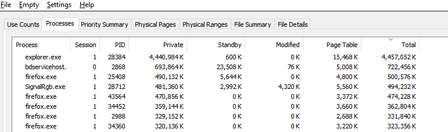
Thumbnails in Explorer.exe Using Up Significant Memory
It seems that there is an issue with explorer with storing thumbnail cache for folders containing 6k to 8k resolution videos. For context, I keep virtual reality videos in one folder and every single time I open this folder and browse through all other files and sub folders, the memory usage for explorer spikes up. I need help on how to fix this issue. Any workarounds such as storing thumbnail cache on the drive instead of the RAM would help. I'm using Windows 10 22H265Views0likes1Comment
The File History log still has problems after the KB5126657 update.
After updating my Windows 10 22H2 desktop computer to KB5126657, I'm still having problems with the file history log. Although I successfully back up to the D drive, after editing and saving the archive, clicking the Execute Now button under Control Panel > System and Security > Archive History fails to update the last copied date and time to the actual latest save time. For newly created files (such as Word files), File Properties > Previous Versions displays: No previous versions are available. The contents of older files do not display the latest timestamp version; only the date and time of the previous version are shown. A new entity version of the file has been created without modification. When attempting to perform the Clear Versions function, the system immediately displays the error message Element not found. If you're still using Windows 10, tell me and submit your question to the feedback center.283Views0likes3Comments
Any recommendations for a DocuSign alternative?
I’m looking for a DocuSign alternative for occasional document signing. I’d like to sign PDFs received by email and send them back, as well as send documents to other people for their signatures. A straightforward process for both the sender and the recipient would be important. When comparing services, I’d like to understand: Whether recipients can review and sign without creating an account What a free or low-cost plan includes, particularly the limits on signature requests Whether I can track outstanding signatures and download the completed documents Whether an audit trail is included or requires a paid plan Could anyone recommend a service that handles these tasks reliably? I’d especially appreciate hearing about any plan limits or recipient-side difficulties that are easy to overlook when choosing an alternative.164Views0likes1CommentWindows 10 downgrade
I have upgraded to W11 on my old laptop. Internet now drops out which I found is due to the TPM being 1.2 instead of 2.0. I want to downgrade back to W10, it has been more than 10 days so I have looked up the process for this which includes entering my previous W10 password which I have forgotten. Is there a way to find this old password ? Thanks.170Views0likes2Comments