webinar
27 Topics
Customized Webinar Teams Email Invitation
Can you edit/customized webinar teams email invitation? I want to add an instruction below the email invitation that says "Click the ics file" so that the calendar event will be added to their calendar. Or is there a way that when they registered it will automatically added to their calendar?Solved7.9KViews1like7Comments
Teams - External Webinars and reporting on attendees
Hi, We are currently looking at different Webinar products for our organisation. The main driver for the Webinar product is to be able to report on who has attended and for how how long. The reporting on attendees is the biggest driver at the moment. We have Skype for Business Hybrid and from what I can see the reporting is somewhat lacking. You can view the call history of the meeting, but it displays people who join via the web app as anonymous and has no way of linking a person who has dialed into the meeting via the dial-in number to their email address. Does Teams/Teams live events provide better reporting on attendees?4.4KViews0likes1CommentWebinar calendar invite shows an invalid join link when viewed in Outlook 2016
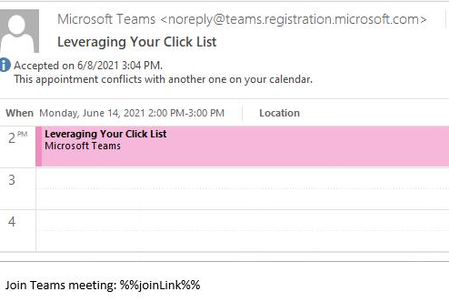
Good afternoon. Our organization has started to use Webinars for various events. Many of our users are currently on Outlook 2016 (Windows) and we are experiencing abnormal behavior with the body of Webinar .ICS meeting invites. Any help / feedback is greatly appreciated. After registering for an event and receiving the registration confirmation, we are opening the .ICS attachment in Outlook 2016 and seeing the text Join Teams meeting: %%joinLink%% in the body. This behavior is only in Outlook 2016. M365 Apps and Outlook on the web are both displaying the body as follows:Solved3.8KViews0likes7CommentsCouldn't find that event. Refresh your calendar to try again.
Hi I created the event but with the time I can't enter it to edit, to see participant lists etc. I can see it in my calendar and in my iPhone can see the presenters, but can't enter and edit it somhow I've logged out reinstalled teams app for Mac nothing helped I also failed to enter teams in safari Chrome shows the same problem as Teams app Advise please if someone faced the same problem3.4KViews0likes1Comment
Webinar function in Teams meeting creation
In latest feature releasing, it says Webinar function can be used while Teams meeting creation, I followed the guide PDF, but couldn't find the "Webinar" icon. My Teams version is 1.4.00.11161 (64-bit) So is it the correct version to get Webinar feature? or I went to wrong direction?Solved3.3KViews1like7Comments
Options for GDPR in webinar registration form
I would like there to be two set of fields on GDPR when creating the forms - one for storing/processing data and one for letting us send information about the event. Or at least let us save commonly used custom fields, so we don't have to manually create these each time we have a webinar.2.3KViews0likes1CommentTeams Premium Recurring Webinars
Is there a way to set a Teams Webinar as a recurring webinar? We have Teams Premium and our Training Department is running a basics type of webinar 2x/month covering the exact same topic. We want to give people options of which one they want to attend vs. having to create a single webinar for each date. Is this possible?2.2KViews1like2CommentsRecording meeting send outside organisation
Hello, I am new to teams. I've started doing webinars and recording for people outside our organisation to view later. When I sent the link, it's asking them for a password. Are they able to view it? Where do I get the password from? Thanks for your help2.1KViews0likes1Comment