stream
17 Topics
Stream API
Hi everyone. I'm trying to understand if there will be the possibility to have Stream API in the near future. My need is to download the autogenerated transcript, translate it via online services, and then load the new transcript file back on the video. Do u have any advice? thanks Michele12KViews1like8Comments
Join Microsoft Stream at BETT 2020!
BETT 2020 is kicking off this week and we look forward to seeing you there! The Stream team will join educators, students, partners and others on January 22 -25 in London. We hope you visit us in the Microsoft Hub and in sessions to learn more about inclusive and collaborative digital experiences that are fueling learning and growth for students and teachers from K-12 to higher education and beyond. SESSIONS Join Stream in the Learn Live Theater where we will share new innovations and best practices for using video in classrooms and with your fellow educators. Wednesday - Friday @ 14:00-14:30 Learn Live Theater: Develop a Teaching and Learning Video Culture with Teams and Stream - Connect with meetings and live events, teach with web-based screen recordings and create on mobile using the Flipgrid Camera. MICROSOFT TRAINING ACADEMY Attend these sessions to learn how to enrich your classrooms with Teams, Stream and other collaboration applications in Office 365. Wednesday- Saturday @ 10:30-11:00 Getting teachers to learn and students to teach This session will inspire teachers to leverage Class Notebook, Teams, SharePoint and Stream to experiment with new student tasks and innovative practice for their own context and set up opportunities for O365 staff training to improve learning outcomes in the long run. Wednesday - Saturday @ 15:30- 16:00 Teams University - Maximizing Teams at your higher education institution This session will cover the basics of Teams for a newcomer in Higher Education that don't have much experience with the tool. Faculty will benefit from getting hands on training and immersing themselves in the tool. MICROSOFT HUB Come by the Microsoft Hub to connect with Stream experts throughout the conference. The Hub is located in booth Booth #NF40 . We look forward to seeing you at BETT 2020!9.1KViews1like0CommentsNew Stream Web Part - Source > Folder > From Sites > Only shows recent shared libraries
The new Stream (on SharePoint) web part just hit my org's tenant. When you add the web part to the SharePoint page, there are several source options: Videos on this site, Folder, and Single Video. When you select Folder as the source and the Select Folder button, it gives you the option to select Your Organization, OneDrive, Site, and From sites. Here's the problem I'm running into: When you select From sites, it only allows you to see the Shared (Doc) Libraries you have accessed most recently and is limited to 12. If the Shared (Doc) Library you need is not shown, you have to: Stop editing the SharePoint page Navigate too and open the Shared (Doc) Library where the video file(s) live Wait a few minutes Go back to the SharePoint page you were editing and hope the Shared (Doc) Library shows up when you select From sites. The workaround "works" but it isn't a great experience for the end user. Is there any other way to get the ability to search for the Shared Library?5.5KViews3likes20Comments
I thought we'd be able to use Stream for playing videos on Teams meetings without lag but we can't?
From everything I've read, we should be able to host a video on SharePoint or OneDrive in order to share it in a teams meeting. It doesn't seem like this feature works. Stream isn't an app available in the apps list unless I use the one available in the chat window. If I select Microsoft Stream from the chat apps, it asks me to post a link to share with the meeting. When I input my video link from sharepoint, it gives the error "Please enter a valid Stream URL." It should be a valid URL. We've tested this numerous time with numerous settings, but even if we set it so that anyone with the link can view the video, it won't let us use the sharepoint link (from mysharepoint.com) to Stream on a Teams meeting. We can't watch videos by sharing our screens or windows because it lags too much. The only current solution we have is to use the YouTube app which seems to work better than the Microsoft ones. Is there a solution for this?3.3KViews0likes4Comments
New chapters taking all my storage space./How to turn off versioning/delete old versions all at once
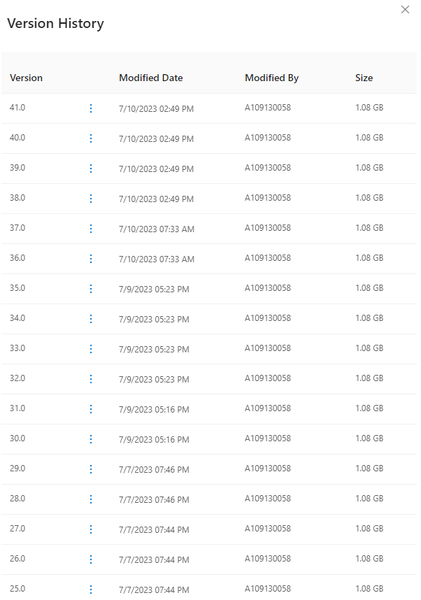
(I'm using education version)Whenever I create or edit a chapter in Stream, it automaticly creates a new version for me in onedrive, the problem is, it actually duplicates the file, for example, if the video size is 1GB and I edited the chapter 50 times, then there would be 50 versions of this video file, and the file size would be 50GB, this issue is really bothering me, it basically takes up all 1TB of my storage, someone help plz. it shows 1.08GB if you check on the detail of this file, but if you check the size of the directory this file is in it shows hundreds of GBsSolved2.6KViews0likes6CommentsUpload and add a video to a channel via MS (on SP)
Hello, I have created a company wide channel, however when I upload a video using the new Stream on SharePoint option, the video uploads fine but there is no "add to channel" option. Checking videos uploaded to Stream Classic, they have a different interface and the 3 dots with an option to add to a channel. I also don't have the option to upload a new video to Classic which allows the channel option. I am stuck and appreciate any advice. thanks.2.4KViews0likes6Comments
Accessing video length via JSON
I've recently migrated my videos from Stream (Classic) to Stream (on SharePoint) I'm now using custom formatting to make the document library appear more like the search results on YouTube, for example -- large thumbnail, title and description. I'd like to add the video length as well. I can see the Duration field in each video's properties (along with Dimensions, Type etc.), but how do I access the value via JSON?