siem
324 TopicsMicrosoft Ignite 2026: New Sentinel Connectors Announcement
Microsoft Sentinel helps organizations detect, investigate, and respond to threats across increasingly complex environments. As AI transforms security operations, bringing together the right data and context is more important than ever, giving human defenders and AI agents a more complete view of the environment to reason over and act on. These integrations bring signals from Microsoft and third-party technologies together across the security environment, unlocking richer context for investigations and helping power the new Integrated Security Operations Center (ISOC) in Microsoft Defender, where human defenders and AI agents can reason across the environment with shared context. The connector ecosystem isn’t the only area seeing rapid growth. Microsoft Sentinel continues to add new capabilities, including Nested API support, Azure Blob support, and multi-account support, while AI-powered tools like the connector builder agent are making it easier than ever for developers to build integrations and bring more of their security data into Sentinel. At the same time, Unified Data Management, now in public preview, makes it easier for customers to manage their Microsoft Sentinel data, connectors, tables, and ingestion health in one place. For Microsoft Ignite 2026, we’re excited to showcase recent additions to this growing ecosystem and the partners making them possible. These new and enhanced connectors continue to broaden the security data available to customers, helping human defenders and AI agents gain the context they need across the technology estate. Airlock Digital for Microsoft Sentinel Airlock Digital helps prevent malware, ransomware, and unauthorized software with deny by default application control, allowing only trusted applications, scripts, and processes to run. Its Microsoft Sentinel push integration ingests execution history, browser extension control events, server administrative activity, and policy changes for monitoring and investigation. Included parsers map execution and audit events to Microsoft’s ASIM for analysis alongside other security signals. A customizable workbook supports investigation and monitoring, and teams can create analytics rules using the ingested data. NC Protect Data Connector for Microsoft Sentinel NC Protect Data Connector for Microsoft Sentinel from archTIS brings user activity and protection logs from NC Protect into Sentinel for centralized security analysis. The connector captures user activities and access-related events, while built-in workbooks support investigation and visualization of user behavior. By correlating NC Protect audit data with other security telemetry, the integration helps teams identify suspicious user activity, trigger alerts and response workflows, strengthen auditing, and monitor guest activity across SharePoint and Teams. blacklens.io for Microsoft Sentinel blacklens.io for Microsoft Sentinel brings external and internal attack-surface data, risk-prioritized vulnerabilities, darknet intelligence, and supply-chain risks into Microsoft Sentinel. The connector ingests exposed assets, compromised identities, stolen credentials and session cookies, typosquatting domains, and supplier activity on ransomware leak sites. The solution includes a data connector and analytics rule for creating Sentinel incidents, with configurable notification rules for alert severity and type. Findings are available in Log Analytics for correlation with existing Sentinel signals and can support custom analytics rules, workbooks, automation, and threat investigations. BloodHound Enterprise BloodHound Enterprise (BHE) helps organizations protect critical assets across modern hybrid environments by continuously uncovering identity attack paths and providing actionable remediation guidance. By integrating with Microsoft Sentinel, BHE delivers attack path data and identity security posture insights directly into Sentinel workflows. This helps security teams prioritize remediation efforts based on exposure to critical assets while enriching investigations into identity-based threats, including lateral movement and privilege escalation. Together, BHE and Microsoft Sentinel help security teams connect threat detection to underlying identity risk, speed investigations, and reduce opportunities for attackers. BlueVoyant Anthropic Claude Compliance BlueVoyant Anthropic Claude Compliance brings compliance activity from the Anthropic Claude Compliance API into Microsoft Sentinel using the Codeless Connector Framework (CCF). The connector ingests Claude compliance events into Sentinel, giving security, risk, and audit teams centralized visibility into AI usage and related activity. By correlating these compliance signals with identity, endpoint, and other security telemetry, the integration supports threat hunting, investigation of policy violations and anomalous behavior, compliance monitoring, and repeatable audit workflows. Cato Networks for Microsoft Sentinel Cato Networks for Microsoft Sentinel brings security and network events from the Cato SASE Platform into Microsoft Sentinel using the Codeless Connector Framework (CCF) Push pattern. The connector pushes events into a dedicated Log Analytics table, making Cato activity available alongside other Sentinel data. By centralizing this telemetry in Sentinel, the integration enables security teams to incorporate Cato events into threat hunting, detection, and visualization workflows alongside broader security signals. Check Point EM ThreatCloud Intelligence Feed Connector for Microsoft Sentinel The Check Point EM ThreatCloud Intelligence Feed Connector brings threat intelligence from Check Point Exposure Management into Microsoft Sentinel. The connector ingests indicators of compromise (IoCs), including malicious IP addresses, domains, URLs, and file hashes, enriched with threat context such as confidence, severity, kill-chain stage, and campaign associations. An included playbook further enriches incident IoCs through ThreatCloud, helping security teams correlate intelligence with existing telemetry, accelerate triage and investigation, and reduce the manual effort required to maintain threat intelligence. Check Point Exposure Management Threat Intelligence IoC for Microsoft Sentinel Check Point Exposure Management Threat Intelligence IoC for Microsoft Sentinel brings threat intelligence from Check Point Infinity External Risk Management into Sentinel. The connector ingests malicious IP addresses, domains, URLs, and file hashes, enriched with context such as severity, confidence, and detected activity. By correlating these indicators of compromise (IoCs) with existing logs through analytics rules, hunting queries, and watchlists, the integration helps security teams reduce manual intelligence management, identify matches with external threats, and accelerate threat detection and investigation. Citrix SPA Sentinel App Citrix SPA Sentinel App brings Citrix Secure Private Access and Device Posture service events into Microsoft Sentinel using the Codeless Connector Framework (CCF). The connector imports critical logs, policy outcomes, and user activity data, giving security teams greater visibility into application access and device posture activity. An included workbook supports visualization and analysis of Citrix data, helping SOC teams correlate activity with broader security telemetry, investigate security risks, support compliance monitoring, and strengthen threat hunting across their environment. ContraForce Events for Microsoft Sentinel ContraForce Events for Microsoft Sentinel brings security delivery and administrative activity from ContraForce workspaces into Microsoft Sentinel using the Codeless Connector Framework (CCF). ContraForce is an Agentic Security Delivery Platform for service providers and security teams running triage, investigation, and response across Microsoft Defender XDR and Sentinel. The connector ingests incidents, privileged access changes, service account credential activity, and high-impact workspace actions. Three included analytics rules detect privileged access, credential, and high-impact workspace activity, helping teams monitor and investigate the platform supporting their security operations. Corelight for Microsoft Sentinel By transforming all network traffic into rich, comprehensive evidence, Corelight gives security teams using Microsoft Sentinel the visibility to understand exactly what is happening across their enterprise networks. In addition to native integration with Microsoft Sentinel, Corelight integrates with Microsoft Defender for Endpoint, Defender Vulnerability Management, and Entra ID to streamline investigations, accelerate responses, and remediate incidents quickly and easily. The Corelight App for Microsoft Sentinel includes intuitive dashboards, pre-defined workbooks , sample queries, and analytics rules that help make SOC teams more efficient and effective. CTM360 CTM360 brings external threat visibility into Microsoft Sentinel. The integration connects the CTM360 HackerView and CyberBlindspot platforms to Sentinel through REST APIs, so external attack surface and digital risk events flow straight into security operations workflows. HackerView surfaces externally exposed assets and security issues across your attack surface. CyberBlindspot adds organization-specific threat intelligence from surface, deep, and dark web monitoring. With these signals centralized in Sentinel, security teams can analyze external exposures alongside their broader telemetry and speed up detection, investigation, and response. Cyren CrowdStrike IOC Automation Cyren CrowdStrike IOC Automation connects Cyren IP reputation threat intelligence with Microsoft Sentinel and CrowdStrike Falcon to operationalize malicious IP indicators. An included Logic App playbook automatically retrieves known malicious IP addresses from Cyren and submits them to CrowdStrike Falcon as custom indicators of compromise (IOCs) for blocking and detection. Scheduled execution keeps the intelligence updated and automates the flow of Cyren IP reputation data into CrowdStrike Falcon for blocking and detection. Vaikora AI Agent Signals for Microsoft Sentinel Vaikora AI Agent Signals for Microsoft Sentinel brings behavioral security signals from AI agents into Sentinel for centralized monitoring and response. The connector ingests risk scores, anomaly and threat classifications, policy enforcement decisions, and audit data, including signals for prompt injection attempts and suspicious tool usage. Included analytics rules and a workbook help security teams detect behavioral anomalies, investigate policy violations, and incorporate AI agent risks into existing Sentinel incident workflows. Vaikora AI Agent Signals for SentinelOne Vaikora AI Agent Signals for SentinelOne brings high-risk behavioral security signals from Vaikora into SentinelOne as threat intelligence indicators of compromise (IOCs). The integration filters high-severity and anomalous AI agent activity and maps Vaikora risk scores to SentinelOne severity levels. The resulting IOCs are submitted to SentinelOne and expire after 90 days, enabling Vaikora security signals to be incorporated into SentinelOne endpoint protection workflows. DataBahn Agentic Data Control Plane for Microsoft Sentinel DataBahn’s agentic data control plane integrates with Microsoft Sentinel to provide our shared customers an AI-native data pipeline and orchestration platform that allows them to accelerate enterprise deployments. DataBahn’s pipeline standardizes onboarding and shaping across all data sources while providing operational visibility into data flow and health. Together, the collaboration focuses on reducing onboarding friction, improving normalization consistency, and enabling intentional routing, which helps security teams improve visibility, support threat detection, and streamline investigation and incident response workflows. Delinea Platform for Microsoft Sentinel Delinea Platform Sentinel Solution brings privileged access activity into Sentinel natively through the Content Hub, as a complete SOC package. The connector pulls audit events covering secrets access, authentication, session activity and configuration changes directly into Sentinel. Ready-made workbooks, analytics rules with baseline-driven detection, hunting queries and an automated response playbook let security teams detect bulk secret access, failed sign-in bursts and privilege escalation sooner, investigate without leaving Sentinel and answer auditors with a record of what happened and why it was allowed. Dynatrace Software Intelligence Platform with Microsoft Sentinel Dynatrace integrates bidirectionally with Microsoft Sentinel, bringing application attacks, runtime vulnerabilities, Dynatrace Intelligence problems, and audit logs into Sentinel, where analytics rules, workbooks, and playbooks support detection, triage, and response. Sentinel can also send alerts to Dynatrace and enrich detected attacks with Sentinel and Microsoft Defender XDR insights. Bindplane by Dynatrace complements the integration by collecting and routing logs into Sentinel, including normalization to ASIM tables, giving SOC teams runtime and topology context for investigations. ExtraHop RevealX for Microsoft Sentinel ExtraHop RevealX for Microsoft Sentinel brings network detection and response (NDR) into Sentinel, giving your SOC visibility into threats that endpoint and log tools miss, including lateral movement and credential abuse hiding in encrypted east-west traffic. RevealX decrypts and analyzes network traffic at line rate, out of band with no impact on the network. The connector sends ExtraHop detections into Sentinel for dashboards, custom alerts, and investigation, so network context enriches your existing SOC workflows instead of sitting in a separate console. Fire Compass FireCompass Risks for Microsoft Sentinel brings validated external risk findings from the FireCompass platform into Microsoft Sentinel through the Codeless Connector Framework. The connector ingests risk data including severity, affected assets, assessment context, impact, and remediation guidance. By making validated exposures available in Sentinel, security teams can correlate external risks with endpoint and network telemetry, track remediation progress, and build analytics rules, workbooks, and hunting queries on top of FireCompass findings. Gambit Security Sentinel Solution Gambit brings resilience context into Microsoft Sentinel. It finds the resilience issues in your environment and syncs them to your Sentinel workspace daily, to help analysts see recovery risk before anything goes wrong. Sentinel correlates those issues with its detections. Your team can then prioritize the attacks most likely to disrupt critical operations: the ones hitting resources that aren’t ready to recover. Sentinel tells you what’s happening. Gambit tells you whether you can recover from it. Holm Security for Microsoft Sentinel Holm Security for Microsoft Sentinel brings asset data from the Holm Security platform into Sentinel via the Holm Security REST API. The connector ingests web and network assets into Microsoft Sentinel, including metadata such as IP addresses, hostnames, operating systems, tags, and vulnerability counts per asset. By incorporating this asset inventory alongside other security telemetry, the integration enables security teams to build dashboards, create custom alerts, and correlate asset information with other data in Microsoft Sentinel. Idira Endpoint Privilege Manager for Microsoft Sentinel The Idira® Endpoint Privilege Manager by Palo Alto Networks integration for Microsoft Sentinel pulls application events and policy audit activity into Microsoft Sentinel using the Codeless Connector Framework and the Idira Endpoint Privilege Manager REST API. Events land in a dedicated Log Analytics table, so security teams can analyze privilege activity alongside their other telemetry and build detections. IPinfo: IP geolocation & intelligence database IPinfo: IP geolocation & intelligence database brings contextual IP intelligence into Microsoft Sentinel to enrich security logs and investigations. The solution provides data such as IP geolocation, network ownership and routing, proxy and residential proxy detection, ASN information, and other IP classifications. By adding this context to IP addresses observed in Sentinel, the integration helps security teams better understand indicators of compromise, prioritize security events, strengthen threat detection and investigation, and inform network and access management decisions. Island Solution for Microsoft Sentinel Island Solution for Microsoft Sentinel brings user activity and administrative audit events from the Island Enterprise Browser into Microsoft Sentinel for centralized security monitoring. The solution automatically shares events from the Island Management Console with Sentinel and includes data connectors and workbooks for user activity and admin audit logs. By adding browser activity context to existing security telemetry, the integration helps security teams monitor and analyze user and administrative activity and investigate potential security issues. NetApp Ransomware Resilience for Microsoft Sentinel NetApp Ransomware Resilience detects and contains ransomware attacks on NetApp ONTAP workloads in real time, then enables fast, clean recovery. Its Microsoft Sentinel integration enriches alerts with data-layer context, including attack type, severity, user and IP, and affected cluster, volume, and SVM. The NetApp SOAR playbook can take actions on ONTAP such as trigger immutable snapshots, block suspicious users or IPs, and take compromised volumes offline. Together, these integrations extend the NetApp Platform’s ability to help security teams triage and respond to ransomware attacks, limit data loss, protect recovery points, and coordinate response across storage and security teams. NordStellar for Microsoft Sentinel NordLayer Intelligence by NordStellar for Microsoft Sentinel brings external threat and exposure findings into Sentinel through the Azure Monitor Logs Ingestion API. The integration provides findings including leaked credentials, breach exposures, malware and info-stealer infections, dark web activity, domain impersonation risks, and external attack surface vulnerabilities. By correlating these findings with other security telemetry in Sentinel, the solution helps teams investigate external threats, identify exposures affecting their organization, and automate triage and response through analytics rules and SOAR playbooks. Panorays for Microsoft Sentinel Panorays for Microsoft Sentinel brings third-party security findings from the Panorays platform into Sentinel through the Panorays API. The connector provides security teams with visibility into the security posture of vendors and supply-chain organizations, making third-party risk and vulnerability findings available alongside other security telemetry. By incorporating Panorays findings into Sentinel workflows, the integration helps SOC teams centrally monitor and investigate third-party risks and correlate them with internal security signals. USTA Account Takeover Prevention Sentinel Connector USTA Account Takeover Prevention Sentinel Connector brings compromised credential intelligence from the PRODAFT USTA Threat Intelligence platform into Microsoft Sentinel. The connector ingests alerts for exposed corporate credentials, enabling security teams to investigate potential account takeover risks within existing Sentinel workflows. Included analytics can identify newly compromised credentials and successful Microsoft Entra ID sign-ins involving known-compromised accounts, helping SOC teams operationalize external credential intelligence and prioritize investigation and response. USTA IoC Threat Stream for Sentinel USTA IoC Threat Stream for Sentinel brings curated indicators of compromise (IoCs) from the PRODAFT USTA Threat Stream into Microsoft Sentinel Threat Intelligence. The integration provides indicators including malicious URLs, phishing sites, and malware hashes derived from PRODAFT investigations. By making these indicators available for correlation with existing telemetry, hunting queries, and detection rules, the solution helps security teams identify connections to malicious infrastructure, investigate phishing and malware activity, and incorporate external threat intelligence into existing triage and response workflows. USTA Payment Card Fraud Intelligence Sentinel Connector USTA Payment Card Fraud Intelligence Sentinel Connector brings compromised payment card intelligence from the PRODAFT USTA Threat Intelligence platform into Microsoft Sentinel. The connector retrieves alerts associated with an organization’s payment card BIN ranges and makes them available within Sentinel for investigation. Included analytics identify newly exposed and non-expired compromised cards, helping security teams centralize payment fraud intelligence, prioritize potentially actionable exposures, and incorporate them into existing investigation and response workflows. Pulumi Cloud Audit Logs for Microsoft Sentinel Pulumi Cloud Audit Logs for Microsoft Sentinel brings audit logs from Pulumi, the infrastructure platform for humans and agents, into Microsoft Sentinel through the Codeless Connector Framework (CCF). The connector ingests authentication events, organization membership changes, stack lifecycle operations, policy changes, and access token usage. It also includes three analytics rules that detect failed login attempts, stack deletions, and organization membership changes. Your security team can see what a human or agent did, when, and where across infrastructure as code, secrets, configuration, and policies, which helps speed up security and governance investigations. QCrypton PQC Scanner for Microsoft Sentinel QCrypton PQC Scanner for Microsoft Sentinel brings post-quantum cryptography readiness findings from Azure environments into Sentinel using the Codeless Connector Framework (CCF). The connector provides visibility into cryptographic assets including Key Vault keys, TLS certificates and configurations, and Entra ID app registration certificates, with quantum posture ratings and risk scores. Included are six analytics rules, a workbook, and a notification playbook to help security teams identify vulnerable cryptographic assets and prioritize post-quantum migration planning. SailPoint for Microsoft Sentinel SailPoint for Microsoft Sentinel brings identity security telemetry from SailPoint Identity Security Cloud into Sentinel using the Codeless Connector Framework (CCF). The solution streams audit and search events into Sentinel tables, where analysts can correlate identity activity with other security signals and query SailPoint APIs for additional identity and account context during incident triage. Automated playbooks can also remediate threats by revoking access or disabling compromised accounts, helping teams connect identity insight with investigation and response. SAP LogServ (RISE), S/4HANA Cloud private edition SAP LogServ (RISE), S/4HANA Cloud private edition extends Microsoft Sentinel security monitoring for SAP RISE environments with infrastructure, database, operating system, and network security logs managed by SAP Enterprise Cloud Services. Deployed alongside the Microsoft Sentinel Solution for SAP applications, it complements application-layer monitoring to provide visibility across the SAP stack and enable cross-layer threat detection and correlation. The solution supports near real-time log collection, built-in analytics and workbooks, ASIM-based security content, and correlation with signals from endpoints, Microsoft Entra ID, and other sources in Microsoft Sentinel. MailRisk data connector for Microsoft Sentinel MailRisk data connector for Microsoft Sentinel brings suspicious email data analyzed by users through Secure Practice MailRisk into Sentinel. The connector ingests enriched email metadata and risk assessment updates from the Secure Practice API, providing potential indicators of compromise identified from reported emails. By incorporating MailRisk data alongside other security telemetry, the integration helps security teams correlate suspicious email activity, search and investigate potential threats, and incorporate user-reported email intelligence into alerting and incident response workflows. SecurityScorecard Ratings for Microsoft Sentinel SecurityScorecard Ratings for Microsoft Sentinel provides cybersecurity posture ratings based on continuously monitored risk factors and threat intelligence. SecurityScorecard evaluates organizations using an A-F rating, helping security teams identify and track cybersecurity risks. The solution supports use cases including enterprise cyber risk management, third-party risk monitoring, executive reporting, and cyber due diligence. SIGNL4 - Mobile Alerting & Response for Microsoft Sentinel and Defender for Cloud SIGNL4 bridges the gap between security detection and human response with mobile-first alerting and incident management for Microsoft Sentinel and Defender for Cloud. Its two-way integrations allow security teams to acknowledge, escalate, and resolve incidents directly from their mobile devices, with updates automatically synchronized back to Sentinel. Critical Defender for Cloud findings trigger actionable response workflows, while persistent mobile notifications, automated escalations, and on-call scheduling ensure the right people are reached when it matters most. The result is faster incident response, clear accountability, and a fully auditable process - wherever responders are. SOC Prime Audit CCP SOC Prime Audit CCP brings SOC Prime Platform audit logs into Microsoft Sentinel for centralized security monitoring and analysis. The connector ingests platform activity including user actions, API calls, and administrative events, providing an audit trail across detection engineering processes. By correlating SOC Prime activity with other security signals in Sentinel, the integration helps security teams investigate platform activity, support compliance monitoring, and incorporate audit telemetry into broader threat detection and response workflows. SOCRadar Alerts Azure Sentinel Directional Solution SOCRadar Threat Intelligence for Microsoft Sentinel enriches security operations by bringing prioritized, context-rich alerts directly into Microsoft Sentinel. Covering SOCRadar’s Extended Threat Intelligence capabilities, including Brand Protection, External Attack Surface Management (ASM), Third-Party Findings, and other security modules, the integration helps organizations monitor external threats and manage investigations within their existing SOC workflows. Bidirectional synchronization also helps keep incident status, severity, and comments aligned between Microsoft Sentinel and SOCRadar. SpyCloud Enterprise Protection for Microsoft Sentinel SpyCloud Enterprise Protection for Microsoft Sentinel brings stolen identity data from infostealer malware, phishing attacks, and third-party breaches into Microsoft Sentinel, helping security teams uncover compromised identities, prioritize high-risk exposures, and accelerate remediation to prevent session hijacking and other targeted identity-based attacks. The solution includes a custom API connector, a Logic Apps playbook for ingesting data into Log Analytics, analytic rules that generate Sentinel incidents from breach and malware data, and additional Logic Apps playbooks for incident automation and enrichment. Tenable App for Microsoft Sentinel Tenable App for Microsoft Sentinel brings asset and vulnerability data from Tenable One Vulnerability Management into Sentinel for centralized security analysis. The integration combines Tenable cyber exposure insights with Sentinel’s collection, detection, and investigation capabilities, making vulnerability context available alongside other security telemetry. By incorporating asset and vulnerability findings into Sentinel workflows, the solution helps security teams correlate exposure data with security signals, investigate risks affecting vulnerable assets, and better prioritize remediation efforts. Uniqkey Security Events for Microsoft Sentinel Uniqkey Security Events for Microsoft Sentinel brings authentication, credential access and management, sharing, administrative activity, and platform threat detections into Microsoft Sentinel using the Codeless Connector Framework (CCF). Included analytics rules identify scenarios such as sign-ins from unfamiliar IP addresses, excessive credential access, data exports, and security policy or privilege changes. A workbook visualizes activity and threat detections, helping security teams monitor password-management activity, investigate potential credential risks, and correlate findings with broader security telemetry. Utimaco Enterprise Secure Key Manager Utimaco Enterprise Secure Key Manager (ESKM) integrates with Microsoft Sentinel to provide centralized security monitoring and visibility into cryptographic key management activities through KMIP server logs. The solution enables organizations to monitor key operations, KMIP client activity, and authentication events, helping security teams identify suspicious behavior and investigate potential threats. Built-in analytics rules help detect brute-force authentication attempts, repeated permission-denied events, and key-destruction activity, while hunting queries and a dedicated workbook support deeper investigation of unusual users, source IPs, key retrieval patterns, and after-hours activity. valimail-sentinel-enforce Valimail enables organizations to see who sends email using your domain, protects against domain impersonation, and displays a verified logo in inboxes to increase brand trust. Our Microsoft Sentinel Connector brings Valimail Enforce event data directly into Sentinel, allowing security teams to incorporate our telemetry into unified SIEM workflows, monitor authentication and enforcement trends in real time, and build custom alerts and visualizations based on DMARC events. Once configured, Sentinel continuously ingests Valimail event logs, enriching your broader security intelligence and helping to improve your ability to detect and respond to threats across your environment. Varonis for Sentinel Solutions Varonis for Sentinel Solutions brings enriched, data-centric Varonis alerts into Microsoft Sentinel for triage, investigation, and remediation. Varonis insights are contextualized alongside other security events to provide a unified view of data risk. This allows security teams to view and close Varonis alerts directly within Sentinel, reducing the need to switch interfaces and supporting incident resolution with less manual effort Whisper for Sentinel Whisper for Sentinel enriches Microsoft Sentinel incidents and alerts with threat and infrastructure intelligence for IPs, domains, ASNs, and networks. The solution provides threat scores, supporting evidence, infrastructure relationships, and historical context directly within Sentinel. Included enrichment playbooks, analytics rules, hunting queries, and workbooks support investigation of threats including C2 communications, malicious infrastructure, suspicious domains, and BGP anomalies, while retained enrichment data can be queried and correlated with existing logs. WhoisFreaks Threat Intelligence for Microsoft Sentinel The WhoisFreaks solution for Microsoft Sentinel brings domain threat intelligence and newly registered domain (NRD) data into Sentinel using the Codeless Connector Framework (CCF). Customers can connect malware, phishing, and spam threat feeds, along with gTLD and ccTLD NRD feeds with or without WHOIS data. Included analytics rule templates help identify high-confidence malicious domains, newly registered domains appearing in threat feeds, threat-listed parked domains, and unusual NRD volumes that may indicate bulk registration activity. Wiz for Microsoft Sentinel Wiz for Microsoft Sentinel brings Wiz Issues, Vulnerability Findings, and Audit logs into Microsoft Sentinel. Wiz identifies and prioritizes cloud security risks across areas including vulnerabilities, malware, internet exposure, identity, and data security in AWS, Azure, Google Cloud, OCI, Alibaba, and Kubernetes environments. In addition to the solutions from our third-party partners, we are also excited to announce the following connectors published by the Microsoft Sentinel team: Agari Solution Akamai DDOS Protection Alibaba Cloud Networking Atlassian Organization Audit AWS Elastic Kubernetes Service AWS Elastic Load Balancing Cisco Cloud Security Cisco Meraki Events via REST API Crowdstrike Falcon Endpoint Protection Elastic Agent Solution Imperva WAF Cloud Solution Microsoft Copilot Microsoft Dragon Copilot Mulesoft CloudHub Alerts OpenAI Qualys VM Knowledgebase Rapid7 InsightVM CloudAPI SentinelOne TheHive Solution Trellix Enpoint Security Trend Micro Cloud App Security VMware Workspace ONE Zoom Reports Building a more connected foundation for security operations The strength of the connector ecosystem reflects the work of Microsoft and our technology partners to support our shared customers. Together, we are helping organizations connect the technologies they rely on and bring more of their security data into a unified operational experience. For customers If you are a Microsoft Sentinel or ISOC customer, or considering adopting it, we want you to have the security connectors and integrations you need to get value from the platform. If an integration with an independent software vendor (ISV) is not yet available, or you have an issue with an existing solution, we have a dedicated team that may be able to assist by working with ISVs to build new or update existing connectors. For software companies If you are a software development partner, the Microsoft Sentinel Codeless Connector Framework (CCF) provides a streamlined way to bring your product into the Microsoft Security ecosystem. Partners can also work directly with Microsoft for engineering guidance and support to build or improve a connector. Building a more connected foundation for security operations Our goal is simple: help customers protect their digital environments by giving human defenders and AI agents a more complete picture of risk. We’ll continue investing in connectors, partnerships, and integrated security experiences to help customers defend their organizations with greater visibility, context, and confidence. Learn More Microsoft Sentinel What is Microsoft Sentinel Empower Real-Time Security with Microsoft Sentinel’s CCF Push Feature | Microsoft Community Hub Growing our connector ecosystem with 500+ Microsoft Sentinel connectors Microsoft Defender ISOC in Microsoft Defender Microsoft Sentinel connector hands-on labs Building Microsoft Sentinel Connectors in Minutes with the Sentinel Connector Builder Agent Building a CCF Nested API Pull Connector: A Technical Lab Walkthrough Microsoft Sentinel features in public preview Accelerate connectors development using AI agent in Microsoft Sentinel | Microsoft Community Hub Extending Sentinel Data Integration: Azure Blob Storage Support for CCF Connectors | Microsoft Community Hub Public Preview: Nested API Support Comes to Microsoft Sentinel CCF | Microsoft Community Hub Public Preview: Multi-Account Support for Microsoft Sentinel Codeless Connectors | Microsoft Community Hub Manage all your Microsoft Sentinel data in one place with Unified Data Management (Public Preview) | Microsoft Community Hub1.3KViews0likes1CommentProtecting Microsoft's SAP workload with Microsoft Sentinel for SAP: the RISE with SAP chapter
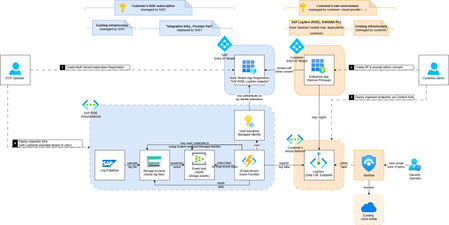
Inside Track | Microsoft Digital When infrastructure operations shift, security visibility must evolve with the operating model Four years ago, we told the story of how Microsoft became Customer Zero for using Microsoft Sentinel as the SIEM for its own SAP estate, pairing a then-new product “Sentinel Solution for SAP” with our existing SOAR platform and proving out cross-correlation between SAP and the rest of the enterprise. The ambition was stated plainly at the time: an internally managed and configured SIEM that could baseline user behaviors and detect anomalies across SAP, spanning the OS and network layer, the database layer, and the application and business logic layers. Then we moved to RISE with SAP on Azure. With that move, responsibility for instrumenting one of those layers transitioned to SAP under the RISE operating model. The visibility challenge shared responsibility creates In RISE with SAP, SAP operates the underlying infrastructure, operating system, and database as part of the managed service. This changes how customers obtain security telemetry from those layers and raises an important shared-responsibility question: how can the customer SOC maintain end-to-end visibility while SAP operates the platform? The layers remain relevant to security monitoring, so visibility must extend across both SAP-managed and customer-managed parts of the landscape. What changed: SAP LogServ meets Sentinel for SAP SAP LogServ is SAP's centralized log service for RISE-managed landscapes, carrying the security-relevant telemetry from the layers SAP now operates. Microsoft Sentinel for SAP ingests it directly, authenticated with managed identity for Azure. There is no stored secret, no rotation calendar and no bespoke connector for a future engineer to inherit and maintain. The integration is a configuration, not a project. “RISE with SAP introduces a shared operating model in which SAP manages the infrastructure while customers remain responsible for maintaining end-to-end security oversight. The integration of SAP LogServ with Microsoft Sentinel for SAP, secured through managed identity for Azure, brings telemetry from SAP-managed layers together with application-layer signals and the wider enterprise context. Our SOC can continue using familiar detections and workflows without a separate integration or credential-management process. At Microsoft, we believe in being Customer Zero, so we are putting this approach to work in our own RISE with SAP on Azure environment.” — Narasa Reddy Pekety, Principal Platform Lead, Microsoft Commerce Financial Platforms (CFP) For our SOC, the practical effect is that almost nothing about the working day changed. Events from SAP-managed layers land in the same tables queried by existing analytics rules based on Microsoft’s Advanced Security Information Model (ASIM), so detections tuned before the move can continue operating after it. Analysts remain in one console rather than managing a separate SAP queue and specialist on-call rotation. Cross-correlation – the ability to examine the points where SAP meets Dynamics 365 and the rest of our IT estate – remains especially important because it preserves the context that could otherwise be lost when telemetry is distributed across operating boundaries. “What I appreciate most is that we did not have to create a parallel operating model for SAP. We can reuse the analytics, investigation workflows, and response processes our SOC already knows, while adding the signals we were missing.” — Satya Veera Phaneendra Bonda, Platform Engineer, Microsoft Digital Who runs what, and where the signal comes from. An opinionated excerpt: Layer Operated by Signal path into our ISOC in Microsoft Defender Application and business logic Microsoft Microsoft Sentinel for SAP, as before the move Database SAP, Global Cloud Operations SAP LogServ Operating system and infrastructure SAP, Global Cloud Operations SAP LogServ Identity, endpoint and the wider cloud estate Microsoft Existing Microsoft Defender connectors, correlated with the above Co-engineering, in the open The part that matters most here is not the connector. It is a standing engineering relationship. The SAP LogServ team and the Microsoft Sentinel for SAP team work as one co-engineering group, shipping new security content on a continuous cadence: detections, analytics rules, watchlists and normalization for log sources as SAP exposes them. “By co-engineering SAP LogServ with Microsoft Sentinel for SAP, we turn SAP-managed telemetry into security insights customers can use immediately – and continue improving together as threats and landscapes evolve.” — Lalit Patil, EVP & CTO Global Cloud Operations, SAP That cadence is the direct continuation of the commitment made in the original solution, that the SAP and Sentinel teams would keep expanding threat-detection capabilities and the risk scenarios the product addresses as it evolves. “We built this as a co-engineering relationship rather than a connector handover, and that is what makes the estate legible to our perception agents. A security AI agent is only as good as the signal and the semantics it is handed. An agent reasoning over an unlabeled log stream is guessing; an agent reasoning over normalized, curated, continuously refreshed detection content is making an informed decision about what to escalate, what to correlate and what to close. Every piece of content the two teams ship raises the floor for every AI agent downstream of it.” — Martin Pankraz, Product Manager, SAP Security, Microsoft That work also attacks a problem we named in the first edition and never stopped working on: separating permissible activity from genuine threats, and improving alert fidelity rather than drowning analysts in false positives. Content that arrives already tuned to the layer it describes is the most direct lever we have on that ratio. Find the latest guidance always on the running engineering blog series on the SAP community. The foundation we need for the Agentic SOC This work also lays the groundwork for what comes next. Project Perception, Microsoft Security’s model for multi-agent defense, relies on blue team agents that detect, triage and respond to incidents, and those agents are only as effective as the signals they can reason over. SAP LogServ and Microsoft Sentinel for SAP provide exactly that: normalized, curated telemetry from the SAP-managed layers and the application layer, correlated with the wider enterprise estate in Sentinel. With that foundation in place, blue team agents can handle incidents involving SAP with the same context as any other part of our environment, rather than treating SAP as a black box. What comes next We intend to do what we did in 2022. We will share the challenges and the remedies as the work proceeds, so that customers can accelerate their own implementations with what we learn rather than rediscovering it. RISE with SAP does not have to mean less security visibility, but it does mean visibility has to be designed in rather than assumed, and designed in early enough that the SOC never works a period without it. We are running it ourselves first, as always. Final words We encourage all fellow RISE with SAP customers to verify their own cloud security posture, integrated SIEM practices, and choose to integrate with SAP LogServ as foundational service. Till next time. Related reading The first edition of this story: “Protecting Microsoft's SAP workload with Microsoft Sentinel,” Inside Track, February 4, 2022 — www.microsoft.com/insidetrack/blog/protecting-microsofts-sap-workload-with-microsoft-sentinel/ Microsoft Sentinel solutions for SAP | Microsoft Learn SAP LogServ integration with Microsoft Sentinel Solution for SAP overview | Microsoft Learn Microsoft Ignite 2026 Sentinel Connector announcments | TechCommunity122Views0likes0CommentsRun agentless SAP connector cost-efficiently
📢 Microsoft Ignite news, November 16: Extend SAP protection across your environment Customers moving to ISOC in Defender can extend SAP protection across more of their environment and bring SAP security data into their broader security operations: Protect more of your SAP environment. The SAP solution fee for production SIDs does not apply to ISOC as of Jan 15th 2027, helping customers extend protection beyond production to dev, test, and QA. Bring more security data together. SAP and other non-Microsoft data can be ingested at $2.40/GB*, enabling broader visibility for investigation and response. Existing Sentinel SAP licensing models remain unchanged. Mirroring SAP logs to the Sentinel data lake continues to be supported. Extending protection across the SAP landscape helps reduce blind spots, including in non-production environments that can also be targeted by attackers, while giving security teams more comprehensive visibility across critical SAP systems. *Sample based on East US; check your individual Azure region as prices vary slightly. The SAP agentless connector uses SAP Integration Suite (Cloud Integration/CPI) to fetch SAP audit log data and forward it to Microsoft Sentinel for SAP. Because SAP CPI billing typically reflects message counts and data volume, you can tune the connector to control costs - while preserving reliability and timeliness. SAP offers small basic tenants to customers that are completely new to SAP Integration Suite where the license price is up for negotiation. Cost reductions primarily come from sending fewer CPI messages by increasing the polling interval. The max-rows parameter is a stability safeguard that caps events per run to protect CPI resources; it is not a direct cost-optimization lever. After any change, monitor CPI execution time and resource usage. Busy systems should be kept on the 1min default polling frequency. ☝️Note: It may not be feasible to increase the polling interval on busy systems processing large data volumes. Larger intervals lengthen CPI execution time and cause truncation when event spikes exceed max-rows. Cost optimization via longer intervals generally works best on lower-utilization environments (for example, dev and test) where event volume is modest and predictable. Tunable parameters Setting Default Purpose Cost impact Risk / trade-off Polling interval 1 minute How often the connector queries SAP and triggers a CPI message. Lower message count at longer intervals → potential cost reduction. Larger batches per run can extend CPI execution time; spikes may approach max-rows after which message processing for that interval is truncated. max-rows 150,000 Upper bound on events packaged per run to protect CPI stability. None (safeguard) - does not reduce message count on its own. If too low, frequent truncation; if too high, runs may near CPI resource limits. Adjust cautiously and observe. excluded-audit-users - Chatty technical SAP batch users that allow no interactive SAP log-in can produce the bulk of security audit log messages with low threat protection value In some cases up to 50% log volume reduction The SOC sees no batch user behaviors with batch user audit log kept on SAP only. ☝️Note: When event volume within one interval exceeds max-rows, the batch is truncated by design. Remaining events are collected on subsequent runs. Find the latest documentation on available customizing parameters always on Microsoft Learn. Recommended approach Start with defaults. Use a 1-minute polling interval and max-rows = 150,000. Measure your baseline. Understand average and peak ingestion per minute (see KQL below). Optimize the polling interval first to reduce message count when costs are a concern. Treat max-rows as a guardrail. Change only if you consistently hit the cap; increase in small steps. Consider excluding chatty sap batch users Monitor after each change. Track CPI run duration, CPU/memory, retries/timeouts, and connector health in both SAP CPI and Sentinel. 💡Aim for the lowest interval that keeps CPI runs comfortably within execution-time and resource limits. Change one variable at a time and observe for at least a full business cycle. 🧐Consider the Azure Monitor Log Ingestion API limits to close the loop on your considerations. Analyze ingestion profile (KQL) ABAPAuditLog | where TimeGenerated >= ago(90d) | summarize IngestedEvents = count() by bin(UpdatedOn, 1m) | summarize MaxEvents = max(IngestedEvents), AverageEvents = toint(avg(IngestedEvents)), P95_EventsPerMin = percentile(IngestedEvents, 95) See additional diagnostic KQLs on our Sentinel Solution GitHub repos. How to use these metrics? AverageEvents → indicates typical per-minute volume. P95_EventsPerMin → size for spikes: choose a polling interval such that P95 × interval (minutes) remains comfortably below max-rows. If MaxEvents × interval approaches max-rows, expect truncation and catch-up behavior—either shorten the interval or, if safe, modestly raise max-rows. Operational guidance ⚠️❗Large jumps (for example, moving from a 1-minute interval to 5 minutes and raising max-rows simultaneously) can cause CPI runs to exceed memory/time limits. Adjust gradually and validate under peak workloads (e.g., period close, audit windows). Document changes (interval, max-rows, timestamp, rationale). Alert on CPI anomalies (timeouts, retries, memory warnings). Re-evaluate regularly in higher-risk periods when SAP event volume increases. Balancing Audit Log Tuning and Compliance in SAP NetWeaver: Risks of Excluding Users and Message Classes When tuning SAP NetWeaver audit logging via transaction SM19 (older releases) or RSAU_CONFIG (newer releases), administrators can filter by user or message class to reduce log volume - such as excluding high-volume batch job users or specific event types - but these exclusions carry compliance risks: omitting audit for certain users or classes may undermine traceability, violate regulatory requirements, or mask unauthorized activities, especially if privileged or technical users are involved. Furthermore, threat hunting in Sentinel for SAP gets "crippled" due to missing insights. Best practice is to start with comprehensive logging, only apply exclusions after a documented risk assessment, and regularly review settings to ensure that all critical actions remain auditable and compliant with internal and external requirements. Cost-Efficient Long-Term Storage for Compliance Microsoft Sentinel Data Lake enables organizations to retain security logs - including SAP audit data - for up to 12 years at a fraction of traditional SIEM storage costs, supporting compliance with regulations such as NIS2, DORA and more. By decoupling storage from compute, Sentinel Data Lake allows massive volumes of security data to be stored cost-effectively in a unified, cloud-native platform, while maintaining full query and analytics capabilities for forensic investigations and regulatory reporting. This approach ensures that organizations can meet strict data retention and auditability requirements without compromising on cost or operational efficiency. Summary Use the polling interval to reduce message count (primary cost lever). Keep max-rows as a safety cap to protect CPI stability. Measure → adjust → monitor to achieve a stable, lower-cost configuration tailored to your SAP workload. Use built-in mirroring to the Sentinel Data Lake to store the SAP audit logs cost-efficient for years Next Steps Explore agentless SAP deployment config and parameter guide on Microsoft Learn Expand deployment to SAP Business Technology Platform Use the insightful blog series by AryaG for details on how to move to production with the built-in SAP content of agentless Leverage our troubleshooting guide for any challenges1KViews0likes0CommentsRSAC 2026: New Microsoft Sentinel Connectors Announcement
Microsoft Sentinel helps organizations detect, investigate, and respond to security threats across increasingly complex environments. With the rollout of the Microsoft Sentinel data lake in the fall, and the App Assure-backed Sentinel promise that supports it, customers now have access to long-term, cost-effective storage for security telemetry, creating a solid foundation for emerging Agentic AI experiences. Since our last announcement at Ignite 2025, the Microsoft Sentinel connector ecosystem has expanded rapidly, reflecting continued investment from software development partners building for our shared customers. These connectors bring diverse security signals together, enabling correlation at scale and delivering richer investigation context across the Sentinel platform. Below is a snapshot of Microsoft Sentinel connectors newly available or recently enhanced since our last announcement, highlighting the breadth of partner solutions contributing data into, and extending the value of, the Microsoft Sentinel ecosystem. New and notable integrations Acronis Cyber Protect Cloud Acronis Cyber Protect Cloud integrates with Microsoft Sentinel to bring data protection and security telemetry into a centralized SOC view. The connector streams alerts, events, and activity data - spanning backup, endpoint protection, and workload security - into Microsoft Sentinel for correlation with other signals. This integration helps security teams investigate ransomware and data-centric threats more effectively, leverage built-in hunting queries and detection rules, and improve visibility across managed environments without adding operational complexity. Anvilogic Anvilogic integrates with Microsoft Sentinel to help security teams operationalize detection engineering at scale. The connector streams Anvilogic alerts into Microsoft Sentinel, giving SOC analysts centralized visibility into high-fidelity detections and faster context for investigation and triage. By unifying detection workflows, reducing alert noise, and improving prioritization, this integration supports more efficient threat detection and response while helping teams extend coverage across evolving attack techniques. BigID BigID integrates with Microsoft Sentinel to extend data security posture management (DSPM) insights into security operations workflows. The solution brings visibility into sensitive, regulated, and critical data across cloud, SaaS, and on‑premises environments, helping security teams understand where high‑risk data resides and how it may be exposed. By incorporating data‑centric risk context into Sentinel, this integration supports more informed investigation and prioritization, enabling organizations to reduce data‑related risk and align security operations with data protection and compliance objectives. Commvault Cloud Commvault Cloud integrates with Microsoft Sentinel to bring data protection and cyber‑resilience telemetry into security operations workflows. The connector ingests security‑relevant signals from Commvault Cloud—such as backup anomalies, malware and ransomware indicators, and other threat‑related events—into Sentinel, enabling centralized detection, investigation, and automated response. By correlating backup intelligence with broader Sentinel telemetry, this integration helps security teams reduce blind spots, validate the scope of incidents, and improve coordination between security and recovery operations. CyberArk Audit CyberArk Audit integrates with Microsoft Sentinel to centralize visibility into privileged identity and access activity. By streaming detailed audit logs - covering system events, user actions, and administrative activity - into Microsoft Sentinel, security teams can correlate identity-driven risks with broader security telemetry. This integration supports faster investigations, improved monitoring of privileged access, and more effective incident response through automated workflows and enriched context for SOC analysts. Cyera Cyera integrates with Microsoft Sentinel to extend AI-native data security posture management into security operations. The connector brings Cyera’s data context and actionable intelligence across multi-cloud, on-premises, and SaaS environments into Microsoft Sentinel, helping teams understand where sensitive data resides and how it is accessed, exposed, and used. Built on Sentinel’s modern framework, the integration feeds context-rich data risk signals into the Sentinel data lake, enabling more informed threat hunting, automation, and decision-making around data, user, and AI-related risk. TacitRed CrowdStrike IOC Automation Data443 TacitRed CS IOC Automation integrates with Microsoft Sentinel to streamline the operationalization of compromised credential intelligence. The solution uses Sentinel playbooks to automatically push TacitRed indicators of compromise into CrowdStrike via Sentinel playbooks, helping security teams turn identity-based threat intelligence into action. By automating IOC handling and reducing manual effort, this integration supports faster response to credential exposure and strengthens protection against account-driven attacks across the environment. TacitRed SentinelOne IOC Automation Data443 TacitRed SentinelOne IOC Automation integrates with Microsoft Sentinel to help operationalize identity-focused threat intelligence at the endpoint layer. The solution uses Sentinel playbooks to automatically consume TacitRed indicators and push curated indicators into SentinelOne via Sentinel playbooks and API-based enforcement, enabling faster enforcement of high-risk IOCs without manual handling. By automating the flow of compromised credential intelligence from Sentinel into EDR, this integration supports quicker response to identity-driven attacks and improves coordination between threat intelligence and endpoint protection workflows. TacitRed Threat Intelligence Data443 TacitRed Threat Intelligence integrates with Microsoft Sentinel to provide enhanced visibility into identity-based risks, including compromised credentials and high-risk user exposure. The solution ingests curated TacitRed intelligence directly into Sentinel, enriching incidents with context that helps SOC teams identify credential-driven threats earlier in the attack lifecycle. With built-in analytics, workbooks, and hunting queries, this integration supports proactive identity threat detection, faster triage, and more informed response across the SOC. Cyren Threat Intelligence Cyren Threat Intelligence integrates with Microsoft Sentinel to enhance detection of network-based threats using curated IP reputation and malware URL intelligence. The connector ingests Cyren threat feeds into Sentinel using the Codeless Connector Framework (CCF), transforming raw indicators into actionable insights, dashboards, and enriched investigations. By adding context to suspicious traffic and phishing infrastructure, this integration helps SOC teams improve alert accuracy, accelerate triage, and make more confident response decisions across their environments. TacitRed Defender Threat Intelligence Data443 TacitRed Defender Threat Intelligence integrates with Microsoft Sentinel to surface early indicators of credential exposure and identity-driven risk. The solution automatically ingests compromised credential intelligence from TacitRed into Sentinel and can support synchronization of validated indicators with Microsoft Defender Threat Intelligence through Sentinel workflows, helping SOC teams detect account compromise before abuse occurs. By enriching Sentinel incidents with actionable identity context, this integration supports faster triage, proactive remediation, and stronger protection against credential-based attacks. Datawiza Access Proxy (DAP) Datawiza Access Proxy integrates with Microsoft Sentinel to provide centralized visibility into application access and authentication activity. By streaming access and MFA logs from Datawiza into Sentinel, security teams can correlate identity and session-level events with broader security telemetry. This integration supports detection of anomalous access patterns, faster investigation through session traceability, and more effective response using Sentinel automation, helping organizations strengthen Zero Trust controls and meet auditing and compliance requirements. Endace Endace integrates with Microsoft Sentinel to provide deep network visibility by providing always-on, packet-level evidence. The connector enables one-click pivoting from Sentinel alerts directly to recorded packet data captured by EndaceProbes. This helps SOC and NetOps teams reconstruct events and validate threats with confidence. By combining Sentinel’s AI-driven analytics with Endace’s always-on, full-packet capture across on-premises, hybrid, and cloud environments, this integration supports faster investigations, improved forensic accuracy, and more decisive incident response. Feedly Feedly integrates with Microsoft Sentinel to ingest curated threat intelligence directly into security operations workflows. The connector automatically imports Indicators of Compromise (IoCs) from Feedly Team Boards and folders into Sentinel, enriching detections and investigations with context from the original intelligence articles. By bringing analyst‑curated threat intelligence into Sentinel in a structured, automated way, this integration helps security teams stay current on emerging threats and reduce the manual effort required to operationalize external intelligence. Gigamon Gigamon integrates with Microsoft Sentinel through a new connector that provides access to Gigamon Application Metadata Intelligence (AMI), delivering high-fidelity network-derived telemetry with rich application metadata from inspected traffic directly into Sentinel. This added context helps security teams detect suspicious activity, encrypted threats, and lateral movement faster and with greater precision. By enriching analytics without requiring full packet ingestion, organizations can reduce noise, manage SIEM costs, and extend visibility across hybrid cloud infrastructure. Halcyon Halcyon integrates with Microsoft Sentinel to provide purpose-built ransomware detection and automated containment across the Microsoft security ecosystem. The connector surfaces Halcyon ransomware alerts directly within Sentinel, enabling SOC teams to correlate ransomware behavior with Microsoft Defender and broader Microsoft telemetry. By supporting Sentinel analytics and automation workflows, this integration helps organizations detect ransomware earlier, investigate faster using native Sentinel tools, and isolate affected endpoints to prevent lateral spread and reinfection. Illumio The Illumio platform identifies and contains threats across hybrid multi-cloud environments. By integrating AI-driven insights with Microsoft Sentinel and Microsoft Graph, Illumio Insights enables SOC analysts to visualize attack paths, prioritize high-risk activity, and investigate threats with greater precision. Illumio Segmentation secures critical assets, workloads, and devices and then publishes segmentation policy back into Microsoft Sentinel to ensure compliance monitoring. Joe Sandbox Joe Sandbox integrates with Microsoft Sentinel to enrich incidents with dynamic malware and URL analysis. The connector ingests Joe Sandbox threat intelligence and automatically detonates suspicious files and URLs associated with Sentinel incidents, returning behavioral and contextual analysis results directly into investigation workflows. By adding sandbox-driven insights to indicators, alerts, and incident comments, this integration helps SOC teams validate threats faster, reduce false positives, and improve response decisions using deeper visibility into malicious behavior. Keeper Security The Keeper Security integration with Microsoft Sentinel brings advanced password and secrets management telemetry into your SIEM environment. By streaming audit logs and privileged access events from Keeper into Sentinel, security teams gain centralized visibility into credential usage and potential misuse. The connector supports custom queries and automated playbooks, helping organizations accelerate investigations, enforce Zero Trust principles, and strengthen identity security across hybrid environments. Lookout Mobile Threat Defense (MTD) Lookout Mobile Threat Defense integrates with Microsoft Sentinel to extend SOC visibility to mobile endpoints across Android, iOS, and Chrome OS. The connector streams device, threat, and audit telemetry from Lookout into Sentinel, enabling security teams to correlate mobile risk signals such as phishing, malicious apps, and device compromise, with broader enterprise security data. By incorporating mobile threat intelligence into Sentinel analytics, dashboards, and alerts, this integration helps organizations detect mobile driven attacks earlier and strengthen protection for an increasingly mobile workforce. Miro Miro integrates with Microsoft Sentinel to provide centralized visibility into collaboration activity across Miro workspaces. The connector ingests organization-wide audit logs and content activity logs into Sentinel, enabling security teams to monitor authentication events, administrative actions, and content changes alongside other enterprise signals. By bringing Miro collaboration telemetry into Sentinel analytics and dashboards, this integration helps organizations detect suspicious access patterns, support compliance and eDiscovery needs, and maintain stronger oversight of collaborative environments without disrupting productivity. Obsidian Activity Threat The Obsidian Threat and Activity Feed for Microsoft Sentinel delivers deep visibility into SaaS and AI applications, helping security teams detect account compromise and insider threats. By streaming user behavior and configuration data into Sentinel, organizations can correlate application risks with enterprise telemetry for faster investigations. Prebuilt analytics and dashboards enable proactive monitoring, while automated playbooks simplify response workflows, strengthening security posture across critical cloud apps. OneTrust for Purview DSPM OneTrust integrates with Microsoft Sentinel to bring privacy, compliance, and data governance signals into security operations workflows. The connector enriches Sentinel with privacy relevant events and risk indicators from OneTrust, helping organizations detect sensitive data exposure, oversharing, and compliance risks across cloud and non-Microsoft data sources. By unifying privacy intelligence with Sentinel analytics and automation, this integration enables security and privacy teams to respond more quickly to data risk events and support responsible data use and AI-ready governance. Pathlock Pathlock integrates with Microsoft Sentinel to bring SAP-specific threat detection and response signals into centralized security operations. The connector forwards security-relevant SAP events into Sentinel, enabling SOC teams to correlate SAP activity with broader enterprise telemetry and investigate threats using familiar SIEM workflows. By enriching Sentinel with SAP security context and focused detection logic, this integration helps organizations improve visibility into SAP landscapes, reduce noise, and accelerate detection and response for risks affecting critical business systems. Quokka Q-scout Quokka Q-scout integrates with Microsoft Sentinel to centralize mobile application risk intelligence across Microsoft Intune-managed devices. The connector automatically ingests app inventories from Intune, analyzes them using Quokka’s mobile app vetting engines, and streams security, privacy, and compliance risk findings into Sentinel. By surfacing app-level risks through Sentinel analytics and alerts, this integration helps security teams identify malicious or high-risk mobile apps, prioritize remediation, and strengthen mobile security posture without deploying agents or disrupting users. Semperis Lightning Semperis Lightning integrates with Microsoft Sentinel to deliver deep visibility into identity‑centric risk across Active Directory and Microsoft Entra environments. The connector ingests identity security telemetry such as indicators of exposure, Tier 0 assets, and attack path insights into Sentinel, enabling security teams to correlate identity risks with broader security signals. By bringing rich identity context into Sentinel analytics, hunting, and investigations, this integration helps organizations detect, prioritize, and respond to identity‑driven attacks more effectively across hybrid identity infrastructures. Synqly Synqly integrates with Microsoft Sentinel to simplify and scale security integrations through a unified API approach. The connector enables organizations and security vendors to establish a bi‑directional connection with Sentinel without relying on brittle, point‑to‑point integrations. By abstracting common integration challenges such as authentication handling, retries, and schema changes, Synqly helps teams orchestrate security data flows into and out of Sentinel more reliably, supporting faster onboarding of new data sources and more maintainable integrations at scale. Versasec vSEC:CMS Versasec vSEC:CMS integrates with Microsoft Sentinel to provide centralized visibility into credential lifecycle and system health events. The connector securely streams vSEC:CMS and vSEC:CLOUD alerts and status data into Sentinel using the Codeless Connector Framework (CCF), transforming credential management activity into correlation-ready security signals. By bringing smart card, token, and passkey management telemetry into Sentinel, this integration helps security teams monitor authentication infrastructure health, investigate credential-related incidents, and unify identity security operations within their SIEM workflows. VirtualMetric DataStream VirtualMetric DataStream integrates with Microsoft Sentinel to optimize how security telemetry is collected, normalized, and routed across the Microsoft security ecosystem. Acting as a high-performance telemetry pipeline, DataStream intelligently filters and enriches logs, sending high-value security data to Sentinel while routing less-critical data to Sentinel data lake or Azure Blob Storage for cost-effective retention. By reducing noise upstream and standardizing logs to Sentinel ready schemas, this integration helps organizations control ingestion costs, improve detection quality, and streamline threat hunting and compliance workflows. VMRay VMRay integrates with Microsoft Sentinel to enrich SIEM and SOAR workflows with automated sandbox analysis and high-fidelity, behavior-based threat intelligence. The connector enables suspicious files and phishing URLs to be submitted directly from Sentinel to VMRay for dynamic analysis, while validated, high-confidence indicators of compromise (IOCs) are streamed back into Sentinel’s Threat Intelligence repository for correlation and detection. By adding detailed attack-chain visibility and enriched incident context, this integration helps SOC teams reduce investigation time, improve detection accuracy, and strengthen automated response workflows across Sentinel environments. XBOW XBOW integrates with Microsoft Sentinel to bring autonomous penetration testing insights directly into security operations workflows. The connector ingests automated penetration test findings from the XBOW platform into Sentinel, enabling security teams to analyze validated exploit activity alongside alerts, incidents, and other security telemetry. By correlating offensive testing results with Sentinel detections, this integration helps organizations identify monitoring gaps, validate detection coverage, and strengthen defensive controls using real‑world, continuously generated attack evidence. Zero Networks Segment Audit Zero Networks Segment integrates with Microsoft Sentinel to provide visibility into micro-segmentation and access-control activity across the network. The connector can collect audit logs or activities from Zero Networks Segment, enabling security teams to monitor policy changes, administrative actions, and access events related to MFA-based network segmentation. By bringing segmentation audit telemetry into Sentinel, this integration supports compliance monitoring, investigation of suspicious changes, and faster detection of attempts to bypass lateral-movement controls within enterprise environments. Zscaler Internet Access (ZIA) Zscaler Internet Access integrates with Microsoft Sentinel to centralize cloud security telemetry from web and firewall traffic. The connector enables ZIA logs to be ingested into Sentinel, allowing security teams to correlate Zscaler Internet Access signals with other enterprise data for improved threat detection, investigation, and response. By bringing ZIA web, firewall, and security events into Sentinel analytics and hunting workflows, this integration helps organizations gain broader visibility into internet-based threats and strengthen Zero Trust security operations. In addition to these solutions from our third-party partners, we are also excited to announce the following connector published by the Microsoft Sentinel team: GitHub Enterprise Audit Logs Microsoft’s Sentinel Promise For Customers Every connector in the Microsoft Sentinel ecosystem is built to work out of the box. In the unlikely event a customer encounters any issue with a connector, the App Assure team stands ready to assist. For Software Developers Software partners in need of assistance in creating or updating a Sentinel solution can also leverage Microsoft’s Sentinel Promise to support our shared customers. For developers seeking to build agentic experiences utilizing Sentinel data lake, we are excited to announce the launch of our Sentinel Advisory Service to guide developers across their Sentinel journey. Customers and developers alike can reach out to us via our intake form. Learn More Microsoft Sentinel data lake Microsoft Sentinel data lake: Unify signals, cut costs, and power agentic AI Introducing Microsoft Sentinel data lake What is Microsoft Sentinel data lake Unlocking Developer Innovation with Microsoft Sentinel data lake Microsoft Sentinel Codeless Connector Framework (CCF) Create a codeless connector for Microsoft Sentinel Public Preview Announcement: Microsoft Sentinel CCF Push What’s New in Microsoft Sentinel Monthly Blog Microsoft App Assure App Assure home page App Assure services App Assure blog App Assure Request Assistance Form App Assure Sentinel Advisory Services announcement App Assure’s promise: Migrate to Sentinel with confidence App Assure’s Sentinel promise now extends to Microsoft Sentinel data lake Ignite 2025 new Microsoft Sentinel connectors announcement Microsoft Security Microsoft’s Secure Future Initiative Microsoft Unified SecOps Editor's Note - April 7th, 2026: This blog was updated to include connector descriptions for BigID, Commvault, Semperis, and XBOW.2.6KViews0likes0Comments
Growing our connector ecosystem with 500+ Microsoft Sentinel connectors
Connecting the modern security environment Having spent years working across Microsoft's cloud, AI, and customer-facing organizations. I have seen that technology delivers the greatest value when it works with the environments customers already operate. That's especially true in cybersecurity. Most organizations rely on a diverse mix of platforms, applications, and security solutions. Security teams need to bring signals from across that environment together so they can understand risk, investigate threats, and respond with confidence. As a Microsoft Security customer experience leader, one of my priorities is ensuring that we're helping connect these technologies and get more value from their existing investments. When security data remains fragmented across disconnected tools, teams can lose valuable context. When that data comes together, defenders gain a more complete view of their environment and can make faster, better-informed decisions. Expanding the connector ecosystem Microsoft recently announced the Integrated Security Operations Center (ISOC) in Microsoft Defender. ISOC brings together security signals, threat intelligence, AI, and protection capabilities into a unified experience. It gives humans defenders and AI agents shared context to reason across the environment, coordinate investigations, and strengthen protection. Today, we are expanding the connector ecosystem to more than 500 connectors that enable customers to bring data from Microsoft and diverse third-party sources into their security operations experience. By connecting more signals across the technology estate, organizations can build a more complete understanding of risk and uncover relationships that might otherwise remain fragmented across separate tools. Combined with Microsoft's threat intelligence, AI, and protection capabilities, those signals become actionable context that helps human defenders and AI agents make better decisions and coordinate protection at the speed of the threat. Growing through partnership The strength of this connector ecosystem reflects the work of Microsoft and our technology partners to support our shared customers. Together, we are helping organizations connect the technologies they rely on and bring more of their security data into a unified operational experience. Below we showcase just a portion of the many partners with solutions available in Microsoft Security Store today. We remain committed to expanding this ecosystem so customers can achieve can gain broader visibility and greater value from their security investments. How to Get Started For Customers If you are a Microsoft Sentinel or ISOC customer, or considering adopting it, we are committed that you have the security connectors and integrations you need to enable your use of the platform. If an integration with an independent software vendor, or ISV solution is not yet available, or you have an issue with a solution already published, we have a dedicated team that may be able to assist by working with ISVs to build new, or update existing, connectors. If you have such a need, submit a request here. For Software Companies If you are a software development partner, the Microsoft Sentinel Codeless Connector Framework, or CCF, provides a streamlined way to bring your product into the Microsoft Security ecosystem. Use our Sentinel connector builder agent now to turn your API documentation into a working connector in just minutes. Partners can also come to us directly for engineering guidance and support in getting a connector built or improved. Reach out to us via our intake form. Building a more connected foundation for security operations Our goal is simple: help customers protect their digital environments by giving human defenders and AI agents a more complete picture of risk. We'll continue investing in connectors, partnerships, and integrated security experiences to help customers defend their organizations with greater visibility, context, and confidence. Learn More Microsoft Sentinel What is Microsoft Sentinel Empower Real-Time Security with Microsoft Sentinel’s CCF Push Feature | Microsoft Community Hub Sentinel connector hands-on labs Building Microsoft Sentinel Connectors in Minutes with the Sentinel Connector Builder Agent Building a CCF Nested API Pull Connector: A Technical Lab Walkthrough Microsoft Sentinel features in public preview Accelerate connectors development using AI agent in Microsoft Sentinel | Microsoft Community Hub Extending Sentinel Data Integration: Azure Blob Storage Support for CCF Connectors | Microsoft Community Hub Public Preview: Nested API Support Comes to Microsoft Sentinel CCF | Microsoft Community Hub Public Preview: Multi-Account Support for Microsoft Sentinel Codeless Connectors | Microsoft Community Hub627Views0likes1CommentManage all your Microsoft Sentinel data in one place with Unified Data Management (Public Preview)
As security teams bring in more data from more sources and use it across SIEM and XDR workflows, decisions about connector health, ingestion volume, and cost optimization get harder. Today, we’re announcing the public preview of Unified Data Management for Microsoft Sentinel, available in the new Data & connectors experience in the Microsoft Defender portal, so you can monitor and manage your data from a single place. What Unified Data Management is and why it matters Unified Data Management brings connectors, tables, and ingestion health together. Instead of moving between separate pages, you can see your full data landscape, spot issues, and act on them from one view. It’s designed to help you quickly answer questions like: Which connectors are configured and which need attention? Which tables are receiving data? Are there ingestion spikes, drops, or stale data patterns? Which tables drive the most ingestion volume? What schema, transformations, and retention settings apply to a table? You’ll find it under Setup & configuration > Data & connectors, organized into three tabs: Overview, Connectors, and Tables. Overview: See health at a glance The Overview tab gives you a workspace-level snapshot of ingestion and health, so you can catch data issues before they impact analytics, detections, investigations, or reporting. It surfaces: Ingestion volume: Daily ingestion split by Analytics tier and Data Lake tier for your selected time range. Connectors that need attention: Connectors with credential errors, ingestion failures, or outages, including error type, failure count, and last successful ingestion. Table ingestion fluctuations: Tables with unexpected volume changes, grouped into spikes and drops. Data ingestion volume by table: Your top ingesting tables, ranked by daily volume. Ingestion latency by table: How long it takes for data to become available after it’s generated. Together, these insights help you troubleshoot connector failures, track down cost spikes, validate that new connectors are flowing, and catch unexpected changes in volume. Figure 1: The Overview tab shows daily ingestion volume by tier alongside data health insights, including connectors that need attention and tables with unexpected volume spikes or drops. Connectors: One inventory for unified and classic connectors The Connectors tab puts unified data connectors and Sentinel classic data connectors side by side, so it’s easier to see which data sources are onboarded and how they're connected. From here, you can: View onboarded connectors with their status, provider, content source, and available updates. Switch between unified connectors and Sentinel classic connectors. Search and filter connectors by provider, data type, and status. Open connector details to review configuration and health. Unified connectors reduce duplication by allowing supported data sources to connect once and feed data across Microsoft security products. Sentinel classic connectors continue to support the broad connector ecosystem, including connectors built with the Codeless Connector Framework (CCF). Figure 2: The Connectors tab brings unified and Sentinel classic connectors into a single inventory, with counts for onboarded and connected connectors, available updates, and filters for provider, data type, and status. Tables: Health, schema, transformations, and retention in one place The Tables tab brings Microsoft Sentinel and Microsoft Defender XDR tables together with their health signals, schema, transformations, and retention settings. Key insights now appear right in the grid, so you can compare tables side by side: last data received, average daily ingestion volume, estimated daily ingestion cost, volume anomaly, tier, and retention settings. This makes it easier to spot tables that have gone stale, are growing unexpectedly, or are driving a big share of your ingestion volume. Select any table to open the details panel, which organizes everything about that table into tabs: Details panel tab What it shows Overview Table type, tier, analytics retention, total retention, and other table metadata. Schema Column names, data types, and descriptions, with no KQL query required. Transformations Filter, Split, and Scope Tag transformation rules applied to the table. Retention Analytics retention and total retention settings. Figure 3: The Tables tab opens a details panel for any selected table. The Schema tab is especially useful when you need to understand incoming data, validate table fields, or create transformation logic without first writing schema-discovery queries. Built for everyday data operations in the Microsoft Defender portal Data management touches nearly every part of security operations, from detection and investigation to hunting, retention, and cost optimization. By bringing these tasks into the Microsoft Defender portal, Unified Data Management cuts down on context switching and makes it clearer how connectors, tables, health, transformations, and retention fit together. It’s one more step in Microsoft Sentinel’s investment in a unified security operations experience, where SIEM and XDR data can be managed and used together. Preview availability and prerequisites Unified Data Management is now available in public preview in commercial cloud environments. To experience it, you’ll need: Microsoft Sentinel onboarded to the Microsoft Defender portal. Unified role-based access control (URBAC) enabled in the Microsoft Defender portal. Data (manage) permission in the Data Operations permission group. Workspace permissions equivalent to Log Analytics Contributor, including permissions to write workspace and table settings. Get started Ready to try it? Open the Microsoft Defender portal and go to Setup & configuration > Data & connectors. From there: Start on the Overview tab to check ingestion volume and data health. Use the Connectors tab to view your unified and classic connectors. Explore the Tables tab to review table health, schema, transformations, and retention. For implementation and configuration guidance, see: Manage data in Microsoft Sentinel and Defender Configure data connectors Manage your existing tables and data Monitor the health of your Microsoft Sentinel data connectors Unified connectors overview Microsoft Sentinel data connectors More Microsoft Sentinel data integration news Public Preview: Nested API Support Comes to Microsoft Sentinel CCF Create a pull codeless connector for Microsoft Sentinel Logs Ingestion API in Azure Monitor1.4KViews1like0Comments
Expanded cross-tenant delegated access in Microsoft Defender is generally available
Security operations rarely stop at a single tenant boundary. Managed security service providers (MSSPs) protect many customer environments, and central security teams often operate across a tenant estate spanning business units, regions, or subsidiaries. In both cases, teams need to delegate security work without granting broad access or managing permissions one analyst at a time. Today, we’re announcing the general availability of cross-tenant delegated administration in Microsoft Defender, built on the same governance relationship model as Microsoft Entra Tenant Governance. Organizations can now use a consistent governance model to establish cross-tenant relationships, delegate access to partner or central security teams, and enforce least-privilege permissions across their tenant estate. We’re also extending delegated access to support Microsoft Sentinel resources and enabling granular permissions for delegated users through Defender unified RBAC, reducing the need for separate access models across identity and security. With the consistent access model, MSSPs partners (non-CSP) and multitenant organizations can run security operations across tenants, while each customer or governed tenant decides exactly what access to grant. Govern access across your tenant estate Microsoft Entra Tenant Governance helps organizations establish least-privilege governance relationships across related tenants. The same governance relationship model now extends into Microsoft Defender and Sentinel, enabling MSSPs and central security teams to manage security operations across governed environments without requiring separate local administrator identities in each tenant. This model helps organizations: Scale without multiplying identities. Analysts use their home-tenant accounts instead of requiring local administrator or Microsoft Entra B2B guest accounts in every governed tenant. Apply least privilege. Each governed tenant controls the roles and resource scopes assigned to remote tenant groups. Simplify ongoing administration. The partner or central team keeps access current by managing membership in its own security groups rather than maintaining individual assignments across customer tenants. Support integrated security operations. MSSPs and multitenant organizations can use a consistent governance relationship to support delegated operations across Microsoft Defender and Sentinel. Bring identity and security access together. Use a consistent governance relationship model across Microsoft Entra, Defender, and Sentinel, reducing the need for separate delegated-access arrangements. One relationship, two controls A governance relationship is a directional connection between two Microsoft Entra tenants: The governing tenant is where the MSSP or central security team manages its analysts and security groups. The governed tenant is the customer or organizational tenant that grants delegated access. After the relationship is approved, selected security groups from the governing tenant are represented in the governed tenant as remote tenant groups. The governed tenant can then assign the supported roles and resource scopes those groups need, while the governing tenant continues to manage group membership. This creates a clear separation of responsibilities: tenant administrators set the access boundaries in the governed tenant, and partners or central security teams manage their analysts within those boundaries. How the relationship works The governance relationship is established through a three-step, consent-based handshake: The governed tenant sends an invitation. A customer or organizational administrator enables governance invitations in Microsoft Defender and invites the governing tenant. The governing tenant sends the relationship request. The MSSP or central security team creates an access template containing the relevant security groups and Microsoft Entra role assignments, then sends the governance relationship request. The governed tenant approves the request and assigns roles and resource scopes. The governed tenant explicitly approves the governance relationship and configures the Defender and Sentinel roles and resource scopes granted to the remote tenant groups. With approval and permissions in place, the governance relationship is ready to be used. Figure 1: The governed tenant reviews the requested role assignments and retains final approval over delegated access. The relationship provides the cross-tenant foundation. Governed-tenant administrators then apply the workload and resource permissions required for the intended security operations: For Microsoft Defender: Administrators can assign supported Microsoft Defender unified RBAC roles to remote tenant groups, including custom roles with the permissions and scopes required for the work. For Microsoft Sentinel: Customers can manage delegated access using Defender unified RBAC or Azure RBAC, assigning remote tenant groups the permissions needed to operate customer environments with least privilege. Figure 2: Assign custom roles to a remote tenant group using Defender unified RBAC. This distinction allows each governed tenant to approve the relationship and right-size access for its own environment while the governing tenant manages the analysts who perform the work. What partners are saying Partners are seeing how expanded support for delegated access can simplify cross-tenant operations and help them deliver managed security services with least privilege. “The ability to assign Azure RBAC and Defender Unified RBAC to remote tenant groups over GDAP will allow us to securely and efficiently configure and access customer environments at scale. Historically, we would need to configure a range of different access methods to access all the different services, but now we can use GDAP to access everything we need to provide managed SOC services.” — Riley Boon, Senior Capability Engineer, CyberCX “Microsoft's investments in its partner programs pay off in real outcomes for the products BlueVoyant and our customers rely on every day. Over the past several months, Microsoft has worked alongside BlueVoyant to address limitations in Granular Delegated Admin Privileges (GDAP) and deliver new capabilities, including support for assigning GDAP security groups to Sentinel workspace roles and Unified Role-Based Access Control (URBAC) support for GDAP remote tenant groups. These improvements let us manage customer environments with least-privilege access. That is what customers have been asking for and Microsoft listened.” — Ryan Sturm, Senior Manager – Microsoft Security Engineering, BlueVoyant Whether you’re onboarding your first customer tenant or consolidating access across dozens, the same model applies: tenant administrators set the boundaries, and your team works within them. Get started Start with the work your partner or central security team needs to do. Identify the eligible security groups, establish the governance relationship, and assign only the workload roles and scopes that work requires. Configure delegated access with governance relationships for multitenant organizations Manage unified role-based access control in multitenant management Create custom roles with Microsoft Defender unified RBAC Additional resources Microsoft Entra tenant governance documentation2.4KViews1like0CommentsIntroducing the Microsoft Sentinel ASIM EmailEvent schema
Email remains one of the most common entry points for security threats. Yet email products often describe the same activity with different table names, fields, and values. This makes it harder to build detections and investigations that work consistently across data sources. The Microsoft Sentinel Advanced Security Information Model, or ASIM, EmailEvent schema is now available. It provides a common structure for email delivery and inspection events, helping customers and partners create security content that works across supported email data sources. A consistent view of email security activity EmailEvent standardizes the information analysts need to understand what happened to an email and why. It covers: Email delivery and inspection events Sender, source, and recipient information Message subject, size, direction, and delivery location URLs and file attachments SPF, DKIM, and DMARC authentication results Delivery actions such as delivered, blocked, quarantined, or deleted Threat, risk, confidence, tactic, technique, and remediation details Instead of learning a different data model for every product, analysts can query the normalized EmailEvent fields. Parser developers map each source's native data to the same schema. How it works Consider an email that contains a suspicious attachment. The email security product records the sender, recipients, attachment, authentication results, inspection verdict, and final action. A connector collects that event. A parser or Data Collection Rule maps the source fields to EmailEvent. Microsoft Sentinel can then query the normalized record using the same field names used for other supported email sources. This common structure separates security content from the details of a specific product. When another source adds an EmailEvent parser, existing source-independent queries and detections can work with that source without being rewritten around its native field names. Why it matters Simpler analytics: Write queries against one consistent set of email fields. Broader coverage: Apply source-independent security content across normalized email sources. Faster investigations: Compare delivery, authentication, attachment, URL, and threat details without translating different data models. Easier integration: Give connector and parser developers a defined contract for bringing new email telemetry into ASIM. EmailEvent does not replace the rich native data produced by email security products. It provides a consistent security layer that makes that data easier to use together. Build on EmailEvent The EmailEvent release includes the schema definition, source-independent parser framework, filtering parser, deployment templates, and validation support in the Azure-Sentinel repository. The schema version is 1.0.0. Customers can use normalized EmailEvent data to develop hunting queries, analytics rules, workbooks, and investigation experiences. Partners and community contributors can create source-specific parsers that map their email data to the schema. Get started Normalization Email Schema MS Learn Learn about normalization and ASIM Explore the EmailEvent implementation in Azure-Sentinel Deploy ASIM parsers Thank you to the ASIM engineering and partner teams who contributed to the schema, deployment path, validation, and release.899Views1like0Comments
How Granular Delegated Admin Privileges (GDAP) allows Sentinel customers to delegate access
Simplifying Defender SIEM and XDR delegated access As Microsoft Sentinel and Defender converge into a unified experience, organizations face a fundamental challenge: the lack of a scalable, comprehensive, delegated access model that works seamlessly across Entra ID and Sentinel’s Azure Resource Manage creating a significant barrier for Managed Security Service Providers (MSSPs) and large enterprises with complex multi-tenant structures. Extending GDAP beyond CSPs: a strategic solution In response to these challenges, we have developed an extension to GDAP that makes it available to all Sentinel and Defender customers, including non-CSP organizations. This expansion enables both MSSPs and customers with multi-tenant organizational structures to establish secure, granular delegated access relationships directly through the Microsoft Defender portal. This is now available in public preview. The GDAP extension aligns with zero-trust security principles through a three-way handshake model requiring explicit mutual consent between governing and governed tenants before any relationship is established. This consent-based approach enhances transparency and accountability, reducing risks associated with broad, uncontrolled permissions. By integrating with Microsoft Defender, GDAP enables advanced threat detection and response capabilities across tenant boundaries while maintaining granular permission management through Entra ID roles and Unified RBAC custom permissions. Delivering unified management of delegated access across SIEM and XDR With GDAP, customers gain a truly unified way to manage access across both Microsoft Sentinel and Defender—using a single, consistent delegated access model for SIEM and XDR. For Sentinel customers, this brings parity with the Azure portal experience: where delegated access was previously managed through Azure Lighthouse, it can now be handled directly in the Defender portal using GDAP. More importantly, for organizations running SIEM and XDR together, GDAP eliminates the need to switch between portals—allowing teams to view, manage, and govern security access from one centralized experience. The result is simpler administration, reduced operational friction, and a more cohesive way to secure multi-tenant environments at scale. How GDAP for non-CSPs works: the three-step handshake The GDAP handshake model implements a security-first approach through three distinct steps, each requiring explicit approval to prevent unauthorized access. Step 1 begins with the governed tenant initiating the relationship, allowing the governing tenant to request GDAP access. Step 2 shifts control to the governing tenant, which creates and sends a delegated access request with specific requested permissions through the multi-tenant organization (MTO) portal. Step 3 returns to the governed tenant for final approval. The approach provides customers with complete visibility and control over who can access their security data and with what permissions, while giving MSSPs a streamlined, Microsoft-supported mechanism for managing delegated relationships at scale. Step 4 assigns Sentinel permissions. In Azure resource management, assign governing tenant’s groups with Sentinel workspaces permissions (in the governed tenant), selecting the governing tenant’s security groups used in the created relationship. Learn more here: Configure delegated access with governance relationships for multitenant organizations - Unified se…7.6KViews2likes37CommentsWhat’s new in Microsoft Sentinel: September 2026
Welcome back to What's new in Microsoft Sentinel. In September, Case Management brings investigation and collaboration together in Microsoft Defender, with a shared workspace to track work through resolution. Defender unified RBAC custom roles for granular delegated admin privileges (GDAP) give you finer control over what managed security service providers (MSSPs) and other partners can access. In Sentinel data lake, a single Codeless Connector Framework (CCF) connector can bring in data from many accounts, and our connector catalog has passed 500 data connectors. Read on for the details. Sentinel innovations: Sentinel SIEM Sentinel data lake Sentinel SIEM Case Management (Public Preview) Starting September 23, 2026, Case Management brings investigation and collaboration together in one experience in Defender. With Incident Cases, you can investigate, coordinate response, assign work, capture notes, and track progress through resolution, all from a shared workspace that holds investigation context alongside tasks and workflow tracking. Your existing Sentinel automation, playbooks, workbooks, and integrations carry over unchanged. This builds on the integrated security operations (ISOC) vision of bringing the context and workflows practitioners need to investigate and respond together in Defender. Read our Case Management blog, see the documentation, and watch the demo to learn more. Unified RBAC custom roles (Public Preview) If you work with a managed security service provider (MSSP) or manage multiple tenants, giving partners the right level of access is simpler. Granular delegated admin privileges (GDAP) sets which partner groups can be delegated access to your tenant, and Defender unified role-based access control (RBAC) sets what they can see and do once delegated. You can assign unified RBAC custom roles to GDAP remote tenant groups and scope each role down to specific security products, data sources, and data collections so partners receive only the access they need. GDAP previously only supported Microsoft Entra directory roles, which often meant handing partners more access than the job needed. Anyone who is a member of a remote tenant group receives its permissions. Your partner manages who belongs to the group, while you keep control of the role and its scope. Learn more. Sentinel data lake Multi-account support for codeless connectors (Public Preview) A single connector built on the Codeless Connector Framework (CCF) can bring data from many accounts, tenants, or environments into one Sentinel workspace. A unified connections list shows each account as its own row, labeled so you can tell them apart by account name, tenant ID, or environment. An “Add connection” experience walks you through setting up each one, and an independent lifecycle per connection means you can edit or remove any account without affecting the rest. Shared, efficient ingestion sends all of it to the same table, so you have one place to investigate instead of a separate connector for every account. This helps if you run separate production and development accounts, segment by region or business unit, or manage several customers in one workspace. Learn more. Sentinel data connectors pass the 500 mark Sentinel has reached an exciting milestone of more than 500 data connectors. Our connectors bring security signals from Microsoft services, non-Microsoft solutions, multicloud environments, applications, infrastructure, and custom sources into Sentinel, where they can be correlated and analyzed to help teams detect threats, investigate incidents, hunt across their digital estate, and automate response. With 500+ connectors and growing, Sentinel makes it easier for organizations to unify their security ecosystem and give the security operations center (SOC) broader visibility where it matters most. Find your connector. Additional resources Blogs and documentation: Integrated Security Operations Center in Microsoft Defender ISOC in Microsoft Defender (preview) Activate Microsoft Defender unified role-based access control (URBAC) Support multiple connections in a codeless connector Upcoming webinars: Oct 6: Security Immersion Event: Into the Breach Oct 14: Microsoft Security Immersion Event: Shadow Hunter Upcoming events: Oct 19: Microsoft Security Days Summit: Dallas Edition (In Person) ISOC: What's new with the Defenders Capture the Flag: Agent Wars (Hands-on) Nov 17–20: Microsoft Ignite at Moscone Center in San Francisco, CA, USA. See what's next in Microsoft Security. Register now. Stay connected Check back each month for the latest innovations, updates, and events to ensure you’re getting the most out of Microsoft Sentinel. We’ll see you in the next edition!1.3KViews2likes1Comment