sharepoint designer
13 TopicsInfoPath replacement in SharePoint 2016
We are in process of migration from SharePoint 2010 to SharePoint 2016. In our environment we have a lot of InfoPath forms. I know we can migrate the InfoPath forms from SharePoint 2010 to SharePoint 2013 and then to 2016. Given that InfoPath will be deprecated, we don't want users to create more InfoPath forms as this will be difficult for any future migrations. Are there any alternative in SharePoint 2016 from Microsoft for InfoPath forms? We would avoid using third party tools. Thanks in advance for your help!Solved27KViews0likes12Comments
SharePoint Designer 2013 Stuck at the Windows Security Window
I have used SharePoint Designer 2013 (SPD) with our SharePoint Online sites to create workflows. This week when I try to open a site with SPD a Windows Security window pops up and entering my credentials does not work. The window does not go away. I have the problem on the sites I have worked on and new ones. I have tried the following without luck. IE cache cleared. WebsiteCache cleared ProxyAssemblyCache cleared Windows credentials cleared SPD 2013 repaired SPD 2013 uninstall and reinstall Another computer with a new SPD 2013 install Cancel button (willing to try anything at this point) My supervisor, who is a SharePoint administrator, does not have a problem. I have site collection permissions. I do not have problem accessing the sites just a problem accessing them with SharePoint Designer. Any ideas on what I can try next?14KViews0likes25CommentsUnable to edit or open Workflows
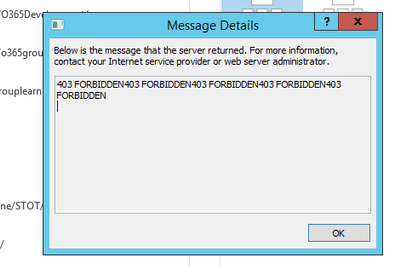
I am trying to see and edit workflows on our SP Online site (backend SP 2013) but all I can see is that they exist. When I try to open them up in SharePoint Designer 2013 I get this: I am using 64 bit SP Designer 2013. I can't seem to install any patches because it says it effects nothing installed on my machine yet I clearly have it installed and I clearly have issues addressed in the patches. I have already seen a post like this (and others on the web) about the patch but apparently I can't use that. Is there another fix? How else can I edit these workflows?4.3KViews0likes3Comments
Workflow based on multi choice list
I have a workflow in SPD 2010. I have an Infopath 2013 form for a sharepoint 2013 list. The form has a multi-choice list with six departments. Each department that is selected revels a hidden section with it's own set of fields to be filled in by a user. For example, one of the fields in each hidden section is a date field showing when the work in that section was completed. The workflow would auto populate a completion date for the form once all the selected departments' "date complete" fields where entered. Could someone point me in the right direction? Thanks in advance!2.7KViews0likes2CommentsFunctionality of InfoPath and SharePoint Designer-Created SharePoint Content After 2026
What will will happen to existing forms and workflows created with InfoPath and SharePoint Designer when they go completely out of service in 2026? Will everything created with them still work the same? Or will the mechanisms that once existed that allowed these to work slowly be phased out by then? When considering whether or not my company should invest in the time and energy it will take to move everything to a Modern site, if we will still be able to maintain the functionality we have for some time. I suppose I am looking for more information on what, if anything, not switching from InfoPath and SharePoint Designer will do to our user experience and/or why people recommend switching sooner than later—versus switching to Modern sites (We are using the Classic experience right now), and . I want to be able to present the most well-rounded information to my staff. I've done some digging myself, definitely, but I'm thinking people here might have even more poignant/focused positions on the subject. Who better to know our products and the benefits of transitioning them to newer technologies than those of us who work with them every day, right? That's my thought, anyway. (We are on SharePoint Online, btw.) Thank you, in advance.1.9KViews0likes2Comments
Booking System - SharePoint
I created a Booking System using List of Sharepoint, the requirments are as follow Booking Date: This is set to select the desire Date but not today Date or Past Date "I added the Enforce unique values and add the Column validation for it =[Booking Date]>TODAY() with the message to appear as "The date entered cannot be today or in the past." Booking Time: This is set as (Dropdown List) Morning: 07:00am-03:00pm Evening: 04:00pm -11:30pm All day: 07:00am- 11:30pm Now the requirement is If someone wanted to book Lets say on 31-12-2021 can able to book Morning and if someone/Same Person wanted to book on same day evening time can be done but the Uniqe Value of booking date is the issue, it dont allow double booking and if i removed this uniqe value then many ppl can book at same Day and time. And if someone click one All Day even then no one can book Morning and Evening. If anyone knows how please support, Validation or Java Script. Kindly provide the full details im new to this please. Thanks Inadvance.1.5KViews0likes0Comments
Designer Workflow Email Highlighting Issue
I have searched for weeks for an answer to this issue. I have a user who regularly builds SharePoint 2013 workflows in Designer. Since we upgraded to Office 2016, whenever she tries to have a workflow send an email, the workflow highlights any list fields in the email with a gray background. I have tried reinstalling designer to no avail. Anyone else know what is going on or have any suggestions? Much appreciated.Solved1.5KViews0likes2Comments
SPOnline OOO Calendar & Workflow w/ SPDesigner
Hi, I was finally able to connect my SPOnline OOO/Leave Request calendar to SP Designer and I've run into a problem. This calendar and workflow was created before my time here, and I'm currently familiarizing myself with Designer. When a request is processed and approved, it shows up onto the calendar like this: https://imgur.com/6NQsvoy However, when I click on "IT Test" in the green box, I am redirected to: https://imgur.com/YwbfUFY Essentially, we want to see who was approved, the duration of approval, and a short description - much like the requester fills out when making the original request like this: https://imgur.com/c2OtKVP After messing around in SP Designer, I can't seem to find how to solve this problem. Here are the screenshots I have taken of my SP Designer menu/screen: https://imgur.com/5HX7VfR & https://imgur.com/I7H5SbO I'm sure it has something to do with the workflows? I've also looked into the "Forms" box on the last two screenshots, and couldn't find a solution. Any help would be greatly appreciated.901Views0likes1Comment
SharePoint custom theme toggles to a default Blue after a published site page refresh.
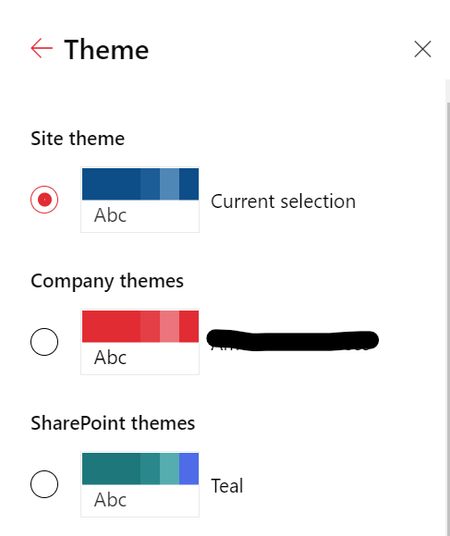
I have created a SharePoint subsite and applied a custom theme to it. The page looks good until I publish it. After it is published, once I refresh the page, it quickly toggles to a default blue theme. The theme was created using the custom PowerShell script as below, $themepalette = @{ "themePrimary" = "#e81a2b"; "themeLighterAlt" = "#fef5f6"; "themeLighter" = "#fbd8db"; "themeLight" = "#f8b6bb"; "themeTertiary" = "#f1707b"; "themeSecondary" = "#eb3342"; "themeDarkAlt" = "#d11726"; "themeDark" = "#b01320"; "themeDarker" = "#820e18"; "neutralLighterAlt" = "#f8f8f8"; "neutralLighter" = "#f4f4f4"; "neutralLight" = "#eaeaea"; "neutralQuaternaryAlt" = "#dadada"; "neutralQuaternary" = "#d0d0d0"; "neutralTertiaryAlt" = "#c8c8c8"; "neutralTertiary" = "#595959"; "neutralSecondary" = "#373737"; "neutralPrimaryAlt" = "#2f2f2f"; "neutralPrimary" = "#000000"; "neutralDark" = "#151515"; "black" = "#0b0b0b"; "white" = "#ffffff"; } Add-SPOTheme -Identity "ThemeName" -Palette $themepalette -IsInverted $false879Views0likes0Comments