sentinel
18 Topics
How to export list of all connectors
Hi, I'm trying to export all the connectors (both connected and not) for review. I've experimented with the Powershell module, az.securityinsights, which does give me the command get-AzSentinelDataConnector. However this only produces the following:- AzureSecurityCenter AzureActiveDirectory AzureAdvancedThreatProtection MicrosoftCloudAppSecurity MicrosoftDefenderAdvancedThreatProtection Office365 ThreatIntelligence yet there are 125 in total. What might I be doing wrong ? Thanks, JamieSolved5.7KViews0likes4Comments
forward logs to Log Analytics
how do i forward logs and alerts generated from MS Defender Security Center to Log analytics to be used in Sentinel ? there is an on preview connector on sentinel but i dont seem to find the configuration on the Defender security center side? tnx5.5KViews0likes2Comments
KQL: setting query time leads to problem in watchlist column projecting
Hello to the community! I have stumbled upon a very strange issue when using watchlists. I have a watchlist with 2 columns (userPrincipalName,allowedActivity) that I am then using to whitelist activities. Watchlist is imported using: let WhitelistedUsers = _GetWatchlist("testQuery") | project userPrincipalName, allowedActivity; Then I wanted to set it to a specific time frame to test it on given data set: set query_now = datetime("1/14/2022, 1:45:46.556 PM"); Problem is that when setting my query for a specific time, I get the following error from the watchlist: 'project' operator: Failed to resolve scalar expression named 'userPrincipalName'. Commenting the set query_now solves the project problem (not my problem though). I tried to set the time before and after watchlist import but that does not solve the issue. I could not find any posts around the topic (quite a specific one), so anyone observed similar behaviors or has a possible explanation? I can probably work around the set query_now with other functions but I gotten used to it, and find this behavior extremely strange4.9KViews0likes5CommentsAMA: Microsoft SIEM & XDR: unified security operations
At Microsoft Ignite we announced that we are bringing our Microsoft Sentinel and Microsoft Defender XDR products together to deliver an optimized and unified security operations experience. We are combining the full power of these products into a single portal enhanced with more comprehensive features, automation, guided experiences, and Microsoft Security Copilot. Bring your questions to this Ask Microsoft Anything (AMA) as members of our Microsoft Security engineering team bring clarity and insights about this new experience. This session is part of the Microsoft Security Tech Accelerator. RSVP for event reminders, add it to your calendar, and post your questions and comments below! This session will also be recorded and available on demand shortly after conclusion of the live event.4.4KViews4likes41CommentsSplitting single-tenant Microsoft Defender XDR Sentinel logs in multiple company scenarios
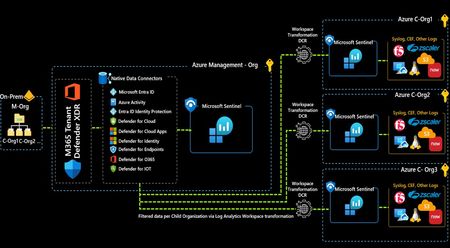
This article describes a simple, yet effective solution for the problem of segregating Microsoft Defender XDR and Entra ID Sentinel logs ingestion in a single-tenant with multiple companies scenario, leveraging Log Analytics workspace transformations and some simple KQL query statements.Sentinel Notebook: Guided Hunting - Domain Generation Algorithm (DGA) Detection
Overview This notebook, titled “Guided Hunting - Domain Generation Algorithm (DGA) Detection”, provides a framework for investigating anomalous network activity by identifying domains generated by algorithms, which are often used by malware to evade detection. It integrates data from Log Analytics (DeviceNetworkEvents) and employs Python-based tools and libraries such as “msticpy”, “pandas”, and “scikit-learn” for analysis and visualization. DGA detection is crucial for cybersecurity as it helps identify and mitigate threats like botnets and malware that use dynamically generated domains for command-and-control communication, making it a key component in proactive threat hunting and network defense. Link: https://github.com/GonePhishing402/SentinelNotebooks/blob/main/DGA_Detection_ManagedIdentity.ipynb What is Domain Generation Algorithm and How to Detect it? A Domain Generation Algorithm (DGA) is a technique used by malware to create numerous domain names for communicating with Command and Control (C2) servers, ensuring continued operation even if some domains are blocked. DGAs evade static signature detection by dynamically generating unpredictable domain names, making it hard for traditional security methods to identify and blacklist them. Machine learning models can effectively detect DGAs by analyzing patterns and features in domain names, leveraging techniques like deep learning to adapt to new variants and identify anomalies that static methods may miss. How to Run the Notebook Log in with Managed Identity This notebook requires you to authenticate with a managed identity. The managed identity can be created from the Azure portal and must have the following RBAC: - Sentinel Contributor - Log Analytics Contributor - AzureML Data Scientist - AzureML Compute Operator Replace the [CLIENT_ID] with the client ID for your managed identity. This can be obtained from the Azure portal under Managed Identities -> Select the identity -> Overview. Note: This notebook will still work if you choose to authenticate with just an azure user using the CLI method as well. Import Libraries This code block is used to import the necessary libraries and label the “credential” variable to use the ManagedIdentityCredential() library. Setup msticpyconfig.yaml This section just pulls the msticpyconfig.yaml to use later on in the notebook. Ensure this is setup before running this notebook and in your current working directory. Setup QueryProvider The query provider is setup for Azure Sentinel. This does not need to be changed unless you want to use a different query provider from msticpy. Connect to Sentinel This code block is used to connect to Sentinel with the managed identity to the workspace specified in your msticpyconfig.yaml. You should see a “connected” after running this code block. DGA Model Creation This code block is designed to use CountVectorizer() and MultinomialNB() to create a model called dga_model.joblib and save it to the path specified in the “model_filename” variable. It is important to change this path specific to your environment. You must give the algorithm data to learn from in order to be effective. Download the domain.csv located here and upload to your current working directory on Azure Machine Learning Workspace: DGA_Detection/data/domain.csv at master · hmaccelerate/DGA_Detection You must also change line 10 in this code block to have the “labeled_domains_df” point to the domain.csv in your environment. Once you run the code block, you should see the model saved and the model accuracy. This number will vary depending on the data you are giving it. Apply dga_model.joblib to Sentinel Data This code block uses the model that we generated in the previous block and runs it against our data we specific in the “query” variable. This is using domain names from the “DeviceNetworkEvents” table in MDE events. The “parse_json” was used in our KQL to extract the appropriate sub-field needed for this search. When this model is run against the data, it will try to determine if any domains in our environment are associated with domain generation algorithms (DGA). If the “IsDGA” column contains a value of “True”, the model has determined that the characteristics of that domain matches a DGA. Here is what the output will look like: Output All Results to CSV This code block will output all the results above to a CSV called “dgaresults.csv”. Change the “output_path” variable to match your environment. Filter DGA Results to CSV This code block will output just the DGA results above to a CSV called “dgaresults2.csv”. Change the “output_path” variable to match your environment. How to Investigate these Results Further You can take the domain results that match DGA and find the correlating IP to see if it matches any threat intelligence. Correlate findings with other security logs, such as firewall or endpoint data, to uncover patterns of malicious behavior. This approach helps pinpoint potential threats and enables proactive mitigation. We can also create logic apps to automate follow-on analysis of these notebooks. This will be covered in a later blog.
Securing Enterprise AI Agents with Microsoft Sentinel
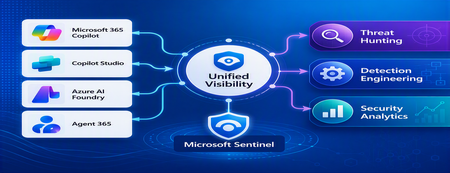
1. Introduction Enterprise adoption of Generative AI is accelerating rapidly through Microsoft 365 Copilot, Copilot Studio, Azure AI Foundry Agents, Security Copilot, and custom AI agents integrated with business applications. Unlike traditional SaaS applications, AI agents can: Access enterprise data Query internal knowledge repositories Invoke APIs and MCP tools Execute workflows Interact with business applications Make decisions on behalf of users While these capabilities improve productivity, they introduce a new attack surface that security teams must monitor and secure. Common AI threats include: Prompt Injection Cross Prompt Injection Attacks (XPIA) Jailbreak Attempts Unauthorized Tool Invocation Data Exfiltration through AI Agents Agent Identity Abuse Excessive Data Access Malicious MCP Tool Execution Traditional SOC monitoring platforms were designed for users, devices, applications and infrastructure—not autonomous AI systems. To address this challenge, Microsoft provides a comprehensive AI security monitoring framework built around: Agent 365 Observability Microsoft Agent Identities Microsoft Copilot Logs Defender XDR Defender for AI Microsoft Sentinel Together these components provide end-to-end observability of: User prompts Agent execution paths Tool invocations Safety signal detections Agent identities Security alerts 2. Reference Architecture AI Security Monitoring Architecture 3. Integration Architecture Microsoft provides multiple telemetry sources that complement one another. 3.1 Agent Runtime Telemetry Sentinel Data Connector Agent 365 Data Connector Table UnifiedAgentObservability Captures runtime behavior of AI agents including: User prompts Session IDs Conversation IDs Agent identities MCP tool invocations Connector invocations Tool arguments Tool responses Request payloads Response payloads Execution errors This dataset provides the forensic trail of everything an AI agent performed. 3.2 Agent Governance and Asset Inventory Sentinel Data Connector Microsoft Agent Identities Provides visibility into: Agent inventory Agent blueprint inventory Ownership Relationships Governance metadata Risk context This allows SOC teams to answer: Who owns this agent? What permissions does it have? Which business unit deployed it? Which related agents exist? 3.3 Copilot Audit and Usage Monitoring Sentinel Data Connector Microsoft Copilot Logs Connector Table CopilotActivity Provides: Copilot usage auditing Operational visibility User interaction tracking Useful for governance, compliance and adoption reporting. 3.4 AI Safety Telemetry Sentinel Data Connector Microsoft Defender XDR Connector Table CloudAppEvents CloudAppEvents provides AI safety signals such as: Prompt Shield detections Prompt Injection attempts Cross Prompt Injection Attacks (XPIA) Jailbreak-related verdicts Unsafe prompt classifications Think of CloudAppEvents as answering: "Was the prompt malicious?" 3.5 AI Security Alerts Sentinel Data Connectors Microsoft Defender XDR Microsoft Defender for Cloud Tables SecurityAlert SecurityIncident Used for: AI attack detections Security incidents Correlated investigation workflows 4. Understanding the Two Most Important AI Tables CloudAppEvents Focuses on AI Safety Questions answered: Was Prompt Shield triggered? Was this a jailbreak attempt? Was XPIA detected? Was the prompt suspicious? UnifiedAgentObservability Focuses on Agent Runtime Behavior Questions answered: What tool was invoked? Which connector executed? What arguments were passed? What data was returned? What actions did the agent perform? 5. Advanced Threat Hunting Scenarios The Agent365 Observability hunting guide contains several investigation scenarios that can be used directly in Microsoft Sentinel. Reference: Agent 365 Observability — AI Agent Telemetry Hunting https://github.com/SCStelz/security-investigator/blob/main/queries/cloud/agent365_observability.md 5.1 Prompt Injection Detection Detect prompts containing indicators such as: Ignore previous instructions Reveal system prompt Developer mode Disregard safety controls Investigation workflow: Review Tool Activity This allows analysts to determine whether a suspicious prompt resulted in downstream actions. 5.2 Session Reconstruction One of the most powerful capabilities of UnifiedAgentObservability is session reconstruction. Analysts can correlate: This creates complete forensic timelines. 5.3 MCP Tool Auditing Monitor all MCP activity including: query_lake Graph API tools ServiceNow connectors SharePoint connectors Custom enterprise tools Questions answered: Which tool was used? Who triggered it? What parameters were supplied? What data was returned? 5.4 Sensitive Data Access Monitoring Monitor AI agent interaction with: Employee records Customer data Financial information SharePoint repositories HR databases Useful for identifying: Data exfiltration attempts Excessive access patterns Sensitive data exposure 5.5 Query Lake Monitoring The GitHub hunting guide introduces monitoring of: query_lake RunAdvancedHuntingQuery Analysts can inspect: Actual KQL submitted Target workspaces Data sources queried Scope of access This provides visibility into AI-driven security investigations. 5.6 New Tool Detection Identify newly observed tool usage. Examples: Unauthorized MCP servers Newly registered connectors Unapproved tools Unexpected integrations This use case is particularly useful for governance programs. 5.7 Tool Failure Monitoring Monitor: Permission failures Connector failures Application errors Access-denied responses A sudden increase in failures may indicate: Reconnaissance activity Misconfiguration Privilege abuse attempts 6. Detection Engineering Opportunities Organizations can create Sentinel Analytics Rules for: 6.1 Prompt Injection Detection Developer Mode prompts Prompt Override attempts System Prompt disclosure requests 6.2 Jailbreak Attempt Detection Safety bypass attempts Role manipulation prompts Instruction override patterns 6.3 Unauthorized Tool Usage New MCP tools High-risk connectors Rare tool executions 6.4 Sensitive Data Access HR data queries Identity information retrieval Large-volume exports 6.5 Agent Identity Abuse Ownership changes Unexpected agent activity Agent-to-agent anomalies 7. Data Lake Exploration and Long-Term Analytics Because agent telemetry resides within Sentinel Data Lake, organizations can perform: Long-term AI investigations Historical AI attack analysis Agent baselining Governance reporting Trend analysis Tool inventory reporting Example dashboards include: Top Prompt Injection Attempts Most Active Agents High-Risk MCP Tools Agent Ownership Analysis AI Security Incidents Sensitive Data Access Trends 8. Summary AI agents represent the next major computing platform, but they also introduce a completely new attack surface. To effectively secure enterprise AI solutions, organizations require visibility across: User interactions Agent execution paths MCP tool usage Prompt safety signals Agent identities Security detections Microsoft Sentinel provides this unified view by integrating: Agent 365 Observability UnifiedAgentObservability Microsoft Agent Identities Microsoft Copilot Logs CloudAppEvents Defender XDR Defender for AI By combining AI runtime telemetry with AI safety signals and Defender detections, security teams can move beyond traditional monitoring and build a modern SOC capability for threat hunting, incident response, governance and forensic investigations across Microsoft 365 Copilot, Copilot Studio, Azure AI Foundry and future AI agent ecosystems. Reference: https://github.com/SCStelz/security-investigator/blob/main/queries/cloud/agent365_observability.mdCloud Discovery Data Import - Sentinel vs Cloud App Sec
Hi, Proxy logs benefit both Sentinel and Cloud App Security Cloud Discovery. What is the most sensible way of getting proxy log data into both with least amount of moving parts? For example, ZScaler emits CEF which can be consumed by Azure Log Forwarder into Sentinel, but then Cloud App Security cannot pick up from Sentinel.1.9KViews0likes3Comments
Linux Connectors - MCAS & Sentinel
Just checking – as we are looking at trying to get more info feeding in to the solution and there is a Bluecoat Proxy + Cisco ASA transferring to Palo Alto. As there is no “connector” listed for Bluecoat in Sentinel, but there is one listed in MCAS, would it make sense to simply ingest the Bluecoat into MCAS and then have MCAS alerts feed into Sentinel? While this might not be ideal that Sentinel does not have the raw data, at least it will have the Alerts, and by aggregating the data it will reduce the storage needs in Sentinel? Would I be correct in thinking that it’s not possible to run a single Linux Connector that can run various tasks in a PoC scenario? So for the Cisco ASA & the Palo Alto we’d likely need two separate Linux Connectors, one for each task?Solved