remote desktop
30 Topics
TSplus as an alternative to RDS without paying RDS license fees to microsoft
Hello, We are evaluating whether to use TSplus (https://www.terminalserviceplus.eu/) as an alternative to Microsoft RDS/Terminal Server. According to TSplus we can not install or uninstall the RDS role, so we do not use RDS CALs and use TSplus CALs. This way it would not be necessary to pay for Windows Remote Desktop licenses. Is this correct? I can't find any information from Microsoft about it reading documentation. As I see it is correct that using TSPlus without installing Microsoft RDS it would not be necessary to pay Remote Desktop licenses. Could someone confirm me that it is so?28KViews0likes19Comments
Remote Desktop Web Access HTML5 certificate error after replacing
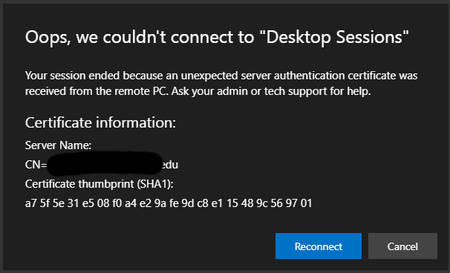
Hi everyone. We needed to update our certificate in our RDS servers. Unfortunately, now users receive this alert: I know this is old, but I was hoping maybe someone found a better solution. Stuff that I tested to reduce the problem: clear cookies for specific sites at the end of a session clear images and files when the browser close (running this manually solves this most of the time). Deployed the certificate thumbprint as GPO. (didn't have to before but maybe will assist later) Allow .RDP files from valid publishers and user's default .RDP settings (we use a wildcard certificate, so this is ashot in the dark.) Any help would be appreciated. Rahamim.27KViews0likes24CommentsOffice on RDS 2019 server
Hi, We have licenses for both office 2019 and office 365. We would like to install office in a way that users who don't have office 365 license can use 2019. I installed office 365 as a shared license but office keeps showing license issues. Is there a way to use both versions? Rahamim.Solved22KViews0likes3Comments
Windows Server 2022 App Compatibility FOD breaks Remote Desktop
When installing the App Compatibility FOD on Windows Server 2022, Remote Desktop connections to the server seem to be no longer possible. I think this is a bug, but haven't found any other reports. Can someone confirm? How to reproduce: Install Windows Server 2022 Standard Core (physical and virtual installs are equally affected). In SConfig, enable Remote Desktop. Connect to the server via Remote Desktop using the default 'Administrator' account. Works fine. Install the App Compatibility FOD and reboot: Add-WindowsCapability -Online -Name ServerCore.AppCompatibility~~~~0.0.1.0 Restart-Computer Try establishing a Remote Desktop connection again. Doesn't work. You either get a blank screen or get disconnected immediately. Install all applicable Windows Updates and try again. No change. Remove the App Compatibility FOD and reboot: Remove-WindowsCapability -Online -Name ServerCore.AppCompatibility~~~~0.0.1.0 Restart-Computer Try again. Remote Desktop functionality is now restored. This did work fine in Server 2019.Solved18KViews3likes32Comments
remote desktop connection - Black Screen (nothing loads)
I am having some issues with a Windows 2012 R2 Standard with remote desktop services installed. There are issues for a particular account that is experiencing login issues. When they log in, all they get is a black screen, nothing loads. I have cleared the user profile, closed all sessions for the user and have successfully still been able to log in under other accounts on the same server. When i check via task manager, there are only 3 running processes for the user: Client server runtime process Desktop window manager windows logon application In event viewer, under system, there is a common error log when they (no one else) logs in: Unable to start a DCOM Server: {AAC1009F-AB33-48F9-9A21-7F5B88426A2E} as Unavailable/Unavailable. The error: "5" Happened while starting this command: C:\Windows\system32\TSTheme.exe -Embedding Any known issues for this one? There have been no recent windows updates that we have applied before this first started as well..Solved17KViews0likes4Comments
On-Prem RDS NLA troubleshooting
Hi, I'm working to support integration of my customer with a new parent company. Our environment, we'll call this Site A: Windows Server 2016 w/Essentials Role, Windows 2016 w/MultiPoint Role, Windows 10 Pro desktops (1909). Local AD Domain runs AAD Connect using password hash sync. Is now connected using site-to-site VPN and 2-way forest trust to.... (We have site-to-site VPN to both Site 1 and Site 2 below) Their environment: Site 1: 2x DCs Windows Server 2016 Std 1x Terminal Server running Windows Server 2016 DC *this is just a Windows Server 2016 set up as a Session Host, there's no RD Gateway, Broker, etc because those things are hard <shrug> Site 2: 1x DC Windows Server 2012 Mostly people connecting into our Multipoint server Our users connect from the Windows 10 desktops and MultiPoint server (joined to our domain) into the Site 1 Terminal Server (joined to the remote domain) and primarily run an Access app there. On a frequent basis our users get disconnected - they usually get the generic disconnected message....when they try to re-connect they generally get an NLA error. Anecdotally it appears to happen when Site A - Site 2 VPN connection drops. I understand using NLA the RDS server tries to communicate back to the domain to authenticate the machine that's trying to connect.....but every article I find about RDS and NLA is "how to disable NLA," which we don't want to do. Any resources or links discussing how to troubleshoot NLA in the RDS context? Beyond that....would the RDS be trying to authenticate the client PCs via the trust through its own domain, or contacting our DC directly? Which domain should we be nltest-ing? Thanks in advance! -Greg C9KViews0likes7CommentsDisable RDP Certificate Warning
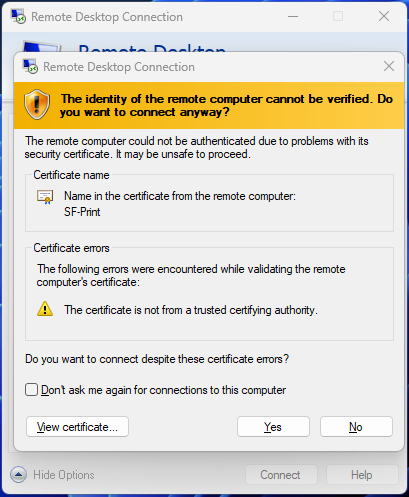
Hi, In the past, members of our organisation have mentioned that when they used RD Web Access to remotely connect to their workstations, they never received the RDP Certificate Warning popup at all. Is there a way to prevent this pop up from ever appearing at all? We currently have RD Web Access configured on a Widows Server 2022 install. Is there possibly a hidden setting for this? Kind Regards, Tamoor5.9KViews0likes2Comments
RDP Works, RemoteApps Do Not
Hi Everyone, We are having an issue with RemoteApps. This has recently stopped working. We can still RDP into the server and run the programs just fine. When we log into the RD Gateway and click on a published app we are prompted for credentials and authenticated. After that, we get the RemoteApp Disconnected error saying we can't connect for one of the 3 reasons; user account not authorized, computer not authorized, or incompatible authentication method. We have followed many articles and are still stuck. Any help would be great right now. Thanks!!Solved4.9KViews0likes1CommentHyper-V VM blue screen
Hi everyone, I have a terminal server VM which is part of a 2019 RDS farm. The server is 40 giga memory with 16 cores and 320 GB disk (100 of them are free to make sure that a dump file can be created just in case.) I also have another 100 GB disk to dump the .DMP file. I also configured the NUMA of the VM: max processors per V-NUMA node - 16 Max memory per V-Numa - 20GB Max V-NUMA nodes per socket - 4 Up until the past 2 days we had minimal crashes. The server does have more than 150 profiles opened, and we do use OneDrive on the server installed to all users. We do have SAP and SPSS installed on the TS along with Office 365 shared license. The reason I mention all these things is to maybe help point me in the right direction. Now for the problem - Every time the server crashes I have a Hyper-V Worker error 18950 with the reason for the blue screen - "has encountered a fatal error. The guest operating system reported that it failed with the following error codes: ErrorCode0: 0x3B, ErrorCode1: 0xC0000005, ErrorCode2: 0xFFFFF8012FA65284, ErrorCode3: 0xFFFFD908E25FDD80, ErrorCode4: 0x0. If the problem persists, contact Product Support for the guest operating system". When I do catch the blue screen, it reports something about cldflt.sys. Looks like a service issue which I can't figure out. The dump file is 4 GB and when I try to debug with WINDBG it says the file is corrupt. If someone has an idea other than rebuild the server. I would be more than happy to hear. I can upload the dump file if someone thinks they can do something with it. Thanks in advance. Rahamim.3.8KViews0likes5CommentsIssues with Remote Desktop access on Server 2019 Virtual Server
Hi everyone, I'm having some issues with using a terminal server that I've setup inside of Server 2019. We currently have a company with about 30-40 employees that use a VPN and remote desktop into a server that is virtually hosted (VMware) on a local server. I'm running into an issue where some employees remote in and the session freezes at either the login screen or afterwards using a program on the server. This happens almost daily, but does not affect everyone at the same time. If they exit the connection and go back in, it will work properly for a few seconds and then freeze again. It also seems to register any clicks on the server when frozen, like if I open a program it will be open the next time I reconnect. It's almost like the viewing of the screen is frozen but the session is still working properly. I find that a server reboot or a restart of the Remote Desktop service will fix this issue, usually for the full day. I've created a task that restarts the service early in the morning, but the issue sometimes still crops up. There are no errors in the event log as far as I can tell. This issue has been happening ever since I created this new server and gave it the remote desktop roles. Please let me know at least a direction I can look into, or what information is needed for more troubleshooting. Thanks in advance, Devon LaVoy Systems Administrator3.8KViews0likes2Comments