powershell
103 TopicsShould I use automation account workbook or a azure function?
I have a powershell script I want to run daily (change language and region settings for onedrive mysites) I'm wondering what the best approuch would be: use a workbook with azure automation? Or maybe use an Azure function? thanks for any inputSolved38KViews0likes2Comments
Install AzureAD and AzureADPreview module in PowerShell Function App
One wants to install AzureAD and AzureADPreview in his/her windows PowerShell function app. Modules are already input in requirements.psd1, managedDependency is also enabled in host.json. But when executing functions in Azure, error "Could not load file or assembly…" shows up. Analysis: The problem is rooted in the compatibility issue between PS7(PowerShell Core 7) and module AzureAD and AzureADPreview. As of now, the Functions runtime with PowerShell 7 is being rolled out globally. If one wants to check the powershell Core Version, he/she can simply goes to Function Portal --> Configuration --> General settings. AzureAD works out of the box with Powershell 7! People need to import AzureAD with the -UseWindowsPowershell switch. Import-Module AzureAD -UseWindowsPowerShell Below is the detailed step one can use in order to install AzureAD and AzureADPreview module in Azure Function App. Step 1: In requirements.psd1, input the two modules with their versions, wildcard is recommend to get the latest version of module; @{ # For latest supported version, go to 'https://www.powershellgallery.com/packages/Az'. # To use the Az module in your function app, please uncomment the line below. # 'Az' = '6.*' 'AzureADPreview' = '2.*' 'AzureAD' = '2.*' } Step 2: make sure “managedDependency” is set to true in host.json; { "version": "2.0", "logging": { "applicationInsights": { "samplingSettings": { "isEnabled": true, "excludedTypes": "Request" } } }, "extensionBundle": { "id": "Microsoft.Azure.Functions.ExtensionBundle", "version": "[1.*, 2.0.0)" }, "managedDependency": { "enabled": true } } Step 3: import module with below syntax: Import-Module AzureAD -UseWindowsPowerShell Import-Module AzureADPreview -UseWindowsPowerShell Results: Modules will be presented under C:\home\data\ManagedDependencies\xxxxxx.r. One can also invoke methods this module provides in his function code.36KViews6likes1CommentAzure Landing Zones Accelerators for Bicep and Terraform. Announcing General Availability!
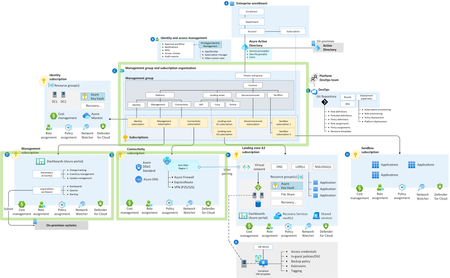
Azure Landing Zones Accelerators are designed to simplify the process of onboarding your Infrastructure as Code into a robust CI / CD pipeline with Azure DevOps or GitHub. Learn more about what the Accelerator can do for you and why you should be using it.33KViews12likes5CommentsAzure DevOps - How to monitor the files & folders placed into the Build Pipeline Workfolder
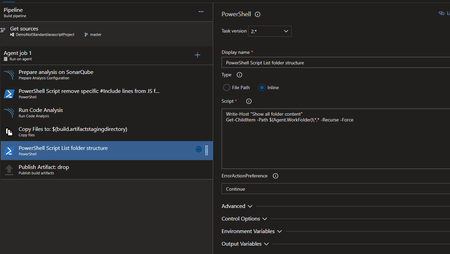
When we are building a new Pipeline into Azure DevOps, we don't have any visibility on the server itself and his content placed into work folder. In many situation, like debugging, that vision is really useful to find a file or a path to apply into another task (like Code Coverage report path). To do that, the simplest option is to place into the pipeline flow one PowerShell step with this simple execution. In Yaml mode: - powershell: | Write-Host "Show all folder content" Get-ChildItem -Path $(Agent.WorkFolder)\*.* -Recurse -Force errorActionPreference: continue displayName: 'PowerShell Script List folder structure' continueOnError: true In visual editor mode: At the next execution, you will have into the Pipeline execution log all folders and files placed into the agent workplace like: You can use the search button or View raw log option to look the file or folder you are looking for. That task could be disable in standard usage, and enable only when you need to debug. Fabrice Romelard29KViews0likes0Comments
Azure Powershell DSC vs Ansible
Hey Guys, I just want to find out what are you using for Desired State Configuration on Azure. Do you use built in Powershell DSC or you are using Ansible with DSC enabled for Windows Machines? I am in the process of deciding which solution should the best for us. Also I would like to automate on-prem infrastructure. Which solution do you use? Regards, Wojciech22KViews0likes7CommentsHow to deploy your Web App from Azure Pipeline with restricted access.
More and more users now choose to integrate App Service with Azure DevOps to streamline build and deployment process of their applications. The SCM site is the engine behind App Service for deployment, meaning that the release pipeline of Azure DevOps deploys code to the SCM site of an app. In most scenario, SCM site can be reached through public internet. Therefore, ensuring secure access to the site becomes more important. We can enable access restriction on SCM site or set up other firewall solutions to control incoming traffic to the site. Here we will introduce you on how to identify and whitelist deployment traffic from Azure pipeline to SCM site with access restriction. This article also applies when setting up the same rules in other firewall solutions.21KViews1like6Comments
Get AzADGroupMembers from nested groups
Hi, I'm trying to get all members of a group (including nested groups members) to add to a teams private channel. We have a script to add members of a group to a private channel, but it will not add nested groups members. $members = Get-AzADGroupMember -ObjectId 'source_groupID_here' | select mail $tal = 0 foreach ($member in $members) { $User = $member.mail Add-TeamChannelUser -GroupId 'teams_groupID_here' -DisplayName 'Private_channel_name' -user $User $tal += 1 } $tal Is there a way to add those who are members of the nested groups without having to add each nested group individually?19KViews1like3Comments