power automate
329 Topics
Is there a way to send an email with an attachment for a form submission
Hello. I couldn't find a clear answer on this. Is there a way to use power automate to send attachment(s) via email to a form sender depending on their answers on a form? Example - Information request Would you like more information on dogs - ( ) yes ( ) no Would you like more information on cats - ( ) yes ( ) no Would you like more information on rabbits - ( ) yes ( ) no If the person selects yes for one of the options it would send them a specific PDF via email. If they select yes for multiple options, it would send them a single email with multiple PDFs that coordinate with the questions. The PDFs are available to pull from either my one drive or share point.256Views0likes1Comment
Is there any solution to getting question names yet for a form submission in Power Automate?
It's been about 10 years now. Surely there is a solution to dynamically retrieve question names without needing a janky britttle workaround that may or may not work, not just IDs (get form response etc), without having to rely on a hard coded list of questions with answers inserted in against them.691Views0likes1CommentMicrosoft Power Platform community call - June 2026
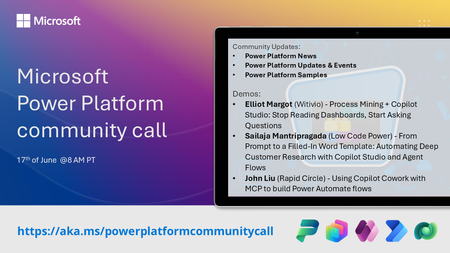
💡 Power Platform monthly community call focuses on different extensibility options for builders, makers and developers within the Power Platform. Typically demos are from our awesome community members who showcase the art of possible within the Power Platform capabilities. 👏 Looking to catch up on the latest news and updates, including cool community demos, this call is for you! 📅 On 17th of June we'll have following agenda: Power Platform Updates & Events Latest on Power Platform samples Elliot Margot (Witivio) - Process Mining + Copilot Studio: Stop Reading Dashboards, Start Asking Questions Sailaja Mantripragada (Low Code Power) - From Prompt to a Filled-In Word Template: Automating Deep Customer Research with Copilot Studio and Agent Flows John Liu (Rapid Circle) - Using Copilot Cowork with MCP to build Power Automate flows 📅 Download recurrent invite from https://aka.ms/powerplatformcommunitycall 📞 & 📺 Join the Microsoft Teams meeting live at https://aka.ms/PowerPlatformMonthlyCall 💡 Building something cool for Microsoft 365 or Power Platform (Copilot, SharePoint, Power Apps, etc)? We are always looking for presenters - Volunteer for a community call demo at https://aka.ms/community/request/demo 👋 See you in the call! 📖 Resources: Previous community call recordings and demos from the Microsoft 365 & Power Platform community YouTube channel at https://aka.ms/community/videos Microsoft 365 & Power Platform samples from Microsoft and community - https://aka.ms/community/samples Microsoft 365 & Power Platform community details - https://aka.ms/community/home448Views0likes1Comment
Feature Request – Read-only and Locked Fields for Pre-filled Microsoft Forms
Microsoft Forms has recently introduced support for pre-filled responses, which is a very valuable addition. However, the lack of read-only fields significantly limits its usability in real-world and enterprise application scenarios. In many workflows, especially those involving bots, kiosks, or guided user interactions, some fields must be pre-populated with system-generated data such as user identity, email, or contextual information. These fields need to remain visible to the user for transparency, but must not be editable in order to guarantee data integrity and prevent tampering. Currently, there is no reliable way to enforce this behavior. Even when using pre-filled URLs, users can still modify the values before submission. This creates a risk of data inconsistency and makes it difficult to maintain a secure and synchronized interaction between the client and backend systems. This is not just a UX limitation, but also a data integrity issue in integrated workflows. As a result, developers are forced to implement server-side validation and ignore user-provided values for critical fields, which defeats the purpose of pre-filling them in the first place. This forces developers to rely entirely on server-side validation, reducing the effectiveness of pre-filled data and introducing unnecessary complexity. While Power Apps can address this limitation, it is often too complex and heavy for simple scenarios where Microsoft Forms would otherwise be perfectly adequate. Suggested improvement: - Allow form fields to be marked as read-only or locked - Optionally support hidden or system fields - Allow pre-filled values to be protected against tampering - Preserve compatibility with pre-filled URLs This feature would enable Microsoft Forms to be used in secure, system-driven workflows without requiring migration to more complex platforms.500Views0likes1Comment
Power Automate not pulling all form answers
I have a flow that triggers fine using the "When a new response is submitted" but the "Get response details" is only returning a few of the answers submitted. I can see the full submission the the back end of forms but Power Automate is not pulling a lot of the submitted answers. It has worked fine for 50 times, the automation is long and complex so if possible id like to stay away from deleting and restoring the trigger and get response details...330Views0likes1CommentMicrosoft 365 & Power Platform Community call
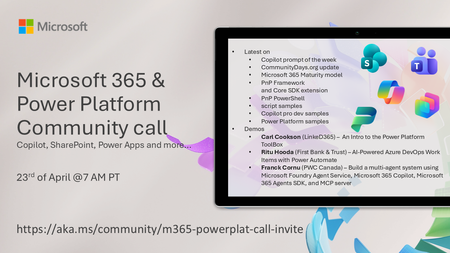
💡 Microsoft 365 & Power Platform Development bi-weekly community call focuses on different use cases and features within the Microsoft 365 and Power Platform - across Microsoft 365 Copilot, Copilot Studio, SharePoint, Power Apps and more. 👏 Looking to catch up on the latest news and updates, including cool community demos, this call is for you! 📅 On 23rd of April we'll have following agenda: Copilot prompt of the week CommunityDays.org update Microsoft 365 Maturity model Latest on PnP Framework and Core SDK extension Latest on PnP PowerShell Latest on script samples Latest Copilot pro dev samples Latest on Power Platform samples Picture time with the Together Mode! Carl Cookson (LinkeD365) – An Intro to the Power Platform ToolBox Ritu Hooda (First Bank & Trust) – AI‑Powered Azure DevOps Work Items with Power Automate Franck Cornu (PWC Canada) – Build a multi-agent system using Microsoft Foundry Agent Service, Microsoft 365 Copilot, Microsoft 365 Agents SDK, and MCP server 📅 Download recurrent invite from https://aka.ms/community/m365-powerplat-dev-call-invite 📞 & 📺 Join the Microsoft Teams meeting live at https://aka.ms/community/m365-powerplat-dev-call-join 👋 See you in the call! 💡 Building something cool for Microsoft 365 or Power Platform (Copilot, SharePoint, Power Apps, etc)? We are always looking for presenters - Volunteer for a community call demo at https://aka.ms/community/request/demo 📖 Resources: Previous community call recordings and demos from the Microsoft Community Learning YouTube channel at https://aka.ms/community/youtube Microsoft 365 & Power Platform samples from Microsoft and community - https://aka.ms/community/samples Microsoft 365 & Power Platform community details - https://aka.ms/community/home 🧡 Sharing is caring!149Views0likes0CommentsMicrosoft 365 & Power Platform Community call
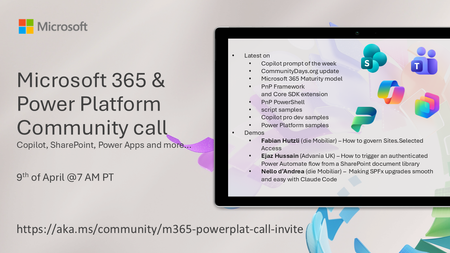
💡 Microsoft 365 & Power Platform Development bi-weekly community call focuses on different use cases and features within the Microsoft 365 and Power Platform - across Microsoft 365 Copilot, Copilot Studio, SharePoint, Power Apps and more. 👏 Looking to catch up on the latest news and updates, including cool community demos, this call is for you! 📅 On 9th of April we'll have following agenda: Copilot prompt of the week CommunityDays.org update Microsoft 365 Maturity model Latest on PnP Framework and Core SDK extension Latest on PnP PowerShell Latest on script samples Latest Copilot pro dev samples Latest on Power Platform samples Picture time with the Together Mode! Fabian Hutzli (die Mobiliar) – How to govern Sites.Selected Access Ejaz Hussain (Advania UK) – How to trigger an authenticated Power Automate flow from a SharePoint document library Nello d’Andrea (die Mobiliar) – Making SPFx upgrades smooth and easy with Claude Code 📅 Download recurrent invite from https://aka.ms/community/m365-powerplat-dev-call-invite 📞 & 📺 Join the Microsoft Teams meeting live at https://aka.ms/community/m365-powerplat-dev-call-join 👋 See you in the call! 💡 Building something cool for Microsoft 365 or Power Platform (Copilot, SharePoint, Power Apps, etc)? We are always looking for presenters - Volunteer for a community call demo at https://aka.ms/community/request/demo 📖 Resources: Previous community call recordings and demos from the Microsoft Community Learning YouTube channel at https://aka.ms/community/youtube Microsoft 365 & Power Platform samples from Microsoft and community - https://aka.ms/community/samples Microsoft 365 & Power Platform community details - https://aka.ms/community/home 🧡 Sharing is caring!270Views0likes0CommentsHave OneDrive or SharePoint files/folders on home screen of iPad without internet connection?
This. I'm on a big iOS project. We have several users who need files on an ipad when traveling, and be able to open them when there is no internet connectivity. These files aren't intended to be edited, just 'read only.' These files do not contain any sensitive corporate data. The content lives in SharePoint online and I'm using OneDrive as a bridge to their sharepoint site. BUT the files can only be viewed on the ipad within the OneDrive app without internet access. These are devices using user affinity enrollment. Initially, the solution for users was to use the 'Mark Offline' feature within the OneDrive iOS app. I used Power Automate to have it fetch new files found in OneDrive and move them to the teams SharePoint site. These shared devices are locked down (an understatement). These will be used by the least computer savy/literate people and so having them dive through OneDrive folder after folder, even offline, is a tall order to ask. I totally get it and don't want them doing that either. So now I have to move onto plan B. How can we put the files that live within OneDrive/Sharepoint onto the home screen without an internet connection when the ipad is 'out in the field.?' This would make it infinitely easier for them. The key here is to not have end users manually moving files around. We don't want them to even have to go into OneDrive and mark folders/files offline, if possible. We don't have the SharePoint app on them. I tried the SP app a while back, and it is a hot mess of garbage. I could revisit it. Whatever I can get to work of course we'll have to modify our Intune polices. Thoughts?465Views0likes1Comment
Guidance on Planner Premium, Dataverse and Power Automate
Hoping this title invites you to share more knowledge around Planner Premium, Dataverse and working with Automate Scenario: I have a user inside our company saying i need access to Dataverse since he wants to automate some task creation with regards to planner premium. I am pretty ok with that, so he needs a Power Automate Premium license. Although looking at the data in the Projects data tables in the default environment their business units are the root BU - getting a little concerned. Are all projects and related data available for all people that can read the Dataverse tables? If you have some insights or experience please comment :) Could they develop that in a development or sandbox environment before piping it to a designated environment? but there are no Projects tables in dev or in sandbox environment. Main problem: there's so much information about planner and power automate that it's impossible to actually find any guidance around this scenario amongst all classic planner hits1.6KViews0likes1CommentMicrosoft 365 & Power Platform Community call - Community demos
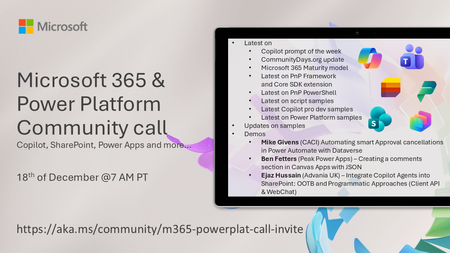
💡 Microsoft 365 & Power Platform Development bi-weekly community call focuses on different use cases and features within the Microsoft 365 and Power Platform - across Microsoft 365 Copilot, Copilot Studio, SharePoint, Power Apps and more. 👏 Looking to catch up on the latest news and updates, including cool community demos, this call is for you! 📅 On 18th of December we'll have following agenda: Copilot prompt of the week CommunityDays.org update Microsoft 365 Maturity Model update Latest on PnP Framework and Core SDK extension Latest on PnP PowerShell Latest on Copilot pro dev samples Latest on Power Platform samples Picture time with the Together Mode! Mike Givens (CACI) Automating smart Approval cancellations in Power Automate with Dataverse Ben Fetters (Peak Power Apps) – Creating a comments section in Canvas Apps with JSON Ejaz Hussain (Advania UK) – Integrate Copilot Agents into SharePoint: OOTB and Programmatic Approaches (Client API & WebChat) 📅 Download recurrent invite from https://aka.ms/community/m365-powerplat-dev-call-invite 📞 & 📺 Join the Microsoft Teams meeting live at https://aka.ms/community/m365-powerplat-dev-call-join 👋 See you in the call! 📖 Resources: Previous community call recordings and demos from the Microsoft Community Learning YouTube channel at https://aka.ms/community/youtube Microsoft 365 & Power Platform samples from Microsoft and community - https://aka.ms/community/samples Microsoft 365 & Power Platform community details - https://aka.ms/community/home 🧡 Sharing is caring!196Views0likes0Comments