partner center
130 Topics
Microsoft 365 EDU A5 in Partner Benefits
What are the terms and conditions for using Microsoft 365 EDU A5 in Partner Benefits? What purposes can we use these licenses for? For what purposes is this license provided to partners? We want to launch a tenant (non-production) in which our employees will be able to test available services within the O365 platform.351Views0likes3Comments
Checking for additional charges before sending a multiparty private offer
Hi everyone, how are other resellers checking for recurring or usage-based charges outside a multiparty private offer’s main upfront or installment payments? Before sending an offer to the customer, I want to confirm whether the vendor’s setup allows any additional charges, such as monthly fees, usage charges, or overages, even when there’s a fixed payment schedule. Is this clearly visible somewhere in Partner Center, or do you need the vendor to confirm it separately? Are there specific fields or pricing details you always check Curious how others handle this so everyone knows what to expect before the customer accepts.179Views1like5Comments
Are In-App Seat Purchases Allowed in a Transactable Azure Marketplace VM Offer?
Hi everyone, We're planning to publish a transactable Azure Marketplace VM offer with the following licensing model: Usage-based pricing: Customers pay Microsoft for VM usage, including our software IP. Internal licensing: Our application manages user seats independently. In-app purchases: Customers can purchase additional seats directly through our application using our own payment system. We're not combining BYOL and usage-based Marketplace plans. The offer itself would only use usage-based pricing. Microsoft Support confirmed that our VM offer would be transactable and potentially MACC eligible, but couldn't confirm whether external in-app payments are permitted. They referred us to Technical Presales and Deployment, which we cannot access without eligible partner benefits. Does Microsoft allow this licensing model? Would it affect Marketplace certification or MACC eligibility? Any official documentation or experience with a similar implementation would be appreciated. Thanks!
Introducing Windows Ready Print and Modernized Driver Selection
Windows Ready Print: A clearer path to modern printing on Windows Printing on Windows is evolving. As printing environments modernize, customers and partners are asking for solutions that are reliable, secure, and easy to manage across today’s devices. To reflect this shift and make the value of our platform clearer, we are evolving the Modern Print Platform under a new name: Windows Ready Print. Windows Ready Print highlights what matters most: a streamlined, dependable printing experience built for modern Windows environments. It represents our commitment to simplifying printing, aligning modern standards, and delivering consistent, forward-looking experiences for users, IT admins, and partners. Driving the transition to Windows Ready Print with driver selection controls At the core of Windows Ready Print is a transition away from legacy, third party drive-based workflows toward modern, standards-based printing with IPP (Internet Printing Protocol) using the Windows inbox IPP printer driver. Starting in July 2026, new printer installations will default to Windows Ready Print where supported, enabling a simpler and more reliable setup experience. This change reduces the need for traditional driver management and lays the foundation for a more scalable and predictable print experience. However, we recognize that not all environments can move to Windows Ready Print immediately. To ensure a smooth and flexible transition, we are introducing the ability for users to configure Windows to install their printers using Windows Ready Print (if supported) or the OEM printer driver during installation. You can find this setting under Settings > Bluetooth & Devices > Printers & Scanners > Default install printer using Windows Ready Print. This feature enables users and IT admins to control how Windows selects drivers when installing printers: When “Default install printers using Windows Ready Print” is enabled, Windows Ready Print installation is preferred When “Default install printers using Windows Ready Print” is disabled, default driver selection is used The configuration applies to new printer installations only, without affecting existing devices. To enable/disable this feature via group policy, go to: Launch Group Policy Editor Navigate to Local Computer Policy -> Administrative Templates -> Printers Find and select 'Configure Windows Ready Print driver ranking' -> double click to open it Select 'Enabled' (if you wish to enable Windows Ready Print driver selection) or 'Disabled' (if you wish to explicitly disable Windows Ready Print driver selection). Select Apply Select OK How driver selection configuration works with Windows protected print mode When you enable "Default install printers using Windows Ready Print”, new printer installations will default to Windows inbox IPP printer driver when supported. When you enable Windows protected print mode, printers are exclusively installed with Windows Ready Print. Devices that do not support Windows Ready Print cannot be installed. Note: When you’ve enabled Windows protected print mode, you cannot disable "Default install printers using Windows Ready Print".14KViews1like4Comments
Payout and tax profiles non-us individual, no company, no tax ID
Subject: Tax profile for an individual in the UAE: is a VAT/Tax ID mandatory? Hello, I am an individual developer (account type: Individual), permanent resident of the United Arab Emirates, creating a tax profile in order to sell a paid add-on on the Microsoft Store. At the "Tax Residence Country/Region" step, the field "Tax ID type" is required and its only option is "VAT number", which then requires a Tax ID. I am not registered for VAT in the UAE and have no Tax Registration Number (TRN). Leaving the field empty blocks the Next button (screenshot attached). In the UAE, TAX registration is only required to businesses above a set yearly revenue. I am only an individual. Questions: 1. Is a UAE VAT number (TRN) mandatory to create a tax profile as an individual seller? 2. If so, is there an alternative path for individuals who are not VAT registered? 3. If a TRN is required, is registering for VAT the only option? Thank you.
Getting first customers after publishing what actually worked for you?
I published two transactable SaaS offers earlier this month (Microsoft 365 security and compliance assessment). The technical side went fine, with good support from the ISV team. Getting the offers in front of customers is where I'm stuck. So far I've reached Rewards Tier 3 and activated the listing optimisation benefit. I understand customer references are the gate to co-sell readiness, which feels like a chicken-and-egg problem when you have none yet. For publishers further along than me: what actually produced your first few customers? Was it private offers to targeted tenants, co-sell once you had references, the Marketplace Rewards activities, or something outside the marketplace entirely? I'd rather spend my limited time on what works than keep guessing.Looking to Connect with Dynamics 365 Teams for Support & Delivery Collaboration
I’m reaching out on behalf of Array Platforms Pvt. Ltd., a Microsoft solutions team specializing in Dynamics 365 and Power Platform. We’re interested in connecting with businesses and Microsoft implementation partners that need support with existing Dynamics 365 environments, ongoing maintenance, customizations, enhancements, or additional development resources. We’re also open to collaborating with implementation partners who need reliable delivery support to manage project workloads and ongoing client requirements. If your team is exploring ways to strengthen its Dynamics 365 support or delivery capabilities, I’d be happy to connect and explore potential collaboration opportunities. Looking forward to exchanging ideas with the community.Build your SaaS offer with the modernized SaaS Accelerator to sell on Marketplace
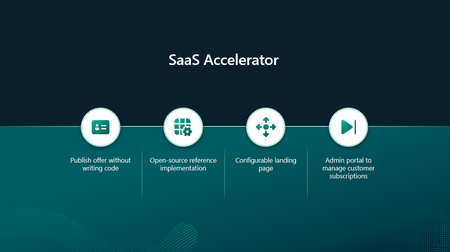
Build your SaaS offer for Microsoft Marketplace with coding agent guidance and the modernized SaaS Accelerator. Explore resources that help simplify Marketplace integration and move from development to publishing faster.267Views5likes0CommentsLearned something useful today about updating multiparty private offers
I needed to update a multiparty private offer in Azure Marketplace today, and a vendor showed me a simple way to do it as the reseller. While the offer is still pending customer acceptance, select the checkbox next to it in Partner Center and click Withdraw at the top. This lets you edit your part of the offer and send it back to the customer. If the change involves something the vendor controls, they’ll need to update it on their side. In other marketplaces I’ve worked with, this can involve getting a new resale authorization and creating a new offer, so I appreciated how easy this was. This feature has probably been around for a while, but I only learned about it today. A small thing that makes day-to-day work easier and helps move sales along. Thought I’d share!107Views1like0CommentsAgentic Marketplace publishing expands with broader product coverage and generally available APIs
When we introduced Marketplace Ingestion Model Context Protocol (MCP), the idea was simple: help developers start with what they want to accomplish, rather than with an API payload. Now, that workflow can go further. Marketplace Ingestion MCP and APIs have reached 100% product coverage for Microsoft Marketplace offers, giving publishers more ways to bring Microsoft Marketplace publishing into the development processes and tools they already use. We’ve also reached another important milestone: the Product Ingestion APIs for SaaS and virtual machine offers are now generally available (GA). Together, these updates give development teams more flexibility in how they build Marketplace publishing into their workflows, whether they work with an AI agent through Marketplace Ingestion MCP, integrate directly with APIs, or combine both approaches. From agentic publishing to broader product coverage In my previous post, I shared how Marketplace Ingestion MCP connects natural-language intent with Microsoft Marketplace publishing actions. That experience now supports a broader range of Marketplace products. With 100% product coverage across our MCPs and APIs, publishers can apply the same outcome-first approach across their Marketplace publishing workflows. Marketplace Ingestion MCP connects supported agentic experiences with Partner Center APIs. Instead of manually constructing API payloads, you can describe the publishing outcome you want. Your agent can then help retrieve the right schema, build and validate the payload, and perform supported publishing actions. For development teams, that means publishing can become part of the workflow rather than a separate activity after development is complete. SaaS and virtual machine APIs are now generally available Publishers that prefer to integrate directly with Marketplace publishing APIs also have an important update: Product Ingestion APIs for SaaS and virtual machine offers are now generally available. These APIs give development teams a programmatic way to create, publish, and manage their offers in Microsoft Marketplace. With these APIs now generally available, publishers have another way to build Marketplace publishing into their development and release processes. For teams already using the APIs, there is no need to immediately rework integrations built with older preview versions. Existing preview API versions continue to work. You can continue using those versions in your current integrations while adopting to the GA versions. If you're starting a new integration, we encourage you to use the latest generally available API versions for SaaS and virtual machine offers. Choose the workflow that works for your team There isn't one way every publisher needs to work. Some teams may want an agent-assisted experience, using natural language and Marketplace Ingestion MCP to handle more of the translation between publishing intent and API structures. Other teams may work directly with the Product Ingestion APIs to build publishing into automated processes. And some teams may combine both. The opportunity is to make Marketplace publishing fit more naturally into how your team develops and ships software. You can: Start with intent. Use Marketplace Ingestion MCP to describe the publishing outcome you want and let your agent help translate it into supported actions. Build repeatable workflows. Bring common offer creation and update tasks into development workflows, including CI/CD processes where appropriate. Integrate directly with APIs. Use the generally available Product Ingestion APIs for SaaS and virtual machine offers to build programmatic publishing experiences. Move forward at your own pace. Existing integrations using older preview API versions continue to work, giving teams flexibility in when they adopt the latest GA versions. What this means for publishers The goal is straightforward: give developers more flexibility in how they bring their cloud and AI solutions to customers through Microsoft Marketplace. Marketplace Ingestion MCP brings publishing closer to the tools and agentic workflows developers already use. The Product Ingestion APIs provide the foundation for teams that want direct programmatic integration. With expanded product coverage and GA APIs for SaaS and virtual machine offers, publishers have more options for building Marketplace publishing into the way they already develop and operate their products. If you've been exploring agent-assisted publishing, now is a good time to take another look. And if you're building directly with the Product Ingestion APIs, consider using the latest generally available SaaS and virtual machine API versions as you create new integrations. Get started Marketplace Ingestion MCP is included with access to Microsoft Marketplace submission APIs. To get started, you'll need: A Partner Center account with the required role Access to Microsoft Marketplace submission APIs An MCP-compatible client, such as Visual Studio Code or GitHub Copilot CLI, if you want to use Marketplace Ingestion MCP Learn more: Marketplace Ingestion MCP server | Microsoft Learn Product Ingestion API for Microsoft Marketplace | Microsoft Learn Product Ingestion API for SaaS | Microsoft Learn Product Ingestion API for virtual machines | Microsoft Learn Marketplace Ingestion MCP server - Marketplace publisher Publishing doesn't need to sit at the end of development. With agent-assisted workflows, broader product coverage, and generally available APIs, teams have more ways to make publishing a natural part of how they build and bring solutions to market.255Views2likes0Comments