office 365
1362 Topics
Accepted Domain Verification Causes Mail Flow Failure to Google Workspace Recipients (No MX Changes)
Scenario Source: - Google Workspace (production) - All users actively using Gmail Target: - Microsoft 365 tenant - Existing Exchange Online users Actions Performed 1. Added the production domain to Microsoft 365. 2. Added only the TXT record required for domain verification. 3. No MX, SPF, or other mail-routing records were changed. 4. Domain verification completed successfully. Observed Behavior - Users in the Microsoft 365 tenant could no longer send email to recipients hosted in Google Workspace using the same domain. - Google Workspace users continued to receive email from external senders. - MX records remained pointing to Google Workspace. Testing Performed 1. Removed the domain from Microsoft 365. Result: Mail flow to Google Workspace users worked normally. 2. Added the domain and TXT verification again. Result: Mail flow failure immediately reoccurred. 3. Repeated the test multiple times with consistent results. Question Is this expected behavior when a domain becomes an accepted domain in Exchange Online, even if MX records remain pointed to Google Workspace? Has anyone experienced similar recipient-resolution or routing behavior during Google Workspace to Microsoft 365 migration preparation?128Views0likes1CommentHow do you make a Shared Mailbox the default Send From account? (New Outlook)
I'm using Outlook for Windows version 1.2025.109.100 (on behalf of another user). I'm reading some suggestions online that say you need to add the account to Outlook first before making it the default Send From. I'm also looking at the Help section in Outlook that directs you to change this in the Compose and Reply settings. However, it's not possible to sign into a mailbox that isn't a user. I thought you used to be able to 'sign into' a shared mailbox using your own account but that is not the case now (perhaps it never was?). What it seems like is that we instead need to convert "Accounting" to a User account, give it a license, then sign into it in Outlook. That's not a Shared Mailbox - that's a user mailbox. I don't want to create a point of weakness for a potential cyber-attack (which we've had several). I can't really set up MFA for this account that no one can maintain. And I really don't want to have to spend money on a license to do something just because one piece of software is incompatible. Having to repeatedly instruct people and then repeatedly remind them to change their FROM account is just bonkers. On Outlook for Mac, as long as you're in the Shared Mailbox, the default FROM is that mailbox. (but, don't get me started on how much better the Mac version of Outlook is than the Windows version - see: All Accounts)2.2KViews0likes4Comments
IMAP Migration from Google Workspace to Microsoft 365
Hello Team, Greetings!! We have recently been experiencing significant delays during IMAP migrations from Google Workspace to Microsoft 365 and would like to understand if there are any known issues or recent changes affecting IMAP migration performance. We are aware that Microsoft provides the native Google Workspace migration method, which would generally be preferable. However, in our migration scenarios, we have split routing/coexistence configured, with the domain configured as Internal Relay in Exchange Online. Because of this setup, we are currently unable to select/configure the required target delivery domain as expected during the native Google Workspace migration process. Could you please confirm: Whether there are any known issues, throttling, or performance degradation with IMAP migrations from Google Workspace to Microsoft 365 recently? Whether the Internal Relay/split-routing configuration can affect the native Google Workspace migration process or the availability of the target delivery domain option? Is there any recommended configuration or workaround that would allow us to use the native Google Workspace migration while maintaining split routing? Any guidance or recommended approach would be highly appreciated.273Views0likes1Comment
Cross-tenant Migration
Hi all, I will be doing migration from existing tenant to a new one soon. I've recently completed IMAP migration to Exchange online, and also Google Workspace Migration to Exchange online.... So I thought that cross-tenant will be the easiest one as it is all under MS.... Looks that I was wrong, and seems to be quite the most challenging one 🙂 Few details first - there is a COMPANY-A tenant. There is also COMPANY-B domain created in that tenant . Now, COMPANY-B is going to move to a new tenant and keep the name. It will be only 15 users, so not a huge amount. So, I can see that there is a Cross-Tenant migration option available in EAC, so I want to use it. It does look a bit complicated anyway. What I'm trying to confirm/clarify is: Is the Cross-Tenant Migraiton option in EAC the one that I can use for my scenario? Checking https://docs.microsoft.com/en-us/microsoft-365/enterprise/cross-tenant-mailbox-migration?view=o365-worldwide . It seems to be however a bit of work in powershell etc (I'm not expert with powershell). Is this the only and easiest way to do the migration? 🙂 Anyone has any guide on "step-by-step" that I could have a look? Would help me a lot. Are there any "tricky" parts that I should be aware of during migration? Ppl that already used this way to migrate PS: For SharePoint migration, I will use Migration and Mover that is abailable for via SharePoint... which seems to be quite straight forward. Any info that will help me to prepare for the move would be much appreciated.2KViews1like5CommentsMicrosoft Defender for Office 365: New “Move to Quarantine” Feature Coming Soon
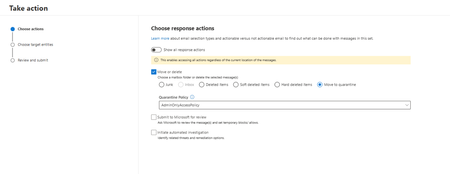
Microsoft introducing Move to Quarantine, a new remediation action in Microsoft Defender for Office 365. It enables security teams to move potentially malicious email messages from users' mailboxes directly to Microsoft Defender quarantine. This provides a safer and more flexible way to contain suspicious messages that bypassed initial detection while preserving the ability to investigate, release, or permanently delete them later. This capability is available with Microsoft Defender for Office 365 Plan 2, including eligible Microsoft 365 subscriptions that include Plan 2. Rollout schedule General Availability (Worldwide): Beginning in early November 2026 and expected to complete by mid-December 2026 Remediate malicious email that was delivered in Office 365 - Microsoft Defender for Office 365 | Microsoft Learn228Views0likes0Comments
Exchange RFC 6710, RFC 6758 and RFC 4021 compliance
I need to verify whether Exchange Online supports the following SMTP extension RFCs: RFC 6710 - Simple Mail Transfer Protocol Extension for Message Transfer Priorities (MT-PRIORITY) RFC 6758 - Tunneling Plaintext Authentication Credentials Using TLS (CRAM) RFC 4021 - Registration of Mail and MIME Header Field Names Specifically, I need to know: Are these RFCs implemented and advertised in the Exchange Online SMTP EHLO response? Is there official Microsoft documentation that lists the complete set of supported SMTP extensions for Exchange Online? If these RFCs are not supported, is there a published list of unsupported RFCs or a roadmap for future implementation? Context: I'm integrating third-party mail systems that require RFC 6710 (MT-PRIORITY) support for priority message handling. Currently, Microsoft documentation only references RFCs 3030, 2920, 6698, and 8461 as supported extensions, but there is no comprehensive list of unsupported RFCs. Any clarification or documentation would be greatly appreciated.75Views0likes0Comments
Account locked
I am the business owner and the only Global Administrator of my Microsoft 365 business tenant. I am completely locked out of my administrator account because Microsoft Authenticator is not working correctly. When I try to sign in, Microsoft offers only two authentication methods: Approve a request in Microsoft Authenticator. Enter a verification code from Microsoft Authenticator. Neither method works. The Authenticator app displays an 8-digit code, but Microsoft requests a 6-digit code. I have no alternative authentication method available, and I cannot access the Microsoft 365 admin centre to reset my MFA settings. Please escalate this case to the Microsoft Data Protection team for sole Global Administrator account recovery and MFA reset. I can provide the necessary evidence to verify my identity, business ownership and tenant ownership.166Views0likes2Comments