office 365
37 Topics
How to use AD groups in Sharepoint Online
Hi, In my company we created a Sharepoint online site to manage our procedure. To manage security, we think about to use the existed groups in our on-premise active directory. So, we started by add our key users to the site with a specific AD group. But, these people don't have any access. But, if we create a Sharepoint group and add user in this group, it works. In fact, we can't use our on-premise AD security groups... We are using Azure AD Connect for sync. How can we do that?67KViews0likes6Comments
Add email alias to multiple O365 user accounts in bulk
Hello team, We currently have a domain: abc.com We are going to add a new domain: xyz.com users are in-cloud. We want to add email aliases to some of our users as user@xyz.com and set it as primary. however I didnt find any script which will do this in bulk for multiple users. I found a script which does for all users however we just have to apply the script for 60-70 users. Any help would be appreciated35KViews0likes5Comments
Using SharePoint Client Side Object Model with PowerShell and Multifactor Authentication
There is a technique to connect to SharePoint Online with PowerShell when Multi-factor Authentication(MFA) is enabled. https://technet.microsoft.com/en-us/library/fp161372.aspx There is a very limited list of SharePoint Online cmdlets https://technet.microsoft.com/en-us/library/fp161364.aspx I would like to leverage the client side object model to access objects like the webs(spweb) and lists(splist). https://dev.office.com/sharepoint/docs/sp-add-ins/complete-basic-operations-using-sharepoint-client-library-code Is there a technique( or example) to use my identity/credentials after I have authenticated with Multifactor Authentication with Microsoft.SharePoint.Client.ClientContext?Solved25KViews0likes7Comments
Organizational Assets Office Templates not showing in Office
Hi, I've added a library in my root site collection as an organizational assets library but I don't see it in Office when accessing "New" (Should see my organization name in the templates section). My library is registred correctly and it was configured as a Private CDN. I've waited 24 hours but it is still not showing. Did I miss some steps? Get-SPOOrgAssetsLibrary DisplayName : Gabarits LibraryUrl : /Templates ListId : xxxxxxxxxxxxxxxxxxxxxxx OrgAssetType : OfficeTemplateLibrary ThumbnailUrl :Solved17KViews0likes6Comments
New Search Bar - Missing across SharePoint Online
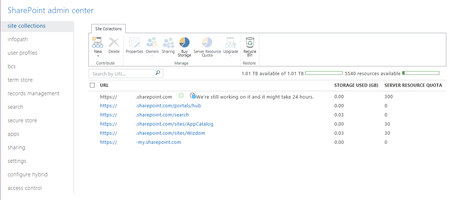
I would appreciate your help in resolving the below issue. I notice Office 365 rolled out a new feature of displaying the search bar in top ribbon (especially across SharePoint Online environment). I don't see this in my organizational profile, but when I subscribed for Office 365 personally its displaying. (please refer below image)Solved10KViews0likes4CommentsSite Collection error “We're still working on it and it might take 24 hours.”
Hi All, We are using SharePoint Online (Office 365). Yesterday afternoon I deleted the root site collection (https://OurCompany.Sharepoint.com) and recreated it using the publishing portal template. A day later it still has not finished creating the site collection. It has a message saying: “We're still working on it and it might take 24 hours.” This is the first time this has happened to me. It normally takes a few minutes and not a day to create a site collection. Please view the attached image to view the screenshot. I hope you can help Colin8.6KViews0likes13Comments
Office365 Profile Photos Disappearing
Hi, We have added profile photos to all users O365 Profiles in both Azure AD and the Office Admin Centre and these were not pulling through to the People webpart in SharePoint Online. After painstakingly going through each user profile in the SharePoint Admin portal, the photos seemed to appear. All seemed fine for about a week and then all of a sudden people's photos started disappearing from Delve and the SharePoint people webpart! Users confirmed that they did not manually delete the photo themselves. Why is this happening and how do we stop it happening to anymore users?! Thanks.7.7KViews1like8CommentsTeams Site / Office 365 Group creation problem
Hi everyone, I'm facing a really strange problem with the Team Site / Office 365 Group creation. Yesterday I created a new Office 365 Group connected Team Site from the SharePoint landing page in Office 365. The creation of the site seemed to work as expected and I was able to browse the site afterwards but when I looked at the Groups section in the Office 365 Admin center I noticed that it was showing the wrong e-mail adress for the Office 365 Group. We have configured groups to be created in our own domain, not the onmicrosoft.com domain, but for this particular group the onmicrosoft.com address was showed. I took another look in the Exchange Online using both the Exchange Admin Center and the Exchange Online PowerShell module and there the group looks fine, in other words, it is listed with the correct primary e-mail address and the onmicrosoft.com address is shown as an alias. When I created a team for the existing group in Microsoft Teams, that also seems to be working but when I try to change the image for the Team I'm not able to that as all the buttons are disabled and greyed out and I'm presented with the message "We're still setting up your team, you can change your picture when we're done." As I said, the SharePoint Site / Office 365 Group was created yesterday but the problems mentioned above are still there one day after the creation. Any ideas what could be causing this? Is there a bug in the Office 365 Admin Center causing the group to be shown wrong? -Mattias5.2KViews0likes2CommentsMy PowerPoint document properties keep reverting when I save the file
My PowerPoint document properties keep reverting when I save the file I am experience a strange issue. I am on SharePoint online and I have a SharePoint library with several columns to that I update the document metadata/properties (manually or by a power automate flow). However from today for some reason, after I have updated the document metadata/properties, if I open the file and let it auto-save or even if I do change something in it and save it, all the recent metadata/properties gets wiped and those that remain get overwritten with the default/previous old values. Through investigating this, I am pretty sure it isn't being caused by a rouge power automate flow as I turned them all off and it still did it. I think it has retained a value on the actual PowerPoint file property and this is what overwrites what's been updated on the column on the SharePoint library. This happens immediately after saving. Any help to resolve this? As I need the updated columns to remain as they are unless changed either manually or by a flow. I am using: SharePoint Online Office 3655.1KViews0likes8Comments
What's the recommended way to completely remove a modern teamsite?
Hello, I'd like to get your point of view on the "correct" way on how to remove a modern teamsite. The reason I'm asking is because once I remove an Office 365 group, either via O365 admin center or PowerShell (Remove-PnPUnifiedGroup), the site collection will not be removed with it. In a peculiar way the site collection will be locked and I'm getting a 403 forbidden error. I expect that if provisioning an O365 group creates a modern team site, removing th group should also lead to the removal of the site collection. Any points of view here? Thanks.Solved4KViews0likes4Comments