monitoring
103 Topics
Unsupported but very useful way to use the hidden Azure API
Obviously not supported, but for those of us managing many tenants and/or setting up (test/training/pilot) tenants often, you may want to automate certain Azure AD or Intune settings that are not available through supported API's or PS modules, there is a 'hidden' API at https://main.iam.ad.ext.azure.com/api/MdmApplications/eab0bcaf-9b2e-4e62-b9be-2eea708422f8?mdmAppliesToChanged=true&mamAppliesToChanged=true, here's an example: http://www.lieben.nu/liebensraum/2018/03/set-intune-mdm-user-scope-to-all-using-powershell-and-hidden-api/ If you want to use this in a production environment, I recommend doing only READ operations.Solved19KViews3likes6CommentsMicrosoft Azure Hub-Spoke model by Enterprise Design 1 of 4
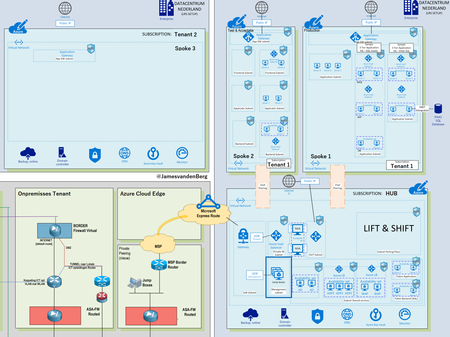
Microsoft Virtual Datacenter Transition to Azure (Hybrid Cloud) Microsoft Azure Hub-Spoke Architecture This Enterprise reference architecture shows how to implement a hub-spoke topology in Azure. The hub is a virtual network (VNet) in Azure that acts as a central point of connectivity to your on-premises network. The spokes are VNets that peer with the hub, and can be used to isolate workloads. Traffic flows between the on-premises datacenter and the hub through an ExpressRoute or VPN gateway connection. Read the complete Blogpost Journey to the Azure Cloud here17KViews0likes0Comments[Solved] Allow PIN support for Windows 10 devices
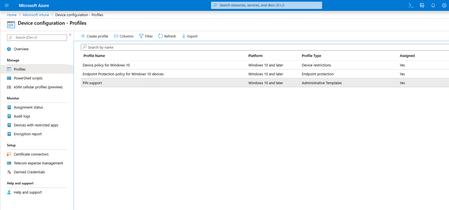
I want to allow my Windows 10 1909 (Hyper-V VM) to be able to use PIN for sign ins. I have created a non-administrator account and joined my VM during Windows installation to the AAD from the start. I also configured this for PIN policy in Windows 10 in Azure portal - Intune I created a group in Intune and put my VM device + User into that. then I assigned this profile that I created for PIN to that group. added my administrator user as the group owner. I've also read this article: https://support.microsoft.com/en-us/help/3201940/can-t-configure-a-pin-when-convenience-pin-and-hello-for-business-poli still, in my Windows 10 account settings, there is no sign of PIN. i've waited 2 hours, synced my device from AAD portal and also from Windows settings to receive the latest policies. still nothing. I'm running out of clues that why this is not working. any ideas? Thanks in advanceSolved17KViews0likes5Comments
Log Analytics into Azure Lighthouse
I had a look at the community pages, but can't find a section specific to Lighthouse, so pardon me for posting here. If there is a dedicated space, I would appreciate a link. I have an issue pulling customer log information from Log Analytics into our Lighthouse tenant. I have a group that gets assigned Contributor rights to the customer environment at subscription level. I am able to browse all resources, and I have verified that I can create resources. However, when I access the Log Analytics workspace(s), I am unable to run any queries (or query any VM performance data through Azure Monitor), and it's as if it just hangs there trying to retrieve the log data. Attached is a snip of what I see. Logging in to the customer tenant directly with Owner permissions I am able to successfully query the logs and view VM performance data. Please advise if there are any specific considerations in terms of permissions. I assumed Contributor role at subscription level would have sufficed. Thanks SebastiaanSolved8.3KViews0likes13CommentsMy learning path to the Microsoft Certified: Windows Server Hybrid Administrator Associate!
Dear Microsoft Azure Friends, When I read from Microsoft Learn that there was again a Windows Server exam along with Microsoft Azure, I was excited. The new certification is called: Microsoft Certified: Windows Server Hybrid Administrator Associate! This certification consists of two exams: AZ-800 and AZ-801. If you successfully pass both exams you will receive the certification. This article is all about the AZ-801 exam. I have described my learning path to the AZ-800 in this article! https://techcommunity.microsoft.com/t5/azure/my-preparations-for-the-exam-az-800-administering-windows-server/m-p/3262042 After I had passed the AZ-800, I quickly asked myself, will the AZ-801 be even more difficult? For me, it is always best to read the skills measured first. This gives me a first impression of the exam. Now let me show you how my preparation for the exam was: 1. First of all, I looked at the Exam Topics to get a first impression of the scope of topics. https://docs.microsoft.com/en-us/learn/certifications/exams/az-801 Please take a close look at the skills assessed: https://query.prod.cms.rt.microsoft.com/cms/api/am/binary/RWKPgH 2. So that I can prepare for an exam I need an Azure test environment (this is indispensable for me). You can sign up for a free trial here. https://azure.microsoft.com/en-us/free/ I have also set up a small local test environment with a couple of Windows Server 2022. You can get the operating systems directly from Microsoft: https://www.microsoft.com/en-us/evalcenter/evaluate-windows-server-2022 https://www.microsoft.com/en-us/evalcenter/evaluate-windows-11-enterprise https://www.microsoft.com/en-us/evalcenter/evaluate-windows-admin-center 3. Now it goes to the Microsoft Learning paths content. Work through the learning paths at your leisure. They are really super helpful to prepare for the exam. At this point, many thanks to Microsoft Learn ( SandraMarin ) for the great learning content: https://docs.microsoft.com/en-us/learn/paths/secure-windows-server-premises-hybrid-infrastructures/ https://docs.microsoft.com/en-us/learn/paths/implement-windows-server-high-availability/ https://docs.microsoft.com/en-us/learn/paths/implement-disaster-recovery-windows-server-premises/ https://docs.microsoft.com/en-us/learn/paths/migrate-servers-workloads-premises-hybrid-environments/ https://docs.microsoft.com/en-us/learn/paths/monitor-troubleshoot-windows-server-environments/ 4. Register for the exam early. This creates some pressure and you stay motivated. https://docs.microsoft.com/en-us/learn/certifications/exams/az-801 5. Please also have a look at thomasmaurer 's website this is also very helpful! https://www.thomasmaurer.ch/2022/03/az-801-exam-study-guide-configuring-windows-server-hybrid-advanced-services/ 6. I have created a repository on GitHub for the two exams AZ-800 and AZ-801. There are links, scripts and a lot of content in it, please have a look: https://github.com/tomwechsler/Microsoft_Certified_Windows_Server_Hybrid_Administrator_Associate 7. I started (in german) with a YouTube playlist (it's still early days) to become a Microsoft Certified: Windows Server Hybrid Administrator Associate https://www.youtube.com/playlist?list=PLi0MTIjZai_xLvMSMgOxnk-0QFSxjSEe5 8. More helpful information directly from Microsoft, divided into the functional groups (Skills measured)! Secure Windows Server On-premises and Hybrid Infrastructures: https://docs.microsoft.com/en-us/microsoft-365/security/defender-endpoint/enable-exploit-protection https://docs.microsoft.com/de-de/mem/configmgr/protect/deploy-use/use-device-guard-with-configuration-manager https://docs.microsoft.com/en-us/mem/configmgr/protect/deploy-use/defender-advanced-threat-protection https://docs.microsoft.com/en-us/windows/security/identity-protection/credential-guard/credential-guard-manage https://docs.microsoft.com/en-us/windows/security/threat-protection/microsoft-defender-smartscreen/microsoft-defender-smartscreen-overview https://docs.microsoft.com/en-us/windows/security/threat-protection/windows-security-configuration-framework/windows-security-baselines https://docs.microsoft.com/en-us/windows-server/identity/ad-ds/plan/security-best-practices/best-practices-for-securing-active-directory https://docs.microsoft.com/en-us/azure/active-directory/authentication/tutorial-configure-custom-password-protection https://docs.microsoft.com/en-us/windows-server/identity/ad-ds/plan/security-best-practices/appendix-c--protected-accounts-and-groups-in-active-directory https://docs.microsoft.com/en-us/windows-server/identity/ad-ds/plan/security-best-practices/securing-domain-controllers-against-attack https://docs.microsoft.com/en-us/windows-server/identity/ad-ds/manage/how-to-configure-protected-accounts https://docs.microsoft.com/en-us/windows-server/identity/ad-ds/plan/security-best-practices/best-practices-for-securing-active-directory https://docs.microsoft.com/en-us/windows-server/identity/ad-ds/plan/security-best-practices/appendix-h--securing-local-administrator-accounts-and-groups https://docs.microsoft.com/en-us/windows-server/identity/ad-ds/plan/security-best-practices/appendix-b--privileged-accounts-and-groups-in-active-directory https://docs.microsoft.com/en-us/defender-for-identity/what-is https://docs.microsoft.com/en-us/azure/sentinel/data-connectors-reference?tabs=LAA#windows-security-events-via-ama https://docs.microsoft.com/en-us/azure/defender-for-cloud/defender-for-servers-introduction https://docs.microsoft.com/en-us/windows/security/threat-protection/windows-firewall/best-practices-configuring https://docs.microsoft.com/en-us/windows/security/threat-protection/windows-firewall/restrict-server-access-to-members-of-a-group-only https://docs.microsoft.com/en-us/windows/security/threat-protection/windows-firewall/create-an-authentication-request-rule https://docs.microsoft.com/en-us/azure/security/fundamentals/encryption-models https://docs.microsoft.com/en-us/windows/security/information-protection/bitlocker/bitlocker-overview Implement and manage Windows Server high availability: https://docs.microsoft.com/en-us/azure/virtual-machines/disks-shared https://docs.microsoft.com/en-us/azure/virtual-machines/windows/tutorial-availability-sets https://docs.microsoft.com/en-us/windows-server/failover-clustering/create-failover-cluster https://docs.microsoft.com/en-us/windows-server/storage/storage-replica/stretch-cluster-replication-using-shared-storage https://docs.microsoft.com/en-us/windows-server/storage/storage-replica/cluster-to-cluster-azure-cross-region https://docs.microsoft.com/en-us/windows-server/failover-clustering/clustering-requirements https://docs.microsoft.com/en-us/windows-server/storage/storage-replica/cluster-to-cluster-azure-cross-region https://docs.microsoft.com/en-us/windows-server/failover-clustering/clustering-requirements https://docs.microsoft.com/en-us/windows-server/failover-clustering/manage-cluster-quorum https://docs.microsoft.com/en-us/windows-server/failover-clustering/failover-clustering-overview https://docs.microsoft.com/en-us/azure-stack/hci/deploy/cluster-set https://docs.microsoft.com/en-us/windows-server/failover-clustering/sofs-overview https://docs.microsoft.com/en-us/windows-server/failover-clustering/deploy-cloud-witness https://docs.microsoft.com/en-us/troubleshoot/windows-server/high-availability/cluster-information-ip-address-failover https://docs.microsoft.com/en-us/windows-server/failover-clustering/cluster-aware-updating https://docs.microsoft.com/en-us/azure-stack/hci/concepts/storage-spaces-direct-overview https://docs.microsoft.com/en-us/windows-server/storage/storage-spaces/deploy-storage-spaces-direct Implement disaster recovery: https://docs.microsoft.com/en-us/azure/backup/backup-windows-with-mars-agent https://docs.microsoft.com/en-us/azure/backup/backup-azure-restore-windows-server https://docs.microsoft.com/en-us/azure/backup/backup-mabs-whats-new-mabs https://docs.microsoft.com/en-us/azure/backup/backup-azure-microsoft-azure-backup https://docs.microsoft.com/en-us/azure/backup/backup-instant-restore-capability https://docs.microsoft.com/en-us/azure/backup/backup-azure-arm-userestapi-createorupdatepolicy https://docs.microsoft.com/en-us/azure/backup/backup-client-automation https://docs.microsoft.com/en-us/azure/virtual-machines/backup-and-disaster-recovery-for-azure-iaas-disks https://docs.microsoft.com/en-us/azure/backup/backup-azure-arm-restore-vms https://docs.microsoft.com/en-us/azure/site-recovery/site-recovery-manage-network-interfaces-on-premises-to-azure https://docs.microsoft.com/en-us/azure/site-recovery/site-recovery-create-recovery-plans https://docs.microsoft.com/en-us/azure/site-recovery/azure-to-azure-about-networking https://docs.microsoft.com/en-us/azure/site-recovery/azure-to-azure-about-networking https://docs.microsoft.com/en-us/windows-server/virtualization/hyper-v/manage/set-up-hyper-v-replica Migrate servers and workloads: https://docs.microsoft.com/en-us/windows-server/storage/storage-migration-service/cutover https://docs.microsoft.com/en-us/windows-server/storage/storage-migration-service/overview https://docs.microsoft.com/en-us/azure/storage/files/storage-files-migration-overview https://docs.microsoft.com/en-us/azure/migrate/deploy-appliance-script https://docs.microsoft.com/en-us/azure/migrate/how-to-set-up-appliance-physical https://docs.microsoft.com/en-us/azure/migrate/how-to-migrate https://docs.microsoft.com/en-us/iis/publish/using-web-deploy/migrate-a-web-site-from-iis-60-to-iis-7-or-above https://docs.microsoft.com/en-us/virtualization/windowscontainers/quick-start/building-sample-app https://docs.microsoft.com/en-us/windows-server/get-started/upgrade-migrate-roles-features Monitor and troubleshoot Windows Server environments: https://docs.microsoft.com/en-us/troubleshoot/windows-server/performance/performance-overview https://docs.microsoft.com/en-us/windows-server/manage/system-insights/overview https://docs.microsoft.com/en-us/windows-server/manage/windows-admin-center/azure/azure-monitor https://docs.microsoft.com/en-us/windows-server/manage/system-insights/overview https://docs.microsoft.com/en-us/azure/azure-monitor/agents/agent-windows https://docs.microsoft.com/en-us/azure/azure-monitor/agents/agent-windows https://docs.microsoft.com/en-us/azure/azure-monitor/agents/diagnostics-extension-overview https://docs.microsoft.com/en-us/troubleshoot/windows-server/networking/networking-overview https://docs.microsoft.com/en-us/troubleshoot/azure/virtual-machines/boot-error-troubleshoot https://docs.microsoft.com/en-us/troubleshoot/azure/virtual-machines/performance-diagnostics https://docs.microsoft.com/en-us/troubleshoot/azure/virtual-machines/support-agent-extensions https://docs.microsoft.com/en-us/azure/virtual-machines/windows/disk-encryption-overview https://docs.microsoft.com/en-us/troubleshoot/windows-server/identity/reset-directory-services-restore-mode-admin-pwd https://docs.microsoft.com/en-us/azure/active-directory/hybrid/tshoot-connect-pass-through-authentication https://docs.microsoft.com/en-us/windows-server/identity/ad-ds/deploy/troubleshooting-domain-controller-deployment More helpful links: https://docs.microsoft.com/en-us/windows-server/failover-clustering/bitlocker-on-csv-in-ws-2022 https://docs.microsoft.com/en-us/microsoft-365/security/defender-endpoint/customize-controlled-folders?view=o365-worldwide https://docs.microsoft.com/en-us/azure/defender-for-cloud/managing-and-responding-alerts https://docs.microsoft.com/en-us/azure/defender-for-cloud/deploy-vulnerability-assessment-vm https://docs.microsoft.com/en-us/defender-for-identity/technical-faq https://docs.microsoft.com/en-us/windows/security/threat-protection/microsoft-defender-smartscreen/microsoft-defender-smartscreen-overview https://docs.microsoft.com/en-us/windows-server/failover-clustering/deploy-cloud-witness https://docs.microsoft.com/en-us/windows-server/failover-clustering/sofs-overview https://docs.microsoft.com/en-us/azure/site-recovery/recovery-plan-overview https://docs.microsoft.com/en-us/windows-server/storage/storage-migration-service/migrate-data https://docs.microsoft.com/en-us/windows-server/storage/storage-migration-service/overview https://docs.microsoft.com/en-us/azure/app-service/app-service-hybrid-connections https://docs.microsoft.com/en-us/azure/migrate/tutorial-discover-physical https://docs.microsoft.com/en-us/iis/publish/using-web-deploy/synchronize-iis I want to emphasize it again in this article, read the questions very carefully. The difference is very often in the details. If it says you have to back up the server and all data to Azure, then that is something different than if it would only say all data. This small difference has a big impact on the subsequent solution! One final tip: When you have learned something new, try to explain what you have learned to another person (whether or not they know your subject). If you can explain it in your own words, you understand the subject. That is exactly how I do it, except that I do not explain it to another person, but record a video for YouTube! I hope this information helps you and that you successfully pass the exam. I wish you success! Best regards, Tom Wechsler P.S. All scripts (#PowerShell, Azure CLI, #Terraform, #ARM) that I use can be found on github! https://github.com/tomwechsler8.1KViews2likes2CommentsAzure application gateway accesslogs query - Timetaken
I have all my Application Gateway logs going to a Log Analytics workspace. I want to query this data to show any URIs with latency and period of the site responses from backend pools. Can someone point me in the right direction of how to query this? Thanks Darwin Vinoth7.6KViews0likes3Comments
Azure REST API - $filter param for time delta throws ProviderError
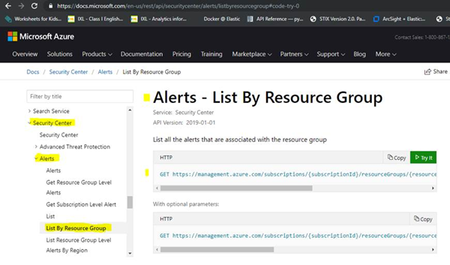
Hello All, We are facing issues with the Azure API endpoint for fetching security alerts based on given time filter. https://apc01.safelinks.protection.outlook.com/?url=https%3A%2F%2Fdocs.microsoft.com%2Fen-us%2Frest%2Fapi%2Fsecuritycenter%2Falerts%2Flistbyresourcegroup%23code-try-0&data=02%7C01%7Cannishprashan.stevi%40hcl.com%7Ce89ea1593b4247b8b13f08d70530766b%7C189de737c93a4f5a8b686f4ca9941912%7C0%7C0%7C636983578009379205&sdata=JavMX5P2vJPhQ5ERafc4kC5gxELv%2FEjtulWo%2B84xhIQ%3D&reserved=0 and screenshot for the API section, We encountered the following error while hitting the endpoint with the required params and Bearer access token. Error Details: { "error": { "code": "ProviderError", "message": "Resource provider 'Microsoft.Security' failed to return collection response for type 'alerts'." } } Endpoint URL: https://management.azure.com/subscriptions/{subscription-id}/resourceGroups/{ResourceGroup}/providers/Microsoft.Security/alerts?api-version={version}}&$filter=properties.reportedTimeUtc eq '2019-07-06T08:00:51.8801218Z' NOTE: The URL gives response without specifying the time “filter” , but when using filter as one of the params, we get the above mentioned error. The param value used: $filter = properties.reportedTimeUtc eq '2019-07-06T08:00:51.8801218Z' Could anyone help in the resolution of this issue? Let me know for any additional details/clarifications. Thank You.5.7KViews1like3CommentsAzure App Service - Get Public Client IP (not RFC1918)
Hello, I'm currently looking at the "AppServiceHTTPLogs" from an App Service. This App Service is publicly accessible over the internet. When I watch the logs, I'm not able to get the Private IP from the customer, would it be possible somehow to get the IP of the customer accessing my App Service. At the moment, I only see RFC1918 IPs in the cIP field. Kind Regards, Thomas4.8KViews0likes3Comments