microsoft purview
672 TopicsSecure the data that fuels AI with Microsoft Purview
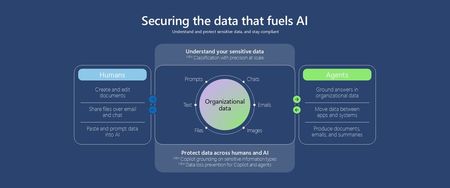
Agents in Microsoft 365 grew 15x year-over-year, and every one of them can reach your organization's sensitive data. AI accesses, creates, and updates data, faster than current classification and labeling can keep up. At the same time, AI apps and agents introduce new surface areas for sensitive data to be exposed such as grounding data, prompts, responses, tool calls and more. Without the right controls, that data exposure can erode customer trust and create regulatory, legal, competitive, and financial consequences. Microsoft Purview helps organizations secure the data that fuels AI. To act quickly and confidently, data security teams need a precise, current understanding of their sensitive data, without extra manual work, and controls that enforce protection across humans, apps, and agents. Purview helps teams understand their sensitive data, protect data across humans and AI, and stay ahead of compliance with the auditability that evolving regulations demand. At Ignite, we're announcing enhanced classification and labeling at scale to help teams get to data protection faster, and new data loss prevention (DLP) controls that protect the data Microsoft Copilot and local agents use. Ignite announcements at a glance Get to data protection faster Stay current with recurring classification refresh (public preview January 2027): Automatically re-classify data that hasn’t been touched in years when classifiers are updated or improved. Deploy faster with enhanced built-in sensitive information types (SITs) (available starting January 2027): Get precise detection out of the box with less manual tuning and customization, starting with the 100+ most widely used SITs, such as credit card and U.S. Social Security numbers, and extending to all built-in SITs over time. Simplify workflows with a unified classification management experience (public preview): Find and manage all your classifiers in one place, with improved search and filtering. Accelerate data protection with auto-labeling scalability improvements (generally available): Now label up to 500,000 files per day, match 20M items in simulation, target sites by attribute instead of hand-picking with adaptive scopes; and apply default library labels to SharePoint libraries for data-at-rest (public preview). Protect data across humans and AI Protect the sensitive data that Copilot uses (public preview January 2027): Apply DLP policies that prevent Copilot from processing files with sensitive data, even when those files aren't labeled. Additionally, Copilot will not process prompts with attached or linked files containing sensitive data. Protect the sensitive data local agents use (public preview January 2027): Gain visibility into local agent activity and apply DLP policies that prevent local agents from processing sensitive data, whether it comes from a prompt or from the files and tools the agent accesses. Additionally, data protection policies can be scoped to specific agents for more granular controls tailored to each agent’s role. Integrate agent activity signals into Unified Agent Risk score (public preview): Purview agent activity and interaction with sensitive data signals now feed into Unified Agent Risk score in Agent 365, so security teams can spot higher-risk agents, prioritize investigations, and apply the right controls. Get to data protection faster AI creates large volumes of new data. More than 2 billion files are uploaded to SharePoint every day, and SharePoint is now the top grounding source for Microsoft 365 Copilot. At that volume, admins can't pause to manually tune and validate classification before enforcing auto-labeling and DLP policies. That's why we're enhancing our built-in sensitive information types (SITs) for precise detection out of the box, so admins can move confidently from detecting sensitive data to enforcing protection. We're starting with the 100+ most widely used SITs, such as credit card and U.S. Social Security numbers, and will extend these enhancements to all built-in SITs over time. To secure data effectively, classification must keep pace as your data estate grows and your definition of what's sensitive evolves. Purview classifies content as it is accessed, created, and shared, but AI tools can also access and process older files that no one has opened in years. If those files were never classified, protection policies have nothing to act on, leaving the sensitive data inside them exposed to AI. Last year, we introduced on-demand classification to scan and classify that older content, so organizations can identify and protect sensitive data in older files before AI accesses it. Now, we're evolving it from a point-in-time scan into a recurring classification refresh. After a baseline scan, Purview will automatically re-classify existing content when an enhanced built-in sensitive information type (SIT) rolls out or your organization adds or updates custom SITs, so protection reflects the latest understanding of what's sensitive. For example, when the enhanced built-in credit card number SIT rolls out, the next refresh can identify card numbers in a years-old customer contract, so DLP can prevent Copilot from processing it, even if no one has opened or edited the file. The baseline scan and two recurring classification refreshes will be included in Microsoft 365 E5 licenses in the coming months. Getting to protection faster also means making classification easier to manage. The new unified classification management experience brings all classifiers, including sensitive information types, exact data match, trainable classifiers, and document fingerprinting, into one place, with improved search and filtering. Once Purview classifies sensitive data at scale, new auto-labeling scalability improvements help admins apply sensitivity labels at scale, up to 500,000 SharePoint and OneDrive files per tenant per day (up from 100,000) and preview up to 20 million matched items in simulation mode before turning a policy on (up from 4 million). Admins can now apply auto-labeling policies to every SharePoint site that matches a rule, such as all sites with “Finance” in the URL, and with no cap on matching sites, one policy keeps covering new sites as the organization grows. Finally, admins can extend a SharePoint library's default sensitivity label, previously applied to new and modified files, to data-at-rest, without anyone opening or editing the files. This helps organizations scale baseline protection across high-priority sites. Admins can now extend a SharePoint library's default sensitivity label to all files in the library, including data-at-rest. Protect data across humans and AI Sensitive data can be exposed in Copilot in three ways: text typed into prompts, files attached or linked in prompts, and content retrieved as grounding data. Organizations need to protect all three without getting in the way of productive AI use. Admins can already use Purview sensitivity labels and DLP policies to restrict Copilot from processing labeled files and emails, as well as prompts containing sensitive information. Today, we're taking that further: admins can protect the data Copilot uses, even when files aren't labeled. When Copilot retrieves content to ground a response, Purview can detect sensitive data such as financial information or personal ID numbers, and DLP can block Copilot from using it. This helps organizations deploy Copilot more quickly, with confidence. DLP policy to prevent Copilot from grounding responses on files containing sensitive information, even if the file is not labeled. Protection also extends to the prompt itself: admins can now protect sensitive data in Copilot prompt attachments and linked files, in addition to typed text, so sensitive data is covered as it flows into and through Copilot. For example, an employee might ask Copilot to analyze a linked financial planning document that hasn’t been labeled. Without a label, Purview can still identify a SIT, such as an ABA routing number, and apply the organization’s DLP policy to prevent it from grounding the response. The same protection extends to prompts and attachments. With protection integrated into Copilot, organizations can confidently turn AI innovation into everyday impact. In addition to protecting Copilot, Purview currently provides visibility into agent activity and audit records for agents built on Microsoft Copilot Studio and Foundry, helping organizations understand how AI is being used. We are now extending that visibility and bringing new data protection capabilities across agents running locally on Windows devices, including Claude Code, GitHub CLI, the GitHub Copilot app, Claude Desktop, and the Claude Code and GitHub Copilot extensions for Visual Studio Code. Admins can now safeguard the sensitive data local agents use at runtime by blocking prompts and tool calls that contain sensitive information in text, files, and links. Data protection policies can also be scoped to specific agents for more granular controls tailored to each agent’s role. Security teams need a consistent way to identify higher-risk agents, prioritize investigation and scope the right controls. To address that, Purview agent activity and sensitive data interaction signals are now integrated into the Unified Agent Risk score, surfaced in Agent 365. Local agent access to sensitive information is blocked by DLP policy. A local AI coding agent illustrates how interaction-level protection and broader risk-based controls work together. For example, a developer might use Claude Code on a corporate laptop to debug an application. Purview provides visibility into the agent’s activity and interactions with organizational data. As the agent accesses local files and invokes tools, it may attempt to send proprietary source code, API keys, or connection strings to an external AI service or connected tool through a prompt or tool call. A Purview DLP policy scoped specifically for Claude Code agents can identify the sensitive content and block the interaction before the data is exposed at runtime. To evaluate agent behavior, the security and IT teams can also leverage the Unified Agent Risk score to refine policies over time. By extending consistent data protection across a rapidly growing agent ecosystem, Purview helps organizations embrace the next wave of AI innovation with greater confidence. Secure the data that fuels AI Data security admins need to keep pace with AI adoption without compromising protection. With more precise, up-to-date classification and expanded protections for Copilot and agents, Microsoft Purview helps teams get to data protection faster and protect data across AI — turning an understanding of sensitive data into protections built into the workflows people and agents use. Explore these enhancements at Ignite. Browse the Microsoft Ignite 2026 guide to Microsoft Purview to discover sessions, hands-on learning, and one-on-one time with experts.Microsoft Purview: Data Loss Prevention (DLP) vs. Insider Risk Management (IRM)
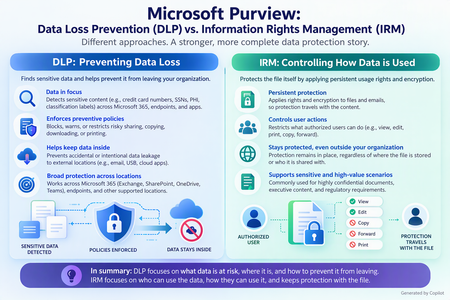
Navigating the Microsoft Purview compliance suite often leads to a common question: what sets Data Loss Prevention (DLP) apart from Insider Risk Management (IRM)? Although these two solutions frequently overlap in organizational security strategies, they address entirely different challenges. In this article, we will explore the core distinctions between them, highlighting how DLP safeguards your sensitive data, while IRM detects and manages risky user behavior before it leads to an incident. The fundamental difference is that DLP focuses on protecting sensitive data, while Insider Risk Management focuses on identifying and managing risky user behavior. Both are Microsoft Purview security and compliance capabilities, but they address different dimensions of data security. Data Loss Prevention (DLP): Determines whether sensitive information is being shared, transferred, or used in ways that violate organizational policies and can automatically prevent those actions. Insider Risk Management (IRM): Analyzes patterns of user activity and contextual signals to identify potential insider threats, including accidental data exposure, intellectual property theft, and other security violations. Side-by-side comparison Capability Purview DLP Purview Insider Risk Management Primary objective Prevent unauthorized disclosure of sensitive data Detect, investigate, and mitigate insider risks Primary focus Data and how it is handled User activities, behavioral patterns, and risk context Key question Is sensitive information leaving the organization or being shared inappropriately? Is a user exhibiting potentially risky behavior? Detection approach Content inspection, sensitivity labels, sensitive information types, and policy conditions Correlation of user activities, risk indicators, and contextual signals Typical triggers Sensitive data emailed externally, copied to USB, uploaded to unauthorized destinations Unusual downloads, repeated data exfiltration activities, or risky actions associated with departing employees Prevention capabilities Directly blocks, restricts, audits, or warns about policy violations Primarily detects and investigates; can initiate mitigation and integrate with DLP for preventive controls Risk analysis Evaluates data and activities against configured policies Correlates activities and indicators to identify potential insider risk Investigation DLP alerts, activity details, and incident reports Risk alerts, user activity timelines, investigation cases, and escalation workflows User awareness Policy tips, warnings, and notifications Primarily analyst-facing; privacy-preserving investigation workflows Privacy controls Role-based access and compliance controls Pseudonymization by default, role-based access, and auditing Typical stakeholders Security, compliance, and data protection teams Insider risk, security investigations, compliance, and authorized HR/legal stakeholders Practical example: An employee downloading confidential customer information Consider a financial services organization where an employee downloads confidential customer records and attempts to transfer them to a personal cloud storage account. Scenario A: Using Purview DLP The organization has configured DLP policies to protect customer information. What happens? An employee accesses an Excel file containing customer financial information. The employee attempts to upload the file to an unauthorized cloud storage service. DLP evaluates the content and activity against the configured policies. If the file contains protected information and the policy conditions match, DLP can block the upload. A policy notification or alert may be generated. Outcome: Sensitive customer information is prevented from leaving through the restricted channel. Important: DLP does not need to determine whether the employee has malicious intentions. It enforces the configured data protection policy. Scenario B: Using Purview Insider Risk Management Now consider the same employee, but with additional activities: Downloads unusually large amounts of confidential information. Copies files from multiple sensitive SharePoint locations. Attempts to transfer information to personal storage. Repeatedly performs activities associated with potential data exfiltration. What happens? IRM collects relevant activity signals from supported sources. It correlates those signals using configured insider risk policies. It identifies potentially risky patterns across activities. It generates risk alerts when the configured detection criteria are met. Authorized investigators can review the activity context, investigate, and determine appropriate next steps. Outcome: The organization can investigate whether the employee's behavior represents a potential insider threat. Important: IRM identifies potential risk, not proven malicious intent. An alert is not evidence that an employee has committed wrongdoing. IRM supports risk investigation and escalation workflows, including integration with Microsoft Purview eDiscovery. The biggest architectural difference: Data-centric vs. user-centric security This is probably the most important distinction when explaining these capabilities to enterprise customers. Purview DLP: Data-centric protection DLP essentially evaluates: Data sensitivity + Activity + Destination + Policy = Enforcement decision For example: Is the document classified as confidential? Does it contain credit card numbers? Is it being shared externally? Is the destination permitted? Should the activity be allowed, audited, or blocked? DLP focuses on whether a particular action involving data violates a protection policy. Purview IRM: User-centric risk detection IRM evaluates: User activities + Risk indicators + Context + Correlation = Potential insider risk For example: Is the user performing multiple potentially risky activities? Are there unusual patterns of sensitive data access or transfer? Are activities associated with a configured risk scenario? Does the combination of signals warrant investigation? IRM provides broader context around potential insider risk rather than evaluating only an individual data-sharing transaction. Can DLP and Insider Risk Management work together? Absolutely. In fact, Microsoft provides an integration called Adaptive Protection that combines their strengths. Adaptive Protection uses Insider Risk Management signals to dynamically adjust DLP enforcement based on the risk level associated with a user. This is particularly valuable because traditional DLP policies can apply consistent restrictions, while Adaptive Protection enables more context-aware enforcement. Example: Adaptive Protection Imagine an organization with three insider risk levels. User risk level IRM assessment Example DLP enforcement Minor Limited indicators of potential risk Monitor activity and generate alerts Moderate More significant indicators of potential risk Increase monitoring and notify users Elevated Significant indicators warranting stronger controls Block specified external sharing activities These are illustrative policy choices, not mandatory Microsoft defaults. How it works: IRM evaluates relevant user activity and assigns a risk level. Adaptive Protection makes that risk level available to supported enforcement policies. DLP evaluates the risk level alongside its other policy conditions. DLP applies the configured controls. As the risk level changes, applicable enforcement can change dynamically. For example, an employee at an elevated insider risk level could be prevented from sharing certain content externally, while users at lower risk levels continue working with fewer restrictions. This is where the two solutions become particularly powerful together. Does Insider Risk Management replace DLP? No. They are complementary, not competing solutions. Consider these customer requirements: Customer requirement Recommended capability Prevent employees from emailing credit card numbers externally DLP Block confidential files from being copied to USB drives DLP Prevent sensitive information from being uploaded to unauthorized cloud applications DLP Identify potential intellectual property theft IRM Investigate suspicious patterns of employee data access and transfer IRM Identify potential data exfiltration associated with departing employees IRM Apply stricter DLP restrictions to users exhibiting elevated insider risk IRM + DLP with Adaptive Protection Protect sensitive data while investigating suspicious user activity DLP + IRM One important nuance: DLP can detect and report risky activities, and IRM can contribute to mitigation. The distinction is their primary purpose and operating model, not an absolute separation between detection and prevention. Which capability should customers implement first? For customers beginning their Microsoft Purview data security journey, I would generally recommend the following sequence. Phase 1: Establish data protection with DLP Start by identifying sensitive information and understanding where it resides. Define sensitive information types and classification requirements. Implement sensitivity labels where appropriate. Configure DLP policies for Microsoft 365 workloads. Extend protection to endpoints and other supported locations. Initially use audit or simulation capabilities to assess impact before enabling blocking. Business outcome: Reduce accidental and unauthorized sensitive data exposure. Phase 2: Introduce Insider Risk Management Once the organization has foundational visibility and protection, introduce insider risk detection. Identify relevant insider risk scenarios. Establish investigation ownership and privacy safeguards. Configure appropriate risk indicators and policies. Develop alert triage and investigation workflows. Integrate with existing security and compliance processes. Business outcome: Improve the ability to detect and investigate potentially harmful insider activities. Phase 3: Enable Adaptive Protection Connect the two capabilities to establish risk-based enforcement. Configure insider risk levels. Map risk levels to DLP policy conditions. Apply proportionate restrictions based on risk. Continuously tune detection and enforcement. Business outcome: Stronger security controls where risk is elevated, with less disruption for lower-risk users. The actual deployment order should depend on the customer's highest-priority risks, licensing, regulatory obligations, and organizational readiness. How I would position this to a customer For your CAIP and Security cross-solution conversations, I would use this positioning: Microsoft Purview DLP protects sensitive information from inappropriate sharing or movement, while Microsoft Purview Insider Risk Management identifies potentially risky user activities that could lead to data loss, intellectual property theft, or security incidents. Together, through Adaptive Protection, they enable organizations to move from static data protection policies toward dynamic, risk-aware security controls. Executive-level analogy Think of these solutions as two different security mechanisms: DLP is the security checkpoint: It examines what information is moving and determines whether that movement should be permitted. IRM is the security intelligence function: It analyzes patterns of activity to identify potential insider threats that warrant investigation. Adaptive Protection connects them: It enables the checkpoint to adjust restrictions based on the risk intelligence available. My recommendation When discussing Microsoft Purview with enterprise customers, I would avoid positioning DLP and IRM as alternative products. Instead, position them as three layers of a comprehensive data security strategy: Understand the data: Discover, classify, and label sensitive information. Protect the data: Use DLP to prevent unauthorized exposure. Understand and respond to insider risk: Use IRM and Adaptive Protection to identify potential threats and dynamically strengthen enforcement. Bottom line: DLP answers, "How do we prevent sensitive data from leaking?" IRM answers, "How do we identify potentially risky insider activity?" Adaptive Protection answers, "How do we automatically adjust protection based on that risk?" References: https://learn.microsoft.com/en-us/purview/dlp-learn-about-dlp https://learn.microsoft.com/en-us/purview/insider-risk-management https://learn.microsoft.com/en-us/purview/insider-risk-management-adaptive-protection https://learn.microsoft.com/en-us/purview/insider-risk-management-adaptive-protection-guideSecure Data at Microsoft Ignite 2026: Plan Your Experience
We're excited for you to join us at Microsoft Ignite 2026, our biggest event of the year! As organizations scale Microsoft Copilot, Cowork, and AI agents, one question keeps coming up: is our data ready? This post is your one-stop Ignite guide to sessions on data security and activities we have planned, so you can learn how Microsoft Purview helps prepare, manage, and protect data as you scale AI adoption. Visit Microsoft Ignite homepage to learn more, register, and build your agenda. When: November 17–20, 2026 Where: Moscone Center in San Francisco, plus a digital event experience online Types of sessions Here’s a quick overview of what types of sessions there are so you can decide which ones to join that will get you to the next step in your data security journey: Keynotes: The opening keynote is on Tuesday, November 17, from 10:00 AM to 12:00 PM PT, live from the Chase Center in San Francisco and online. Hear Microsoft's latest announcements and get a preview of what's coming across AI, cloud, security, and data. Breakout sessions: Expert led L200–L400 sessions with best practices, tips, and deep technical information, open to both in-person and online attendees. Labs: Expert led sessions that give you hands-on experience with our technology in a virtual environment. You'll need to reserve a seat. Late night labs run Tuesday and Thursday evenings, from 6:15 to 7:30 PM PT. Theater sessions: 25-minute technical deep dives with demos of product features, held inside the Hub. Lightning talks: Informal 15-minute sessions designed to spark conversation, questions, and discussion. Table talks: Small-group technical conversations that extend and deepen what you learn in the formal sessions. Microsoft Purview breakout sessions Day / time (PT) Session What you'll learn Wed, Nov 18 | 11:30 AM–12:15 PM BRK346: Protect data and accelerate AI adoption with Microsoft Purview Learn how Microsoft Purview provides unified data security and compliance to help you identify risk, protect sensitive data across Microsoft 365 and Copilot, and accelerate investigations — so you can scale AI securely and confidently. Wed, Nov 18 | 4:15–5:00 PM BRK348: From understanding sensitive data to protecting it Secure AI starts with understanding your data. Discover how Microsoft Purview uses AI-powered classification and sensitivity labels to identify sensitive content, automate protection, and help organizations confidently scale Copilot adoption. Thu, Nov 19 | 9:00–9:45 AM BRK342: Secure data and manage AI risk for Microsoft Copilot Chat and Cowork Confidently deploy and scale Microsoft Copilot Chat and Cowork. Explore how Microsoft Purview helps you understand and protect sensitive data, reduce oversharing risk, govern permissions and investigate incidents, to secure your AI-powered workplace. Thu, Nov 19 | 11:30 AM–12:15 PM BRK211: Secure and govern Microsoft Copilot Chat and Cowork Microsoft Copilot and Cowork are transforming how employees and agents work together, creating new opportunities and new governance challenges. Learn how to secure, govern, and manage Copilot & Cowork across your organization using Microsoft's integrated security, compliance, and governance capabilities. We'll cover protecting sensitive data, reducing oversharing risks, meeting regulatory requirements, and gaining visibility into usage so you can confidently scale Copilot & Cowork adoption. Thu, Nov 19 | 4:00–4:45 PM BRK329: Get your data AI-ready: Discover and mitigate sensitive data exposure risks As AI accelerates access to information, organizations need stronger protections for sensitive data. Learn how Microsoft Purview combines classification, permissions insights, and controls to reduce oversharing and secure data across AI. Thu, Nov 19 | 4:00–4:45 PM BRK335: Insights from Microsoft's journey to prepare its data for AI adoption Before deploying Copilot broadly, Microsoft focused on the fundamentals: understanding sensitive data, managing access, reducing oversharing risks, and establishing governance. Learn the strategies and lessons from our AI readiness journey. Fri, Nov 20 | 10:15–11:00 AM BRK338: Protect and govern data to scale your AI agents with Microsoft Purview AI agents can access data and automate work at unprecedented scale. Learn how Microsoft Purview helps discover agent activity, protect sensitive information, detect risk, and meet compliance requirements for a growing landscape of AI agents. Fri, Nov 20 | 11:30 AM–12:15 PM BRK347: Microsoft Purview: Scale data protection with sensitivity labels As data grows and AI accelerates how quickly it’s accessed, shared, and used, organizations need a scalable way to protect sensitive information. Microsoft Purview sensitivity labels provide persistent protection and context that travels with your data. Learn how to build an effective labeling strategy and use auto-labeling to automate protection and prevent oversharing in Microsoft 365 Copilot interactions. Microsoft Purview lab and theatre sessions Day / time (PT) Session What you'll learn Tue, Nov 17 | 6:15–7:30 PM; Wed, Nov 18 | 8:30–9:45 AM; Wed, Nov 18 | 12:00–1:15 PM; Fri, Nov 20 | 9:00–10:15 AM LAB685: Deploy Copilot with confidence: Find and protect exposed sensitive data Prepare your organization for secure AI adoption. In this hands-on lab, assess oversharing risks, identify exposed sensitive data, apply labels and policy controls, and validate that Microsoft Copilot can scale without exposing critical information. Wed, Nov 18 | 10:10–10:35 AM THR878: Secure exfiltration gaps with Microsoft Purview Data Loss Prevention Learn how Microsoft Purview provides unified data security and compliance to help you identify risk, protect sensitive data across Microsoft 365 and Copilot, and accelerate investigations — so you can scale AI securely and confidently. Microsoft Purview Lighting Talks Day / time (PT) Session What you'll learn Tue, Nov 17 | 4:25–4:40 PM LTG1234: Beyond data classification: Understanding human and data interactions Data security goes beyond knowing what's sensitive. It's understanding how people interact with data, where insider risk may emerge, and whether that activity fits the business need. Learn why user-data interactions are critical to reducing risk and securing AI. Thu, Nov 19 | 11:00–11:15 PM LTG1243: Turn global regulations into operating control with Microsoft Purview Regulatory demands are outpacing evidence. Understand how Microsoft Purview turns global AI and data requirements into assigned actions, operating protections, and reviewable records across data security, insider risk, and compliance management. Thu, Nov 19 | 12:15–12:30 PM LTG1241: Stay audit-ready for every AI interaction with Microsoft Purview Effective governance requires visibility. Learn how Microsoft Purview helps organizations track agent activity, support investigations, and maintain the auditability and evidence needed to satisfy compliance requirements. Microsoft Purview Table Talks Day / time (PT) Session What you'll learn Wed, Nov 18 | 1:20–2:05 PM TT2531: Protecting AI in real time: Ask the experts Effective governance requires visibility. Learn how Microsoft Purview, Defender, and Entra help organizations track agent activity, understand data access, support investigations, and maintain the auditability and evidence needed to satisfy compliance requirements Wed, Nov 18 | 3:30–4:15 PM TT2533: What's next for Microsoft Purview? Join this interactive community table talk to explore what’s next for Microsoft Purview. Share your feedback on protecting data across Microsoft 365, Copilot, and AI agents—and help shape the future of integrated data security and compliance. Thu, Nov 19 | 9:00–9:45 AM TT2534: Microsoft Purview AMA: Preparing your data for secure AI Bring your questions and join the conversation. In this interactive table talk, discuss real-world challenges, best practices, and lessons learned for classification and labeling. Explore how organizations are building the data foundation needed for secure AI adoption. More ways to connect at Ignite Visit the Hub: Stop by the Hub at the Moscone Center campus (November 17–19) to explore booths, catch theater sessions, and connect with Microsoft experts. Visit the booth area during Hub drop-in hours to ask questions, see live demos firsthand, and get practical guidance to make the most of your Ignite experience. Attendee Hours Mon Nov 16 – Tue Nov 17 12:00 PM – 6:00 PM Wed Nov 18 8:30 AM – 5:00 PM Thu Nov 19 8:30 AM – 6:00 PM Pre-day sessions and labs: Get a head start on Monday, November 16 with hands-on pre-day training designed to help you build skills you can put into action right away. Get certified: Eligible in-person attendees can take one Microsoft or GitHub certification exam at no cost, subject to the offer terms. Registration is required, so reserve your slot early. Can't make it in person? Register for the digital pass to stream keynotes and sessions online and catch up on demand after the event. Build your agenda We can't wait to see you at Ignite! Head to the homepage to register, add the Microsoft Purview sessions above to your schedule, and reserve your seat for LAB685 before it fills up. Learn more about Microsoft Purview Discover Microsoft Purview: Explore how Microsoft Purview helps you secure and govern data and manage compliance. Explore Microsoft Purview Explore technical documentation: Find guidance and resources to get started with Microsoft Purview. Browse Microsoft Learn Stay up to date with the latest innovations: Discover the latest Microsoft Purview announcements and innovations from Ignite 2026. Read the blogA next step in the evolution of the Microsoft Data Governance strategy
Today we're sharing an important update about the Microsoft Data Governance strategy. AI is changing what organizations expect from their data. Across the industry, leading data platforms are building governance directly into the data platform instead of treating it as a separate, disconnected tool. Our customers have told us the same thing repeatedly. They want governance where their data is analyzed and put to work. The next chapter of our data governance strategy is built natively into Microsoft Fabric. The OneLake catalog is now the single foundation for governing data across your entire estate. When governance is built into the platform, policies, trust signals, lineage, and stewardship stay close to the data and to the people and AI agents who use it. Data governance is a core Microsoft priority. What's changing is not our commitment to governance, it's where that governance lives. And it lives within Microsoft Fabric. Why we're making this change Governance works best when it isn't a separate stop. When the catalog sits apart from the data platform, every policy, label and lineage update must bridge two systems, and customers have been clear that this slows them down. At the same time, AI success increasingly depends on a well-governed, lake-first data foundation, an area where Microsoft has momentum and a long-term commitment. OneLake is increasingly where that work happens. With shortcuts and mirroring multi-cloud and on-premises sources, many organizations now bring their data together in OneLake. Governing it there keeps policies, lineage, and stewardship close to the data and to the people and agents who use it. Most of our data governance customers already use Fabric, so governance moves to a platform many of them know, and it's included in Fabric capacity rather than billed through separate meters. This becomes more important as organizations adopt AI. Agents need to know what data means, who can use it, and whether it can be trusted. Because the OneLake catalog sits alongside the data that agents use, the same permissions, sensitivity labels, endorsements, and lineage that govern your data also govern how AI uses it. What the OneLake catalog offers today The OneLake Catalog includes a substantial set of governance capabilities across discovery, governance, and security and protection. It also governs data that doesn't live in OneLake. Through shortcuts, mirroring, and supported connectors, the OneLake catalog can govern data across Fabric, Azure, and third party sources without copying or moving it. This supports a federated governance model while keeping controls close to where data is analyzed and consumed. The OneLake catalog is also embedded in the applications people already use like Teams, Excel, and Foundry, making data accessible to all business users. Fabric is the foundation for governance at Microsoft; however, we acknowledge that some organizations have needs that reach beyond what's in Fabric today. Fabric also integrates with other 3 rd party providers such as Atlan, Alation, Collibra and Informatica so customers can decide what works best for their data governance requirements. What to do next Microsoft is drawing a clearer line between protecting data and governing it. Microsoft Purview stays focused on data security and compliance: classifying, labeling and protecting sensitive data, preventing data loss across your estate and AI, and staying ahead of the shifting compliance landscape. With data security as the #1 priority for the majority of organizations adopting AI, we look forward to continuing to invest in its capabilities that integrate with Microsoft 365, Azure, and Fabric exactly as they do today. To bring governance closer to your data, Microsoft Fabric is now our data governance solution, and Purview Data Governance will be retired a year from now. Starting today, we are supporting Purview data governance customers to transition to Microsoft Fabric. Support for Purview Data Governance will end Nov. 12, 2027. Customers with contractual obligations and in highly regulated industries should engage with their Microsoft account team early. These scenarios need to be assessed individually, and we will work through them with you directly. Detailed transition guidance is available as of today, and your Microsoft account team can help with questions specific to your environment. We believe governance embedded in the platform where your data lives, rather than maintained alongside it, is the right foundation for what organizations are trying to do with their data and with AI. Microsoft is committed to helping you get there. Where to learn more OneLake catalog: the trusted catalog for organizations worldwide Microsoft Fabric roadmap Get started with Microsoft FabricSharePoint Online Extends Auto-Labeling of Sensitivity Labels to Cover Older Files
A new auto-label policy allows SharePoint Online to stamp unlabeled files in document libraries with default sensitivity labels with the default label. The idea is to find and protect Office and PDF files that aren’t labeled because they existed before the document library was configured with the default label and haven’t been modified since. It’s a good idea. The only weakness is that each tenant is limited to one policy of this type and the policy can only process ten sites. https://office365itpros.com/2026/11/05/auto-label-policy-default-label/71Views0likes0CommentsThe CISO Cheat Sheet to Microsoft Digital Defense Report 2026
I know we’re all busy, so I’ve pulled the most important data from this year’s Microsoft Digital Defense Report into one short read. The full report is well worth exploring, but this article focuses on the numbers and trends most relevant to security leaders. This year’s edition shows that AI is lowering the time, expertise and cost required to discover and exploit weaknesses, enabling attackers to operate with greater speed, scale and autonomy. The report describes this as AI “changing the physics of cybersecurity”: attack timelines are compressing and agentic systems are beginning to automate more of the attack lifecycle. Trend 1: Time has collapsed The clearest finding is about speed. Vulnerability discovery is increasingly running ahead of remediation, while the time from discovery to weaponisation is shrinking. In the AI era, weaponisation can follow in hours. Vulnerability discovery and weaponisation now often needs only a well-written prompt. The median time from discovery in the wild to weaponisation is below 24 hours. Vulnerabilities were on track for a record estimated 72,000 CVEs in 2026. The report expects a multi-year period in which the number of known but unpatched vulnerabilities rises sharply before eventually declining. The median time from container start to first exploit attempt is 5.3 hours. The ransomware actor Storm-1175 moved from web-facing exploitation to deploying Medusa ransomware in as little as 24 hours. CISA added over 110 CVEs to its Known Exploited Vulnerabilities catalogue between November 2025 and May 2026, most within a week of disclosure. The mismatch with enterprise reality is the uncomfortable part. The report says the disclosure-to-exploitation window has shrunk to single-digit days. Between November 2025 and May 2026, CISA added more than 110 vulnerabilities to its Known Exploited Vulnerabilities catalogue, most within a week of disclosure. In one example, Storm-1175 moved from exploiting a web-facing vulnerability to deploying Medusa ransomware in as little as 24 hours. Microsoft’s Red Team makes an important point: a patch is also a disclosure. Every fix points attackers towards the flaw it closes. As AI-assisted analysis makes reversing patches faster and more reliable, the report argues that patch velocity, not simply patch availability, becomes the control that matters. Trend 2: Attack chains are gaining autonomy The report charts a clear progression: September–November 2025: AI assists in orchestrating a campaign, as in the Anthropic-reported espionage case. April–June 2026: Full-chain autonomy is demonstrated in labs. July 2026: Real-world autonomous attacks of increasing complexity appear. Two frontier models, Mythos and GPT-5.5, completed a 32-step attack chain against an emulated enterprise with no human help. The test environment had no defenders. The UK AI Security Institute reached a similar finding independently. GPT-5.5 was the second model to solve its end-to-end corporate network attack simulation, a task AISI estimates would take a human about 20 hours. Open-weight models lag closed models at orchestrating attacks by about seven months. In the wild, early July 2026 saw the first documented automated ransomware extortion attack, named JADEPUFFER by Sysdig. Microsoft has seen AI-orchestrated intrusions that share elements with it. Initial access consistently came from internet-exposed services running known-vulnerable software. The report is measured on this point. Volumes of AI-orchestrated activity remain low. In most observed real-world operations, complex end-to-end intrusions still retain meaningful human direction. The Red Team's framing is the most useful one: AI doesn't create a new class of attack, it collapses the effort needed to find and exploit existing attack paths. Trend 3: AI has become an attack surface The report's second takeaway is that attackers are already targeting AI itself. The adoption numbers explain why. 88% of enterprises are experimenting with agents, and 82% of leaders plan broader rollouts within 12–18 months. The report cites industry projections of roughly 1.3 billion agents in production by 2028. What attackers are doing to AI systems: Four techniques accounted for roughly 90% of observed attack activity in telemetry from Azure AI workloads: malicious link injection (52%), jailbreaks (16%), tool and agent abuse (12%), and identity and credential abuse (10%). Memory poisoning: An attacker who can place content anywhere an agent reads can often place it where the agent remembers. Email is the dominant pathway the Red Team has observed. Human-in-the-loop isn't a complete control: Red team testing saw approval prompts ignored, or bypassed by a policy stored in poisoned memory. Developer tools turned against their owners: The "s1ngularity" malware hijacked locally installed AI command-line tools to hunt for secrets. It leaked about 2,000 secrets and 20,000 files across 225 victims. AI browsers: In daily use at more than 40% of organisations in Microsoft's dataset, they were the initial infection vector in incidents involving 57 malware families in a May 2026 analysis. Chat histories as a target: Malicious AI-assistant extensions reached nearly 900,000 installs and more than 20,000 enterprise tenants, harvesting AI chat histories that often contain code, architecture and credentials. The identity implications are direct. Each agent needs its own identity, not one borrowed from an employee, and a named human sponsor. The report also treats revocation latency, the time to cut off a compromised agent, as a measured outcome. Trend 4: The front door is still identity AI changes the speed and personalisation of social engineering. It hasn't changed where attacks start. Initial access in Defender Experts data: User execution: 30% Valid accounts: 20% Malicious copy-and-paste: 13% Phishing: 11% Together, user execution and valid accounts account for over half of observed activity. In incident response engagements, phishing as an initial access vector jumped from 7% to 23% year on year. The standout numbers: ClickFix: Defender saw user-pasted malicious commands on more than 1.1 million unique devices between February and early May 2026, roughly an 8x increase. AiTM: URLs accounted for 45% of the identified phishing techniques in the report’s breakdown. Separately, the share of AiTM phishing and token-theft attacks more than doubled during the first six months of 2026, although the report notes that their overall share remained comparatively small. Teams vishing: Weekly confirmed malicious volume increased 502% year on year. Per attempt, 48% of vishing calls kept the victim engaged for more than 20 seconds, and 30% lasted more than one minute. When a call succeeds, attackers can persuade the victim to install a remote-management tool and complete reconnaissance in two minutes or less. Business contact impersonation (BCI): The report introduces this term for conversations that start with a trusted-looking contact. Microsoft detected more than 46 million attacks in 12 months, with a 121% spike in April 2026. The share of first-contact messages that explicitly asked for money or documents fell from 17% to 3%. The first message is deliberately bland, like "Are you at your desk?" Password attacks declined 26% year on year, which the report describes as strong evidence that MFA and passkeys are forcing attackers to pivot. That pivot includes techniques such as fatigue attacks, AiTM phishing and token theft designed to circumvent conventional MFA. Trend 5: Attackers are inheriting trust rather than breaking in The report's headline theme is that risk is increasingly interconnected. Threats travel through the trusted relationships between identities, software supply chains, partners and cloud platforms. The numbers: Supply chain: Major open-source ecosystems saw attacks roughly every ten days, accelerating through Q2 2026. Shai-Hulud 2.0 affected 25,000 repositories. Megalodon backdoored 5,561 GitHub repositories in under six hours. Trusted signing: In May 2026, Microsoft disrupted Fox Tempest, a "malware-signing-as-a-service" operation that obtained genuine certificates for ransomware loaders and infostealers. Microsoft revoked over a thousand fraudulent code-signing certificates. Legitimate access: An unsanctioned remote monitoring tool is now one of the most reliable mid-stage indicators of a human-operated intrusion. Cloud identity: Cloud identity abuse was the most observed technique against critical infrastructure, representing 78% of the technique mix in Microsoft’s data for March to June 2026. Hybrid intrusions: The Storm-2885 case showed an attacker using a privileged cloud identity to close and downgrade security alerts. The report says identity governance and alert-handling workflows deserve Tier 0 treatment. Dwell time: DART data shows a statistically significant increase in dwell time year on year, meaning organisations took longer to detect intrusions. Ransomware shows the same ecosystem pattern. Qilin led leak-site data with 16.4% of victims, up 386%. Defender detections tell a different story, with Akira at 22%. Trend 6: Defence works best when it's connected The report is not only a catalogue of threats. The strongest defensive evidence: Disruption works. Following the March 2026 disruption, Tycoon2FA activity had fallen 95% from its November 2025 peak by June. Its share of CAPTCHA-gated phishing declined from 76% in December 2025 to 12% in June 2026. Correlation is the highest-leverage variable. The report argues that how well defenders share and correlate signals across endpoint, identity, cloud, email and network is one of the highest-leverage strategic variables under their control. AI is also changing defensive operations. The report describes AI-assisted triage, incident summarisation, hunting-query generation and detection engineering as ways to accelerate investigations and allow analysts to concentrate on higher-value work. Automated disruption can compress response time. The report says that when a correlated incident reaches a defined confidence threshold, defensive systems can automatically isolate devices, disable compromised accounts, revoke sessions or quarantine affected cloud resources. It also stresses the importance of appropriate governance and human oversight for high-risk AI actions. The report also recommends changing what leaders measure. It suggests moving from patches deployed to exposure reduced, detection coverage increased and time-to-mitigate compressed. What the MDDR recommends: ten security priorities The report starts its recommendations with the foundations: Secure by Design, Secure by Default and Secure Operations, applied through identity-centric Zero Trust. Microsoft says these keep the priorities below durable as AI adds more identities, applications, agents and dependencies to govern. Govern cyber risk at leadership level. Report identity exposure, patch latency, agent permissions, critical dependencies, dwell time and recovery readiness to the board. Defend identity as the primary control plane. Deploy passkeys and phishing-resistant MFA, reduce privilege and govern human and non-human identities. Invalidate and rotate tokens and session credentials quickly. Establish governance, visibility and data controls for AI. Keep visibility of approved AI tools, services and agents, and monitor for unauthorised or unmanaged use. Apply sensitivity-aware access and data protection to the data those systems can reach. Reduce exposure and edge risk. Continuously discover internet-facing assets and patch edge devices quickly. Centralise high-fidelity logging, enforce strong authentication and combine network visibility with threat intelligence. Focus on cross-signal correlation. Correlate endpoint, identity, cloud, application, email and network signals to detect intrusions earlier. Correlation also helps defenders anticipate attack paths and likely targets. Enact a continuous threat and vulnerability management model. Combine asset visibility, vulnerability identification, threat detection and AI-accelerated insight into a single continuous programme. Validate exposure through proactive testing. Run assume-breach exercises on cloud services, SaaS platforms, APIs and workflow automation. Prioritise them by where your highest-value data is stored, accessed or aggregated. Secure software dependencies. Harden software installation, keep a software inventory and validate provenance. Monitor packages and prepare for rapid containment. Participate in collective defence. Share actionable threat indicators and victim-informed intelligence with trusted partners and law enforcement. This supports coordinated tracking, investigation and disruption. Prepare for long-horizon technology transitions. Build a cryptographic inventory and advance post-quantum planning alongside AI governance. Read together, the numbers tell one story: the attacker’s workflow is becoming faster and less expensive. AI can shorten vulnerability discovery, exploitation, secret discovery and lateral movement, while organisations still face the slower operational work of testing, coordinating and deploying safe changes across complex environments. At the same time, agent identities can proliferate faster than organisations can inventory, govern and revoke them The defining question for boards today is not whether disruption will occur, but whether the organization can continue operating, contain harm, recover quickly, and maintain trust when it does. Source: Microsoft Digital Defense Report 2026, Version 1.1. Reporting period: July 2025–June 2026.Converting Scripts from Search-UnifiedAuditLog
Investigating the work necessary to convert PowerShell scripts based on the Search-UnifiedAuditLog cmdlet to use the AuditLogQuery Graph API shows that it’s not easy. Running audit jobs is a multi-stage process rather than running a simple cmdlet. Parameter values are now passed in a request body or different named parameters, and the properties output in the AuditData payload use a different format. This is definitely not a drop-in exercise, so it’s time to get ready by finding scripts that need to be converted. https://office365itpros.com/2026/10/27/auditlogquery-conversion/77Views0likes0CommentsMicrosoft to Retire the Search-UnifiedAuditLog Cmdlet in 2027
MC1505599 covers two big announcements. First, the AuditLogQuery Graph API is GA. Second, Microsoft will retire the heavily used Search-UnifiedAuditLog cmdlet in October 2027. Microsoft hasn’t said why they want to retire Search-UnifiedAuditLog and have tenants convert their PowerShell scripts to use the AuditLogQuery API but reducing engineering cost and complexity are probably at the heart of the matter. In any case, the conversion will cost Microsoft 365 development effort and money between now and October 2027, and that’s a bad thing. https://office365itpros.com/2026/10/19/search-unifiedauditlog-retirement/207Views0likes0Comments
Protecting Organizations from External Email Risks in Microsoft 365 Copilot
Introduction As organizations embrace Microsoft 365 Copilot (Copilot), a new category of risk emerges: what happens when Copilot grounds its responses in untrusted external emails? Messages from external or unverified senders can carry content Copilot shouldn’t rely on. A new policy in Microsoft Purview Data Loss Prevention (DLP) addresses exactly this challenge. It lets organizations ground Copilot in trusted internal email only—reducing the risk of cross-prompt injection, while keeping everyday work uninterrupted. Why This Matters: The Risk of External Email in Copilot Grounding Copilot is built to integrate deeply with your organizational data—emails, files, meetings, and more—to generate intelligent and context-aware responses. However, not all mailbox content is equally reliable. External emails—messages originating from outside your organization’s trusted domains—can introduce risks such as: Prompt injection (or cross prompt injection) attempts disguised as legitimate communication Manipulated or misleading content aimed at influencing Copilot-generated outputs Unverified information or instructions that may lead to inaccurate responses Social engineering content that could be amplified through Copilot summarization Without proper safeguards, Copilot may inadvertently reference or summarize this content, potentially impacting decision-making or exposing users to biased or manipulated information. Consider a common scenario: an employee receives a message from an outside address that looks like a routine vendor note but contains hidden text instructing any AI assistant to ignore prior guidance and surface the recipient’s recent internal updates. Later, the employee asks Copilot to "summarize my inbox." Without this policy, that external message is eligible for grounding, and its planted instructions could influence the summary. With this new policy enabled, the external email is excluded from grounding entirely—Copilot never reads it as a source, so the injected instructions have no effect. How It Works: Under the Hood The feature operates through a DLP policy configured in the Microsoft Purview portal using the "Microsoft 365 Copilot and Copilot Chat" policy location with the "Email is received from > External users" condition. Here is how Copilot enforces the policy at runtime: Metadata Evaluation: Copilot evaluates email metadata and it checks the sender’s domain against your tenant’s accepted domains to determine whether an email is internal or external. Importantly, the body of the email is not inspected—only sender metadata is evaluated. External Emails Excluded from Grounding: Emails received from an external sender are excluded from Copilot grounding (source) data. This means when a user asks Copilot to summarize their inbox or reason over recent communications, those external emails are not referenced, summarized, or cited in the response. Other Grounding Sources Remain Available: Results from other grounding sources, such as web search, Word documents, Excel files, PowerPoint presentations, and internal emails, continue to show up in Copilot responses as normal. The policy is surgical in scope. No Impact on Email Access: User access to email remains completely unchanged. Users can still read, reply to, forward, and manage all their external emails as they always have. No Impact on Mail Flow: The policy does not affect mail flow, delivery, or retention. It operates exclusively at the Copilot grounding layer, not at the transport or storage layer. Things to Keep in Mind A few points help set the right expectations before you deploy: Metadata-only evaluation: The policy evaluates sender metadata, not message content. It does not scan or analyze the body of any email. Scoped to the grounding layer: The policy affects only what Copilot can use as a grounding source. It does not change mail flow, delivery, retention, or a user’s ability to access their email. Other sources are unaffected: Internal emails, files, and web results remain available to Copilot, so most everyday scenarios are unchanged. Validate before enforcing: Assess where external email is important to business workflows, then use simulation mode to validate impact and apply the protection only where it is relevant and needed. Key Benefits for Your Organization Mitigates Cross-Prompt Injection Risk: By excluding untrusted external email from Copilot’s grounding data, organizations significantly reduce the attack surface for prompt injection attempts embedded in incoming email. Applies protection where it is needed: Organizations can use the policy when external email presents a meaningful risk to Copilot grounding, while leaving external email available in scenarios where it is relevant and trusted. Ensures Copilot Responses Are Grounded in Trusted Data: Copilot responses reflect only your organization’s internal, verified communications, building greater confidence in Copilot generated insights. Minimal Disruption to Productivity: The feature keeps everyday work uninterrupted. Users retain full access to all their emails, and Copilot continues to function using all other permitted data sources. Simple Policy-Based Administration: Configured through familiar Microsoft Purview DLP policy workflows, making it easy for compliance and security teams to deploy and manage. Transparent User Experience: Users receive clear notifications when organizational policies restrict content, maintaining trust and transparency in the Copilot experience. Prerequisites Before you begin, make sure you have: Permissions: An account with the Compliance Administrator or Data Loss Prevention administrator role, or equivalent permissions to create DLP policies in the Microsoft Purview portal. Accepted domains: Your tenant’s accepted (internal) domains configured correctly, since these determine which senders are treated as internal versus external. How to Set It Up Setting up this protection is straightforward: Sign in to the Microsoft Purview portal (https://purview.microsoft.com). Navigate to Data Loss Prevention > Policies and select + Create policy. Choose the Custom template, then Custom policy. On the Locations page, enable the Microsoft 365 Copilot and Copilot Chat location. Add a rule with the condition "Email is received from," and set the value to External users. Set the action to "Prevent Copilot from processing content". Deploy the policy in simulation (test) mode first, and review the impact to confirm only the intended external email is affected. Once validated, save and activate (enforce) the policy. Conclusion As M365 Copilot becomes central to enterprise productivity, organizations must control what data feeds its responses. This new policy features adds a critical layer of defense, grounding M365 Copilot in trusted internal data while keeping the door open to seamless collaboration. By deploying this DLP policy, you protect more than data—you protect the integrity and trustworthiness of every Copilot-generated insight your organization relies on. Ready to get started? Create the policy in simulation mode today, validate the impact, and enforce it once you’re confident—so every Copilot response your organization relies on is grounded in data you trust. Learn more: https://learn.microsoft.com/en-us/purview/dlp-microsoft365-copilot-location-learn-about