microsoft intune
21 TopicsWelcome to the Microsoft Security Community!
We have moved! Registering for webinars is now easier than ever—you can add any session directly to your calendar with a single click using the link below. Please visit: https://securitycommunity.microsoft.com/VirtualEvents/ to sign up for future webinars!53KViews7likes13CommentsSimplifying device management for schools with Microsoft Intune and Windows Autopilot
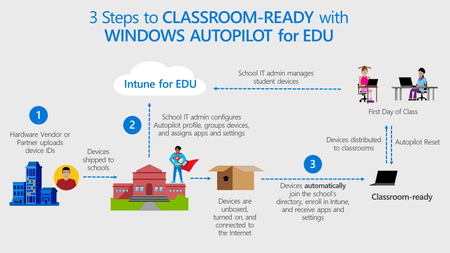
Since launching Intune for Education back in 2017, we have seen some amazing momentum in its adoption. Along the way, our engineering teams have continued to do some great work to simplify device management for schools. We spend a lot of time speaking directly with school IT departments, faculty, and students to better understand how we can build things that will meet the unique needs of the learning process – that means a richer learning experience with better learning outcomes for students and an environment where teachers can teach instead of troubleshoot technical problems.
Introducing the Azure Threat Research Matrix
When performing a security assessment, it’s common to find the assessment team attribute their actions to the MITRE ATT&CK knowledge base so that high-level stakeholders can visually see what techniques were successful and defenders can understand the techniques that were performed. However, the commonly utilized MITRE knowledge base lacks formal documentation of Azure or AzureAD-related tactics, techniques, or procedures (TTPs) that assessment teams can attribute to. Over the past year, Microsoft has worked with some of the top Azure security researchers to create the Azure Threat Research Matrix (ATRM), a matrix that provides details around the tactics & techniques a potential adversary may use to compromise an Azure Resource or Azure Active Directory.29KViews7likes6CommentsHardening Windows Clients with Microsoft Intune and Defender for Endpoint
Explore an approach at hardening clients in your organization by using Microsoft Intune and Defender for Endpoint to apply and mitigate some of the most common security misconfigurations. This blog unveils a centralized approach to automating asset management, deploying security baselines consistently, and minimizing the impact on end users. Learn valuable insights on planning, testing, and monitoring security policies, while discovering the power of attack surface reduction rules. Dive into this comprehensive guide and elevate your organization's security posture with streamlined solutions and proactive measures. Don't miss the chance to turn a major pain point into a significant win for your team!NIST CSF 2.0 - Protect (PR) - Applications for Microsoft 365 (Part 1)
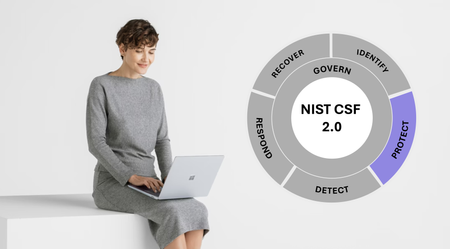
This blog and series will look to apply the National Institute of Standards and Technology (NIST) Cybersecurity Framework (CSF) 2.0 and, specifically, the Protect (PR) Function to Microsoft 365. Though the discussion will endeavor to focus primarily on Microsoft 365, topics may venture into Microsoft Azure topics periodically by the nature of each solution. Part 1 or any subsequent blogs in the series will not be an exhaustive review of all possible applications of NIST CSF 2.0, nor exhaustive of the technologies mentioned and their abilities to manage cybersecurity risks. Other applicable Functions or Categories found in NIST CSF 2.0 will be evoked throughout in the true spirit of the framework. PR as a function is intended to cover “safeguards to manage the organization’s cybersecurity risks” and contains five Categories. The prior CSF publication included six categories, but two were significantly edited and renamed. Let’s first dive into Identity Management, Authentication, and Access Control (PR.AA).Learn more about Microsoft Security Communities.
In the last five years, Microsoft has increased the emphasis on community programs – specifically within the security, compliance, and management space. These communities fall into two categories: Public and Private (or NDA only). In this blog, we will share a breakdown of each community and how to join.Deployment guide for conditional access to email with Microsoft Intune
First published on CloudBlogs on Mar 10, 2016 As part of our continuous investments to help you enable and manage mobile productivity for your employees, we have a new deployment guide available that is intended to help you understand how you can use conditional access capabilities in Intune to help secure access to email and email data depending on the conditions you specify.Automating and Streamlining Vulnerability Management for Your Clients
Learn how to enhance vulnerability management for your windows clients using Microsoft Defender for Endpoint, Intune, and Azure AD. Harness the potential of automation to simplify processes and minimize expenses. *Discover how automation transforms security by removing manual tasks, minimizing human error, and conserving time and resources. *Observe how Microsoft's tools deliver a complete vulnerability management solution for both on-site and remote devices. *Follow our detailed guide on setup, enrollment, strategic updates deployment, and monitoring progress through the Microsoft 365 Defender portal. Take charge of your vulnerability management and protect your organization. Don't miss our blog post, and keep an eye out for the upcoming entry on servers!