microsoft entra
52 TopicsWelcome to the Microsoft Security Community!
We have moved! Registering for webinars is now easier than ever—you can add any session directly to your calendar with a single click using the link below. Please visit: https://securitycommunity.microsoft.com/VirtualEvents/ to sign up for future webinars!53KViews7likes13CommentsAuthorization and Identity Governance Inside AI Agents
Designing Authorization‑Aware AI Agents Enforcing Microsoft Entra ID RBAC in Copilot Studio As AI agents move from experimentation to enterprise execution, authorization becomes the defining line between innovation and risk. AI agents are rapidly evolving from experimental assistants into enterprise operators—retrieving user data, triggering workflows, and invoking protected APIs. While many early implementations rely on prompt‑level instructions to control access, regulated enterprise environments require authorization to be enforced by identity systems, not language models. This article presents a production‑ready, identity‑first architecture for building authorization‑aware AI agents using Copilot Studio, Power Automate, Microsoft Entra ID, and Microsoft Graph, ensuring every agent action executes strictly within the requesting user’s permissions. Why Prompt‑Level Security Is Not Enough Large Language Models interpret intent—they do not enforce policy. Even the most carefully written prompts cannot: Validate Microsoft Entra ID group or role membership Reliably distinguish delegated user identity from application identity Enforce deterministic access decisions Produce auditable authorization outcomes Relying on prompts for authorization introduces silent security failures, over‑privileged access, and compliance gaps—particularly in Financial Services, Healthcare, and other regulated industries. Authorization is not a reasoning problem. It is an identity enforcement problem. Common Authorization Anti‑Patterns in AI Agents The following patterns frequently appear in early AI agent implementations and should be avoided in enterprise environments: Hard‑coded role or group checks embedded in prompts Trusting group names passed as plain‑text parameters Using application permissions for user‑initiated actions Skipping verification of the user’s Entra ID identity Lacking an auditable authorization decision point These approaches may work in demos, but they do not survive security reviews, compliance audits, or real‑world misuse scenarios. Authorization‑Aware Agent Architecture In an authorization‑aware design, the agent never decides access. Authorization is enforced externally, by identity‑aware workflows that sit outside the language model’s reasoning boundary. High‑Level Flow The Copilot Studio agent receives a user request The agent passes the User Principal Name (UPN) and intended action A Power Automate flow validates permissions using Microsoft Entra ID via Microsoft Graph Only authorized requests are allowed to proceed Unauthorized requests fail fast with a deterministic outcome Authorization‑aware Copilot Studio architecture enforces Entra ID RBAC before executing any business action. The agent orchestrates intent. Identity systems enforce access. Enforcing Entra ID RBAC with Microsoft Graph Power Automate acts as the authorization enforcement layer: Resolve user identity from the supplied UPN Retrieve group or role memberships using Microsoft Graph Normalize and compare memberships against approved RBAC groups Explicitly deny execution when authorization fails This keeps authorization logic: Centralized Deterministic Auditable Independent of the AI model Reference Implementation: Power Automate RBAC Enforcement Flow The following import‑ready Power Automate cloud flow demonstrates a secure RBAC enforcement pattern for Copilot Studio agents. It validates Microsoft Entra ID group membership before allowing any business action. Scenario Trigger: User‑initiated agent action Identity model: Delegated user identity Input: userUPN, requestedAction Outcome: Authorized or denied based on Entra ID RBAC { "$schema": "https://schema.management.azure.com/providers/Microsoft.Logic/schemas/2016-06-01/workflowdefinition.json#", "contentVersion": "1.0.0.0", "triggers": { "Copilot_Request": { "type": "Request", "kind": "Http", "inputs": { "schema": { "type": "object", "properties": { "userUPN": { "type": "string" }, "requestedAction": { "type": "string" } }, "required": [ "userUPN" ] } } } }, "actions": { "Get_User_Groups": { "type": "Http", "inputs": { "method": "GET", "uri": "https://graph.microsoft.com/v1.0/users/@{triggerBody()?['userUPN']}/memberOf?$select=displayName", "authentication": { "type": "ManagedServiceIdentity" } } }, "Normalize_Group_Names": { "type": "Select", "inputs": { "from": "@body('Get_User_Groups')?['value']", "select": { "groupName": "@toLower(item()?['displayName'])" } }, "runAfter": { "Get_User_Groups": [ "Succeeded" ] } }, "Check_Authorization": { "type": "Condition", "expression": "@contains(body('Normalize_Group_Names'), 'ai-authorized-users')", "runAfter": { "Normalize_Group_Names": [ "Succeeded" ] }, "actions": { "Authorized_Action": { "type": "Compose", "inputs": "User authorized via Entra ID RBAC" } }, "else": { "actions": { "Access_Denied": { "type": "Terminate", "inputs": { "status": "Failed", "message": "Access denied. User not authorized via Entra ID RBAC." } } } } } } } This pattern enforces authorization outside the agent, aligns with Zero Trust principles, and creates a clear audit boundary suitable for enterprise and regulated environments. Flow Diagram: Agent Integrated with RBAC Authorization Flow and Sample Prompt Execution: Delegated vs Application Permissions Scenario Recommended Permission Model User‑initiated agent actions Delegated permissions Background or system automation Application permissions Using delegated permissions ensures agent execution remains strictly within the requesting user’s identity boundary. Auditing and Compliance Benefits Deterministic and explainable authorization decisions Centralized enforcement aligned with identity governance Clear audit trails for security and compliance reviews Readiness for SOC, ISO, PCI, and FSI assessments Enterprise Security Takeaways Authorization belongs in Microsoft Entra ID, not prompts AI agents must respect enterprise identity boundaries Copilot Studio + Power Automate + Microsoft Graph enable secure‑by‑design AI agents By treating AI agents as first‑class enterprise actors and enforcing authorization at the identity layer, organizations can scale AI adoption with confidence, trust, and compliance.
Introducing Microsoft Sentinel data lake
Today, we announced a significant expansion of Microsoft Sentinel’s capabilities through the introduction of Sentinel data lake, now rolling out in public preview. Security teams cannot defend what they cannot see and analyze. With exploding volumes of security data, organizations are struggling to manage costs while maintaining effective threat coverage. Do-it-yourself security data architectures have perpetuated data silos, which in turn have reduced the effectiveness of AI solutions in security operations. With Sentinel data lake, we are taking a major step to address these challenges. Microsoft Sentinel data lake enables a fully managed, cloud-native, data lake that is purposefully designed for security, right inside Sentinel. Built on a modern lake architecture and powered by Azure, Sentinel data lake simplifies security data management, eliminates security data silos, and enables cost-effective long-term security data retention with the ability to run multiple forms of analytics on a single copy of that data. Security teams can now store and manage all security data. This takes the market-leading capabilities of Sentinel SIEM and supercharges it even further. Customers can leverage the data lake for retroactive TI matching and hunting over a longer time horizon, track low and slow attacks, conduct forensics analysis, build anomaly insights, and meet reporting & compliance needs. By unifying security data, Sentinel data lake provides the AI ready data foundation for AI solutions. Let’s look at some of Sentinel data lake’s core features. Simplified onboarding and enablement inside Defender Portal: Customers can easily discover and enable the new data lake from within the Defender portal, either from the banner on the home page or from settings. Setting up a modern data lake now is just a click away, empowering security teams to get started quickly without a complex setup. Simplified security data management: Sentinel data lake works seamlessly with existing Sentinel connectors. It brings together security logs from Microsoft services across M365, Defender, Azure, Entra, Purview, Intune plus third-party sources like AWS, GCP, network and firewall data from 350+ connectors and solutions. The data lake supports Sentinel’s existing table schemas while customers can also create custom connectors to bring raw data into the data lake or transform it during ingestion. In the future, we will enable additional industry-standard schemas. The data lake expands beyond just activity logs by including a native asset store. Critical asset information is added to the data lake using new Sentinel data connectors for Microsoft 365, Entra, and Azure, enabling a single place to analyze activity and asset data enriched with Threat intelligence. A new table management experience makes it easy for customers to choose where to send and store data, as well as set related retention policies to optimize their security data estate. Customers can easily send critical, high-fidelity security data to the analytics tier or choose to send high-volume, low fidelity logs to the new data lake tier. Any data brought into the analytics tier is automatically mirrored into the data lake at no additional charge, making data lake the central location for all security data. Advanced data analysis capabilities over data in the data lake: Sentinel data lake stores all security data in an open format to enable analysts to do multi-modal security analytics on a single copy of data. Through the new data lake exploration experience in the Defender portal, customers can leverage Kusto query language to analyze historical data using the full power of Kusto. Since the data lake supports the Sentinel table schema, advanced hunting queries can be run directly on the data lake. Customers can also schedule long-running jobs, either once or on a schedule, that perform complex analysis on historical data for in-depth security insights. These insights generated from the data lake can be easily elevated to analytics tier and leveraged in Sentinel for threat investigation and response. Additionally, as part of the public preview, we are also releasing a new Sentinel Visual Studio Code extension that enables security teams to easily connect to the same data lake data and use Python notebooks, as well as spark and ML libraries to deeply analyze lake data for anomalies. Since the environment is fully managed, there is no compute infrastructure to set up. Customers can just install the Visual Studio Code extension and use AI coding agents like GitHub Copilot to build a notebook and execute it in the managed environment. These notebooks can also be scheduled as jobs and the resulting insights can be elevated to analytics tier and leveraged in Sentinel for threat investigation and response. Flexible business model: Sentinel data lake enables customers to separate their data ingestion and retention needs from their security analytics needs, allowing them to ingest and store data cost effectively and then pay separately when analyzing data for their specific needs. Let’s put this all together and show an example of how a customer can operationalize and derive value from the data lake for retrospective threat intelligence matching in Microsoft Sentinel. Network logs are typically high-volume logs but can often contain key insights for detecting initial entry point of an attack, command and control connection, lateral movement or an exfiltration attempt. Customers can now send these high-volume logs to the data lake tier. Next, they can create a python notebook that can join latest threat intelligence from Microsoft Defender Threat Intelligence to scan network logs for any connections to/from a suspicious IP or domain. They can schedule this notebook to run as a scheduled job, and any insights can then be promoted to analytics tiers and leveraged to enrich ongoing investigation, hunts, response or forensics analysis. All this is possible cost-effectively without having to set up any complex infrastructure, enabling security teams to achieve deeper insights. This preview is now rolling out for customers in Defender portal in our supported regions. To learn more, check out our Mechanics video and our documentation or talk to your account teams. Get started today Join us as we redefine what’s possible in security operations: Onboard Sentinel data lake: https://aka.ms/sentineldatalakedocs Explore our pricing: https://aka.ms/sentinel/pricingblog For the supported regions, please refer to https://aka.ms/sentinel/datalake/geos Learn more about our MDTI news: http://aka.ms/mdti-convergence General Availability of Auxiliary Logs and Reduced PricingNIST CSF 2.0 - Protect (PR) - Applications for Microsoft 365 (Part 1)
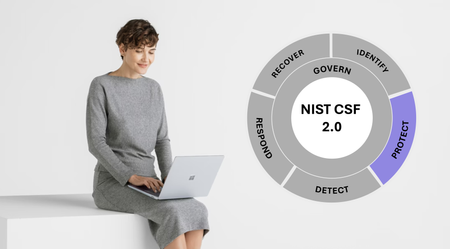
This blog and series will look to apply the National Institute of Standards and Technology (NIST) Cybersecurity Framework (CSF) 2.0 and, specifically, the Protect (PR) Function to Microsoft 365. Though the discussion will endeavor to focus primarily on Microsoft 365, topics may venture into Microsoft Azure topics periodically by the nature of each solution. Part 1 or any subsequent blogs in the series will not be an exhaustive review of all possible applications of NIST CSF 2.0, nor exhaustive of the technologies mentioned and their abilities to manage cybersecurity risks. Other applicable Functions or Categories found in NIST CSF 2.0 will be evoked throughout in the true spirit of the framework. PR as a function is intended to cover “safeguards to manage the organization’s cybersecurity risks” and contains five Categories. The prior CSF publication included six categories, but two were significantly edited and renamed. Let’s first dive into Identity Management, Authentication, and Access Control (PR.AA).Secure Model Context Protocol (MCP) Implementation with Azure and Local Servers
Introduction The Model Context Protocol (MCP) enables AI systems to interact with external data sources and tools through a standardized interface. While powerful, MCP can introduce security risks in enterprise environments. This tutorial shows you how to implement MCP securely using local servers, Azure OpenAI with APIM, and proper authentication. Understanding MCP's Security Risks There are a couple of key security concerns to consider before implementing MCP: Data Exfiltration: External MCP servers could expose sensitive data. Unauthorized Access: Third-party services become potential security risks. Loss of Control: Unknown how external services handle your data. Compliance Issues: Difficulty meeting regulatory requirements with external dependencies. The solution? Keep everything local and controlled. Secure Architecture Before we dive into implementation, let's take a look at the overall architecture of our secure MCP solution: This architecture consists of three key components working together: Local MCP Server - Your custom tools run entirely within your local environment, reducing external exposure risks. Azure OpenAI + APIM Gateway - All AI requests are routed through Azure API Management with Microsoft Entra ID authentication, providing enterprise-grade security controls and compliance. Authenticated Proxy - A lightweight proxy service handles token management and request forwarding, ensuring seamless integration. One of the key benefits of this architecture is that no API key is required. Traditional implementations often require storing OpenAI API keys in configuration files, environment variables, or secrets management systems, creating potential security vulnerabilities. This approach uses Azure Managed Identity for backend authentication and Azure CLI credentials for client authentication, meaning no sensitive API keys are ever stored, logged, or exposed in your codebase. For more security, APIM and Azure OpenAI resources can be configured with IP restrictions or network rules to only accept traffic from certain sources. These configurations are available for most Azure resources and provide an additional layer of network-level security. This security-forward approach gives you the full power of MCP's tool integration capabilities while keeping your implementation completely under your control. How to Implement MCP Securely 1. Local MCP Server Implementation Building the MCP Server Let's start by creating a simple MCP server in .NET Core. 1. Create a web application dotnet new web -n McpServer 2.Add MCP packages dotnet add package ModelContextProtocol --prerelease dotnet add package ModelContextProtocol.AspNetCore --prerelease 3. Configure Program.cs var builder = WebApplication.CreateBuilder(args); builder.Services.AddMcpServer() .WithHttpTransport() .WithToolsFromAssembly(); var app = builder.Build(); app.MapMcp(); app.Run(); WithToolsFromAssembly() automatically discovers and registers tools from the current assembly. Look into the C# SDK for other ways to register tools for your use case. 4. Define Tools Now, we can define some tools that our MCP server can expose. here is a simple example for tools that echo input back to the client: using ModelContextProtocol.Server; using System.ComponentModel; namespace Tools; [McpServerToolType] public static class EchoTool { [McpServerTool] [Description("Echoes the input text back to the client in all capital letters.")] public static string EchoCaps(string input) { return new string(input.ToUpperInvariant()); } [McpServerTool] [Description("Echoes the input text back to the client in reverse.")] public static string ReverseEcho(string input) { return new string(input.Reverse().ToArray()); } } Key components of MCP tools are the McpServerToolType class decorator indicating that this class contains MCP tools, and the McpServerTool method decorator with a description that explains what the tool does. Alternative: STDIO Transport If you want to use STDIO transport instead of SSE (implemented here), check out this guide: Build a Model Context Protocol (MCP) Server in C# 2. Create a MCP Client with Cline Now that we have our MCP server set up with tools, we need a client that can discover and invoke these tools. For this implementation, we'll use Cline as our MCP client, configured to work through our secure Azure infrastructure. 1. Install Cline VS Code Extension Install the Cline extension in VS Code. 2. Deploy secure Azure OpenAI Endpoint with APIM Instead of connecting Cline directly to external AI services (which could expose the secure implementation to external bad actors), we will route through Azure API Management (APIM) for enterprise security. With this implementation, all requests go through Microsoft Entra ID and we use managed identity for all authentications. Quick Setup: Deploy the Azure OpenAI with APIM solution. Ensure your Azure OpenAI resources are configured to allow your APIM's managed identity to make calls. The APIM policy below uses managed identity authentication to connect to Azure OpenAI backends. Refer to the Azure OpenAI documentation on managed identity authentication for detailed setup instructions. 3. Configure APIM Policy After deploying APIM, configure the following policy to enable Azure AD token validation, managed identity authentication, and load balancing across multiple OpenAI backends: <!-- Azure API Management Policy for OpenAI Endpoint --> <!-- Implements Azure AD Token validation, managed identity authentication --> <!-- Supports round-robin load balancing across multiple OpenAI backends --> <!-- Requests with 'gpt-5' in the URL are routed to a single backend --> <!-- The client application ID '04b07795-8ddb-461a-bbee-02f9e1bf7b46' is the official Azure CLI app registration --> <!-- This policy allows requests authenticated by Azure CLI (az login) when the required claims are present --> <policies> <inbound> <!-- IP Allow List Fragment (external fragment for client IP restrictions) --> <include-fragment fragment-id="YourCompany-IPAllowList" /> <!-- Azure AD Token Validation for Azure CLI app ID --> <validate-azure-ad-token tenant-id="YOUR-TENANT-ID-HERE" header-name="Authorization" failed-validation-httpcode="401" failed-validation-error-message="Unauthorized. Access token is missing or invalid."> <client-application-ids> <application-id>04b07795-8ddb-461a-bbee-02f9e1bf7b46</application-id> </client-application-ids> <audiences> <audience>api://YOUR-API-AUDIENCE-ID-HERE</audience> </audiences> <required-claims> <claim name="roles" match="any"> <value>YourApp.User</value> </claim> </required-claims> </validate-azure-ad-token> <!-- Acquire Managed Identity access token for backend authentication --> <authentication-managed-identity resource="https://cognitiveservices.azure.com" output-token-variable-name="managed-id-access-token" ignore-error="false" /> <!-- Set Authorization header for backend using the managed identity token --> <set-header name="Authorization" exists-action="override"> <value>@("Bearer " + (string)context.Variables["managed-id-access-token"])</value> </set-header> <!-- Check if URL contains 'gpt-5' and set backend accordingly --> <choose> <when condition="@(context.Request.Url.Path.ToLower().Contains("gpt-5"))"> <set-variable name="selected-backend-url" value="https://your-region1-oai.openai.azure.com/openai" /> </when> <otherwise> <cache-lookup-value key="backend-counter" variable-name="backend-counter" /> <choose> <when condition="@(context.Variables.ContainsKey("backend-counter") == false)"> <set-variable name="backend-counter" value="@(0)" /> </when> </choose> <set-variable name="current-backend-index" value="@((int)context.Variables["backend-counter"] % 7)" /> <choose> <when condition="@((int)context.Variables["current-backend-index"] == 0)"> <set-variable name="selected-backend-url" value="https://your-region1-oai.openai.azure.com/openai" /> </when> <when condition="@((int)context.Variables["current-backend-index"] == 1)"> <set-variable name="selected-backend-url" value="https://your-region2-oai.openai.azure.com/openai" /> </when> <when condition="@((int)context.Variables["current-backend-index"] == 2)"> <set-variable name="selected-backend-url" value="https://your-region3-oai.openai.azure.com/openai" /> </when> <when condition="@((int)context.Variables["current-backend-index"] == 3)"> <set-variable name="selected-backend-url" value="https://your-region4-oai.openai.azure.com/openai" /> </when> <when condition="@((int)context.Variables["current-backend-index"] == 4)"> <set-variable name="selected-backend-url" value="https://your-region5-oai.openai.azure.com/openai" /> </when> <when condition="@((int)context.Variables["current-backend-index"] == 5)"> <set-variable name="selected-backend-url" value="https://your-region6-oai.openai.azure.com/openai" /> </when> <when condition="@((int)context.Variables["current-backend-index"] == 6)"> <set-variable name="selected-backend-url" value="https://your-region7-oai.openai.azure.com/openai" /> </when> </choose> <set-variable name="next-counter" value="@(((int)context.Variables["backend-counter"] + 1) % 1000)" /> <cache-store-value key="backend-counter" value="@((int)context.Variables["next-counter"])" duration="300" /> </otherwise> </choose> <!-- Always set backend service using selected-backend-url variable --> <set-backend-service base-url="@((string)context.Variables["selected-backend-url"])" /> <!-- Inherit any base policies defined outside this section --> <base /> </inbound> <backend> <base /> </backend> <outbound> <base /> </outbound> <on-error> <base /> </on-error> </policies> This policy creates a secure gateway that validates Azure AD tokens from your local Azure CLI session, then uses APIM's managed identity to authenticate with Azure OpenAI backends, eliminating the need for API keys. It automatically load-balances requests across multiple Azure OpenAI regions using round-robin distribution for optimal performance. 4. Create Azure APIM proxy for Cline This FastAPI-based proxy forwards OpenAI-compatible API requests from Cline through APIM using Azure AD authentication via Azure CLI credentials, eliminating the need to store or manage OpenAI API keys. Prerequisites: Python 3.8 or higher Azure CLI (ensure az login has been run at least once) Ensure the user running the proxy script has appropriate Azure AD roles and permissions. This script uses Azure CLI credentials to obtain bearer tokens. Your user account must have the correct roles assigned and access to the target API audience configured in the APIM policy above. Quick setup for the proxy: Create this requirements.txt: fastapi uvicorn requests azure-identity Create this Python script for the proxy source code azure_proxy.py: import os import requests from fastapi import FastAPI, Request from fastapi.responses import StreamingResponse import uvicorn from azure.identity import AzureCliCredential # CONFIGURATION APIM_BASE_URL = <APIM BASE URL HERE> AZURE_SCOPE = <AZURE SCOPE HERE> PORT = int(os.environ.get("PORT", 8080)) app = FastAPI() credential = AzureCliCredential() # Use a single requests.Session for connection pooling from requests.adapters import HTTPAdapter session = requests.Session() session.mount("https://", HTTPAdapter(pool_connections=100, pool_maxsize=100)) import time _cached_token = None _cached_expiry = 0 def get_bearer_token(scope: str) -> str: """Get an access token using AzureCliCredential, caching until expiry is within 30 seconds.""" global _cached_token, _cached_expiry now = int(time.time()) if _cached_token and (_cached_expiry - now > 30): return _cached_token try: token_obj = credential.get_token(scope) _cached_token = token_obj.token _cached_expiry = token_obj.expires_on return _cached_token except Exception as e: raise RuntimeError(f"Could not get Azure access token: {e}") @app.api_route("/{path:path}", methods=["GET", "POST", "PUT", "PATCH", "DELETE", "OPTIONS"]) async def proxy(request: Request, path: str): # Assemble the destination URL (preserve trailing slash logic) dest_url = f"{APIM_BASE_URL.rstrip('/')}/{path}".rstrip("/") if request.url.query: dest_url += "?" + request.url.query # Get the Bearer token bearer_token = get_bearer_token(AZURE_SCOPE) # Prepare headers (copy all, overwrite Authorization) headers = dict(request.headers) headers["Authorization"] = f"Bearer {bearer_token}" headers.pop("host", None) # Read body body = await request.body() # Send the request to APIM using the pooled session resp = session.request( method=request.method, url=dest_url, headers=headers, data=body if body else None, stream=True, ) # Stream the response back to the client return StreamingResponse( resp.raw, status_code=resp.status_code, headers={k: v for k, v in resp.headers.items() if k.lower() != "transfer-encoding"}, ) if __name__ == "__main__": # Bind the app to 127.0.0.1 to avoid any Firewall updates uvicorn.run(app, host="127.0.0.1", port=PORT) Run the setup: pip install -r requirements.txt az login # Authenticate with Azure python azure_proxy.py Configure Cline to use the proxy: Using the OpenAI Compatible API Provider: Base URL: http://localhost:8080 API Key: <any random string> Model ID: <your Azure OpenAI deployment name> API Version: <your Azure OpenAI deployment version> The API key field is required by Cline but unused in our implementation - any random string works since authentication happens via Azure AD. 5. Configure Cline to listen to your MCP Server Now that we have both our MCP server running and Cline configured with secure OpenAI access, the final step is connecting them together. To enable Cline to discover and use your custom tools, navigate to your installed MCP servers on Cline, select Configure MCP Servers, and add in the configuration for your server: { "mcpServers": { "mcp-tools": { "autoApprove": [ "EchoCaps", "ReverseEcho", ], "disabled": false, "timeout": 60, "type": "sse", "url": "http://<your localhost url>/sse" } } } Now, you can use Cline's chat interface to interact with your secure MCP tools. Try asking Cline to use your custom tools - for example, "Can you echo 'Hello World' in capital letters?" and watch as it calls your local MCP server through the infrastructure you've built. Conclusion There you have it: A secure implementation of MCP that can be tailored to your specific use case. This approach gives you the power of MCP while maintaining enterprise security. You get: AI capabilities through secure Azure infrastructure. Custom tools that never leave your environment. Standard MCP interface for easy integration. Complete control over your data and tools. The key is keeping MCP servers local while routing AI requests through your secure Azure infrastructure. This way, you gain MCP's benefits without compromising security. Disclaimer While this tutorial provides a secure foundation for MCP implementation, organizations are responsible for configuring their Azure resources according to their specific security requirements and compliance standards. Ensure proper review of network rules, access policies, and authentication configurations before deploying to production environments. Resources MCP SDKs and Tools: MCP C# SDK MCP Python SDK Cline SDK Cline User Guide Azure OpenAI with APIM Azure API Management Network Security: Azure API Management - restrict caller IPs Azure API Management with an Azure virtual network Set up inbound private endpoint for Azure API Management Azure OpenAI and AI Services Network Security: Configure Virtual Networks for Azure AI services Securing Azure OpenAI inside a virtual network with private endpoints Add an Azure OpenAI network security perimeter az cognitiveservices account network-rule4.2KViews4likes2CommentsHacking Made Easy, Patching Made Optional: A Modern Cyber Tragedy
In today’s cyber threat landscape, the tools and techniques required to compromise enterprise environments are no longer confined to highly skilled adversaries or state-sponsored actors. While artificial intelligence is increasingly being used to enhance the sophistication of attacks, the majority of breaches still rely on simple, publicly accessible tools and well-established social engineering tactics. Another major issue is the persistent failure of enterprises to patch common vulnerabilities in a timely manner—despite the availability of fixes and public warnings. This negligence continues to be a key enabler of large-scale breaches, as demonstrated in several recent incidents. The Rise of AI-Enhanced Attacks Attackers are now leveraging AI to increase the credibility and effectiveness of their campaigns. One notable example is the use of deepfake technology—synthetic media generated using AI—to impersonate individuals in video or voice calls. North Korean threat actors, for instance, have been observed using deepfake videos and AI-generated personas to conduct fraudulent job interviews with HR departments at Western technology companies. These scams are designed to gain insider access to corporate systems or to exfiltrate sensitive intellectual property under the guise of legitimate employment. Social Engineering: Still the Most Effective Entry Point And yet, many recent breaches have begun with classic social engineering techniques. In the cases of Coinbase and Marks & Spencer, attackers impersonated employees through phishing or fraudulent communications. Once they had gathered sufficient personal information, they contacted support desks or mobile carriers, convincingly posing as the victims to request password resets or SIM swaps. This impersonation enabled attackers to bypass authentication controls and gain initial access to sensitive systems, which they then leveraged to escalate privileges and move laterally within the network. Threat groups such as Scattered Spider have demonstrated mastery of these techniques, often combining phishing with SIM swap attacks and MFA bypass to infiltrate telecom and cloud infrastructure. Similarly, Solt Thypoon (formerly DEV-0343), linked to North Korean operations, has used AI-generated personas and deepfake content to conduct fraudulent job interviews—gaining insider access under the guise of legitimate employment. These examples underscore the evolving sophistication of social engineering and the need for robust identity verification protocols. Built for Defense, Used for Breach Despite the emergence of AI-driven threats, many of the most successful attacks continue to rely on simple, freely available tools that require minimal technical expertise. These tools are widely used by security professionals for legitimate purposes such as penetration testing, red teaming, and vulnerability assessments. However, they are also routinely abused by attackers to compromise systems Case studies for tools like Nmap, Metasploit, Mimikatz, BloodHound, Cobalt Strike, etc. The dual-use nature of these tools underscores the importance of not only detecting their presence but also understanding the context in which they are being used. From CVE to Compromise While social engineering remains a common entry point, many breaches are ultimately enabled by known vulnerabilities that remain unpatched for extended periods. For example, the MOVEit Transfer vulnerability (CVE-2023-34362) was exploited by the Cl0p ransomware group to compromise hundreds of organizations, despite a patch being available. Similarly, the OpenMetadata vulnerability (CVE-2024-28255, CVE-2024-28847) allowed attackers to gain access to Kubernetes workloads and leverage them for cryptomining activity days after a fix had been issued. Advanced persistent threat groups such as APT29 (also known as Cozy Bear) have historically exploited unpatched systems to maintain long-term access and conduct stealthy operations. Their use of credential harvesting tools like Mimikatz and lateral movement frameworks such as Cobalt Strike highlights the critical importance of timely patch management—not just for ransomware defense, but also for countering nation-state actors. Recommendations To reduce the risk of enterprise breaches stemming from tool misuse, social engineering, and unpatched vulnerabilities, organizations should adopt the following practices: 1. Patch Promptly and Systematically Ensure that software updates and security patches are applied in a timely and consistent manner. This involves automating patch management processes to reduce human error and delay, while prioritizing vulnerabilities based on their exploitability and exposure. Microsoft Intune can be used to enforce update policies across devices, while Windows Autopatch simplifies the deployment of updates for Windows and Microsoft 365 applications. To identify and rank vulnerabilities, Microsoft Defender Vulnerability Management offers risk-based insights that help focus remediation efforts where they matter most. 2. Implement Multi-Factor Authentication (MFA) To mitigate credential-based attacks, MFA should be enforced across all user accounts. Conditional access policies should be configured to adapt authentication requirements based on contextual risk factors such as user behavior, device health, and location. Microsoft Entra Conditional Access allows for dynamic policy enforcement, while Microsoft Entra ID Protection identifies and responds to risky sign-ins. Organizations should also adopt phishing-resistant MFA methods, including FIDO2 security keys and certificate-based authentication, to further reduce exposure. 3. Identity Protection Access Reviews and Least Privilege Enforcement Conducting regular access reviews ensures that users retain only the permissions necessary for their roles. Applying least privilege principles and adopting Microsoft Zero Trust Architecture limits the potential for lateral movement in the event of a compromise. Microsoft Entra Access Reviews automates these processes, while Privileged Identity Management (PIM) provides just-in-time access and approval workflows for elevated roles. Just-in-Time Access and Risk-Based Controls Standing privileges should be minimized to reduce the attack surface. Risk-based conditional access policies can block high-risk sign-ins and enforce additional verification steps. Microsoft Entra ID Protection identifies risky behaviors and applies automated controls, while Conditional Access ensures access decisions are based on real-time risk assessments to block or challenge high-risk authentication attempts. Password Hygiene and Secure Authentication Promoting strong password practices and transitioning to passwordless authentication enhances security and user experience. Microsoft Authenticator supports multi-factor and passwordless sign-ins, while Windows Hello for Business enables biometric authentication using secure hardware-backed credentials. 4. Deploy SIEM and XDR for Detection and Response A robust detection and response capability is vital for identifying and mitigating threats across endpoints, identities, and cloud environments. Microsoft Sentinel serves as a cloud-native SIEM that aggregates and analyses security data, while Microsoft Defender XDR integrates signals from multiple sources to provide a unified view of threats and automate response actions. 5. Map and Harden Attack Paths Organizations should regularly assess their environments for attack paths such as privilege escalation and lateral movement. Tools like Microsoft Defender for Identity help uncover Lateral Movement Paths, while Microsoft Identity Threat Detection and Response (ITDR) integrates identity signals with threat intelligence to automate response. These capabilities are accessible via the Microsoft Defender portal, which includes an attack path analysis feature for prioritizing multicloud risks. 6. Stay Current with Threat Actor TTPs Monitor the evolving tactics, techniques, and procedures (TTPs) employed by sophisticated threat actors. Understanding these behaviours enables organizations to anticipate attacks and strengthen defenses proactively. Microsoft Defender Threat Intelligence provides detailed profiles of threat actors and maps their activities to the MITRE ATT&CK framework. Complementing this, Microsoft Sentinel allows security teams to hunt for these TTPs across enterprise telemetry and correlate signals to detect emerging threats. 7. Build Organizational Awareness Organizations should train staff to identify phishing, impersonation, and deepfake threats. Simulated attacks help improve response readiness and reduce human error. Use Attack Simulation Training, in Microsoft Defender for Office 365 to run realistic phishing scenarios and assess user vulnerability. Additionally, educate users about consent phishing, where attackers trick individuals into granting access to malicious apps. Conclusion The democratization of offensive security tooling, combined with the persistent failure to patch known vulnerabilities, has significantly lowered the barrier to entry for cyber attackers. Organizations must recognize that the tools used against them are often the same ones available to their own security teams. The key to resilience lies not in avoiding these tools, but in mastering them—using them to simulate attacks, identify weaknesses, and build a proactive defense. Cybersecurity is no longer a matter of if, but when. The question is: will you detect the attacker before they achieve their objective? Will you be able to stop them before reaching your most sensitive data? Additional read: Gartner Predicts 30% of Enterprises Will Consider Identity Verification and Authentication Solutions Unreliable in Isolation Due to AI-Generated Deepfakes by 2026 Cyber security breaches survey 2025 - GOV.UK Jasper Sleet: North Korean remote IT workers’ evolving tactics to infiltrate organizations | Microsoft Security Blog MOVEit Transfer vulnerability Solt Thypoon Scattered Spider SIM swaps Attackers exploiting new critical OpenMetadata vulnerabilities on Kubernetes clusters | Microsoft Security Blog Microsoft Defender Vulnerability Management - Microsoft Defender Vulnerability Management | Microsoft Learn Zero Trust Architecture | NIST tactics, techniques, and procedures (TTP) - Glossary | CSRC https://learn.microsoft.com/en-us/security/zero-trust/deploy/overviewSecurity Dashboard for AI - Now Generally Available
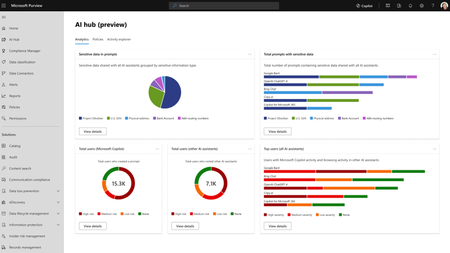
AI proliferation in the enterprise, combined with the emergence of AI governance committees and evolving AI regulations, leaves CISOs and AI risk leaders needing a clear view of their AI risks, such as data leaks, model vulnerabilities, misconfigurations, and unethical agent actions across their entire AI estate, spanning AI platforms, apps, and agents. 53% of security professionals say their current AI risk management needs improvement, presenting an opportunity to better identify, assess and manage risk effectively. 1 At the same time, 86% of leaders prefer integrated platforms over fragmented tools, citing better visibility, fewer alerts and improved efficiency. 2 To address these needs, we are excited to announce the Security Dashboard for AI, previously announced at Microsoft Ignite, is now generally available. This unified dashboard aggregates posture and real-time risk signals from Microsoft Defender, Microsoft Entra, and Microsoft Purview - enabling users to see left-to-right across purpose-built security tools from within a single pane of glass. The dashboard equips CISOs and AI risk leaders with a governance tool to discover agents and AI apps, track AI posture and drift, and correlate risk signals to investigate and act across their entire AI ecosystem. Security teams can continue using the tools they trust while empowering security leaders to govern and collaborate effectively. Gain Unified AI Risk Visibility Consolidating risk signals from across purpose-built tools can simplify AI asset visibility and oversight, increase security teams’ efficiency, and reduce the opportunity for human error. The Security Dashboard for AI provides leaders with unified AI risk visibility by aggregating security, identity, and data risk across Defender, Entra, Purview into a single interactive dashboard experience. The Overview tab of the dashboard provides users with an AI risk scorecard, providing immediate visibility to where there may be risks for security teams to address. It also assesses an organization's implementation of Microsoft security for AI capabilities and provides recommendations for improving AI security posture. The dashboard also features an AI inventory with comprehensive views to support AI assets discovery, risk assessments, and remediation actions for broad coverage of AI agents, models, MCP servers, and applications. The dashboard provides coverage for all Microsoft AI solutions supported by Entra, Defender and Purview—including Microsoft 365 Copilot, Microsoft Copilot Studio agents, and Microsoft Foundry applications and agents—as well as third-party AI models, applications, and agents, such as Google Gemini, OpenAI ChatGPT, and MCP servers. This supports comprehensive visibility and control, regardless of where applications and agents are built. Prioritize Critical Risk with Security Copilots AI-Powered Insights Risk leaders must do more than just recognize existing risks—they also need to determine which ones pose the greatest threat to their business. The dashboard provides a consolidated view of AI-related security risks and leverages Security Copilot’s AI-powered insights to help find the most critical risks within an environment. For example, Security Copilot natural language interaction improves agent discovery and categorization, helping leaders identify unmanaged and shadow AI agents to enhance security posture. Furthermore, Security Copilot allows leaders to investigate AI risks and agent activities through prompt-based exploration, putting them in the driver’s seat for additional risk investigation. Drive Risk Mitigation By streamlining risk mitigation recommendations and automated task delegation, organizations can significantly improve the efficiency of their AI risk management processes. This approach can reduce the potential hidden AI risk and accelerate compliance efforts, helping to ensure that risk mitigation is timely and accurate. To address this, the Security Dashboard for AI evaluates how organizations put Microsoft’s AI security features into practice and offers tailored suggestions to strengthen AI security posture. It leverages Microsoft’s productivity tools for immediate action within the practitioner portal, making it easy for administrators to delegate recommendation tasks to designated users. With the Security Dashboard for AI, CISOs and risk leaders gain a clear, consolidated view of AI risks across agents, apps, and platforms—eliminating fragmented visibility, disconnected posture insights, and governance gaps as AI adoption scales. Best of all, the Security Dashboard for AI is included with eligible Microsoft security products customers already use. If an organization is already using Microsoft security products to secure AI, they are already a Security Dashboard for AI customer. Getting Started Existing Microsoft Security customers can start using Security Dashboard for AI today. It is included when a customer has the Microsoft Security products—Defender, Entra and Purview—with no additional licensing required. To begin using the Security Dashboard for AI, visit http://ai.security.microsoft.com or access the dashboard from the Defender, Entra or Purview portals. Learn more about the Security Dashboard for AI at Microsoft Security MS Learn. 1AuditBoard & Ascend2 Research. The Connected Risk Report: Uniting Teams and Insights to Drive Organizational Resilience. AuditBoard, October 2024. 2Microsoft. 2026 Data Security Index: Unifying Data Protection and AI Innovation. Microsoft Security, 2026