microsoft copilot
419 TopicsCopilot, Microsoft 365 & Power Platform Community call
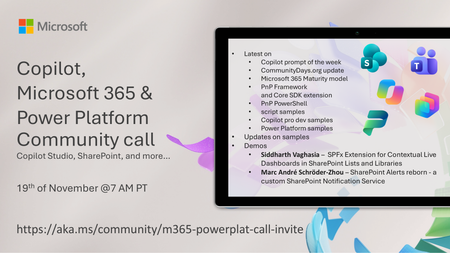
💡 Copilot, Microsoft 365 & Power Platform weekly community call focuses on different use cases and features within the Microsoft 365 and Power Platform - across Microsoft 365 Copilot, Copilot Studio, SharePoint, Power Apps and more. Demos in this call are presented by the community members. 👏 Looking to catch up on the latest news and updates, including cool community demos, this call is for you! 📅 On 19th of November we'll have following agenda: Latest news and events from Microsoft Latest on Copilot prompt of the week CommunityDays.org update Microsoft 365 Maturity model PnP Framework and Core SDK extension PnP PowerShell Script samples Copilot pro dev samples Power Platform samples Demos this time Siddharth Vaghasia – SPFx Extension for Contextual Live Dashboards in SharePoint Lists and Libraries Marc André Schröder-Zhou – SharePoint Alerts reborn - a custom SharePoint Notification Service 📅 Download recurrent invite from https://aka.ms/community/m365-powerplat-dev-call-invite 📞 & 📺 Join the Microsoft Teams meeting live at https://aka.ms/community/m365-powerplat-dev-call-join 💡 Building something cool for Microsoft 365 or Power Platform (Copilot, SharePoint, Power Apps, etc)? We are always looking for presenters - Volunteer for a community call demo at https://aka.ms/community/request/demo 👋 See you in the call! 📖 Resources: Previous community call recordings and demos from the Microsoft Community Learning YouTube channel at https://aka.ms/community/youtube Microsoft 365 & Power Platform samples from Microsoft and community - https://aka.ms/community/samples Microsoft 365 & Power Platform community details - https://aka.ms/community/home 🧡 Sharing is caring!45Views0likes0CommentsMicrosoft Copilot Studio & Power Platform community call - November 2026
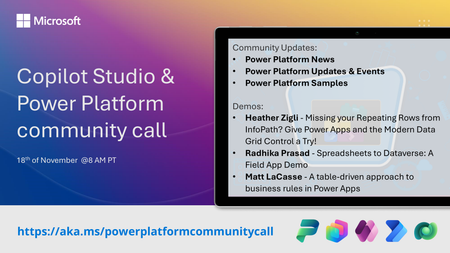
💡 Power Platform monthly community call focuses on different extensibility options for builders, makers and developers within the Power Platform. Typically demos are from our awesome community members who showcase the art of possible within the Power Platform capabilities. 👏 Looking to catch up on the latest news and updates, including cool community demos, this call is for you! 📅 On 18th of November we'll have following agenda: Power Platform Updates & Events Latest on Power Platform samples Heather Zigli - Missing your Repeating Rows from InfoPath? Give Power Apps and the Modern Data Grid Control a Try! Radhika Prasad - Spreadsheets to Dataverse: A Field App Demo Matt LaCasse - A table-driven approach to business rules in Power Apps 📅 Download recurrent invite from https://aka.ms/powerplatformcommunitycall 📞 & 📺 Join the Microsoft Teams meeting live at https://aka.ms/PowerPlatformMonthlyCall 💡 Building something cool for Microsoft 365 or Power Platform (Copilot, SharePoint, Power Apps, etc)? We are always looking for presenters - Volunteer for a community call demo at https://aka.ms/community/request/demo 👋 See you in the call! 📖 Resources: Previous community call recordings and demos from the Microsoft 365 & Power Platform community YouTube channel at https://aka.ms/community/videos Microsoft 365 & Power Platform samples from Microsoft and community - https://aka.ms/community/samples Microsoft 365 & Power Platform community details - https://aka.ms/community/home55Views1like0CommentsCopilot, Microsoft 365 & Power Platform product updates call
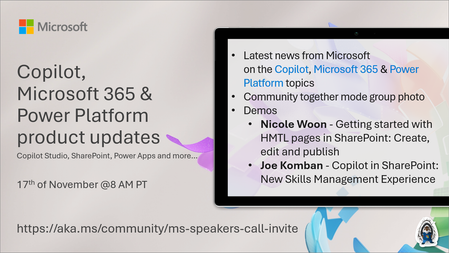
💡Copilot, Microsoft 365 & Power Platform product updates call concentrates on the different use cases and features within the Microsoft 365 and in Power Platform. Call includes topics like Microsoft 365 Copilot, Copilot Studio, Microsoft Teams, Power Platform, Microsoft Graph, Microsoft Viva, Microsoft Search, Microsoft Lists, SharePoint, Power Automate, Power Apps and more. 👏 Weekly Tuesday call is for all community members to see Microsoft PMs, engineering and Cloud Advocates showcasing the art of possible with Copilot, Microsoft 365 and Power Platform. 📅 On the 17th of November we'll have following agenda: News and updates from Microsoft Together mode group photo Nicole Woon - Getting started with HMTL pages in SharePoint: Create, edit and publish Joe Komban - Copilot in SharePoint: New Skills Management Experience 📞 & 📺 Join the Microsoft Teams meeting live at https://aka.ms/community/ms-speakers-call-join 🗓️ Download recurrent invite for this weekly call from https://aka.ms/community/ms-speakers-call-invite 👋 See you in the call! 💡 Building something cool for Copilot, Microsoft 365 or Power Platform (Copilot Studio, SharePoint, Power Apps, etc)? We are always looking for presenters - Volunteer for a community call demo at https://aka.ms/community/request/demo 📖 Resources: Previous community call recordings and demos from the Microsoft Community Learning YouTube channel at https://aka.ms/community/youtube Microsoft 365 & Power Platform samples from Microsoft and community - https://aka.ms/community/samples Microsoft 365 & Power Platform community details - https://aka.ms/community/home 🧡 Sharing is caring!35Views0likes0Comments
Copilot unusable since the latest UI updates were forced on users
Is anyone else having massive issues with Copilot since the latest UI rollout was forced on them with no option to switch back? Problems I have been experiencing: Loss of chat history - initially, this appears to have been a sync/re-index issue as a result of the roll out but, whilst most of my chats & projects are now accessible, some (a few) have lost all the history & context that had been built up The UI does not focus on the latest messages output when a chat message is sent - it randomly scrolls to a part of the conversation and school to end is needed (TBH, this is the least disruptive issue - but still a massive pain, poor UI and a drain on productivity) Copilot cannot see files within a one drive folder - it can see the folder but, cannot access any of the files contained within the folder resource. Adding the files individually does work but, that causes admin overhead and risk of files not being referenced when new files are added There appears to be undocumented (& more importantly, unprompted) limits to conversations lengths in chats - have some chats that have been running for many days which then stop processing any further messages with a message: Sorry, I wasn't able to respond to that. Is there something else I can help with? No warning that chat length is nearing any limits No documentation on what the limit is Once hit, the chat becomes useless since the context cannot be referenced in a new chat No way to ask for a summary of the chat to maintain context into a new thread - the chat is useless save for scrolling back and cut/pasting relevant context into a new thread Conversations randomly truncating - often a conversation that has a significant history does not show the full conversation These problems have degraded a product that was solid and, causing massive overhead in workload to 'work around', they limit the value of the product to me as a user and make me question whether to take the leap and switch to another (much better) AI tool set. Has this actually been tested by Microsoft before forcing on CUSTOMERS or, are your users being treated as unpaid QA resources...1.9KViews10likes39Comments
Accessing copilot app
Hello, I’m using Copilot Basic on a new computer, and for the past two days, I’ve been encountering issues with the embedded Copilot app and the Edge widget. They display the message: "Sorry, I need to verify your request before I can respond. Please try sending your message again." I’ve tried resetting, restarting, uninstalling, and reinstalling both Edge and the Copilot app. I’ve tested this on both of my computers and with an alternate account; my primary account fails to complete a handshake, while the alternate accounts work without issue. My primary account does function on copilot.com, though somewhat inconsistently. Based on this, I suspect the problem may be related to account verification status, authentication token validation, backend entitlement synchronization, or service-side authorization for the Copilot app/Edge experience. I’ve contacted support, and they suggested posting my issue here. Would it be advisable to scrap my primary account and start fresh with a working one? I’m uncertain of my options, but it’s inconvenient not having the services fully integrated.39Views0likes1Comment
Clarification on Copilot Conversation Length Limits and Copilot Studio Agents
TLDR; We need clarification on the undocumented Copilot conversation-length limit: how it is determined, whether the M365 Copilot add-on changes it, and whether the same limit applies to Copilot Studio agents using an M365 Copilot (Basic) license in which case the AI Agent license is usage based, so maybe, because we would be paying for the consumption, the same limit would not apply? Hi, One of our clients is evaluating the possibility of building a custom AI agent using Microsoft Copilot/Copilot Studio. However, we have some concerns regarding the lack of clear documentation around conversation length limits. After a certain point, the Copilot chat unexpectedly returns the following message, without any prior warning: "Sorry, this conversation has reached its limit. Let’s start a new chat." We have encountered this multiple times, but we have not been able to find any official Microsoft documentation specifying the maximum conversation length or the conditions under which this limit is reached. We have, however, found multiple reports of similar behavior in community forums, including this discussion: https://techcommunity.microsoft.com/discussions/microsoft-copilot/sorry-this-conversation-has-reached-its-limit-lets-start-a-new-chat-/4137520 Currently, our client does not have the Microsoft 365 Copilot add-on. When using Copilot, the interface shows “M365 Copilot (Basic)” in the bottom-left corner. Before we invest further in this approach, we would like to clarify the following: What is the officially supported maximum conversation length for M365 Copilot (Basic)? Is there a documented limit in terms of number of messages, tokens, conversation history, or any other measure? If the limit is dynamic or depends on other factors, could you clarify how it is determined? Does the conversation length limit also apply to users who have the Microsoft 365 Copilot add-on? In other words, would purchasing the Copilot add-on change or remove this limitation? How does this apply to agents built using Copilot Studio? If the client remains on the M365 Copilot (Basic) license but builds an agent using Copilot Studio, we understand that usage of the agent can be subject to usage-based billing. In this scenario, would the same conversation-length limitation still apply to conversations with a Copilot Studio agent? Specifically, we are considering a relatively simple declarative agent, without workflows or complex orchestration. The primary requirement is to connect the agent to our CRM through an MCP connector and allow the agent to maintain a conversation with the user while retrieving information from the CRM.391Views1like2Comments