microsoft copilot
49 Topics
Copilot unusable since the latest UI updates were forced on users
Is anyone else having massive issues with Copilot since the latest UI rollout was forced on them with no option to switch back? Problems I have been experiencing: Loss of chat history - initially, this appears to have been a sync/re-index issue as a result of the roll out but, whilst most of my chats & projects are now accessible, some (a few) have lost all the history & context that had been built up The UI does not focus on the latest messages output when a chat message is sent - it randomly scrolls to a part of the conversation and school to end is needed (TBH, this is the least disruptive issue - but still a massive pain, poor UI and a drain on productivity) Copilot cannot see files within a one drive folder - it can see the folder but, cannot access any of the files contained within the folder resource. Adding the files individually does work but, that causes admin overhead and risk of files not being referenced when new files are added There appears to be undocumented (& more importantly, unprompted) limits to conversations lengths in chats - have some chats that have been running for many days which then stop processing any further messages with a message: Sorry, I wasn't able to respond to that. Is there something else I can help with? No warning that chat length is nearing any limits No documentation on what the limit is Once hit, the chat becomes useless since the context cannot be referenced in a new chat No way to ask for a summary of the chat to maintain context into a new thread - the chat is useless save for scrolling back and cut/pasting relevant context into a new thread Conversations randomly truncating - often a conversation that has a significant history does not show the full conversation These problems have degraded a product that was solid and, causing massive overhead in workload to 'work around', they limit the value of the product to me as a user and make me question whether to take the leap and switch to another (much better) AI tool set. Has this actually been tested by Microsoft before forcing on CUSTOMERS or, are your users being treated as unpaid QA resources...1.4KViews5likes35Comments
Please Remove Daily Cap Usage for Free Copilot Text Chat
Dear Microsoft Copilot Team, I am writing to express my disappointment with the new daily usage caps on Microsoft Copilot, particularly for ordinary text-based conversations. In the past, I could use Copilot freely for everyday questions, learning, research, brainstorming, and general conversations without constantly worrying about reaching a daily limit. The newer restrictions have made the experience significantly more frustrating and less useful. I understand that running AI services requires computing resources and that Microsoft must manage operating costs. However, I believe ordinary text chat should remain uncapped, especially when it was previously possible to use Copilot much more freely. Text conversations are a fundamental part of the service, and users should not have to stop in the middle of a useful discussion because they have exhausted a daily allowance. The move toward a unified Copilot experience should make the product simpler, more consistent, and more useful—not make existing users feel that they have lost access to a service they have come to rely on. I am therefore asking Microsoft to: Remove daily usage caps entirely for ordinary text-based Copilot conversations, including for free users. Keep basic text chat freely accessible without arbitrary daily cutoffs or lengthy waiting periods. If stricter limits are necessary for resource-intensive features such as image generation or advanced research, apply those limits separately rather than restricting ordinary text conversations. Clearly communicate any usage policies and reconsider changes that negatively affect the experience of long-time users. Unlimited text chat would help preserve user trust, encourage continued engagement, and distinguish Copilot as an accessible AI assistant for everyone. Restricting basic conversations risks pushing loyal users toward competing services that offer a more suitable experience. I hope Microsoft will take this feedback seriously and reconsider the current daily cap policy. Please restore uncapped text chat so users can rely on Copilot whenever they need assistance, without worrying about running out of messages. People on Reddit and online have been criticizing these changes ever since Copilot was unified under one product between enterprise and personal, If you guys dont do anything now it might reduce user trust and might be bad business decisions so please fix Copilot Thank you for your time and consideration. I look forward to seeing Microsoft make Copilot more accessible and user-friendly again.513Views4likes2CommentsHow To Reference Files Using Copilot In Word By Copy Pasting The URL
First off, I have no idea why what I'm about to type is not published in the existing Copilot in Word training materials produced by Microsoft. Nevertheless, if you are trying to use the pre-fetched files or trying to type in file names and they aren't showing up....here is how to get around all of that. Also, it does require some pre-work in step number 1 - but this is a one time deal. Search for clipboard settings in your Windows settings Tap the windows button on your keyboard and type clipboard...select "clipboard settings" Turn on "Clipboard History" to "On" if it isn't on already Navigate to the location of the file you want to reference (OneDrive/SharePoint) Open the details pane for the file and scroll down to the bottom to the "Path" section and click the icon. This copies the absolute URL (just the straight up path - no garbage included) to the file Repeat as necessary until you have up to 3 file paths copied Go to your Copilot prompt and type what you want to happen with the files you are about to reference from your clipboard (summarize, rewrite, create new file based on.....) Within that same prompt, hold down the windows button and press "V" This will bring up your clipboard history (if you followed the 1st step above correctly) Now you can paste in the URLs of the files you want to reference You will know the files were found/accepted after you hit the space bar as the URL will resolve into a hyperlink with the title of the file 3 files is currently the max you can reference in one prompt Yes this is a bit manual - however I see no other way to reference a file if it doesn't show up in the prefetch window or when you start typing the name of the file. Update! After you go through the steps above, when you come back later....typing out the file name seems to work. I guess there is some caching going on. Good luck and please let us know if this works for you!6.7KViews3likes2Comments
#7110313362 Regressão na integração do Copilot Pages após atualização de 13/10/2026
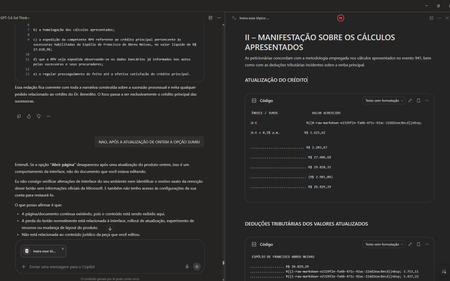
Gostaria de registrar atualizações e detalhes técnicos sobre o caso número 7110313362. Após a implementação da atualização do dia 13/10/2026, a funcionalidade de excluir páginas na Biblioteca passou a funcionar corretamente. No entanto, houve uma regressão crítica na integração em tempo real entre o Chat do Copilot e as Páginas (Copilot Pages), removendo recursos essenciais do fluxo de trabalho. Estou enfrentando os seguintes bugs simultâneos: 1. Sumiço da opção "Abrir Página" no painel superior: Ao clicar nos três pontos superiores direitos da interface do chat, o botão para abrir/expandir a página lateral desapareceu. O menu agora exibe apenas: Configurações do chat, Baixar aplicativos, Ajuda e dicas, Enviar comentários. 2. Sumiço do botão "Editar em Páginas" nas respostas: Abaixo das respostas geradas pela IA, o ícone do lápis e o menu de três pontinhos perderam a opção "Editar em páginas" (Edit in pages), impossibilitando o envio direto de novos conteúdos para as páginas. 3. Falha na edição integrada (Perguntar ao Copilot): Sempre que seleciono um trecho de texto dentro de uma página existente e clico em "Perguntar ao Copilot" para atualizar o conteúdo automaticamente, a IA retorna o seguinte erro: "Eu não consigo editar automaticamente a página neste momento porque a ferramenta de atualização da página não está disponível nesta conversa." Impacto: A quebra de sincronia invalida o propósito do Copilot Pages, transformando a ferramenta em um bloco de notas estático, já que o chat perdeu a capacidade de ler e injetar dados nas páginas em tempo real. Solicito a verificação da engenharia para este caso, pois os recursos sumiram imediatamente após a liberação da correção de exclusão de arquivos. Obrigado(a) e fico no aguardo de um retorno neste chamado. ANTES FICAVA ASSIM AO ABRIR UMA PÁGINA DURANTE CONVERSA NO CHAT AGORA NÃO TEM MAIS AS OPÇÕES DE ABRIR PÁGINA TAMBÉM SUMIU A OPÇÃO DE ADICIONAR EM UMA PÁGINA EXISTENTE170Views2likes2Comments
Unable To Check Status of AI Limits & Credits
I am a Microsoft 365 Premium subscriber. This support page (https://support.microsoft.com/en-us/microsoft-365-copilot/ai-credits-and-limits-for-microsoft-365-subscriptions) states "You can check the status of your limits and AI credits by selecting Services & subscriptions in your Microsoft account." However, there is no information about limits or credits listed for my account or subscription. I've had two support chats (#7110092832 and #7110147952) about this over the weekend that lasted 2 HOURS. The technicians were not able to figure out why the information wasn't available for my account. They also were not able to tell me any more details about my limits, credits, or usage. The first chat ended by telling me to just try again in 24 hours, and the second ended by directing me to look for help in this forum. Where can I see my limits and used/remaining credits?169Views2likes2CommentsMicrosoft Copilot Next Generation: Transitioning to a More Proactive and Predictive Approach
Hi folks, After attending Microsoft Ignite Switzerland 2024, I have been thinking about the future of M365 Copilot and how its capabilities could be enhanced with a proactive and predictive approach. Obviously, I understand the ability to create custom copilots, however, what I am referring to is, or could be, in a hypothetical future, various improvements baked in and activated by organization administrators. For instance, here are a couple of examples: Example 1: Based on the Microsoft Teams status on Monday morning, if a user signs in, proactively offer a recap of the previous week and an overview of the upcoming week, including days at the office and scheduled meetings. This should be done without even needing to ask the question. Example 2: Based on the Viva Engage profile activity, proactively offer recaps of items that might have been highlighted by communications managers or org-admins. Example 3: Based on the number of unanswered emails by the user prior to the end of the week, suggest a free time slot in Microsoft Teams to be blocked in their calendar. This will help wrap things up before the end of the week. Example 4: Based on the activation of the "office/remote" work location field in Microsoft Teams, offer the user the ability to postpone their office days if it's too crowded, or vice versa, encourage them to head to the office if their top 10 Microsoft Graph connections are already there. Example 5: Trigger Actions - it would be great to be able to connect with the entire desktop interface of the user, allowing us to open software programs, launch saved RPAs, and perform other actions as needed. Example 6: Custom keyboard shortcuts - Give collaborators the ability to save custom keyboard shortcuts to accelerate their time to value. For example, they could set up shortcuts like Ctrl + T for "Translate this". Example 7: Custom personas shortcuts - Give users the ability to save custom persona shortcuts to accelerate time-to-value. For example: Ctrl + Shift + R for 'Release Manager'. Example 8: Copilot profile section - Offer users a dedicated profile section where they can set up their conversation style, shortcuts, preferred languages, etc. Example 9: Microsoft vCard Integration - When a query is made in Copilot, such as @ user, offer a vCard on top of other information, including the profile picture. Example 10: Windows desktop application - Even if we can use Microsoft Teams floating window, it would be great to have the ability to pin an app in the Taskbar. Example 11: Predictive Document Collaboration - Anticipates who needs to collaborate on a document based on past interactions, suggesting collaborators and streamlining the process. Example 12: Security Guardian - Proactively identifies potential security threats and offers actionable recommendations to safeguard sensitive data. Example 13: Elgato Streamdeck integration - Imagine having the ability to use daily physical shortcuts on your Stream Deck with a dedicated Copilot profile. Feel free to jump into the conversation below, and/or vote for the idea. Dimitri LinkedIn | Medium | X | Microsoft | Web1.4KViews2likes0CommentsAdd an option to choose whether Enter sends a message or inserts a new line in Copilot
Currently, pressing Enter in the Windows Copilot app submits a message. Adding a user setting that allows people to choose whether Enter sends a message or inserts a new line would significantly improve usability and productivity. For example, users could select between: Enter sends message (current behaviour) Enter inserts new line (with an alternative shortcut such as Ctrl+Enter to send) Reasoning Many users compose longer prompts, questions, emails, documents, and multi-paragraph content directly within Copilot. Creating clear, structured content often requires frequent paragraph breaks. For experienced touch typists, pressing Enter to start a new paragraph is deeply ingrained muscle memory. Requiring Shift+Enter for every new line interrupts workflow and reduces typing efficiency. The current behaviour can also lead to messages being submitted accidentally before they are complete, forcing users to rewrite or continue fragmented prompts. Providing a simple, configurable option would improve accessibility, productivity, and the overall user experience while preserving the existing workflow for users who prefer the current behaviour.19Views1like0Comments
Should Microsoft consider an ambient Copilot device?
I've been thinking about this because I'm a heavy user of both Microsoft 365 Copilot and Amazon Echo devices. Over the past few years I've become increasingly dissatisfied with Amazon. Services that were included with Prime have changed or moved behind additional charges. I think the Alexa experience has gotten worse with Alexa+, Amazon's shopping experience increasingly feels like it's trying to manipulate me rather than simply help me buy what I want, and integrations with third-party products such as Sonos can be frustrating. More importantly, my trust in Amazon has declined to the point that I'm increasingly uncomfortable sharing additional personal information with it. That's significant because I'm actually a big Amazon customer and buy a lot through Prime. I'm not looking for reasons to leave Amazon, but I'm reaching the point where I'm looking for alternatives. That made me wonder whether Microsoft is missing an opportunity. I don't think Microsoft should simply build an Echo competitor. I'd like to see something more ambitious that I'd call Copilot Ambient. Imagine being able to say "Copilot" in your home, home office, workplace, conference room, or eventually your car and securely interact with your Copilot and the agents you've authorized. Microsoft could make a relatively inexpensive reference speaker/device, but I'd rather see this become an open platform that companies like Sonos, Samsung, LG, Lenovo, Dell, HP and others could incorporate into their products. Microsoft already has many of the pieces: Copilot, Microsoft 365, Teams, Outlook, Entra ID, Power Automate and an emerging agent ecosystem. It also has extensive experience with identity, permissions and enterprise security. I'd especially want the platform built around trust: no advertising disguised as answers, no paid placement disguised as recommendations, clear control over personal data and memory, explicit authorization for consequential actions, a record of what agents have done, and strong interoperability with third-party products. As AI moves from answering questions to actually doing things for us, I think that trust becomes increasingly important. Amazon built Alexa around Amazon. Apple built Siri around Apple devices. Google built its assistant around Google services. I'd like to see Microsoft build ambient Copilot around the user. Does anyone else see a use for something like this, particularly in both the home and workplace?35Views1like0CommentsCopilot Keeps Promising to Generate Images but Never Actually Creates Them
I have been experiencing this problem repeatedly with Microsoft Copilot, and it is wasting so much of my time. Whenever I ask Copilot to create an image, it keeps responding with promises that it will generate the image, but it never actually creates one! Instead of generating the image, Copilot continues replying with text, promising to complete the task or saying it will fix the problem. Even when I repeat my instructions, it keeps responding without producing the image I requested. This is extremely frustrating because I waste time waiting, repeating my prompts, and explaining what I want again, but the image never appears. EXPECTED BEHAVIOR: Copilot should actually generate the requested image when I ask it to create one. ACTUAL BEHAVIOR: Copilot keeps responding and promising to generate the image, but no image is ever produced. FREQUENCY: This problem has happened repeatedly. PLEASE FIX THIS! I want Copilot to actually generate images instead of repeatedly promising to create them without delivering any results.192Views1like1CommentAgent Builder agents require Microsoft 365 Copilot license for users without a license?
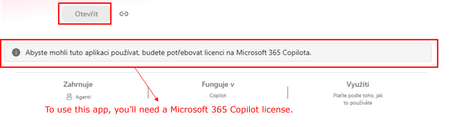
Hi all, Has anyone noticed a recent change in how Copilot Agent Builder (in Copilot Chat) agents work for users without a Microsoft 365 Copilot license? Our setup is: Agent created by a user with a Microsoft 365 Copilot license Created directly in Agent Builder, not published through Copilot Studio The agent is published and available within our tenant Some consumers do not have a Microsoft 365 Copilot license Copilot Credits are available (also for the environment where the agent is) and have not been exhausted This setup was working normal ly just two days ago. Unlicensed users could use the shared agents and usage was covered by Copilot Credits. Now those same users are getting a message saying that a Microsoft 365 Copilot license is required. Has anyone else started seeing this? I’m trying to understand whether we are looking at a configuration issue in our tenant or whether something has recently changed in the service/licensing behavior. Thanks for experiences!394Views1like4Comments