meetings
2871 Topics
Meeting chats visible for only one month in Microsoft Teams
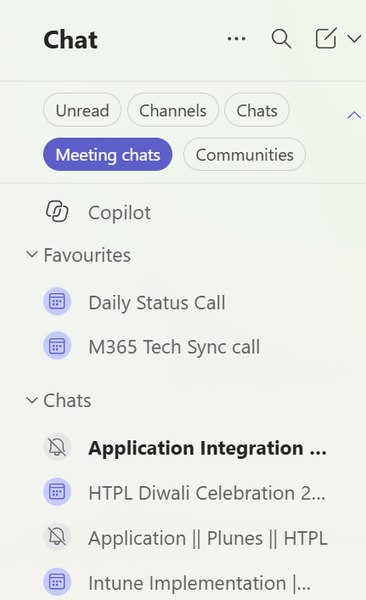
Hi Community, In Microsoft Teams, under Chat > Meeting chats, I am currently able to see meeting chats from only the last one month. Is there any way or setting to extend this so that I can see meeting chats from the last two months (60 days) in the Meeting chats section? Please let me know if this can be configured through Teams settings or the Teams Admin Center. Please find the below screenshot: Thanks!68Views0likes1Comment
Teams co-organizers can’t access meeting engagement data: a gap for centrally managed meetings
Hi everyone, We’ve run into what seems to be a gap in the Microsoft Teams co-organizer model while working on moving our enterprise virtual learning delivery from a dedicated virtual-classroom platform to Teams. Our requirement is fairly straightforward: we run a large number of centrally administered learning sessions, with multiple facilitators who need to be able to step in and deliver a session when required. The model we’d ideally use is: A shared calendar/mailbox for central visibility and administration. The relevant facilitator group automatically added as co-organizers. Facilitators can run the session, manage participants, breakout rooms, recordings, etc. Co-organizers can access the standard attendance report after the session. This gets us almost everything we need. The gap is the richer meeting engagement data. Teams provides engagement information such as reactions, raised hands, camera usage and other engagement measures, but this appears to remain restricted to the meeting organizer, rather than being available to co-organizers. That creates an awkward problem for centrally administered meeting scenarios. A co-organizer can be trusted to run the meeting and access its attendance reporting, but not access all of the post-meeting engagement reporting. It becomes particularly problematic if a shared mailbox is the meeting organizer, because there may be no actual person able to retrieve that organizer-only data. What I’d love to see I’d like Microsoft to allow explicitly assigned co-organizers to access the same post-meeting engagement data as the organizer. I’ve submitted this as a feature request here, which I'd love for you to vote for at the link below please if you think it would help you too: https://feedbackportal.microsoft.com/feedback/idea/28182268-f7d9-f111-bda3-6045bd78a526 I’d be really interested to hear: Is anyone else running centrally managed Teams meetings at scale and hitting this same limitation? Have you found another supported way of retrieving this engagement data? If this would be useful for your organization too, would you consider voting/commenting on the feature request? It feels like a relatively small permissions gap in an otherwise very capable co-organizer model, but closing it would make a big difference for centrally managed training, events and similar enterprise scenarios. Thanks!113Views0likes1CommentMicrosoft Teams updates : Two presenters can share their screens
Summary Starting in late November 2026, Microsoft Teams will support simultaneous screen sharing by two Microsoft Teams will allow two presenters to share screens simultaneously in meetings starting late November 2026. This feature enhances collaboration by displaying both shared contents at once. Tenant admins can control this setting, and meeting organizers can enable or disable it per meeting. No compliance issues identified. Rollout Schedule: General Availability (Worldwide): We will begin rolling out in late November 2026 and expect to complete by mid-December 2026. Impact on Your Organization: This capability will be enabled for all meetings by default, allowing a second presenter to start sharing without requiring the first presenter to stop. When enabled, participants can see both shared content streams at the same time, creating a more seamless experience for scenarios such as comparing documents, presenting complementary information, or collaborating across multiple sources. Meeting organizers will also have a meeting option to control whether multiple presenters can share simultaneously in an individual meeting. Action Required/Recommendations: Organizations will have tenant-level admin control to determine whether simultaneous sharing is available to their users. Review your organization's sharing policies and inform users and support teams about the new experience.1.5KViews4likes2CommentsMicrosoft Teams update: QR code protection for messages from external users
Microsoft Teams is adding extra security to protect users from phishing and fraud. QR code images sent by external users will be hidden by default. Users can choose to reveal the image before viewing or scanning the QR code. Rollout schedule Targeted Release: Beginning in October 2026 General Availability (Worldwide): Beginning in late October 2026 Impact on your organization Who is affected Organizations that allow communication with external users in Microsoft Teams. Users who receive Teams messages from external senders. Teams administrators and support teams that manage external collaboration policies. QR code images sent by external users will be blurred by default in Teams messages. Users can reveal the image if they trust the sender and want to scan the QR code. A blurred image does not mean the QR code has been identified as malicious. This protection will be applied automatically to QR codes received from external users. No admin configuration or policy changes are required. The feature will be enabled by default during the rollout. Action required and recommendations No admin action is required before rollout. Inform users that QR code images from external senders may appear blurred by default. Remind users to verify the sender before revealing or scanning QR codes. Review existing user education materials related to phishing awareness, QR code safety, and external collaboration. Update internal help desk documentation to reflect the new user experience. https://www.linkedin.com/feed/update/urn:li:activity:7520938452184408065/145Views0likes0Comments
Custom video filters for MS Teams
Hi, I've been experimenting with the Teams Video Filters platform that was announced in public preview in 2023 and have successfully built a proof of concept. Before investing further, I'm trying to understand Microsoft's current direction for this capability. While the APIs and documentation still exist, I haven't found much recent discussion, roadmap information, or examples of new apps being built in this space. Can anyone from Microsoft comment on: Whether Video Filters remains an actively supported extensibility platform Whether new third-party filter apps are still encouraged Whether there are plans for further investment in this area I'm mainly trying to assess whether this is a good long-term bet for a commercial Teams app, or a feature area that has effectively plateaued. Thank you and BR, Sergey.167Views0likes0Comments
How are people keeping manager notes private in Teams without creating a mess of separate files?
We’re trying to get managers to keep better notes from 1:1s, performance conversations, development discussions, etc., but the privacy side gets messy pretty quickly. If everything goes into OneNote, Loop, or Word docs, managers end up with a bunch of separate files and folders for different employees. If they keep notes in Teams chats or meeting notes, it becomes harder to control what’s private, what’s shared with the employee, and what HR should actually be able to see. Has anyone found a clean setup in Microsoft 365 where managers can keep private employee notes without turning SharePoint/OneDrive into a filing cabinet?161Views0likes2CommentsTeams Meetings Get AI Memories for Copilot
If your tenant has Microsoft 365 Copilot licenses, you’ll soon see meeting archive files generated by AI for Teams meetings. The files are stored in a SharePoint Embedded container, but they’re not intended for user consumption. Instead, AI tools like Copilot and the Facilitator agent will use meeting archive files to generate better responses to questions from meeting participants about what happened during meetings. It’s yet another file type to figure out how to govern. https://office365itpros.com/2026/10/21/ai-meeting-archive-files/157Views0likes0Comments
How are organisations monitoring attendance and participation during live Microsoft Teams meetings?
Hi everyone, I’m interested in how organisations are monitoring and verifying attendance and participation during live Microsoft Teams meetings, particularly where accurate records are important. Teams attendance reports provide useful information about when participants join and leave, but they don’t necessarily provide a complete picture of what happens throughout a session. For example, how are organisations managing: Participants switching their cameras off for extended periods People stepping away while remaining connected Monitoring attendance throughout longer meetings, training sessions or online events Verifying that participants remain present Maintaining reliable attendance records for compliance, accreditation or reporting purposes Are you relying on Teams’ built-in attendance reports, monitoring participants manually, or using additional tools? I’m particularly interested in how organisations are addressing these challenges without creating additional administrative work for those running the sessions. Would be great to hear what approaches or solutions others have found effective.301Views0likes2CommentsMicrosoft Teams transcription language settings
Hi! With a Microsoft 365 Business Premium license and a Copilot license, I can use transcription during a Teams meeting by setting the spoken language to Auto Detect. However, the transcription is sometimes inaccurate. Is there a way to limit the language detection scope? For example, is it possible that I select only English and Chinese, and Auto Detect is restricted to those two languages instead of also attempting to detect languages such as Spanish or French ?379Views0likes2Comments