ignite
79 TopicsOneDrive Announcements at Microsoft Ignite 2018
Today at the Microsoft Ignite conference, we announced new innovations for OneDrive to better connect you to your personal and shared files in Office 365, from any device. We’re making it easier to share and work together in real-time while using the power of artificial intelligence to help you be more productive. And we're introducing new security and compliance capabilities to better protect your work79KViews13likes20CommentsDesign your Microsoft Search learning experience at Microsoft Ignite
Get the latest roadmap and vision for Microsoft Search, new development opportunities, and new ways to connect Microsoft Search to your world of information outside of Microsoft 365. Recommended Sessions Subscribe to the Microsoft Search Learning Path at Microsoft Ignite and get access to all of the latest Microsoft Search news, announcements, and learning opportunities. Learning Paths provide a unique opportunity to follow a series of modules designed to provide an end-to-end learning experience for your topics of choice. You can learn more about the Microsoft Search Learning Path at https://myignite.techcommunity.microsoft.com/learning-paths/83231. Learning Path modules for Microsoft Search include: SRCH10 What's new and next for Microsoft search Get the latest updates on Microsoft Search. Come on the journey to learn how insights, actions, and answers are being built into your everyday experiences across Microsoft 365, Bing, and Edge. See the latest roadmap across all of your experiences, from SharePoint to Office and beyond. In addition, get insights on how to connect external third-party content connectors, customization, and extensibility. SRCH20 Microsoft Search for the administrator: What you need to know Learn about the impact of Microsoft Search on you, the administrator. We’ll take you through the inner workings of Microsoft Search and pull back the curtains on the architecture. Then we’ll translate that into practical tasks for search administration that will help you and your organization get the most out of Microsoft Search. SRCH30 Connect your world of information to Microsoft 365 and Microsoft Search: A sneak peek at Micr... Modern information workers need to find knowledge quickly and easily regardless of where the data resides. Come take a first look at Microsoft Graph Connectors, which will enable users in your enterprise to search over content sources beyond Microsoft 365. You will see how Microsoft and our partners are jointly making Microsoft Search more powerful to benefit your users. We will also show you a simple set of APIs that you can start using for your custom connector development. SRCH40 Get answers in context with semantic search and natural language in Microsoft search For human beings, reading comprehension is a basic task, performed daily. As early as in elementary school, we can read an article, and answer questions about its key ideas and details. But for AI, full reading comprehension is still an elusive goal—but a necessary one if we’re going to measure and achieve general intelligence AI. In search applications, machine comprehension will give a precise answer rather than a URL that contains the answer somewhere within a lengthy web page. Moreover, machine comprehension models can understand specific knowledge embedded in articles that usually cover narrow and specific domains, where the search data that algorithms depend upon is sparse. In this session, see and learn about the latest innovation with natural language and machine reading comprehension in Microsoft Search. SRCH50 What's new and next for Microsoft Search customization and development Microsoft Search is an intelligent, enterprise search experience from Microsoft that applies the artificial intelligence technology (AI) from Bing and deep personalized insights surfaced by the Microsoft Graph, to make search more effective for you. In this session, we demonstrate new Graph APIs and how Microsoft Search will let you create and customize rich search experiences around all of your enterprise content, regardless of where it resides. See our roadmap and examples of how to modernize your existing SharePoint-based enterprise search experiences to take full advantage of Microsoft Search. In addition to the Learning Path sessions above, we also have several great sessions to immersive yourself deeper into new Microsoft Search experiences, see the latest innovation in demo-centric theater sessions and more… Related Sessions BRK2022 Get started with Microsoft Search in Bing and Edge Microsoft Search in Bing is a new search offering that helps you save time by bringing you the best of the web and work in a single experience. In this session learn how to make the most of world and work information, get tips and tricks on best practices, see demos of what’s new and what’s coming, and learn about the roadmap for Microsoft Search in Bing and Edge. BRK2034 What’s new and what’s next: AI-powered experiences in Microsoft 365 Microsoft 365 uses AI to help employees overcome some of the realities of modern work, including increasing time demands, overwhelming amounts of data, and growing security threats. Learn what's new and what's coming with AI in Microsoft 365 and how to strategically apply AI in your organization, shape your AI strategy, foster an AI culture, and implement AI responsibility. THR3010 Getting started with out-of-box Microsoft Graph Connectors for Microsoft Search Microsoft Graph Connectors let you connect to external data sources to make them searchable from Microsoft Search. Come take a look at how a search admin can easily set up some out-of-box connectors to popular data sources and enable information workers to search over them from various Microsoft Search endpoints. THR3019 Get answers in context with conversational AI and natural language in Microsoft Search For human beings, reading comprehension is a basic task, performed daily. As early as in elementary school, we can read an article, and answer questions about its key ideas and details. But for AI, full reading comprehension is still an elusive goal–but a necessary one if we’re going to measure and achieve general intelligence AI. In search applications, machine comprehension will give a precise answer rather than a URL that contains the answer somewhere within a lengthy web page. Moreover, machine comprehension models can understand specific knowledge embedded in articles that usually cover narrow and specific domains, where the search data that algorithms depend upon is sparse. In this session, see and learn about the latest innovation with natural language and machine reading comprehension in Microsoft Search. THR4000 Hands on with the new Microsoft Search API in the Microsoft Graph Learn how to connect your world of information with Microsoft Search with the new Microsoft Search public API in the Microsoft Graph. In this session, learn how to integrate results from Microsoft Search into your own applications, programmatic access to search, and how to build a tailored search experience through guidance, demos, and more. THR2023 Introducing intelligent new people experiences powered by Microsoft and LinkedIn graphs Join us to learn more about how we are reimagining people/profile experiences across Office 365 by harnessing the rich data and signals available across Microsoft and LinkedIn graphs. We announce new capabilities that can suggest projects, topics that you can choose to highlight in your profile, and help you get discovered for your expertise through Microsoft Search. We also walk through new timely and contextual nudges/highlights from LinkedIn and MyAnalytics to help you complete tasks and stay informed on important updates from your colleagues and share improvements being made available to help with profile field extensibility scenarios. Still have questions? You can meet with the Microsoft Search team at Microsoft Ignite! Meet with the Microsoft Search Team We're very excited about our presence at Ignite this year as we have A LOT to announce! As such, we anticipate you might want to meet with us to go deeper than what we might cover in our sessions. With that said, we're pleased to offer side meeting opportunities to our customers and partners. If you would like to have a side meeting with our team, please fill out the request form at https://aka.ms/meetsearch so your nomination can be considered. Do this soon as schedules will fill fast! Finally, we’re always here to answer your questions whether you’re attending Ignite or not. Follow us on Twitter @MicrosoftSearch or visit the Microsoft Search Resource Center at https://aka.ms/MicrosoftSearch or if you're in Orlando, visit one of our Microsoft Search booths in the Microsoft Showcase and pick up some search swag while you're there. We’ll “find” you in Orlando ‘-)27KViews5likes0CommentsWindows Server at Microsoft Ignite 2026: Sessions, our booth, and how to join the pre-day
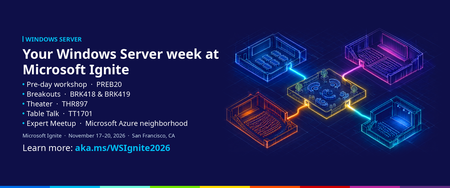
Start early with the Windows Server pre-day Windows Server: Secure, manage, and accelerate with AI (PREB20) Monday, November 16 | 1:00–5:00 PM PT | Moscone Center This is a demo-filled, deep-dive workshop built for Windows Server professionals and led by the engineers and product team who build Windows Server. You'll see how to manage your servers across Azure, hybrid cloud, and on-premises environments, and get an early look at what's coming in the next version of Windows Server, including local AI, security, Hyper-V, Active Directory, networking, and storage. Expect practical tips you can take back to optimize, modernize, and get the most out of your Windows Server fleet. How to sign up The pre-day was added after Ignite registration opened, and it's a paid add-on that you select during registration. That means it doesn't show up when you search the session catalog, and many people who registered early never saw it. Here's how to get a seat. If you haven't registered for Ignite yet: Visit the Microsoft Ignite registration website and select Register. Choose the in-person Conference pass. When you reach the pre-day options, add Windows Server: Secure, manage, and accelerate with AI (PREB20). The pre-day has an additional fee of $325. Finish registration. The pre-day will appear in your confirmation. Already registered for the in-person event? Sign in to your registration using the same account you used to register. Open your registration page and select "Add a Pre-Day pass". Add Windows Server: Secure, manage, and accelerate with AI (PREB20) and complete checkout; additional fee of $325 applies. Watch for an updated confirmation email. If it doesn't arrive, check your junk folder. Seats are limited, and the Windows Server pre-day has sold out in past years, so we recommend adding it soon. Windows Server sessions on Thursday, November 19 All four of our sessions are on Thursday in the Moscone Center area. The venues are close together with 30 to 45 minutes between sessions, so you can catch all of them. Add them to your schedule from the session catalog. Session Speakers What you'll see When and where BRK418 (Breakout): What's new and what's next for Windows Server Neil Hinnant, Elden Christensen The latest release news and a preview of the next version of Windows Server, covering Hyper-V, Active Directory, storage, and networking, and how the next release raises the bar for security, performance, and AI. Thursday, Nov 19 10:15 AM – 11:00 AM BRK419 (Breakout): From VMware to Hyper-V: Hyperscale virtualization in your datacenter Jeff Woolsey, Davanna White How Windows Admin Center Virtualization Mode helps you build cost-effective, cloud-connected on-premises virtualization with Hyper-V in Windows Server. Thursday, Nov 19 1:30 PM – 2:15 PM THR897 (Theater): Cloud management for every Windows Server Theo Tran, Cindy Wan Consistent management with Azure Arc wherever your servers run, plus lower ESU costs, free hotpatching, and SQL Server optimization. Thursday, Nov 19 10:45 AM – 11:10 AM TT1701 (Table talk): On-prem inferencing with Windows Server Dan Cuomo A small-group conversation on running AI workloads on-premises: planning AI-ready server hardware, and thinking through performance, security, and operational consistency. Thursday, Nov 19 9:00 AM – 9:45 AM Come find us at the Windows Server booth Windows Server has its own booth in the Hub, open November 17 to 19. Stop by to see demos, ask the product team your toughest questions, and tell us what you need from Windows Server. Bring your upgrade plans, your hotpatching questions, and your AI ideas. Can't be there in person? The digital pass is free and includes keynotes and a wide range of sessions. Breakouts and Theater sessions will be streamed or available on demand. Table talks and the pre-day are in-person only. Get hands-on before you arrive Want a head start? Join the Windows Server Insider Program to try preview builds of the next version of Windows Server and share feedback with the team. Several features you'll hear about at Ignite are already in Insider builds, and we've covered them here on Tech Community, including Trusted Launch for virtual machines, ReFS boot, and Windows NVMe-over-Fabrics initiator preview. We can't wait to see you in San Francisco. If you have questions about our sessions or the pre-day, refer to the Ignite event page for more information or leave us a comment below.
Introducing Dell PowerScale for Azure: Now in Public Preview
We’re excited to announce the public preview of Dell PowerScale for Microsoft Azure – a fully managed, enterprise-grade file storage solution natively integrated into Azure. This offering brings Dell’s proven scale-out Network-attached storage (NAS) technology directly into Azure, delivering the performance and scalability enterprises expect with the simplicity of Azure-native management. Supporting up to 8.4PB in a single namespace, Dell PowerScale offers the scalability needed for demanding modern workloads. With multi-protocol support (NFS, SMB, S3), it ensures seamless access across diverse applications while maintaining the trusted Dell PowerScale user experience. This Dell-managed solution handles monitoring, maintenance, and updates, enabling organizations to streamline operations, optimize storage, and focus on business priorities with confidence in their data’s security and accessibility. This natively integrated solution uses purpose-built virtual machine infrastructure provisioned by Microsoft in the standard Azure hyper scaler environment. This special VM leverages cache to flash persistent memory technology using NVDIMM-N specifications suitable for the fast linked journaling transactions. These purpose-built VMs enable higher performance throughput and max capacity scale. Capabilities of Dell PowerScale for Azure Multi-protocol access – Global permission structure shared across users and protocols. Seamless scalability – Easily adjust to changing workloads with scale-out capacity. Operational consistency – Same experience as PowerScale on-premises. Smooth data mobility – Transfer data across environments without disruption. Advanced data protection – Safeguard critical information with comprehensive backup and recovery solutions. Snapshots – Fast data backup and recovery. Native replication – Asynchronous replication for data migration or disaster recovery. Why Dell PowerScale for Azure? Dell PowerScale is purpose-built for modern data-intensive workloads that require high performance and scalability — such as AI/ML pipelines, media & entertainment, EDA (electronic design automation), backup & recovery, and enterprise content management. Key Benefits of the Integration: Dell-Managed Service: Enjoy a streamlined storage experience, with Dell handling deployment, monitoring, maintenance, and upgrades — freeing your IT teams to focus on higher-value initiatives. Scalable & Elastic: As business requirements grow, PowerScale dynamically scales capacity and performance by adding nodes on demand, without any downtime. Enterprise-Grade Durability: Data is distributed across multiple nodes within the cluster, ensuring high durability and fault tolerance. Advanced Protection: Uses erasure coding for space-efficient protection and features like SyncIQ for asynchronous replication across sites — keeping your data available even during outages. Secure Private Access: PowerScale integrates into your Azure Virtual Network (VNet) through Vnet Injection, ensuring secure, high-performance data access. Azure-Native Experience: Provision, manage, and monitor PowerScale from within the Azure portal. It supports full integration with Azure Resource Manager (ARM), upcoming support for CLI/Powershell/Terraform, and supports native billing. How to Use the Integration: Mount shared volumes to Azure VMs or Kubernetes running in the same VNet. Run analytics or AI workloads that need parallel access to high-throughput file storage. Support backup, disaster recovery, and archival workflows across sites. Store and manage media assets or research data in regulated industries. Getting Started with Dell PowerScale for Azure Getting started with Dell PowerScale is simple: Navigate to Azure Portal Go to https://portal.azure.com and search for Dell PowerScale in the Marketplace. The offer is named Dell PowerScale for Azure - Dell managed (Public Preview). Contact Dell for a private offer and request a Dell Reference Number. Deploy the Storage Resource Follow guided steps here to configure your resource or cluster Connect Your Workloads Use standard NFS or SMB to mount volumes from Azure VMs or AKS. More Resources You can subscribe to the service through the Azure Marketplace online store or through the Azure portal. Search for it by name: Dell PowerScale for Azure - Dell managed (Public Preview) To learn more about the service, check out Microsoft docs as well as Dell docs501Views4likes0CommentsYour experience matters: help shape what’s next for Windows Server
Windows Server powers the workloads and services organizations rely on every day. As those environments evolve, so do the priorities behind them—from strengthening security and improving resiliency to making operations more consistent across on-premises, cloud, and edge deployments. Every organization brings a different perspective shaped by its people, workloads, and operating needs. We want to learn from those experiences and build lasting connections with the customers who rely on Windows Server. The Windows Server Technology Adoption Program (TAP) brings customers and the Windows Server product team together to validate preview capabilities and releases before they ship. Through the Windows Server TAP, customers can share their perspectives directly with the Windows Server team, explore areas of mutual interest, and help inform how we build and improve the product. We see TAP as an ongoing conversation: listening to your needs, learning from your feedback, and working together to make Windows Server better for the organizations that depend on it. What is Windows Server TAP? TAP is a structured partnership focused on testing and feedback. Participating customers validate defined scenarios in a test or lab environment isolated from production, share their findings, and work with the product team to identify issues and assess readiness. Depending on the engagement, validation may focus on a particular capability or on broader release-readiness scenarios, such as upgrades and workload compatibility. TAP is a two-way partnership: your team can explore upcoming capabilities in a test environment, share what you learn, and engage directly with the Windows Server product team. Your real-world perspective helps us understand how Windows Server is used across different environments and focus validation on the scenarios that matter to customers. Is your organization a good fit for Windows Server TAP? We're interested in hearing from Windows Server customers who can dedicate technical resources to hands-on validation and regular feedback. You must have a non-production environment where your team can deploy preview builds and run test scenarios from Windows Server features. TAP engagements are focused and selective. The team matches customer interests and environments to available validation opportunities, then discusses participation requirements and next steps. Expressing interest does not enroll your organization or guarantee a place in the program. Learn more about Windows Server TAP Attending Microsoft Ignite? Meet the team at the Windows Server Booth in the Hub (open November 17th – 19th) to learn more about TAP and discuss whether it could be a fit for your organization. Prefer to connect virtually? Fill out the Windows Server TAP interest form and let's chat over Microsoft Teams about your organization's interests and whether TAP could be a fit. Questions? Feel free to reach out to the TAP team at windowsserver-engage@microsoft.com.