governance
83 Topics
[Public Preview] Introducing Security Baseline Remediation in Machine Configuration
Security baselines help organizations define and assess their server security posture. But identifying configuration drift is only part of the work—correcting it usually requires custom remediation policies or additional management tools. Today, we’re announcing Public Preview support for security baseline remediation in Azure Policy and Machine Configuration. You can now configure supported baseline settings, audit machines against your organization’s standards, and continuously correct drift—all through an integrated policy experience. The approach is simple: organization-wide auditing, with targeted remediation. What’s New? Baseline remediation builds on the existing baseline customization experience. Alongside defining your organization’s desired values, you can now choose which supported settings Machine Configuration should actively remediate. This brings assessment and correction together: instead of identifying a baseline gap and building a separate remediation solution, you can use Machine Configuration to maintain your selected settings over time. Public Preview includes remediation support for: Baseline Supported settings Azure Security Baselines for Windows and Linux 70 settings CIS baselines for Linux 40–70 settings, depending on the operating system STIG baselines 40–70 settings, depending on the operating system Organization-Wide Auditing, Targeted Remediation Organizations need visibility across their environments without making every configuration change everywhere at once. Baseline remediation lets you retain broad auditing while targeting configuration changes to the settings and locations you choose. Remediation requires three explicit choices: Control How you opt in Behavior without opt-in Policy effect Assign the policy with DeployIfNotExists. The default AuditIfNotExists effect audits without changing configuration. Individual settings Set each desired setting’s Mode to Remediate in the security baseline catalog. Settings left in Audit mode are assessed without being changed. Machine locations Populate the RemediationLocations policy assignment parameter. An empty list means all machines remain audit-only. Machines outside the selected locations also remain audit-only. All three controls must permit remediation before a selected setting can be changed. Policy scope and exemptions are respected, and devices must meet the Machine Configuration prerequisites. This enables a gradual rollout: audit your organization’s standards broadly, begin remediation in selected locations, and expand as you validate the results. Stopping remediation does not restore a machine’s previous configuration, and settings already applied remain in place. Customize Your Baseline Start in the Azure portal under Machine Configuration > Security Baseline, then select your desired baseline. Use the security baseline catalog to: Customize setting values to match your organization’s requirements. Leave settings in Audit mode when you want compliance visibility without configuration changes. Change supported settings to Remediate when you want continuous drift correction. Uncheck settings you do not want included in the baseline. You can combine auditing and remediation within the same baseline, keeping control over which settings are enforced. Assign and Continuously Maintain Your Standards Assign the Azure Policy at your chosen scope with your baseline configuration. To enable remediation, select the DeployIfNotExists effect and populate RemediationLocations with the locations you want to target. Your catalog configuration is deployed automatically to the Machine Configuration agent on devices covered by the assignment. For eligible devices in those locations, Machine Configuration continuously corrects drift for settings marked Remediate. Settings marked Audit, and machines outside the selected remediation locations, continue to be audited without configuration changes. Compliance evaluation follows the existing Machine Configuration schedules. Prerequisites and Availability Before getting started: Assign the Machine Configuration prerequisite policy initiative to enable the required Machine Configuration agent. Ensure devices meet the minimum supported agent versions: OS Type Release Date Version Notes Linux October 30, 2026 1.26.121 Notes Windows October 30, 2026 1.29.122.0 Notes Baseline remediation is available in Public Preview, with no additional charge for the remediation capability, across all Azure public cloud regions. It will also be available for sovereign clouds, including US Gov Clouds by 11/20/26. Get Started Bring baseline assessment and correction into a single workflow. Customize your baseline, choose the settings you want to remediate, and target your rollout while maintaining organization-wide compliance visibility. Learn more: Remediate Security Baselines
Introducing Azure Baseline Security Mode: A simpler path to secure-by-default Azure environments
Today at Microsoft Ignite 2026, we're introducing the public preview of Azure Baseline Security Mode (Azure BSM), a guided experience that makes it simpler to establish consistent baseline security across Azure environments. Built on Azure Policy, Azure BSM helps organizations turn Microsoft-recommended security best practices into consistent configurations without requiring every application to change at once. Using Azure BSM, you can establish secure settings from day one in new environments and take a prescriptive approach to strengthen existing environments. Azure BSM is part of the broader Microsoft Baseline Security Mode effort to help organizations establish consistent, secure-by-default configurations across Microsoft cloud services. Get started with Azure Baseline Security Policies included in Azure BSM Rather than assembling individual policies, your organization begins with Microsoft-curated controls for Azure Storage and Azure Key Vault resources, protecting your organization’s application data, secrets, keys, and certificates. More policies will be included in the future. For Azure Storage, the baseline enforces secure transfer, prevents anonymous public access, enforces a minimum TLS version, and prevents Shared Key authorization to promote identity-based access. For Azure Key Vault, it restricts public network access and requires soft delete and purge protection, supporting recovery and helping protect deleted vault objects from permanent removal. How to get started Ready to adopt Azure BSM? Here's how to get started: Assign the Azure BSM centrally. Assign Azure BSM via Azure Policy at a broad scope, providing compliance across your environment and allowing subscription owners to begin enrolling their scopes into enforcement. Open the experience in the Azure portal and follow the Azure BSM tutorial on Microsoft Learn for step-by-step guidance. Assess posture and impact. Resource owners review compliance results for their scopes and remediate non-compliant resources. By applying Azure BSM at the highest applicable scope in your environment, you receive the latest compliance data at-scale. This centralized view helps your teams in your organization identify and remediate non-compliant resources, to decide when and where to enforce the baseline across underlying scopes. This visibility is especially important for established applications. A workload may rely on Shared Key authorization, public connectivity, or an older TLS version. Understanding those dependencies helps resource owners plan changes while minimizing impact. Azure BSM provides a centralized view of baseline coverage and the current security posture of an Azure environment. Enroll ready scopes. Resource owners enroll eligible management groups or subscriptions for enforcement and temporarily exempt resources or scopes as necessary. Azure BSM pairs organization-wide security direction with local ownership. Security and platform teams assign the baseline at a higher scope, while resource owners apply policy enrollment resources to opt in underlying management groups and subscriptions into policy enforcement, gradually rolled out through Azure Policy’s selectors and overrides. This framework makes flexible adoption practical: a shared baseline can span the organization while enforcement progresses according to workload readiness. Azure Policy provides the underlying compliance evaluation, enforcement, and exemption capabilities. Monitor and expand. Administrators track adoption and compliance, while resource owners prepare and enroll additional scopes over time Related Links Azure Baseline Security Mode tutorial Azure Baseline Security Mode in Azure Portal Sarah Hakim & Jim Cheng Azure Baseline Security Mode PM Team[Now Generally Available] Customizable Security Baseline Policies in Machine Configuration!
Background: Azure Machine Configuration remains committed to enabling greater security and simplicity in at-scale server management for all Azure customers. Machine Configuration (previously known as Azure Policy Guest Configuration) enables both built-in and custom configuration as code allowing you to audit and configure OS, app, and workload level settings at scale, both for machines running in Azure and hybrid Azure Arc-enabled servers. We're excited to announce the General Availability of Customizable Security Baselines in Azure Policy and Machine Configuration. What began as a Public Preview is now a mature, production-grade capability that empowers you to tailor industry security benchmarks to your organization's unique compliance standards across both Azure and Arc-connected machines, at scale. This release moves the experience from "useful" to "everyday default." Standards coverage has expanded, the customization and assignment flow is faster, full lifecycle management is now possible directly from the Azure Portal, and a new Overview page gives you a single pane of glass into which parts of your estate are unprotected. What is Baseline Customization? The core experience remains: tailor security standards through the Modify Settings wizard under Policy > Machine Configuration. You can enable, exclude, or adjust rules from existing benchmarks, apply organization-specific parameters, and export your custom configuration as a downloadable JSON file. Each baseline JSON file serves as a reusable, declarative artifact, ideal for policy-as-code workflows, version control, and CI/CD integration. What's New? GA brings four substantive shifts to the customizable baselines experience: broader standards coverage, a faster path from customization to deployment, lifecycle management directly in the portal, and a new Overview page that surfaces compliance gaps at the subscription level. Together, these changes reflect what we heard from early customers during Preview: that custom baselines need to live alongside the rest of their governance workflows, not in a one-time wizard. This cloud-native approach continues to embody Microsoft's Secure by Design and Secure by Default principles, with a sharper focus on the operational reality of running compliance at scale. Built-in Policy Standards Coverage GA expands what you can customize and where it's supported. Standard Status Notes CIS Benchmarks for Linux Generally Available Expanded distribution coverage since Public Preview. See the full list of supported distros in the official documentation. [NEW!] CIS Benchmarks for Windows Public Preview Initial release covers L1 settings for WS2025 Domain Controller and Member Server roles. Azure Compute Security Baseline for Windows Generally Available Now supports customization for Windows Server 2016 and 2019, in addition to 2022 and 2025. Azure Compute Security Baseline for Linux Generally Available Aligned with Azure Compute recommendations across supported Linux distributions. Key Scenarios Faster Time to Deployment The customization-to-assignment path is now a single continuous flow. You can: Skip the JSON download step entirely. Baseline settings are auto-populated into the Azure Policy assignment flow, so you no longer have to download a JSON file, browse for it, and upload it back. The settings ride with you from Modify Settings straight into Assign Policy. Use the improved settings editor. Role-specific values (Domain Controller, Member Server) and formatted inputs render cleanly in the UX, with validation that prevents malformed parameters from reaching the policy assignment. Still export when you need to. The JSON download remains available for teams that want to commit baselines to source control, share with reviewers, or pipe through CI/CD. The net result: what used to take a multi-step download-and-reupload sequence is now a few clicks inside one blade. Lifecycle Management in the Portal Compliance baselines are not write-once artifacts. They evolve as benchmarks update, as your controls tighten, and as your estate changes. GA introduces two capabilities that treat baselines as living configuration: Import and Modify. From the Definitions tab under Machine Configuration, you can now import an existing baseline JSON and iterate on it directly in the portal. This closes the loop between policy-as-code workflows and ad-hoc edits, so you no longer have to choose between version-controlled artifacts and in-portal convenience. Edit Settings on existing Assignments. The Assignments tab now supports updating an active baseline assignment in place. You can refine rules, adjust role-specific values, or exclude controls without tearing down and re-creating the assignment. All you have to do is select the policy assignment and the "Edit Settings" button should be enabled. Together, these turn baselines into something you maintain, not something you set and forget. New Overview Page: See Where You're Unprotected A new Overview page on Policy > Machine Configuration gives you subscription-level visibility into where Machine Configuration is enabled and where it isn't. For each subscription it surfaces status (At Risk, Not Enabled, Enabled), machines missing prerequisites, machines with prerequisites in place, and total eligible machines. From the same view you can enable Machine Configuration on selected subscriptions to onboard eligible VMs and activate baseline auditing in a single action. This shifts the first question from "is this one machine compliant?" to "which corners of my estate aren't even being assessed yet?", which is usually the more consequential gap. Integration and Automation Security baselines continue to integrate into your DevOps pipelines and configuration management workflows. Each baseline produces a declarative settings catalog (JSON) that can be versioned and deployed using Azure CLI, ARM templates, Bicep, and CI/CD automation, ensuring reproducible, traceable compliance configurations across environments. Availability Customizable security baselines are now generally available in all public Azure regions, Azure Government, and Sovereign Clouds. Getting Started Prerequisites Before you begin: Deploy the Azure Machine Configuration prerequisite policy initiative. (This installs the required Guest Configuration extension on supported VMs.) You can also do this in a single action from the new Overview page. Ensure your Azure subscription or management group includes supported Windows or Linux VMs. Have sufficient permissions (Owner or Resource Policy Contributor) to create and assign custom policy definitions. Step-by-Step Guidance Check your coverage on the Overview page to see which subscriptions are unprotected and onboard them with one click. Select a baseline from the Definitions tab in Machine Configuration or use Import and Modify to iterate on an existing baseline JSON. Modify settings to enable, exclude, or parameterize rules to match your internal policies. Assign the policy directly from the wizard. Settings are auto populated into the assignment flow, no JSON upload required. Iterate when needed. Use Edit Settings on the Assignments tab to refine active baselines in place. Review compliance results to track outcomes in Azure Policy, Azure Resource Graph, or the Guest Assignments page. Learn More Azure Machine Configuration security baselines official documentation CIS Benchmark for Windows Server (Preview) documentation CIS Benchmark for Linux documentation Azure Windows Baseline and Azure Linux Baseline documentation Please note that the use of Azure Machine Configuration on Azure Arc-enabled servers will incur a charge.Introducing the Azure Resource Manager MCP Server!
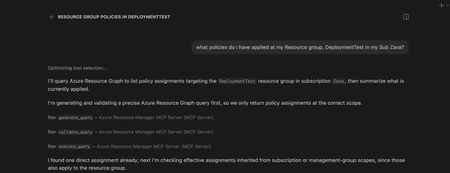
We're super excited to announce the public preview of the Azure Resource Manager MCP Server! This is a remote MCP server that provides tools to give AI agents first-class access to Azure infrastructure operations through Azure Resource Manager (ARM). AI agents can now be equipped with tools to generate, validate, execute Azure Resource Graph (ARG) queries and tools to deploy and manage ARM template deployments. This server is able to generate and execuite queries that return data across all your Azure resource types! At its core, this server is built to help AI agents interact with Azure resources seamlessly. What this means for you Ask natural language questions about your Azure estate to your agents and get real time, accurate answers backed with an ARG query Deploy and manage infrastructure easily by having AI deploy ARM templates for you Monitor deployment status and catch issues before they escalate Ability to build more advanced AI agents that understand your Azure environment What You Can Do Today Generate, Validate, and Execute Azure Resource Graph Queries from Natural Language No need to struggle with writing KQL from stratch! Describe what you need, and the MCP server tool generates Azure Resource Graph queries that match your intent. You ask an AI Agent: "Find all virtual machines in my subscription that don't have managed disks". It uses the tool and returns: A ready-to-execute ARG query without manual KQL writing. These queries spans across all your azure resource types so can learn and navigate across any type! Deploy, monitor and cancel ARM Templates Pass an ARM template, and the MCP server kicks off the deployment targeted to an existing resource group scope. Monitor the deployment by getting status about it and even cancel it if you decide its not doing what you need it to. Here is the complete list of the tool available in this preview: generate_query validate_query execute_query create_template_deployment get_arm_template_deployment_status cancel_arm_template_deployment Real-World Scenarios Infrastructure Compliance Audit "Show me all resources created in the last 30 days that don't have required tags." - The MCP server generates and executes the query, returning resources that need remediation. Your team can then fix them programmatically or through Copilot. Rapid Infrastructure Provisioning "Using this ARM template <path to template>, deploy a secure storage account with HTTPS-only access, private endpoints, and Standard_LRS replication to my production resource group." This will take an existing ARM template and deploy it to a resource group scope. Policy Compliance Check "Check if all resources in my subscription comply with the latest policy applied to it." - The MCP server generates and executes the query, returning resources that are non-compliant. Your team can then take corrective actions programmatically or through Copilot. Building Agents with Azure Resource Manager MCP Server The MCP server's tools can be integrated into custom agents you build with GitHub Copilot. What this means is you can create custom agents that automatically check compliance, track changes in a scope, or ensure all resources have a particular tag applied to them! Getting Started Prerequisites VS Code installed Valid Azure account with appropriate permissions GitHub Copilot subscription Installation Install the MCP Server Open https://aka.ms/JoinARMMCP VS Code launches automatically Click Install under Azure Resource Manager MCP Server Sign in with your Azure credentials If you hit any authentication issues see Troubleshooting Guide in our repo Check tools are enabled in Chat Open Chat in VS Code (View > Chat) Click Configure Tools Ensure the six Azure Resource Manager MCP Server tools are enabled Start Using It Ask Copilot a question about your Azure resources or infrastructure needs The MCP server handles the rest Governance & Security The Azure Resource Manager MCP Server respects your Azure permissions and governance policies. All operations run in the context of your signed-in user. Additionally you can apply Azure Policies to prevent deployments via the MCP Server. Find more details in the README of our documentation repo. What's Next? We are actively expanding the capabilities of the Azure Resource Manager MCP Server! The Server will expand to include: Additional ARM API capabilities with ARM Enhanced query generation and optimization Support for additional MCP clients beyond VS Code, next up: Claude Get Feedback We want to hear from you. Try the public preview and share your feedback. Found a bug? Or have a feature request? Open an issue on GitHub at https://aka.ms/ARMMCPIssue Resources - 📖 Full Documentation – Complete setup and usage guide - 🔗 Install Now – Get started with the public preview - 🐛 Report Issues – Share feedback and bugs - ❓ FAQ – Common questions answered - 🛠️ Troubleshooting – Resolve common issues Try It Today The Azure Resource Manager MCP Server public preview is available now. Visit https://aka.ms/JoinARMMCP to install and start automating your Azure infrastructure with AI. What agents will you build with these tools? We can't wait to see how you'll use this. Steven Bucher PM on Azure Resource Manager and Azure GovernanceAnnouncing General Availability for Azure Resource Graph (ARG) GET/LIST API
ARG GET/LIST API delivers 10X higher throttling quotas to callers compared to ARG query unlocking a more scalable, resilient way to perform resource lookups in Azure. ARG GET/LIST API is a new platform capability within Azure Resource Graph that provides a high-performance experience for both Point GET and collection GET requests. A key advantage of this capability is its ability to significantly reduce READ throttling for high volume calls efficiently. This is made possible through intelligent control plane routing based on a query parameter controlled by the caller. When a specific query parameter is included, requests are automatically directed to this optimized ARG GET/LIST backend. When the parameter is omitted, requests flow to the Resource provider —ensuring flexibility and backward compatibility. What Challenge Are We Addressing? Azure Read Throttling is a significant challenge for many customers. When services hit throttling limits, applications may experience performance degradation, elevated latency, or even failed requests—issues that can disrupt critical workloads and customer operations. The ARG GET/LIST API is designed to directly address this problem. By routing GET and LIST calls through Azure Resource Graph’s scalable indexing infrastructure and intelligent control-plane routing, it dramatically reduces the likelihood of read throttling. Best of all, it follows the ARM control plane GET APIs request response contract, allowing you to benefit from improved performance and reliability with minimal effort, appending the flag “useResourceGraph=true”. When to use Azure Resource Graph (ARG) GET/LIST API The ARG GET/LIST API is designed for scenarios where you need to retrieve a single resource by its ID or list resources of the same type within a defined scope—whether that's a subscription, resource group, or parent resource. You should consider using the ARG GET/LIST API if your service fits into one or more of the following categories: High Volume of GET Calls Within a Single Scope: Your service issues a large number of GET requests targeting resources within a single subscription or resource group, without the need for cross-subscription queries, complex filters, or joins. Risk of Throttling or Quota Competition: Your service produces a high volume of requests and may encounter issues such as:: Experience throttling during sudden traffic spikes. Quota competition, where other workloads in the same subscription consume shared quota limits, causing your service to be throttled. Bursty traffic patterns, where large volume of GET requests are issued within a short time window, increasing the chance of throttling. Need for High Availability and Faster Performance: Your service depends on consistent; low-latency GET operations for either single-resource lookups or listing resources within a specific scope Note: The ARG GET/LIST API is currently supported only for resources in the resources and computeresources tables. Using the ARG GET/LIST API To get started with the ARG GET/LIST API, begin by assessing whether your scenario aligns with the recommended calling patterns and throttling considerations described earlier. Once confirmed, simply append the parameter &useResourceGraph=true to your eligible GET/LIST API calls. This flag routes your request through the Azure Resource Graph GET/LIST API backend, allowing you to take advantage of its optimized performance and query efficiency. No calls will route to ARG GET/LIST backend automatically. The switch is entirely in the user’s control—the call will route to ARG GET/LIST API only when you explicitly include the useResourceGraph=true parameter in your request. Follow the ARG GET/LIST API contract here - Azure Resource Graph GET/LIST API Guidance - Azure Resource Graph | Microsoft Learn Let’s walk through a simple example of retrieving a Virtual Machine (VM) along with its InstanceView through ARG Query vs. ARM API vs. ARG GET/LIST API to show the difference in the calling experience. Using an ARG Query (via ARG Explorer) In ARG Explorer, you can use Kusto Query Language (KQL) to query resources. A sample query to retrieve a specific VM looks like this: Resources | where type =~ 'microsoft.compute/virtualmachines' | where id =~ '/subscriptions/{subscriptionId}/resourceGroups/{resourceGroup}/providers/microsoft.compute/virtualmachines/{vm}' This query filters the Resource Graph index to return the VM resource. Using the ARM (Compute RP) API The equivalent ARM API call to retrieve the VM with InstanceView is: GET https://management.azure.com/subscriptions/{subscriptionId}/resourceGroups/{resourceGroup}/providers/microsoft.compute/virtualmachines/{vm}?api-version=2024-07-01&$expand=instanceView This hits the Compute Resource Provider, pulls the VM state, and expands the instanceView section. Using the ARG GET/LIST API ARG GET/LIST APIs that follow the same request structure as ARM—but with an additional flag that routes the call through ARG: GET https://management.azure.com/subscriptions/{subscriptionId}/resourceGroups/{resourceGroup}/providers/microsoft.compute/virtualmachines/{vm}?api-version=2024-07-01&$expand=instanceView&useResourceGraph=true The important distinction here is the useResourceGraph=true parameter, which routes the call through ARM to serve the response through ARG’s GET/LIST backend. Sample Response - You can find more examples in our documentation - Azure Resource Graph GET/LIST API Guidance - Azure Resource Graph | Microsoft Learn Video Walkthrough Increase Throttling Quota via Azure Resource Graph Learn More Azure Resource Graph GET/LIST API Overview Known Limitations Frequently Asked Questions Share Your Feedback For questions and feedback, you can reach us at Azure Resource Graph team Share Product feedback and ideas with us at Azure Governance · Community Happy Querying!
Optimize Your Cloud Environment Using Agentic AI
In today’s cloud-first world, optimization is no longer a luxury—it’s a strategic imperative. As IT professionals and developers navigate increasingly complex environments, the need to reduce costs, improve sustainability, and accelerate decision-making has never been more urgent. At Ignite 2025, Microsoft is introducing a new wave of agentic capabilities within Azure Copilot—one of the key capabilities includes the optimization agent, designed to help you identify, validate, and act on opportunities to streamline cloud operations. For FinOps teams, this agent becomes especially powerful, enabling cost governance, carbon insights, and actionable recommendations to maximize financial efficiency at scale. From Complexity to Clarity For users familiar with Azure’s cost and performance tools, the new operations center experience in the Azure Portal provides a unified agentic experience to monitor spend and carbon emissions side by side, surface the most critical optimization opportunities, and seamlessly trigger actions by invoking the Optimization agent—bringing governance, efficiency, and sustainability into one streamlined experience. What’s New in Optimization The optimization agent in Azure Copilot empowers teams to: Identify top actions prioritized by impact, cost savings, and ease of implementation. Evaluate cost and carbon impacts side-by-side, helping you make informed decisions that align with financial and sustainability goals. Validate recommendations with supporting evidence, current / projected utilization trends, and alternative SKU choices. Accelerate implementation with step-by-step guidance and agentic workflows that reduce toil and increase confidence. These capabilities are designed to scale FinOps impact, enabling collaboration across engineering, finance, procurement, and sustainability teams—all within a unified experience. A Day in the Life: FinOps in Action Let’s step into the shoes of a FinOps practitioner at a large enterprise navigating the complexities of cost management. It’s Monday morning. Over the weekend, a set of development VMs were left running, quietly accumulating costs. The optimization agent—a capability within Azure Copilot—surfaces a top action: resize or shut down the idle resources. With a few clicks, the practitioner reviews the supporting evidence, including usage trends, cost impact, and carbon footprint. The agent offers visibility over alternative SKUs and guides the practitioner through a step-by-step implementation—all within the same interface. But it doesn’t stop there. For teams that prefer automation or scripting, the agent also generates Azure CLI and PowerShell scripts tailored to the recommended action. This gives practitioners flexibility: they can execute changes directly in the portal or integrate scripts into their existing workflows for repeatability and scale. The experience is seamless—every recommendation is actionable, verifiable, and aligned with enterprise policy. By midweek, the practitioner has implemented multiple optimizations without leaving the console or writing custom code. Each action is logged for audit visibility, ensuring compliance and transparency across the organization. What used to take hours of manual investigation and coordination now happens in minutes, freeing the team to focus on strategic initiatives rather than firefighting cost overruns. Why It Matters These aren’t just features—they’re answers to the pain points customers have been voicing for years. Cost visibility and predictability: Azure Copilot centralizes insights across subscriptions, helping teams avoid surprise bills and understand where every dollar goes. Resource inefficiencies: The optimization agent proactively identifies underutilized resources and guide teams to act before costs escalate. Scalability and complexity: Azure Copilot’s unified experience simplifies operations for even the most complex setups. Azure Copilot isn’t just simplifying cloud operations—it’s transforming how teams collaborate, govern, and optimize. Get Started at Ignite At Ignite 2025, you’ll get hands-on with Azure Copilot’s optimization capabilities. Explore how intelligent assistance can help you: Reduce cloud costs Improve sustainability metrics Strengthen governance and compliance Drive better outcomes—faster Azure Copilot: turning cloud operations into intelligent collaboration. Sign up for the Agents in Azure Copilot Limited (Preview) and try the experience today.
Improve your resiliency posture with new capabilities and intelligent assistance
At Microsoft Ignite 2025, Azure introduces intelligent automation and expanded capabilities to keep your business running—no matter what. From zonal protection and disaster recovery to ransomware defense, discover how the new AI innovations in Azure Copilot helps you move from reactive recovery to proactive resilience.[Public Preview] Introducing Customizable Security Baseline Policies in Machine Configuration
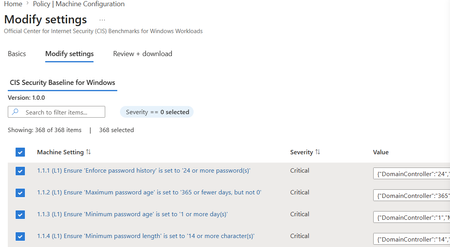
Background: Azure Machine Configuration remains committed to enabling greater security and simplicity in at-scale server management for all Azure customers. Machine Configuration (previously known as Azure Policy Guest Configuration) enables both built-in and custom configuration as code allowing you to audit and configure OS, app, and workload level settings at scale, both for machines running in Azure and hybrid Azure Arc-enabled servers. We’re excited to announce Public Preview support for Customizable Security Baselines in Azure Policy and Machine Configuration. This feature empowers you to tailor industry security benchmarks—such as CIS benchmarks for Linux or Azure Security Baselines for Windows and Linux —to align with your organization’s unique compliance standards across both Azure and Arc-connected machines. This feature builds on top of our existing audit baseline capabilities for Windows and Linux. Now you can create, parameterize, and assign custom baselines at scale, enabling continuous compliance visibility across your entire environment. Learn more about how to get started here: Customize Security Baselines with Azure Policy and Machine Configuration. What's New? Customizable security baselines in Azure Policy and Machine Configuration bring a powerful new way to assess, monitor, and improve your security posture across both Windows and Linux servers. Built on industry benchmarks such as the Center for Internet Security (CIS) and Microsoft’s own Azure Compute Security Baselines, this capability enables you to adapt compliance frameworks to your organization’s specific needs — all while maintaining a consistent governance model across Azure and hybrid environments. By passing custom baseline parameters directly into Azure Policy, you can represent internal controls at scale, ensuring that compliance reflects your enterprise’s unique standards and regulatory requirements. This cloud-native approach embodies Microsoft’s Secure by Design and Secure by Default principles — ensuring your workloads stay compliant, wherever they run. Key Scenarios Baseline Customization Tailor your security standards through the Modify Settings wizard under Policy > Machine Configuration. You can: Enable, exclude, or adjust rules from existing benchmarks Apply organization-specific parameters Export your custom configuration as a downloadable JSON file Each baseline JSON file serves as a reusable, declarative artifact—ideal for policy-as-code workflows, version control, and CI/CD integration. Assign Audit Policies When you assign a baseline via Azure Policy, it automatically: Evaluates configurations against your defined standards Reports compliance in near real time Surfaces findings in Azure Policy, Azure Resource Graph, and the Guest Assignments view This integrated visibility helps IT administrators, security teams, and auditors track compliance status with minimal overhead. Integration and Automation Security baselines integrate seamlessly into your DevOps pipelines and configuration management workflows. Each baseline produces a declarative settings catalog (JSON) that can be versioned and deployed using: Azure CLI ARM templates Bicep CI/CD automation This ensures reproducible, traceable compliance configurations across environments. Supported Standards Standard Description CIS Linux Benchmarks Official CIS Benchmarks for Azure-endorsed Linux distributions, matching the latest CIS versions. Azure Compute Security Baseline for Windows Applies security controls for Windows Server 2022 and 2025, aligned with Azure Compute guidance. Azure Compute Security Baseline for Linux Enforces consistent controls aligned with Azure Compute recommendations. Availability Customizable security baselines are available in all public Azure regions. NOTE: Support for Azure Government and Sovereign Clouds will be added in a future release. These environments are not included in the current Public Preview. Getting Started Prerequisites Before you begin: Deploy the Azure Machine Configuration prerequisite policy initiative. (This installs the required Guest Configuration extension on supported VMs.) Ensure your Azure subscription or management group includes supported Windows or Linux VMs. Have sufficient permissions (Owner or Resource Policy Contributor) to create and assign custom policy definitions. Step-by-Step Guidance Select a baseline from the Machine Configuration tab in Azure Policy. Modify settings to enable, exclude, or parameterize rules to match your internal policies. Download JSON to export your customized baseline configuration file for programmatic and repeatable customization. Assign the policy which can be deployed through the Azure portal, CLI, or your CI/CD pipeline. Review compliance results to track outcomes in Azure Policy, Azure Resource Graph, or the Guest Assignments page. Coming Soon Leverage baseline customization to gradually remediate server security non-compliance using Azure Policy! Join the waitlist here: https://aka.ms/BaselineRemediationWaitlist Learn More Azure Machine Configuration security baselines official documentation CIS Benchmark for Linux documentation Azure Windows Baseline and Azure Linux Baseline documentation Please note that the use of Azure Machine Configuration on Azure Arc-enabled servers will incur a charge.Empower Smarter AI Agent Investments
This curated series of modules is designed to equip technical and business decision-makers, including IT, developers, engineers, AI engineers, administrators, solution architects, business analysts, and technology managers, with the practical knowledge and guidance needed to make cost-conscious decisions at every stage of the AI agent journey. From identifying high-impact use cases and understanding cost drivers, to forecating ROI, adopting best practices, designing scalable and effective architectures, and optimizing ongoing investments, this learning path provides actionable guidance for building, deploying, and managing AI agents on Azure with confidence. Whether you’re just starting your AI journey or looking to scale enterprise adoption, these modules will help you align innovation with financial discipline, ensuring your AI agent initiatives deliver sustainable value and long-term success. Discover the full learning path here: aka.ms/Cost-Efficient-AI-Agents Explore the sections below for an overview of each module included in this learning path, highlighting the core concepts, practical strategies, and actionable insights designed to help you maximize the value of AI agent investments on Azure: Module 1: Identify and Prioritize High-Impact, Cost-Effective AI Agent Use Cases The journey begins with a strategic approach to selecting AI agent use cases that maximize business impact and cost efficiency. This module introduces a structured framework for researching proven use cases, collaborating across teams, and defining KPIs to evaluate feasibility and ROI. You’ll learn how to target “quick wins” while ensuring alignment with organizational goals and resource constraints. Explore this module Module 2: Understand the Key Cost Drivers of AI Agents Building on the foundation of use case selection, Module 2 dives into the core cost drivers of AI agent development and operations on Azure. It covers infrastructure, integration, data quality, team expertise, and ongoing operational expenses, offering actionable strategies to optimize spending at every stage. The module emphasizes right-sizing resources, efficient data preparation, and leveraging Microsoft tools to streamline development and ensure sustainable, scalable success. Explore this module Module 3: Forecast the Return on Investment (ROI) of AI agents With a clear understanding of costs, the next step is to quantify value. Module 3 empowers both business and technical leaders with practical frameworks for forecasting and communicating ROI, even without a finance background. Through step-by-step guides and real-world examples, you’ll learn to measure tangible and intangible outcomes, apply NPV calculations, and use sensitivity analysis to prioritize AI investments that align with broader organizational objectives. Explore this module Module 4: Implement Best Practices to Empower AI Agent Efficiency and Ensure Long-Term Success To drive efficiency and governance at scale, Module 4 introduces essential frameworks such as the AI Center of Excellence (CoE), FinOps, GenAI Ops, the Cloud Adoption Framework (CAF), and the Well-Architected Framework (WAF). These best practices help organizations accelerate adoption, optimize resources, and foster operational excellence, ensuring AI agents deliver measurable value, remain secure, and support sustainable enterprise growth. Explore this module Module 5: Maximize Cost Efficiency by Choosing the Right AI Agent Development Approach Selecting the right development approach is critical for balancing speed, customization, and cost. In Module 5, you’ll learn how to align business needs and technical skills with SaaS, PaaS, or IaaS options, empowering both business users and developers to efficiently build, deploy, and manage AI agents. The module also highlights how Microsoft Copilot Studio, Visual Studio, and Azure AI Foundry can help your organization achieve its goals. Explore this module Module 6: Architect Scalable and Cost-Efficient AI Agent Solutions on Azure As your AI initiatives grow, architectural choices become paramount. Module 6 explores how to leverage Azure Landing Zones and reference architectures for secure, well-governed, and cost-optimized deployments. It compares single-agent and multi-agent systems, highlights strategies for cost-aware model selection, and details best practices for governance, tagging, and pricing, ensuring your AI solutions remain flexible, resilient, and financially sustainable. Explore this module Module 7: Manage and Optimize AI Agent Investments on Azure The learn path concludes with a focus on operational excellence. Module 7 provides guidance on monitoring agent performance and spending using Azure AI Foundry Observability, Azure Monitor Application Insights, and Microsoft Cost Management. Learn how to track key metrics, set budgets, receive real-time alerts, and optimize resource allocation, empowering your organization to maximize ROI, stay within budget, and deliver ongoing business value. Explore this module Ready to accelerate your AI agent journey with financial confidence? Start exploring the new learning path and unlock proven strategies to maximize the cost efficiency of your AI agents on Azure, transforming innovation into measurable, sustainable business success. Get started today