finops
5 TopicsHow to keep agentic workloads orchestrated, fast, and affordable
Getting AI to production is only half the battle. Once agentic workloads are live, organizations face compounding challenges: token costs that grow non-linearly, latency that degrades user trust, Retrieval-Augmented Generation (RAG) pipelines that return noise instead of signal, and orchestration overhead that multiplies with every agent added to the mesh. This is where the real engineering begins. Wrap up your Path to production Tech Accelerator experience with a practical optimization playbook for agentic AI, from model selection and inference routing to prompt compression, RAG tuning, and caching strategies. Learn how to manage orchestration complexity across multi-agent systems while improving signal quality and response times. Explore FinOps practices for AI, including capacity planning, batch processing, and intelligent model routing. Walk away with actionable techniques to reduce inference costs, cut latency, and scale reliably across regions. How do I participate? Select Add to Calendar to save the date, then click the Attend button to save your spot, receive event reminders, and participate in the Q&A. Not able to attend live? This session will be recorded and available on demand shortly after airing. Just announced! Live Q&A will also be available July 29 from 10:00-11:00 AM SGT (UTC+8) to support attendees in Asia and western Australia. Don't see Attend or Add to Calendar? Sign in to the Tech Community to join the conversation. Organizational policies preventing you from signing in to the Tech Community? Use a personal account or tune in on LinkedIn. This session is part of Path to production for agents: a Microsoft Azure AI Tech Accelerator. View the full agenda for more actionable strategies to help you deliver secure, compliant, and high-performing AI solutions across your organization.761Views0likes4Comments
Office hours: FinOps and the Microsoft marketplace
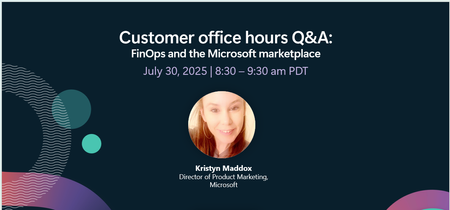
Want to unlock a faster time-to-value for your cloud and AI projects? Join us live, July 30, with your questions! Learn how the Microsoft marketplace can support your FinOps practitioners by sourcing thousands of pre-vetted solutions that accelerate AI transformation while better managing technology spend.979Views1like3Comments
Mine your Azure backup data, it could save you 💰💡
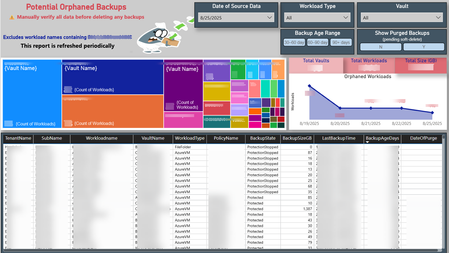
Your data has a story to tell. Mine it, decipher it, and turn it into actionable outcomes. 📊🔍 Azure backups can become orphaned in several ways (I'll dive into that in a future post). But here’s a key point: orphaned doesn’t always mean useless, hence the word “Potential” in the title of my Power BI report. Each workload needs to be assessed individually. If a backup is no longer needed, you might be paying for it - unnecessarily and unknowingly. 🕵️♂️💸 To uncover these hidden costs, I combined data from the Azure Business Continuity Center with a PowerShell script I wrote to extract LastBackupTime and other metadata. This forms the foundation of my report, helping visualize and track backup usage over time. This approach helped me identify forgotten one-time backups, VMs deleted without stopping the backup, workloads excluded due to policy changes, and backups left behind after resource migrations. If you delete unneeded backups and have soft-delete enabled, the backup size drops to zero and Azure stops charging for it. ✅🧹 💡 Do your Azure backups have their own untold story to tell? 📸 Here's a snapshot of my report that helped me uncover these insights 👇171Views0likes0CommentsAnyone managing Azure budgets? Would love to hear how you're doing it
Hi everyone - I’m a founder working on a tool to help engineering and infra teams plan and monitor Azure cloud costs more effectively (especially when it comes to budgeting and forecasting). I’m not selling anything - just trying to understand how teams currently handle: Planning Azure spend across teams or projects Staying within budget or tracking drift over time Forecasting costs based on changing usage If you're involved in this (or have strong opinions about what Azure does well/poorly here), I’d love to hear your thoughts. Even a few sentences would be super helpful. You can DM me here or just drop a quick comment. Happy to share what I’ve learned from others too. Thanks!161Views0likes2CommentsPowerShell script to delete all Containers from a Storage Account
After move the BootDiag settings out of the Custom Storage Account, the original Storage Account used for are still consuming space for nothing. This is part of the standard Clean Up stream need to be consider into the FinOps Plan. This script will help you to clean these Storage Accounts quickly and avoid cost paid for nothing. Connect-AzAccount #Your Subscription $MySubscriptionToClean = "MyGuid-MyGuid-MyGuid-MyGuid-MyGuid" $MyStorageAccountName = "MyStorageAccountForbootdiags" $MyStorageAccountKey = "MySAKeyWithAllCodeProvidedByYourStorageAccountSetting+MZ3cUvdQ==" $ContainerStartName = "bootdiag*" #Set subscription ID Set-AzContext -Subscription $MySubscriptionToClean Get-AzContext $ctx = New-AzStorageContext -StorageAccountName $MyStorageAccountName -StorageAccountKey $MyStorageAccountKey $myContainers = Get-AzStorageContainer -Name $ContainerStartName -Context $ctx -MaxCount 1000 foreach($mycontainer in $myContainers) { Remove-AzStorageContainer -Name $mycontainer.Name -Force -Context $ctx } I used this script to remove millions of BootDiag Containers from several Storage Accounts. You can also use it for any other cleanup use case if you need it. Fab344Views0likes1Comment