files
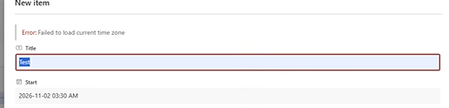
1754 TopicsFailed to load current time zone
SharePoint List Fails to Save Items After Changing Site Time Zone to "Pacific Time (British Columbia)" British Columbia will move to permanent Daylight Saving Time effective November 1, 2026. As a result, clocks will no longer fall back by one hour and will remain on UTC-07:00 year-round. Microsoft has introduced the new time zone (UTC-07:00) Pacific Time (British Columbia) for this change. As part of this transition, we updated the site's Regional Settings from (UTC-08:00) Pacific Time (Canada/US) to (UTC-07:00) Pacific Time (British Columbia). We have SharePoint lists with Start Date & Time and End Date & Time columns configured as Date and Time fields in multiple sites. Following this change, one specific site is now experiencing an issue where both users and site administrators are unable to save list items. The following error is displayed: "Failed to load current time zone" Additional Details: The issue started immediately after changing the site's Regional Settings. Reverting the site back to Pacific Time (Canada/US) did not resolve the issue. Some other SharePoint sites were updated to the same Pacific Time (British Columbia) setting and continue to work correctly. The affected site contains a calendar view built on a custom SharePoint list. The Start Date and End Date columns are configured as Date/Time fields. Location: Victoria, British Columbia. Has anyone encountered this issue before? Are there any known dependencies related to Regional Settings, Date/Time columns, calendar views, or site time zone configuration that could cause this behavior on a single site while others continue to function normally? Any guidance would be appreciated.Solved344Views1like6Comments
SharePoint user adds random metadata to files
I have a SharePoint Library where we add procedures and documents. There is relevant metadata included (Owner, modified date, keywords, department, etc.), but for one individual contributor, every time she uploads it places oddly specific default values in these metadata fields. I have confirmed on the library settings that there are no column defaults (In this folder or the root folder) and the problem does not occur with any other user. We did have her clear cache and log out and back in, but she is still the only user with this problem. What are we missing?325Views0likes2CommentsMGDC for SharePoint: Increased Changes in SizeInBytesWithVersions
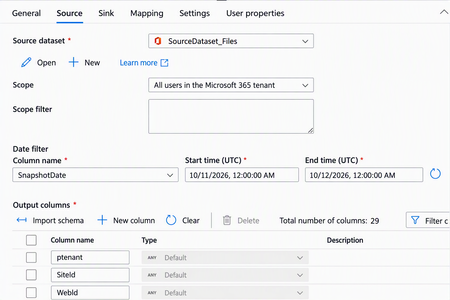
We noticed recently a change in behavior for the SizeInBytesWithVersions column in the SharePoint Files dataset exposed by Microsoft Graph Data Connect (MGDC). This column used to change only when there were changes to the file. It is now possible for this column to be changed when internal processes in the SharePoint infrastructure optimize the storage of file metadata, without a matching change in any other column exposed via the MGDC SharePoint Files dataset. This change is generally not a concern, but it could cause a larger number of SharePoint Files objects to show in MGDC as updated. This would in turn cause an increase in the size of deltas (a feature of MGDC where only changed objects are pulled) and a corresponding increase in cost for pulling SharePoint File deltas. If this becomes a concern, there is a simple workaround. In the copy task definition for the MGDC SharePoint Files dataset, in the Source tab, under the Output columns list, you can delete the SizeInBytesWithVersions column to filter it out of the results. This way, the deltas will see a corresponding reduction.
Sharing with an external user who has changed their email
I have had an issue with trying to share a folder with somebody who changed their email from, for illustrative purposes only, mailto:email address removed for privacy reasons to mailto:email address removed for privacy reasons. because his company EW had merged with Elsewhere. I believe that the second email was an alias for the first as both his actual addresses will reach him. The issue was that when I went to share a folder with his new email it would default back to his original email every single time. Eventually our IT department deleted all trace of his original email from Sharepoint which then recognised and allowed me to share with his new email. My question is - how does Sharepoint know these two different emails are the same person? Is it randomly deciding there is enough similarity in the email addresses- which in my view would be very dangerous, or does it know that both domains are registered to the same organisation?594Views0likes2CommentsSharePoint file links are not working
Recently we have noticed that when you copy the link and share with others (even ourselves), the link fails to open. If we use the path link under details, that works 100% of the time. The only difference we see is there are more gibberish in the link path. Initially, we thought the PDF files were having issues but it can be any file type. Our thought is the issue is with the SharePoint site.1KViews0likes3CommentsExcel Desktop App hangs when attempting to open documents from SharePoint to edit
User attempts to open Excel Documents saved in SharePoint by selecting Edit in Desktop App. As the Excel Desktop App begins to open a message displays stating: We have opened this document in Microsoft Excel in your computer. However, the Excel App just hangs without fully opening (see Screenshot). No problem detected when opening the Excel Desktop app directly, Desktop App opens freely. Excel MS365 is up-to-date version 2609 build 16.0.20430 64 Bit (Before reinstall). I have uninstalled the MS365 Office packet and reinstall it directly from the User's Office Portal, to no avail.449Views1like2CommentsMGDC for SharePoint: New Columns in September 2026
The MGDC for SharePoint team continues to improve the available datasets. This time around, we are introducing additional columns to some of our existing datasets. Here is a summary based on the different scenarios they support: Archive – Extends support for the SharePoint Archive feature. Includes a site property for size of archived files and a file property to indicate that the file is archived. E-signature – Supports the E-signature by adding a file to indicate there is a digital signature and the provider’s name. Filtering – The RootWebTemplateId was added to SharePoint Groups and SharePoint Permission dataset to facilitate filter by type of site, like it is currently available for Sites, Files and File Actions. Hub Site – Extends support for Hub Sites, introducing a column for ParentHubSiteId, to represent a hub site hierarchy. Restricted – Multiple columns indicating restricted flags in sites, including Restricted Access Control (RAC), Restricted Content Discovery (RCD) and Restricted Content Org-wide Search Policy. Retention – Support a set of file properties about Retention Labels, including label name, type, who applied it and when it was applied. Sharing – Extends the SharePoint Permissions properties to support the new sharing model. This includes information about the Main Link and Variants. Versions – Extends support for versions, including version storage metrics and version history policy. Here is a summary of all 26 columns in 4 datasets (Sites, Groups, Permissions and Files): Dataset Column Data type Description Sites ArchiveStorageUsed Number Total size of all archived storage in bytes Sites IsRestrictContentOrgWide SearchPolicyEnforcedOnSite Boolean Restricted Content Org-wide Search Policy Sites IsRestrictedAccess ControlPolicyEnabled Boolean Restricted Access Control Sites IsRestrictedContentDiscovery forCopilotAndAgentsEnabled Boolean Restricted Content Discovery Sites ParentHubSiteId String, GUID Parent hub site for this hub site Sites StorageMetrics, VersionCount Number Number of versions Sites StorageMetrics, VersionSize Number Total size of versions in bytes Sites StorageMetrics, VersionMetadataSize Number Total size of version metadata in bytes Sites VersionHistoryPolicy String Version history policy. Possible values: None, Automatic, Manual. If manual, uses “major version limit”. Sites MajorVersionLimit Number Limit for number of major versions Groups RootWebTemplateId Number Root web template id Groups Description String Description of the group Permissions RootWebTemplateId Number Root web template id Permissions SharingVariant String Sharing link variant. Possible values include: None, PasswordProtected, TrackLinkUsers, Embeddable, Ephemeral, RestrictToExistingRelationships, MainLink, NonDurableRedeem. Multiple values can be set at once. Permissions MainLinkAudience String Main link audience. Possible values include: Organization, Empty (people with existing access). Permissions MainLinkRole String Main link role. Possible values include View, Edit, others. Files RetentionLabel Object Retention label Files RetentionLabel, AppliedByEmail String Email of user who applied retention label Files RetentionLabel, AppliedByName String Name of user who applied retention label Files RetentionLabel, AppliedTime DateTme Time when retention label was applied Files RetentionLabel, Name String Name of retention label Files RetentionLabel, Type String Type of retention label. Possible values: Normal, Record or Regulatory Record Files HasDigitalSignature Boolean File has a digital signature Files DigitalSignatureProvider String Name of digital signature provider if digital Signature exist Files IsFileArchived Boolean File is Archived These changes are non-breaking, which means that your existing pipelines will continue to run. We also let this change sit for 21 days, so that delta datasets are also not impacted. Anyone starting fresh with MGDC for SharePoint will automatically get the new columns in their pipelines. If you have existing pipelines and want to use the new columns, you will need to update your MGDC application, get that update approved and then update your pipeline to pull the new schema. For more details about updating your pipelines to include new columns, or to see how these can be leveraged in specific scenarios, see these articles: Helpful blog on schema changes: MGDC for SharePoint FAQ: How to deal with schema changes Main MGDC for SharePoint article: https://aka.ms/SharePointData Updated schema for SharePoint datasets in MGDC: https://aka.ms/SharePointDatasetsWhat is the maximum length of a Check-In Comment in a SharePoint document library?
We are using SharePoint document libraries with versioning enabled and users provide comments when checking in documents. Is there a maximum number of characters allowed in the Check-In Comment field, and is this limit documented by Microsoft?Solved734Views0likes1Comment
Storing and organizing performance review data - SharePoint lists or something else?
My team has been asked to move our performance review records from a legacy HR system into something within M365. Someone suggested SharePoint lists but I'm worried about permissions (employees shouldnt see each others reviews), workflow complexity, and whether it'll scale. We have about 400 employees. Is SharePoint the right tool for this or should I be looking at something purpose-built that integrates with our M365 environment?415Views1like4Comments
Recycle Bin and Site Content Hidden for Site Members and Site Visitors
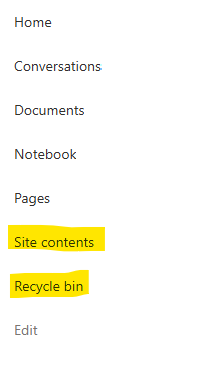
I posted this before but made a mistake with my write up, so I am reposting. I have a requirement that the Recycle bin and Site Contents should be be hidden from the Site Members and Site Visitors. Please how can I achieve this because the Server Infrastructure activation is not working for me. Any workarounds? Please help1KViews0likes1Comment