features
3044 Topics
What happened to the OLD context menu after the latest update?
I had my computer set and ready to exactly how I like to operate, then MS did an update and I lost my context OLD context menu in File Explorer for something that doesn't work for me. There is apparently no way back, even the Regedit code doesn't work anymore. Why does MS think this is better for everyone? Why can't they simply give us BOTH options and let the end user choose? I'm so sick of MS and their sloppy code thinking they know better than anyone else what we need, I'm ready to shift to Linux once an for all...no data tracking, , no age compliance crap, no mandatory MS account crap, etc. This is just another example of Bill's way or the highway from MS. Does anyone have a work-a-round that brings back the OLD context menu system?62Views2likes1Comment
Is there any way to get the classic right-click menu back for good?
I really can't stand the new Windows 11 right-click context menu. Having to click "Show more options" every single time just to extract a zip file or use basic tools is driving me nuts. It adds an unnecessary click to my workflow every single day and just feels like a huge step backward. I know there are registry hacks floating around to restore the old Windows 10 menu, but I'm worried a random update will break it and I'll have to do it all over again. Has anyone found a reliable, permanent fix that actually survives updates? Any advice would be really appreciated.96Views0likes2CommentsHow to fill out a PDF without printing it?
Hi, everyone. What’s a simple way to fill out a PDF form on a computer without printing it and writing everything by hand? I’d like to enter details, mark checkboxes, and save the completed file as a PDF. If the form only has blank lines rather than boxes I can click into, can I still type my answers in the right places? I’m not sure whether that needs a different tool from filling in an interactive form. Being able to fill out and sign a PDF in the same app would also be useful. Can this be done with a regular PDF reader, or would I need a separate form-filling tool? Thanks for any help.53Views0likes3Comments
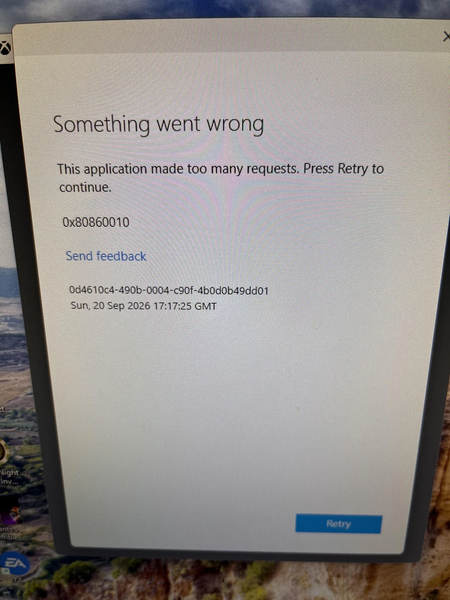
Why can't I sign in to any Microsoft app because of a "too many requests" error?
Why does every Microsoft Store app—including the Store itself—show a "too many requests" error whenever I try to sign in, no matter what I do? I've already flushed DNS, wiped app caches, and even done a fresh install of Windows, but the problem comes right back. Is this tied to my Microsoft account being rate-limited, a server-side issue, or something on my network that keeps triggering it? And is there any way to confirm which one it is before I give up and switch to Linux just to play Minecraft?60Views0likes1CommentWin11: 32GB of RAM is almost fully used up, and the source of the usage is unknown
The 2GB of RAM is often nearly fully utilized, but it's unclear what's consuming it, and even Windows' built-in tools struggle to pinpoint the exact source. However, performance meets expectations—for example, "Star Citizen" runs smoothly after upgrading to 32GB, indicating that the RAM upgrade is indeed effective. The device is an AMD Ryzen 5 5600G running Windows 11 Pro, version 10.0.26300 Build 26300.35Views0likes1Comment
Windows 11 that causes severe eye strain and headaches
Hello, I am reporting a serious display-related issue in Windows 11 that causes severe eye strain and headaches and makes the OS unusable for me and a few other people. We migrated the entire company, 300 people, from Windows 10 to Windows 11 due to security requirements, but now about 30 employees are suffering from headaches. Since switching from Windows 10 to Windows 11, I experience strong headaches and visual discomfort even during short sessions and even when simply looking at the desktop with no active workload. This issue is consistent and reproducible. Based on extensive testing, I suspect Windows 11 applies forced temporal dithering or other frame-to-frame color modulation at the OS / DWM / graphics pipeline level, even when using a native 8-bit display. System configuration: Native 8-bit IPS monitor (not 6-bit + FRC) NVIDIA GPU HDR fully disabled (Windows, driver, and monitor) Tested via DisplayPort and HDMI Multiple refresh rates and timings tested Troubleshooting steps already performed: Clean installation of multiple NVIDIA drivers (Game Ready and Studio, DDU used) Explicitly set 8 bpc color depth Tested RGB and YCbCr output formats Disabled G-SYNC / VRR at both driver and monitor levels Disabled MPO (Multiplane Overlay) via registry Reset NVIDIA Control Panel to defaults Removed all custom ICC profiles and reverted to default sRGB Disabled Night Light, blue light filters, and all adaptive color features Tested different brightness levels and fully disabled monitor post-processing Tested multiple scaling settings (100–150%) Tested different resolutions and timing standards (CVT / CVT-RB) Tested output via integrated GPU (where available) Key observation: With the exact same hardware, cables, monitor, and settings, Windows 10 does not cause these symptoms. The problem appears only on Windows 11, which strongly suggests a change in the Windows 11 graphics pipeline, DWM behavior, or color management. This is not a subjective preference issue but a health-related problem. Questions: Is there any supported or undocumented way to fully disable THIS in Windows 11? If not, then are there plans to provide explicit user control over color modulation in future Windows versions, given that this behavior causes severe eye strain and headaches for some users? I would appreciate a response from a technical specialist familiar with Windows graphics, DWM, and display output behavior.1.1KViews8likes10CommentsWin11 "Settings" app crashes when opening the "Windows Insider Program"page
When navigating to "Settings" → "Windows Update" → "Windows Insider Program," the "Settings" app crashes or becomes unresponsive. The page fails to load the Insider Program options. This issue persists even after restarting the "Settings" app, restarting the computer, or signing out and signing back in.41Views0likes1CommentiPad stuck in recovery mode: how can I fix it without losing data?
My iPad suddenly is stuck into recovery mode after update and now only shows the "connect to computer" screen. My iPad model is iPad Air M3, and it was running iPadOS 26. Now, the iPad won't boot past the recovery screen, and I can't access any of my apps or files. I tried to fix it by force restart, but it didn't help. My question: What to do when iPad is stuck in recovery mode while keeping my data if possible?145Views0likes11CommentsWindows 11 26H2 Windows Search without search highlights??
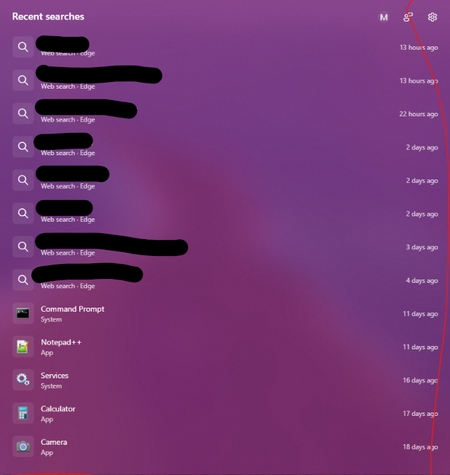
Hello community support, I just recently finally updated my Win11 Desktop PC to 26H2 from 25H2 and now I noticed that Windows removed the Windows Search >> search highlights (along with the little mini picture in the search box on the taskbar that had a daily highlight) and just now has the boring search history: Current Win 11 version: Edition Windows 11 Home Version 26H2 Installed on 4/6/2025 OS build 26300.9711 Experience Windows Feature Experience Pack 1000.26100.372.0 I also see that the "Show search highlights toggle option no longer exists in Settings>>Privacy & Security>>Search Yes, I can still perform "web searches" but the ready-populated web highlights on the righthand side was a decent feature and now it looks generic and very boring (too simple). Obviously I do not want to mess around with the registry and the "HKEY_LOCAL_MACHINE\SOFTWARE\Policies\Microsoft\Windows\Windows Search" option, but again - why not just keep giving users the control and option to turn highlights on or off rather than force users to not have it at all?? Thanks MJ167Views0likes3Comments