events
18 Topics
SharePoint - Event Registration
Good morning everyone. I'm just starting with SharePoint at work. I was excited first Disappointed then realized that I was just ignorant 🙂 Now, I'm trying to use the Event Webpart and allow participant to register. I found a similar question answered by RobElliott here but I think it's already too advanced for me right now. I understand that the event links to a form, that this form once submitted will interact with a list and from the result of this interaction, will send a positive/negative message to the participant. Could someone guide me on how exactly to do that ?2.3KViews0likes0CommentsBug with SharePoint Events?
One of my page admins reached out to me because she was adding events to a communications site, and the events were not showing up on the full list of events. I re-added an event for Oct. 31 three times and it still wasn't showing up when viewing all the the events between April 15 and Dec. 31. But, if I narrowed the range to July 1 to Dec. 31, it suddenly showed up (four times!). As I worked with it more, I realized that the site's "all events" view, which also pulls in events from our main company calendar, wasn't showing any events after Oct. 15, even when the date range went through the end of December. But then, I zoomed out and viewed the page at 80%, and magically all the events through the end of the year were visible. At 100%, they aren’t visible. But then, still at 80%, I reloaded the entire site and went back into the "all events" view. Same issue: Oct. 15 was the last date that would load (end of page). But if I zoomed in even further, suddenly they became visible. Surely this is a weird bug. Any insights out there?996Views0likes0CommentsMaking Category field required when adding a new event
So I am using the Events WebPart to show the latest events in SharePoint, I went ahead and marked the Category column as required, but it's not having any effect when adding a new event using the Events.aspx page. It just works when adding events using the Events list itself. Anyone tried to play with the events fields to make them required?865Views0likes0Comments
Edit the EVENT Form in SharePoint
Our SharePoint Home site/page (/home) has the built-in Events element When you click 'Add Event', you're taken to a new Form, which has a 'Category' field. I've added a new field (Subcategory) to the List, but it does not appear on the Form. Is there a way for this to appear when a user adds a new Event (the Category and Subcategory should also be visible when people view the Events calendar). I've tried going into the Settings for this List Item, but there's no way to edit the form. Can anyone advise if this is possible? Thanks Brian2.8KViews1like0Comments
Communication Site Events Add to Calendar Behaviour
When I use the event's functionality in a modern communication site, the events I create have a little button added to them to "Add to my calendar." When I click it, I get an .ics file. That seems weird to me. I'm in Office 365, why doesn't it add it to my Outlook Online Calendar? Or maybe present me with an option to add it to my online calendar or desktop Outlook?1.5KViews0likes0CommentsColumn Default Value Based on Root URL
I have a tab in an MS Teams team where users can view our upcoming corporate training sessions (i.e. Events). In each event description, I am putting a link to a sign up form. The sign up form is a list in MS SharePoint Online. In this list, there is a column to specify the event to which the user wants to sign up. I want this column to be automatically filled using the column default value function in SharePoint. The default value would be based on the root URL that led the user to the sign up form. For example, if the user was viewing training session X in Teams, it means the root URL is the event X URL. So, the formula would be: IF [Root URL] = (URL of event X) then "X", ELSEIF [Root URL] = (URL of event Y) then "Y"... and so on. Does this hypothetical [Root URL] function even exist? If not do you have any suggestion for how I can tell which event the user is coming from such that I can fill the column automatically? Thanks.2.5KViews0likes4CommentsModern Events Categories
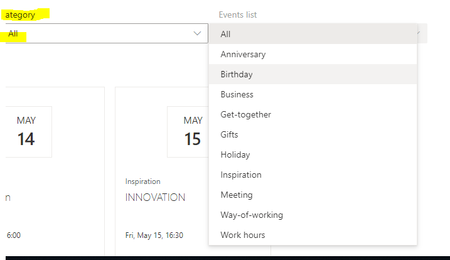
I have a page where I want to add events that users can see and join. In my company, these events have two categories and I want users to filter only by these two categories (by Category, I mean the option available when adding new event https://support.microsoft.com/en-us/office/use-the-events-web-part-5fe4da93-5fa9-4695-b1ee-b0ae4c981909#bkmk_addevent). However, SharePoint provides a bunch of default categories (e.g. Gift, Anniversary, Work hours, etc.) that the user can select from and which I do not want (see below). Is there any way to remove them and keep only my desired categories? Please note that I found a thread that seems possibly to address the same problem (see here). However, the suggestions given require changing lists through Page Properties, an option which I don't seem to have in the first place (see below)! Please help 🙏 Thanks BeshrSolved18KViews0likes7Comments
Create Sharepoint calendar from an Event List with filtered events
Hi, We have an app that outputs an Event list: GlobalEventList. To that event list, all users need to have write permissions in order for the app to create or delete events in the respective user context. I can limit access to the sharepoint site, so general access to that event list is not considered a problem. I now want a specific user to see a calendar with only a filtered set of events (e.g. a calendar with all events where DepartmentName = "DE" (where DepartmentName is a custom field added by the App)). That specific user shall not see all other events from the event list. So creating a view does not do the trick. So I was hoping to create a new Calendar for each filtered set of events, for which I set the permissions accordingly and that copies the events from the GlobalEventsList according to a filter. Any suggestions on how to do this? Regards Julian2.7KViews0likes1CommentHub Site Permission for Specific News/Events in General Category??
Hi there, I have a problem regarding the hub site user access about News web part and Event. My scenario: There are 3 Sub Sites under main Communication site. i.e. Communication A - assigned users: User1, User2 and User3 Sub sites called Sub1, Sub2, Sub3 (these are sub sites of Communication A) - sub site assigned user Sub1 as User1, Sub2 as User2 and Sub3 as User3. And there are another communication sites called Communication B(assigned User4) and Communication C(Assigned User5) That 3 communication sites are connected to Main Hub Site ( assigned User1,User2,User3,User4,User5) My problem is there are 3 different user access to Communication sites. And there are News and Events, categorized to General for all users in Company organization. But I want to appear each site's News in General Category. In Hub Site only view in General item in each site. But problem is when User doesn't have permission to specific site also can't view Hub site General category item too. i.e. Communication B site's General category News item will appear in Hub Site. How can it view all Users in Hub site not only User4? Would I use MS Flow to ignore this matter or how to use grant access to specific News items in General Category?? This problem only for News and Events in use of category option. Any one have an option regarding this matter??1.1KViews0likes0Comments