email security
59 Topics
Account recovery
I've been locked out of my main account for over 45 days now and everything important is linked to that email. I can't log in to many other things that send verification codes to my Microsoft email because it seems impossible to recover my Microsoft email. I have access to my security backup email but because I had 2 factor authentication turned on I need access to the authenticator app which is on my old phone or a 25 digit recovery code I can't find. I tried the account recovery form but because of 2FA it tells me I can't recover an account with 2FA enabled. I then tried the security information replacement which is a 30 day process to replace my old security info I no longer have access to with a new backup email. I received a confirmation that the 30 day replacement process started and a reminder at 15 days giving me an exact date and time that my new security information will replace the old information. The deadline arrived and nothing happened. I then contacted support the next day and they assured me there can be a delay up to 48 hours. I waited the 48 hours and still nothing happened. I've been in contact with support now almost daily and spoken to supervisors that have even taken control of my computer and recorded the issue. I'm now locked out of my account for a total of around 45 days and now 36 days into the 30 day deadline for replacing my old security information. I've even filled out forms that I was advised to fill and submit and in response I was just told to keep trying to "recover my account". But I can't "recover" my account because it had 2FA enabled. No one seems to be able to help even with escalations to the security team.
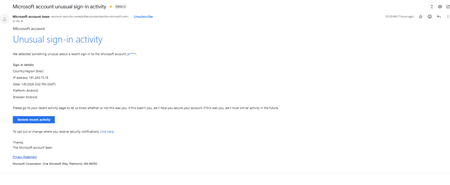
Unusual Sign-In Activity E-mail but I cannot identify the account!
Hi, I'm experiencing something quite weird. This morning I got an alert to a personal e-mail address of mine (w********@gmail.com) that a Microsoft account of mine was accessed from an IP address in Brazil. I've attached that e-mail and it lists the account as "ja*****" with no domain name listed. I have two microsoft accounts that I know of that start with "ja". One is a hotmail account and one is registered with my university account. I figured this alert had to do with my university account because that could explain why it never listed a domain name. However, when I checked, neither account have any record of a sign in, successful or unsuccessful, from an IP address in Brazil today. Furthermore, the university account doesn't have the w*******@gmail.com listed as a primary or secondary e-mail account so even if that was the account that alert wouldn't have gone to that e-mail. I contacted Microsoft support hoping that they could try to locate the alert e-mail and confirm what account the alert was about from their end but they told me they don't have the tools for that and they have limited access to their own system. A supervisor told me that at this point my best bet is to either post on the community forums or to go to the police and ask them to track the IP address. I have a vague memory that years ago when I tried to log into my university Microsoft account, it would let me log in as a personal account and as a work account separately but now I can only use it as a work account. I'm wondering if that might be related like maybe someone was able to access my personal account of my university Microsoft account which could explain both the lack of a domain name in the e-mail and the fact that there's no history of it in my work account. This is really bugging me because someone may have accessed an account belonging to me but I'm completely unable to actually confirm that or even the account this is happening to. Thanks!Defender email audit - sensitive info in subject line
We are doing security auditing of emails. I'm familiar with the Defender portal, not too in-depth though (have not had time to play around) and not so with Sentinel or KQL yet. In the course of my audits, I have been finding people may encrypt emails but still have sensitive information in the subject line. Common understanding that internal emails would not leave the org so encryption is not mandatory (though I have disagreement on that). So auditing emails going external. In M365 Defender >> Email & Collaboration >> Explorer section, I did a search: keyword: "SSN" sender domain: equals my org recipient domain: equals non of my org What are some sensitive information keywords or phrases in the subject line searches in M365 Defender (security.microsoft.com)? So far I have compiled this list to (sucks M365 Defender does not allow searching with wildcards or patterns): SSN social security TIN DOB account acct passport license DLSolved
Quarantine emails marked as High Confidence Phish are being system released
I have a group of about 20 emails that were in quarantine, and within moments they were released by 'System release' There are multiple different domains being released, and all of them have a High Confidence Phish level. Since it is a system release, I cannot submit anything to Microsoft other than it appears clean. Is anyone else experiencing this?
Scheduling attack simulations
I'm starting to use the Defender attack simulation feature. I have approx. 3000 users to target. Leadership don't want to send 3000 tests every month rather divide the people up across 12 months sending smaller monthly batches. The issue of not being enough tests for each individual is there a way to automate the sending of these to even batches of people across 12 months rather than having to set these up manually?294Views0likes3Comments
User app registration - exploitable for BEC?
Hello. Recently dealt with a case of BEC. I'm not trained in forensics, but doing my best. Appears the hacker used an application called eM Client for their attack, getting access to a user's mailbox and hijacking a thread. I can see the login from two weeks ago (the incident was only noticed a couple days ago, however) - from a European country that SHOULD have been blocked by Conditional Access. Come to find out, the tenant conditional access was unassigned from everyone. We're not sure how - we re-enabled it, and audited changes, but the only change that appears was us re-enabling it. Which I thought indicates it was never configured right, except we've got a ticket documenting a change to Conditional Access a couple days after the hack that ALSO does not appear in the logs. So... it's likely it was changed, yet I have no record of that change (atleast, not through Entra > Monitoring > Auditing). If anyone knows any other ways of checking this, please advise - but I can't seem to even access our Diagnostic settings, the page tells me I need an Azure Active Directory subscription (I'm on Entra ID P1, which includes AAD.... this might be related to being global admin, and not Security Admin - we don't use that role in this relationship) ANYWAY, my amateur forensic skills have found that the attacker used an app called eM Client to get access. I'm not sure yet how they obtained the password, and got past MFA... But quick research shows this application (esp it's pro version) is known for use in BEC. The app was registered in Entra, and granted certain read permissions in Entra ID for shared mailboxes, presumably to find a decent thread to hijack. I'm not 100% sure yet there was any actual exploit done using this app, but it's popularity amongst hackers implies it does SOMETHING useful (i think remember that it authenticates using Exchange Web Services instead of Exchange Online, or something similar? Will update when I have the chance to check). We're in the process of improving our Secure Score, and this incident makes me think user's ability to register apps should be locked down. Checked Secure Score for this, and while there ARE recommendations around apps, disabling user app registration is NOT one of them. Just curious about people's thoughts. I just barely understand App Registration in Entra, but if this is a known attack vector, I would think disabling app registration would be a security recommendation?Exchange online - Records Management & Use parent folder policy
Good day, We are in the process of testing and evaluating using Exchange online & Records management to mark items as a records for an x amount of years so that users cannot delete or edit the items during the retention period. Afterwards the items will be removed. We are now seeing the following: Mails that are labeled with a record label restricts the user to edit or delete the mail with the following notification "Outlook cannot delete one or more items because of a retention policy" However when a user navigates to Assign policy and select Use parent folder policy the record retention label gets removed and the user can indeed remove a mail that was actually not meant to be removed. All of the default retention tags were removed from the Default MRM policy except move to Online Archive after 2 years. Is this by design? Or is there a way to disable or remove "user the parent folder policy" option?Purview Information Protection for internal and external emails
I'm working with an organisation that is starting to use sensitivity labels. They have Office 365 E3 licenses. The current plan is to set up a default label for documents and emails called "Internal Only". This label will encrypt contents and grant co-author permissions to all staff. The challenge will be when emails include external recipients. Ideally, the user will change from the default label to one that grants access to any recipients. However, I can imagine that there will be many cases where they forget to do this. If we had Office 365 E5 licenses, we would have the option to create a DLP policy to show a policy tip. I I would expect this would reduce the incidents of mislabeling. I have seen recommendations to avoid encrypting by default and only use it where needed. However this client is keen to use encryption to protect as much content as possible. One suggestion could be to change the default email label to only grant access to the sender and recipients, regardless of whether they are internal or external. I'm interested in any real-world feedback on how others have tackled this issue.2.4KViews0likes3Comments
Custom Rule to qurantine emails in M365 based on total Number of Recipients
Lately we have been getting thousands of emails from Gmail which have pdfs and links. Last week we were hit with around 1.5 million emails which the ATP could not stop( we have A5 license). We created rules which says if attachment has specific name example Oddname.pdf then delete the email. We are not in position to block gmail domain or block all emails which has pdf attachments. Can we have a custom rule which based on number of recipients. Example --->if email has more then 100 recipients and gmail.com domain then quarantine the email or delete them.
MS Sensitivity labels mail sending MIME format Header
I selected the Sensitivity labels in OWA and checked the value exposed in Chrome developer mode when sending an email. When sending mail (C#-EWS sending test), i confirmed that the message was encrypted by additionally coding the header with the information below. ## Header Sample X-MS-Exchange-Organization-ModifySensitivityLabel: 00000000-0000-0000-0000-000000000000;6e4f02ee-0f9f-44eb-9f14-57b7d505f382 msip_labels: MSIP_Label_6e4f02ee-0f9f-44eb-9f14-57b7d505f382_Enabled=True;MSIP_Label_6e4f02ee-0f9f-44eb-9f14-57b7d505f382_SiteId=a23af047-ccd4-43c4-b36d-5303e9f04b12;MSIP_Label_6e4f02ee-0f9f-44eb-9f14-57b7d505f382_SetDate=2024-03-18T00:20:34.940Z;MSIP_Label_6e4f02ee-0f9f-44eb-9f14-57b7d505f382_Name=Confidential;MSIP_Label_6e4f02ee-0f9f-44eb-9f14-57b7d505f382_ContentBits=0;MSIP_Label_6e4f02ee-0f9f-44eb-9f14-57b7d505f382_Method=Privileged; ## Question - If only msip_labels is applied, the sensitivity label is displayed, but the message is not encrypted. Adding X-MS-Exchange-Organization-ModifySensitivityLabel will enable message encryption. Can I code it like this? - The msip_labels guide is provided by https://learn.microsoft.com/en-us/information-protection/develop/concept-mip-metadata Where can I find the specifications for X-MS-Exchange-Organization-ModifySensitivityLabel? - What are the limitations of development if implemented only by adding a header? Thanks in advance1.4KViews0likes2Comments