edge
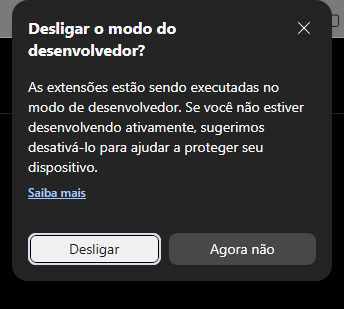
865 TopicsHow to permanently disable 'Turn off developer mode extensions' popup in Edge?
Hello everyone, I am currently running Windows Insider Preview (Build 26200) and I use Microsoft Edge as my primary browser. For my daily workflow, I need to keep Developer Mode permanently active because I run multiple local/unpacked extensions. Every single time the browser starts, I am greeted by the annoying popup: "Turn off developer mode extensions? Extensions are running in developer mode...". I've tried every advanced workaround available: modifying shortcuts with '--disable-features', tinkering with registry keys under 'Policies\Microsoft\Edge' (like ExtensionDeveloperModeSettings and ExtensionInstallAllowlist), but recent updates seem to have completely blocked these workarounds on the stable channel. Moving to Edge Dev or Canary shouldn't be the only solution just to avoid a startup prompt. Why can't Microsoft give us a simple, legitimate Registry Toggle to say "Yes, I know what I'm doing, stop asking me every day"? Is anyone else experiencing this frustration on recent builds, and has anyone found a clean way to whitelist local extensions without enterprise formatting errors? Thanks, André186Views1like2Comments
Edge sync failing on desktop
Hi! Edge sync on my PC (Edge 156.0.4314.56, Windows, personal Microsoft account) gets stuck in "Initializing" every time I restart the browser. Signing out and back in fixes it, but only until I restart again. In edge://sync-internals, the encryption key downloads fine after signing in, but after a restart "Has Keystore Key" goes back to false and Edge never requests the key again, so sync never starts, and it's actually very annoying. I noticed it on October 29 and have already sent feedback through Alt+Shift+I. Is anyone else seeing this, or is there a fix that doesn't require signing out every time?217Views0likes3Comments
Edge Password Manager Suggests Saved Passwords Across Different Subdomains
Description: Microsoft Edge suggests saved credentials from a.example.com when I focus a password field on b.example.com. These are separate websites with different authentication systems. I expect saved credentials to be matched against the exact hostname by default, rather than being suggested across sibling subdomains. Expected behavior: Credentials saved for a.example.com should not be suggested on b.example.com by default. Users should be able to configure strict hostname matching while retaining password autofill for each site. Feature request: Please provide an option to disable cross-subdomain credential suggestions in Microsoft Edge Password Manager.70Views0likes0Comments
【Sync Issue】Edge Sync Stuck on “Setting up sync” on All PCs for One Microsoft Account
English Version Problem Description Microsoft Edge sync is stuck on “Setting up sync” and never completes. The issue appears to be associated with one specific Microsoft account. I have tested multiple devices and accounts, and the results consistently point to an account-specific issue rather than a problem with a particular PC. Troubleshooting Results Same account, multiple PCs: The same account cannot complete Edge sync on multiple different PCs. It remains stuck on “Setting up sync.” Different accounts, same PC: When I sign in with another Microsoft account on the same PC, Edge sync works normally. Same account, mobile device: Sync works normally on the mobile version of Edge using the affected account. Consistent results: The problem follows the same account across multiple PCs, while other accounts sync normally on the same computers. Affected account: mailto:email address removed for privacy reasons Request for Assistance Could this issue be related to the account's server-side sync status, account configuration, or sync data? Is there a way for Microsoft Support to check the sync status of this account or reset its server-side sync state if necessary? Since I have already tested multiple PCs and different accounts, I would appreciate assistance in investigating a possible account-specific sync issue. Thank you for your help! 中文版本 问题描述: 我的 Microsoft Edge 账号同步功能出现异常,登录后一直显示“正在设置同步”,无法正常完成同步。 目前已通过多组测试确认,问题似乎与特定账号有关,而不是某一台电脑或单一设备的配置问题。 已确认的测试结果: 同一账号,不同 PC: 在多台不同的 PC 上登录同一个账号,均无法完成同步,一直停留在“正在设置同步”。 同一 PC,不同账号: 在出现问题的同一台 PC 上切换到其他 Microsoft 账号,Edge 同步功能可以正常使用。 同一账号,手机端: 该账号在手机端可以正常同步。 问题具有一致性: 目前测试结果表明,异常始终跟随同一个账号出现。 出现问题的账号: mailto:email address removed for privacy reasons 希望获得的帮助: 请问这种情况是否可能与账号的同步服务状态、服务器端配置或账号同步数据异常有关? 是否有办法检查该账号的同步状态,或者重置账号在服务器端的同步状态? 我已经进行了跨设备和跨账号测试,希望微软技术支持人员能够协助进一步排查账号层面的问题。 感谢帮助!245Views0likes2Comments
Edge Sync stuck in Initializing with Backend Uninitialized
Hello, I am hoping to get feedback from people familiar with Edge Sync internals, synchronization failures, or similar cases. OVERVIEW Around October 13, 2026, I discovered that my Favorites and saved Passwords were no longer visible in Microsoft Edge. The issue is present on both my desktop PC and my laptop using the same personal Microsoft account. Approximately two weeks later, the issue remains unchanged. What makes this case unusual is that authentication appears to work correctly, Edge Sync servers respond successfully, and encryption keys download successfully, yet the sync engine never completes initialization. ENVIRONMENT Microsoft Edge Windows 11 Personal Microsoft account Desktop PC Laptop The same symptoms occur on both devices. SYNC INTERNALS edge://sync-internals consistently reports: Transport State = Initializing Sync Engine State = Stopped Backend Status = Uninitialized Sync Feature Enabled = True Bookmarks = 0 Passwords = 0 Additional values: Download Key Result = Fail Set Key Result = Fail SIGN-IN STATUS edge://signin-internals reports: Successful authentication Successful token retrieval No authentication errors There is no indication of a Microsoft account sign-in problem. SYNC DIAGNOSTICS sync_diagnostic.log repeatedly shows: SyncState after authenticated = FeatureCanStart Try to start sync engine Load and connect Nigori controller Update key data credentials Reset engine The sync engine repeatedly attempts initialization but never reaches a running state. SERVER COMMUNICATION cv_debug.log reports: SYNC_SERVER_OK EncryptionKeysFetcher.DownloadKeys = Success Key count = 10 SetEncryptionKeys = Success This confirms that sync servers respond and encryption keys can be downloaded successfully. One unusual observation is that Sync Internals reports: Download Key Result = Fail Set Key Result = Fail while the logs simultaneously report successful key download and processing. PROFILE VERIFICATION Active profile: ...\Microsoft\Edge\User Data\Default During troubleshooting, a file named "Bookmarks" could not be located within the active profile. The following sync-related components remain present: Sync Data LevelDB Nigori.bin Logs MULTI-DEVICE IMPACT The same behavior is present on both desktop and laptop using the same Microsoft account. This makes a single-device profile corruption scenario seem less likely. NEW OBSERVATION After the initial failure, I created a new Favorites folder named: After Edge Sync Failure 20261013 The folder appeared correctly in the Favorites Bar. After Microsoft Edge and Windows were closed and restarted, the folder was no longer present. This suggests the issue may still be actively affecting local Favorites persistence and is not limited to historical sync data. ACTIONS NOT PERFORMED Based on recommendations received in Microsoft Q&A, I have intentionally avoided: Reset Sync Deleting the Edge profile Clearing all Edge data Reinstalling Edge The goal has been to avoid overwriting potentially recoverable sync data. PRIMARY QUESTION My main question is not whether synchronization currently works. My main question is whether the original Favorites and Password records may still exist within the Edge Sync service and whether there is any supported way to determine that before attempting potentially destructive recovery actions. QUESTIONS Has anyone seen this exact combination of Transport State = Initializing, Sync Engine State = Stopped, and Backend Status = Uninitialized persisting for weeks? Can a corrupted Nigori or encryption-key state cause Favorites and Passwords to report zero items despite successful authentication and successful key download? Has anyone recovered Favorites or Passwords after a similar state? Is there any supported method to determine whether the original sync data still exists on the sync backend before attempting Reset Sync? Does this pattern suggest an account-level sync corruption, backend corruption, or another known Edge Sync failure mode? Any technical insight would be greatly appreciated. Thank you.330Views0likes1CommentPWAs fail to launch on my WoA (Arm64) environment
For the past few months—coinciding roughly with an Edge Dev 153.0.4224.0 — PWAs have stopped launching on my Surface Pro 11th Gen (Arm64). When I click a PWA icon pinned to the taskbar, the progress cursor appears briefly, but nothing else happens. Clicking "Open" within the Edge Dev app management screen also yields no response. The only exception is Figma: if I open it in browser mode and click a link within the application, it successfully launches in PWA mode. PWAs appear to work without any issues in the retail version of Edge. I have already tried a repair installation of Edge Dev, but it did not resolve the problem. I have submitted feedback directly through the Feedback Hub and built-in feedback feature in Edge Dev, but the issue remains unresolved after several months. Is this problem unique to my specific setup?242Views1like8Comments
Gpo question
Hi, if i set DownloadRestrictions to 2 for preventing Drive by Downloads, it also Block all ZIP files. Is this normal? If i deactivate SmartScreen, it is possible to Download ZIP files, even with this GPO. Is this a bug? Thanks for Feedback/Help in Advanced! best regards Wolle140Views0likes0Comments
TypeError: Cannot read properties of undefined (reading 'media_size')
Since version 153.0.4234.48 (Official build) (64-bit) was released and installed on my machine on 9/18/2026 I've been getting the following error while using Edge to debug a Web Application in Visual Studio 2022: TypeError: Cannot read properties of undefined (reading 'media_size') Thead: edge://print StackTrace: at ei.updateSettingsValues (edge://print/index.js:5:91848) at ir.onSelectedDestinationCapReady (edge://print/index.js:3935:3913) at Object.handleChange (edge://print/index.js:3935:175) at or.notify (edge://print/index.js:1:20564) at Kr.notify (edge://print/index.js:1:20736) at Ae.updateDestination (edge://print/index.js:5:51222) at s (edge://print/index.js:5:53037) at Ae.onCapabilitiesSet (edge://print/index.js:5:53089) Source modules: edge://print/index.js c7754cdafbaf1eb70a049a157e46719b4bd6bd79117bb1ad6fc57a38b51bca24 I thought it had to do with the print JavaScript code I was doing, but any page I try to print from the "..." Print menu options does the same thing. The error doesn't occur in Firefox and appears to be caught and ignored in Chrome.459Views0likes3CommentsMicrosoft Edge Workspaces deleted/hidden after update.
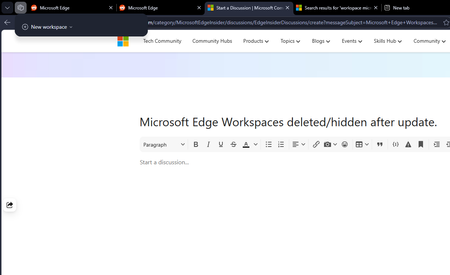
All my workspaces in Edge are hidden and/or are deleted. I updated my windows yesterday night (the restart also updated Edge which was pending) and noticed this issue this morning. I had 10+ workspaces and none of them are here to be found. Tried restarting the browser but no luck there.464Views0likes3Comments