developer
8255 TopicsHow to permanently disable 'Turn off developer mode extensions' popup in Edge?
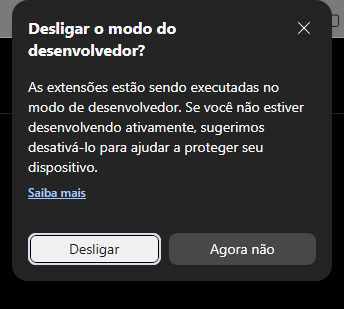
Hello everyone, I am currently running Windows Insider Preview (Build 26200) and I use Microsoft Edge as my primary browser. For my daily workflow, I need to keep Developer Mode permanently active because I run multiple local/unpacked extensions. Every single time the browser starts, I am greeted by the annoying popup: "Turn off developer mode extensions? Extensions are running in developer mode...". I've tried every advanced workaround available: modifying shortcuts with '--disable-features', tinkering with registry keys under 'Policies\Microsoft\Edge' (like ExtensionDeveloperModeSettings and ExtensionInstallAllowlist), but recent updates seem to have completely blocked these workarounds on the stable channel. Moving to Edge Dev or Canary shouldn't be the only solution just to avoid a startup prompt. Why can't Microsoft give us a simple, legitimate Registry Toggle to say "Yes, I know what I'm doing, stop asking me every day"? Is anyone else experiencing this frustration on recent builds, and has anyone found a clean way to whitelist local extensions without enterprise formatting errors? Thanks, André84Views1like2CommentsIntroducing SharePoint tools in Work IQ
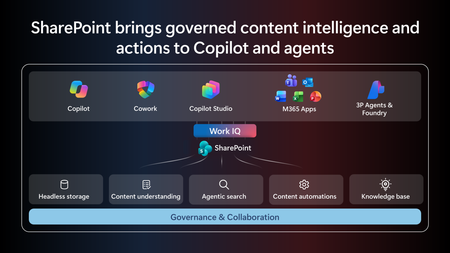
SharePoint tools in Work IQ are now in public preview, bringing more than 60 native SharePoint operations to Copilots and agents. Built on the same tools that power Copilot in SharePoint, they help agents find, create, organize and share content with less prompting. Internal evaluations show task pass rates improving from 70.1% to 84.6%, while using 16% fewer tokens. Delegated permissions, least-privilege scopes and admin policies keep access governed, with consumption-based billing through Copilot Credits.5.7KViews1like1CommentThe GitHub app in Microsoft Teams is now generally available!
GitHub empowers any team to become builders in Microsoft Teams. Customer support teams are using GitHub to turn customer feedback from Teams channels into filed issues. Engineering teams are asking GitHub to investigate, reproduce, and fix bugs without leaving Teams. Business and marketing teams with innovative ideas are asking GitHub to turn their discussions into working prototypes. During public preview, our team has been hard at work addressing feedback and making product improvements to the GitHub experience in Teams. Here is what’s new. Review work in the GitHub Canvas The new GitHub canvas lets you review the plan, file changes, and pull request without leaving Teams. Click “Open Canvas” to follow GitHub Copilot’s progress and see your team’s ideas take shape in code, right beside the conversation. Go from notification to pull request in one app GitHub notifications and GitHub Copilot now live in a single app in Teams called GitHub. Stay on top of issue and pull request updates and act on them right in Teams. When an update needs attention, reply to the notification with "@GitHub". GitHub Copilot can investigate, make the fix, and draft a pull request in the same thread, so your team sees the update and the response together. Issues and pull requests created from Teams now carry attribution. Reviewers can see who started the work and link back to the Teams conversation where it was discussed. Work across repositories and tools Real work rarely lives in one repository. With multi-repo support, GitHub Copilot can work across all the repositories your task needs in the same conversation. In addition, MCP support lets you configure which tools and connected services GitHub can leverage in Teams. Learn more about configuring MCP. Get set up in a guided experience The new guided web onboarding experience helps you sign in through your default browser using saved passwords or passkeys and grant Teams access to the right organizations and repositories. You can now use natural language to ask GitHub to use a default repository or switch repositories in your Teams conversations. You can also choose the model GitHub Copilot uses for a task. Pick a faster model for quick fixes or a more capable model for larger changes. Get started today Add the GitHub app to Teams today, then click “Get started” from its welcome message to connect your account. Type "@GitHub help" to see what else it can do. Admins should verify the following are enabled for users to get started: Microsoft 365 admins: ensure resource-specific consent is enabled so users can let the GitHub app use conversation context. TAC admins: ensure the GitHub app is allowed for users in the Teams admin center. GitHub enterprise admins: ensure Copilot cloud agent, cloud sandboxes, and CLI billing are enabled for each organization and assign GitHub Copilot licenses to users. Learn more at teams.github.com! We'd love to hear what you build. Share your feedback in the comments below.2KViews1like0Comments
Excel 365 removes VBA projects (vbaProject.bin) from all .xlsm files on Windows 11
Hello Microsoft Tech Community, We are the technical support team at NEODIMO, a company that develops Excel-based financial management solutions using VBA. We are investigating an unusual issue affecting one of our customers using Microsoft Excel 365 on Windows 11. Problem description: Whenever the customer opens a macro-enabled Excel workbook (.xlsm), Excel displays the following error: "We found a problem with some content..." When attempting to recover the workbook, Excel removes the entire VBA project. The repair log reports: Removed Part: /xl/vbaProject.bin (Visual Basic for Applications - VBA) Troubleshooting already performed: The same workbooks open and function correctly on other computers. The issue persists when Excel is launched in Safe Mode (excel /safe). Even newly created .xlsm files containing simple VBA macros are affected. The VBA Editor opens normally using Alt + F11. Files have been downloaded again, including through Google Drive, without resolving the issue. Excel Trust Center and File Block settings have been reviewed. The customer reports using only Microsoft Defender. Standard .xlsx files work normally. Additional observation: Excel has also displayed a warning indicating that macro-enabled workbooks are blocked by Trust Center settings. Reviewing these settings has not resolved the issue. Environment: Windows 11 Microsoft 365 Apps for Enterprise Excel version/build: Pending confirmation Office architecture: Pending confirmation File storage location: Pending confirmation Security software: Microsoft Defender Questions for the community: What could cause Excel to remove xl/vbaProject.bin from every macro-enabled workbook on a single computer? Could a Trust Center policy, Microsoft Defender security rule, or Office installation component cause this behavior? Are there specific logs, diagnostic tools, or repair procedures we should investigate? Has anyone experienced and successfully resolved a similar issue? We have already contacted Microsoft Support, which recommended bringing this case to the Excel technical community. Our priority is to resolve the underlying issue without disabling important security protections or compromising the customer's files. Any technical guidance would be greatly appreciated. Thank you! NEODIMO Technical Support224Views2likes2Comments
Guidance Needed: Syncing Appointments Between New Outlook and Web App via Outlook Add-in
Hello Community, I need guidance on syncing appointments between New Outlook and our Web Application. We have an Outlook Add-in where users log in using only their Web Application credentials. When an appointment is created from the add-in, we need it to: Create the appointment in the Web Application (via SOAP API). Create the same appointment in the user's Outlook calendar. Keep updates synchronized in both systems. We previously achieved this using EWS in Classic Outlook, but EWS is not supported in New Outlook. We are now exploring Microsoft Graph API. My understanding is that Graph API requires each Outlook user to be authenticated and authorized before calendar operations can be performed. We have thousands of users across different organizations, and we do not want to require every user to complete a separate Microsoft authentication flow or implement SSO. Is my understanding correct about Microsoft Graph API functioning? If so, what is the recommended approach to create and synchronize Outlook calendar Appointment/Event from a New Outlook web Add-in while minimizing outlook user authentication requirements in Microsoft Graph API? Note: We don't want to suggest every organization (and users in it) to implement SSO now (not sure if this is needed or forced or recommended.), to be able to use the application in Outlook and sync data. So, I am looking for any previous experiences on who this is handled or what can we do differently. Any suggestions or implementation experiences would be greatly appreciated. Thank you in advance for your help. Thanks & Regards, SM127Views0likes1Comment
Custom video filters for MS Teams
Hi, I've been experimenting with the Teams Video Filters platform that was announced in public preview in 2023 and have successfully built a proof of concept. Before investing further, I'm trying to understand Microsoft's current direction for this capability. While the APIs and documentation still exist, I haven't found much recent discussion, roadmap information, or examples of new apps being built in this space. Can anyone from Microsoft comment on: Whether Video Filters remains an actively supported extensibility platform Whether new third-party filter apps are still encouraged Whether there are plans for further investment in this area I'm mainly trying to assess whether this is a good long-term bet for a commercial Teams app, or a feature area that has effectively plateaued. Thank you and BR, Sergey.153Views0likes0CommentsTurn GitHub notifications into code with GitHub Copilot in Microsoft Teams
GitHub can now bring repository updates into a channel, group chat, or private chat. When an update needs action, reply to the notification and @mention GitHub with the task you want GitHub Copilot to carry out. GitHub Copilot uses the issue or pull request linked in the notification and the conversation in the thread to understand the task. It can reproduce a bug, run tests, implement a fix, and prepare a pull request for review. Turn an issue notification into a pull request If the player doesn’t load, open the video in a new window: Open video For a bug report, the workflow starts in the notification thread: A GitHub Issue notification arrives in a Teams channel with a link to the reported bug. You @mention GitHub to investigate the issue and prepare a proposed fix in a pull request. The team reviews the pull request, iterates with GitHub Copilot, tests the proposed changes, and decides whether to merge. Starting from the linked issue and thread lets your team delegate the work to GitHub Copilot without rebuilding the request from scratch. The same workflow can be used to implement a feature, expand test coverage, update documentation, and more. Product and engineering teams at Microsoft are already leveraging the GitHub app in Teams to build products today. Get started Explore the new GitHub app in Microsoft Teams (previously called GitHub Notifications). If you already have GitHub Notifications installed, update the app to the latest version. The legacy GitHub app will be renamed “GitHub (deprecated)” and retired on November 16. Learn more at teams.github.com! Turn the updates your team follows into code your team can review.1.1KViews2likes0CommentsHalloween 2026 Scheduling Challenge 🎃
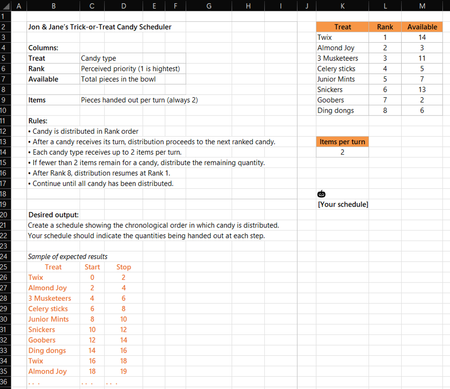
Happy Halloween! You'll find the rules in the screen capture below and in the attached workbook. Creative solutions are encouraged. Feel free to use any functions available in the Beta channel. I won't post my solution immediately so submissions aren't influenced. Enjoy!598Views1like15CommentsAgentic Marketplace publishing expands with broader product coverage and generally available APIs
When we introduced Marketplace Ingestion Model Context Protocol (MCP), the idea was simple: help developers start with what they want to accomplish, rather than with an API payload. Now, that workflow can go further. Marketplace Ingestion MCP and APIs have reached 100% product coverage for Microsoft Marketplace offers, giving publishers more ways to bring Microsoft Marketplace publishing into the development processes and tools they already use. We’ve also reached another important milestone: the Product Ingestion APIs for SaaS and virtual machine offers are now generally available (GA). Together, these updates give development teams more flexibility in how they build Marketplace publishing into their workflows, whether they work with an AI agent through Marketplace Ingestion MCP, integrate directly with APIs, or combine both approaches. From agentic publishing to broader product coverage In my previous post, I shared how Marketplace Ingestion MCP connects natural-language intent with Microsoft Marketplace publishing actions. That experience now supports a broader range of Marketplace products. With 100% product coverage across our MCPs and APIs, publishers can apply the same outcome-first approach across their Marketplace publishing workflows. Marketplace Ingestion MCP connects supported agentic experiences with Partner Center APIs. Instead of manually constructing API payloads, you can describe the publishing outcome you want. Your agent can then help retrieve the right schema, build and validate the payload, and perform supported publishing actions. For development teams, that means publishing can become part of the workflow rather than a separate activity after development is complete. SaaS and virtual machine APIs are now generally available Publishers that prefer to integrate directly with Marketplace publishing APIs also have an important update: Product Ingestion APIs for SaaS and virtual machine offers are now generally available. These APIs give development teams a programmatic way to create, publish, and manage their offers in Microsoft Marketplace. With these APIs now generally available, publishers have another way to build Marketplace publishing into their development and release processes. For teams already using the APIs, there is no need to immediately rework integrations built with older preview versions. Existing preview API versions continue to work. You can continue using those versions in your current integrations while adopting to the GA versions. If you're starting a new integration, we encourage you to use the latest generally available API versions for SaaS and virtual machine offers. Choose the workflow that works for your team There isn't one way every publisher needs to work. Some teams may want an agent-assisted experience, using natural language and Marketplace Ingestion MCP to handle more of the translation between publishing intent and API structures. Other teams may work directly with the Product Ingestion APIs to build publishing into automated processes. And some teams may combine both. The opportunity is to make Marketplace publishing fit more naturally into how your team develops and ships software. You can: Start with intent. Use Marketplace Ingestion MCP to describe the publishing outcome you want and let your agent help translate it into supported actions. Build repeatable workflows. Bring common offer creation and update tasks into development workflows, including CI/CD processes where appropriate. Integrate directly with APIs. Use the generally available Product Ingestion APIs for SaaS and virtual machine offers to build programmatic publishing experiences. Move forward at your own pace. Existing integrations using older preview API versions continue to work, giving teams flexibility in when they adopt the latest GA versions. What this means for publishers The goal is straightforward: give developers more flexibility in how they bring their cloud and AI solutions to customers through Microsoft Marketplace. Marketplace Ingestion MCP brings publishing closer to the tools and agentic workflows developers already use. The Product Ingestion APIs provide the foundation for teams that want direct programmatic integration. With expanded product coverage and GA APIs for SaaS and virtual machine offers, publishers have more options for building Marketplace publishing into the way they already develop and operate their products. If you've been exploring agent-assisted publishing, now is a good time to take another look. And if you're building directly with the Product Ingestion APIs, consider using the latest generally available SaaS and virtual machine API versions as you create new integrations. Get started Marketplace Ingestion MCP is included with access to Microsoft Marketplace submission APIs. To get started, you'll need: A Partner Center account with the required role Access to Microsoft Marketplace submission APIs An MCP-compatible client, such as Visual Studio Code or GitHub Copilot CLI, if you want to use Marketplace Ingestion MCP Learn more: Marketplace Ingestion MCP server | Microsoft Learn Product Ingestion API for Microsoft Marketplace | Microsoft Learn Product Ingestion API for SaaS | Microsoft Learn Product Ingestion API for virtual machines | Microsoft Learn Marketplace Ingestion MCP server - Marketplace publisher Publishing doesn't need to sit at the end of development. With agent-assisted workflows, broader product coverage, and generally available APIs, teams have more ways to make publishing a natural part of how they build and bring solutions to market.233Views2likes0CommentsMy OneDrive with for Developer that associate with MCT, has been force from 1TB to 10GB
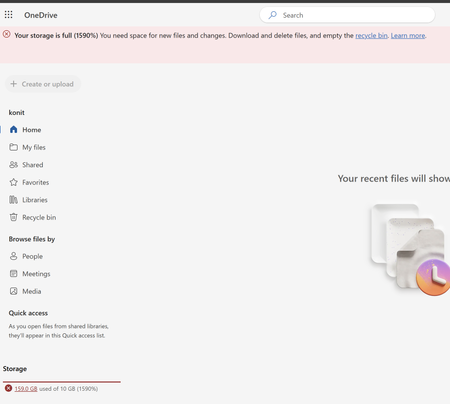
Hello Everyone, I have some issue with my OneDrive Developer, it has been force from current storage 1TB to 10GB without notify. it what happen or something wrong on my account.. thanks Soksamrong232Views0likes3Comments