developer
8259 Topics
Teams app update stuck in Certification for almost three weeks
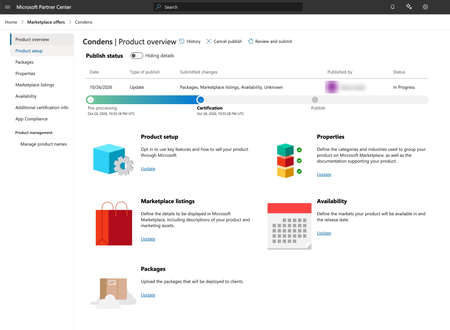
Hi everyone, We submitted an update to our Teams app Condens on October 26. Since Oct 26, 2026, 10:55 PM UTC, it has been in the Certification step in Partner Center, and nothing has changed since. Partner Center estimates under 5 business days for this step. Details: Product ID: WA200008643 Listing: https://marketplace.microsoft.com/en-us/product/wa200008643 Submitted changes: packages, marketplace listings and availability Status: In progress, step “Package availability” under Certification We emailed email address removed for privacy reasons on November 9 and followed up since, but haven’t received a response. Has anyone seen something similar recently? Is there another channel we should use to escalate a stuck submission? If someone from the Teams Store team sees this, we’d really appreciate a look. Thank you! Matej5Views0likes0CommentsDevelop enterprise-grade, AI-ready custom apps with SharePoint Embedded
“Just add documents” sounds simple. Until it isn’t. Once enterprise requirements enter the picture, a simple document feature can become an entire platform: content management, permissions, collaboration, governance, agentic experiences, recovery, and administration. The question becomes: Do you want to build all of that, or build on it? With SharePoint Embedded, developers can use Microsoft 365 as the document platform behind their application while owning the experience in front of it. That can mean more time building what makes your app different, and less time rebuilding commodity content services. Learn how SharePoint Embedded can help you build collaborative, enterprise applications on governed content in the latest SharePoint Embedded blog post: https://devblogs.microsoft.com/microsoft365dev/your-app-needs-documents-do-you-really-want-to-build-a-document-platform Want to learn more about recent updates? Check out our other recent blog posts: Develop enterprise-grade apps with SharePoint Embedded: https://devblogs.microsoft.com/microsoft365dev/develop-enterprise-grade-apps-with-sharepoint-embedded/ Explore the latest SharePoint Embedded guidance to help you plan with confidence, design for reliability at scale, and strengthen governance. Get clearer guidance on limits, throttling, authentication, and authorization to inform your production decisions. Streamline creation and management of AI-ready, custom apps with SharePoint Embedded: https://devblogs.microsoft.com/microsoft365dev/streamline-creation-and-management-of-ai-ready-custom-apps-with-sharepoint-embedded/?utm_source=social-MTC: Learn how the Apps experience in the SharePoint admin center gives admins a centralized place to create and review SharePoint Embedded apps, reducing the need for PowerShell scripts or Graph connectors for app creation. The experience supports registering or associating a Microsoft Entra app, assigning owners, and configuring billing as part of the creation flow. Next steps Get started quickly by pointing your coding assistant at the SharePoint Embedded MCP server (preview) (https://learn.microsoft.com/sharepoint/dev/embedded/build/SharePoint-Embedded-MCP-Server) to provision and manage resources through natural language. Run: npx Microsoft/spe-mcp (https://github.com/microsoft/SharePoint-Embedded-MCP-Server) and then ask it to create a SharePoint Embedded project and a sample app you can upload files to. Prefer to start with a guided view? Use the SharePoint Embedded Visual Studio Code extension (https://marketplace.visualstudio.com/items?itemName=SharepointEmbedded.ms-sharepoint-embedded-vscode-extension) to create a container type, configure the owning app and billing, register the container type, create containers, and load a sample app. Not sure where to start? Visit the SharePoint Embedded documentation hub (https://learn.microsoft.com/sharepoint/dev/embedded/sharepoint-embedded-documentation) to learn more about SharePoint Embedded and whether it fits your use case (https://learn.microsoft.com/sharepoint/dev/embedded/scenarios-and-use-cases). Transparency: I support the SharePoint Embedded product team.21Views0likes0CommentsDevelop enterprise-grade, AI-ready custom apps with SharePoint Embedded
“Just add documents” sounds simple. Until it isn’t. Once enterprise requirements enter the picture, a simple document feature can become an entire platform: content management, permissions, collaboration, governance, agentic experiences, recovery, and administration. The question becomes: Do you want to build all of that, or build on it? With SharePoint Embedded, developers can use Microsoft 365 as the document platform behind their application while owning the experience in front of it. That can mean more time building what makes your app different, and less time rebuilding commodity content services. Learn how SharePoint Embedded can help you build collaborative, enterprise applications on governed content in the latest SharePoint Embedded blog post: https://devblogs.microsoft.com/microsoft365dev/your-app-needs-documents-do-you-really-want-to-build-a-document-platform/?utm_source=social-MTC Want to learn more about recent updates? Check out our other recent blog posts: https://devblogs.microsoft.com/microsoft365dev/develop-enterprise-grade-apps-with-sharepoint-embedded/?utm_source=social-MTC: Explore the latest SharePoint Embedded guidance to help you plan with confidence, design for reliability at scale, and strengthen governance. Get clearer guidance on limits, throttling, authentication, and authorization to inform your production decisions. https://devblogs.microsoft.com/microsoft365dev/streamline-creation-and-management-of-ai-ready-custom-apps-with-sharepoint-embedded/?utm_source=social-MTC: Learn how the Apps experience in the SharePoint admin center gives admins a centralized place to create and review SharePoint Embedded apps, reducing the need for PowerShell scripts or Graph connectors for app creation. The experience supports registering or associating a Microsoft Entra app, assigning owners, and configuring billing as part of the creation flow. Next steps Get started quickly by pointing your coding assistant at the https://learn.microsoft.com/sharepoint/dev/embedded/build/sharepoint-embedded-mcp-server?utm_source=social-MTC to provision and manage resources through natural language. Run: npx https://github.com/microsoft/SharePoint-Embedded-MCP-Server and then ask it to create a SharePoint Embedded project and a sample app you can upload files to. Prefer to start with a guided view? Use the https://marketplace.visualstudio.com/items?itemName=SharepointEmbedded.ms-sharepoint-embedded-vscode-extension to create a container type, configure the owning app and billing, register the container type, create containers, and load a sample app. Not sure where to start? Visit the https://learn.microsoft.com/sharepoint/dev/embedded/sharepoint-embedded-documentation?utm_source=social-MTC to learn more about SharePoint Embedded and https://learn.microsoft.com/sharepoint/dev/embedded/scenarios-and-use-cases?utm_source=social-MTC. Transparency: I support the SharePoint Embedded product team.25Views0likes0Comments
New Zoom Feature allways removes like it's never been
Hi everybody, Ever since the zoom feature was introduced, I’ve repeatedly encountered a phenomenon where the feature—despite having been present—suddenly disappears. There is no slider, no zoom option in the ribbon, and no corresponding database options. I am using Microsoft® Access® for Microsoft 365 MSO (Version 2609, Build 16.0.20430.20032, 64-bit) on the Monthly Enterprise Channel. Following an update to this version, the feature reappeared. I opened several databases, and the slider was visible—it worked without any major issues (even though I rarely use it), with no crashes or error messages. Then, upon opening another database, the slider and all other elements related to the zoom feature vanished. When I went back to the previous databases, the feature had disappeared there as well. Restarting the PC and performing a "Quick Repair" had no effect. I have observed the same behavior across the previous five versions; the feature keeps disappearing. It seems that a new "Click-to-Run" update might re-enable it (though I’m not entirely certain). Something—or someone (Microsoft ?)—is disabling it. Fortunately, I haven’t incorporated this new feature into any of my objects or VBA code yet; otherwise, the database would crash! Does anyone have any ideas? Thx 4 reading388Views0likes19Comments
SharePoint Designer 2013
Hello SharePoint Experts, I need some guidance regarding SharePoint Online classic page customization. Our organization is currently using SharePoint Online, and traditionally we have relied on SharePoint Designer 2013 for tasks such as: Editing Classic Pages Modifying Display Forms (DispForm.aspx) Modifying Edit Forms (EditForm.aspx) Customizing List Forms Making page-level changes using ASPX pages However, I am unable to install SharePoint Designer 2013 on my system and would like to understand the available alternatives. Could you please help clarify the following: What is the recommended alternative to SharePoint Designer 2013 for SharePoint Online? How can Classic Pages be edited in SharePoint Online without SharePoint Designer? Is it possible to customize DisplayForm.aspx, EditForm.aspx, and NewForm.aspx without using SharePoint Designer? Can Power Apps be used as a replacement for customized list forms? Are there any supported Microsoft-recommended approaches for customizing classic pages and forms in SharePoint Online? If SharePoint Designer is no longer recommended, what tools are commonly used by SharePoint Online administrators and developers for these scenarios? My objective is to continue maintaining existing classic SharePoint Online sites while following Microsoft's supported and modern approach. Any guidance, best practices, documentation references, or real-world experiences would be greatly appreciated. Thank you in advance for your support.46Views0likes1CommentHow to permanently disable 'Turn off developer mode extensions' popup in Edge?
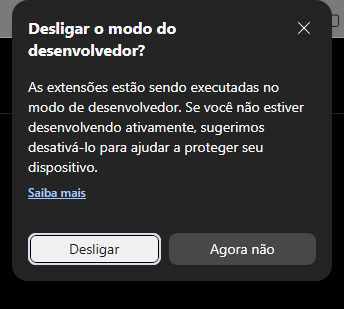
Hello everyone, I am currently running Windows Insider Preview (Build 26200) and I use Microsoft Edge as my primary browser. For my daily workflow, I need to keep Developer Mode permanently active because I run multiple local/unpacked extensions. Every single time the browser starts, I am greeted by the annoying popup: "Turn off developer mode extensions? Extensions are running in developer mode...". I've tried every advanced workaround available: modifying shortcuts with '--disable-features', tinkering with registry keys under 'Policies\Microsoft\Edge' (like ExtensionDeveloperModeSettings and ExtensionInstallAllowlist), but recent updates seem to have completely blocked these workarounds on the stable channel. Moving to Edge Dev or Canary shouldn't be the only solution just to avoid a startup prompt. Why can't Microsoft give us a simple, legitimate Registry Toggle to say "Yes, I know what I'm doing, stop asking me every day"? Is anyone else experiencing this frustration on recent builds, and has anyone found a clean way to whitelist local extensions without enterprise formatting errors? Thanks, André146Views1like2Comments
Excel 365 removes VBA projects (vbaProject.bin) from all .xlsm files on Windows 11
Hello Microsoft Tech Community, We are the technical support team at NEODIMO, a company that develops Excel-based financial management solutions using VBA. We are investigating an unusual issue affecting one of our customers using Microsoft Excel 365 on Windows 11. Problem description: Whenever the customer opens a macro-enabled Excel workbook (.xlsm), Excel displays the following error: "We found a problem with some content..." When attempting to recover the workbook, Excel removes the entire VBA project. The repair log reports: Removed Part: /xl/vbaProject.bin (Visual Basic for Applications - VBA) Troubleshooting already performed: The same workbooks open and function correctly on other computers. The issue persists when Excel is launched in Safe Mode (excel /safe). Even newly created .xlsm files containing simple VBA macros are affected. The VBA Editor opens normally using Alt + F11. Files have been downloaded again, including through Google Drive, without resolving the issue. Excel Trust Center and File Block settings have been reviewed. The customer reports using only Microsoft Defender. Standard .xlsx files work normally. Additional observation: Excel has also displayed a warning indicating that macro-enabled workbooks are blocked by Trust Center settings. Reviewing these settings has not resolved the issue. Environment: Windows 11 Microsoft 365 Apps for Enterprise Excel version/build: Pending confirmation Office architecture: Pending confirmation File storage location: Pending confirmation Security software: Microsoft Defender Questions for the community: What could cause Excel to remove xl/vbaProject.bin from every macro-enabled workbook on a single computer? Could a Trust Center policy, Microsoft Defender security rule, or Office installation component cause this behavior? Are there specific logs, diagnostic tools, or repair procedures we should investigate? Has anyone experienced and successfully resolved a similar issue? We have already contacted Microsoft Support, which recommended bringing this case to the Excel technical community. Our priority is to resolve the underlying issue without disabling important security protections or compromising the customer's files. Any technical guidance would be greatly appreciated. Thank you! NEODIMO Technical Support253Views2likes2CommentsMS Access ODBC driver doesn't support SQLPrimaryKeys function
I'm writing a python script using pyodbc to read an MS Access database. I was hoping to read the primary key of each table, but I'm getting the error IM001 "Driver does not support this function (0) (SQLPrimaryKeys)". Is there another way I can check the primary keys with python?162Views0likes1Comment
Bot not receiving message events in shared channels (RSC)
Hi folks, Running into an issue with a bot in Microsoft Teams shared channels. I've configured RSC permissions to listen for new messages. This works as expected in standard channels - I receive events for every new message. However, in shared channels, the behavior is different: I only receive events when the bot is explicitly tagged Regular messages in the channel don’t trigger any events Permissions currently granted: Channel.ReadBasic.All (Application) ChannelMember.Read.All (Application) ChannelMessage.Read.All (Application) Has anyone faced this with shared channels? Is this expected behavior or am I missing something in setup? Thanks!519Views0likes6Comments