copilot studio
17 TopicsThe AI job boom continues: Build the skills that move business forward
Discover new AI powered business Certifications to validate the skills that matter most. Gretchen LaBelle: Copilot + Agents Learning Portfolio Manager, Global Skilling Tarek Saleh Eldin: Content Publishing Manager, Global Skilling In Part 1 of this series, The AI job boom is here. Are you ready to showcase your skills?, we explored how Microsoft Certifications across AI, cloud, and security are evolving to keep pace with a rapidly changing job market. AI is no longer a niche capability. It’s becoming foundational across roles, reshaping how work gets done, and redefining how professionals create impact. This post picks up that thread. As organizations move from experimenting with AI to operationalizing it at scale, big changes are happening in business solutions roles. These shifts demand the ability to apply AI in real business contexts, redesign processes, build intelligent apps and agents, and lead transformation responsibly across the organization. Earlier this year, Microsoft introduced four new AI business solutions Certifications: Microsoft Certified: Agentic AI Business Solutions Architect (Exam AB‑100) Microsoft 365 Certified: Copilot and Agent Administration Fundamentals (Exam AB‑900) Microsoft Certified: AI Business Professional (Exam AB‑730) Microsoft Certified: AI Transformation Leader (Exam AB‑731) Together, these Certifications map to the critical roles in an AI‑driven workplace, from business practitioners and IT administrators to solution architects and transformation leaders. Building on that foundation, we’re launching new Certifications to help amplify human skills for AI-powered roles in the business landscape. New AI business solutions credentials: April 2026 and beyond Additional new Certification exams begin rolling out in beta starting in April 2026, with more releases over the following months, and going live later this year. The Microsoft Certified: AI Agent Builder Associate Certification is designed for tech pros, including developers, AI engineers, and architects, who are pushing AI agents beyond out‑of‑the‑box scenarios to implement production‑ready Microsoft Copilot Studio agents and multi‑agent solutions capable of sophisticated processes, workflow automation, and enterprise integration. Exam AB-620 beta and training available in April 2026; exam expected to go live in June 2026. The Microsoft Certified: Dynamics 365 Contact Center AI Engineer Associate Certification is designed for contact center engineers and solutions pros who design and run modern contact center as a service (CCaaS) solutions with Dynamics 365 Contact Center and service‑oriented autonomous agents. This Certification goes beyond routing and channels, focusing on how AI, Microsoft Copilot, and agents deliver scalable, always‑on service across voice and digital channels. Exam AB-250 beta and training available in June 2026; exam expected to go live in August 2026. The Microsoft Certified: Dynamics 365 Sales AI Consultant Associate Certification is for modern sellers who design and operationalize AI‑powered sales solutions across the lead‑to‑cash lifecycle, emphasizing Copilot-driven productivity and insights, AI-powered opportunity research and qualification, agent configuration and lifecycle management, and secure, scalable automation aligned with governance and responsible AI. Exam AB‑210 beta and training available in May 2026; exam expected to go live in June 2026. The Microsoft Certified: Intelligent Applications Builder Associate Certification equips Microsoft Power Platform pros to build for an AI-first world, where apps, agents, automation, and models work as one. It validates the skills to use Copilot and natural language to design intelligent solutions, embed agents across experiences, and ship responsibly with strong governance and application lifecycle management. Exam AB-410 beta and training available in April 2026; exam expected to go live in June 2026. The Microsoft Applied Skills: Build an agent-first app credential validates learners’ ability to build an app that surfaces a Copilot Studio agent and to craft prompts that make the agent genuinely effective, not just functional. This credential is part of the broader Microsoft Certified: Intelligent Applications Builder Associate (Exam AB-410) Certification journey, serving as a fast, accessible entry point for those looking to get started with agent-first development before pursuing the full Certification. Credential and training expected to go live in June 2026. Refresh: The Microsoft Certified: Power Platform Fundamentals Certification (Exam PL-900) is being updated with a streamlined, one-day instructor-led course and a new training program. These improvements are designed to align with the AI-powered Microsoft Power Platform and to make it easier than ever for learners to start building confidently. Training and courseware updates are scheduled for June 2026, with minor exam changes planned at the same time to reflect these enhancements. Retiring Certifications: What you need to know We’re committed to keeping our Certifications portfolio aligned with latest technology. As we launch new Certifications, we also retire some older credentials to keep the portfolio mapped to evolving roles. The following table itemizes what’s changing and provides key dates for Certification and training retirements in 2026. If your Certification is eligible for renewal, please renew it before the retirement date. Retiring Microsoft Credential Credential and exam retirement date Planned training retirement date Related new Credential Microsoft Certified: Dynamics 365 Customer Experience Analyst Associate (Exam MB-280) July 31, 2026 July 31, 2026 Microsoft Certified: Dynamics 365 Sales AI Consultant Associate (Exam AB-210) Microsoft Certified: Power Platform Functional Consultant Associate (Exam PL-200) August 31, 2026 August 31, 2026 Microsoft Certified: Intelligent Applications Builder Associate (Exam AB-410) Microsoft Certified: Dynamics 365: Finance and Operations Apps Solution Architect Expert (Exam MB-700) June 30, 2026 June 30, 2026 No new Certification is planned. To stay up to date with these technologies please refer to the Microsoft technical documentation. Microsoft Certified: Power Platform Solution Architect Expert (Exam PL-600) June 30, 2026 June 30, 2026 Microsoft Certified: Dynamics 365 Supply Chain Management Functional Consultant Expert (Exam MB-335) June 30, 2026 June 30, 2026 Microsoft Certified: Dynamics 365 Field Service Functional Consultant Associate (Exam MB-240) June 30, 2026 June 30, 2026 Microsoft Certified: Power Automate RPA Developer Associate (Exam PL-500) June 30, 2026 June 30, 2026 Microsoft Applied Skills: Create and manage model-driven apps with Power Apps and Dataverse June 30, 2026 June 30, 2026 Microsoft Applied Skills: Build an agent-first app Note: The recently released Microsoft Certified: Agentic AI Business Solutions Architect Certification (Exam AB‑100), although not a direct replacement for the retiring Certifications listed here, is the flagship expert‑level Certification, spanning a significantly broader scope and covering agentic architectures, AI‑driven solution design, and end‑to‑end business impact. If you currently hold one of the retiring expert-level Certifications (associated with Exam MB‑700, Exam PL‑600, Exam MB-335, Exam MB-240, or Exam PL-500), consider pursuing the Microsoft Certified: Agentic AI Business Solutions Architect Certification (Exam AB‑100) as your next step. Navigating the transition: FAQs The following questions and answers can help you determine how these retirements and expanded portfolio could impact your learning journey: Q. Why is Microsoft implementing these updates? A. Microsoft Credentials are valuable, as is the time you spend earning them. With the ongoing evolutions in technology, it’s essential that we keep the credentials up to date so we can help you stay aligned with latest skills and trends. We’re implementing these updates to provide a valuable path forward to keep up with the latest skills. Q. I’ve already earned one of the retiring Certifications. What happens now? A. If you’ve already earned any of the retiring Certifications, your credential remains valid until it expires. Retirement does not revoke or invalidate Certifications that were earned while the exam was active. They show your continued dedication to staying up to date and learning new skills in this ever-changing technical landscape. Q. What if a Certification that’s retiring is part of the prerequisites for an expert-level Certification? A. If a retiring Certification is required for an expert-level Certification, the requirements for that expert-level Certification will be updated as needed. The retiring Certification will be removed from the requirements and replaced (as appropriate) with a new associate-level Certification. If you’ve earned an expert-level Certification by earning an associate-level Certification that’s now retiring, you’ll continue to hold the expert-level Certification as long as you renew the expert-level Certification when it’s eligible. After you’ve earned a Certification, and if you renew it when it’s eligible, you hold it until it expires. If you’ve earned an associate-level Certification that’s a requirement for an expert-level Certification and that associate-level Certification hasn't expired, it can still satisfy the expert-level requirement. Be sure to meet all the requirements for the expert-level Certification before the associate-level Certification expires. Expired Certifications cannot be used to meet the requirements for an expert-level Certification. Q. Can I renew a soon-to-retire Certification? A. Yes, as long as it’s eligible for renewal and you renew it before the Certification officially retires, you can renew a soon-to-retire Certification. Please note that Fundamentals Certifications don’t expire. Q. Is there a direct transition path from a retiring Certification that I’ve already earned to the related new Certification, or do I need to pass the new exam? A. To earn the new Certification, you need to pass the new exam, since the new exam and the old one don’t measure the same skill sets. Q. I’m preparing for an exam that’s retiring. What should I do? A. The time you spend preparing for an exam and earning a Certification never goes to waste. If you’re actively preparing for an exam that’s retiring and a replacement exam has been announced: If you’ve already registered for the exam, you can continue preparing for it and take it while it’s still available. Keep in mind that after the exam retires, you won’t be able to retake it if you don’t pass, and you won’t be able to renew it. Exam registration ends on the same day that the exam retires. If you haven’t registered for the exam and there’s a related new exam, we strongly recommend that you prepare for and take the new exam instead, as noted in the following table. If you’re not close to testing for this exam Prepare for and take this exam instead Learning path and instructor-led training expected to be available in Exam MB-280 Exam AB-210 April 2026 Exam PL-200 Exam AB-410 April 2026 If you’re preparing for Exam PL-900 to earn the Microsoft Certified: Power Platform Fundamentals Certification, the new Course PL-900 will be available at the end of June 2026. If you’re preparing for Exam MB-335 to earn the Microsoft Certified: Dynamics 365 Supply Chain Management Functional Consultant Associate Certification, Exam MB-700 to earn the Microsoft Certified: Dynamics 365: Finance and Operations Apps Solution Architect Expert Certification, or Exam PL-600 to earn the Microsoft Certified: Power Platform Solution Architect Expert Certification, consider preparing for and taking Exam AB-100 to earn the Microsoft Certified: Agentic AI Business Solutions Architect Certification, the new flagship expert‑level Certification for solutions architects, available now. Note that to earn the Certification, you must pass Exam AB-100 and you must also have a current associate-level Certification. Q. How might these updates impact partner competency requirements? A. To track whether and how these updates might impact partner competency requirements, go to Solutions Partner for Business Applications in the Partner Center. The bigger picture AI is transforming not only what technology can do but also who does the work and how. Whether you’re building agents, designing intelligent apps, transforming sales, or leading enterprise AI strategy, there’s now a Certification that reflects the real skills your role demands. These Certifications can help ensure that you’re not only ready for AI-driven work but you’re also leading it. We’ll share updates for the new AI business solutions Certifications, including beta exams and go-live dates, on The Skills Hub Blog. Stay tuned! Explore more Microsoft Credentials on AI Skills Navigator.117KViews16likes67CommentsMicrosoft AI Tour Live
Go behind the scenes with interviews and an inside view at select Microsoft AI Tour city events - starting with Mexico City. Akosua Boadi-Agyemang and Karuana Gatimu bring you exclusive interviews and insights from speakers, partners, and MVPs gathered together to share what they know about AI, Copilot, and more.4.4KViews2likes0CommentsMastering Agent Governance in Microsoft 365
The "Mastering Agent Governance in Microsoft 365" series is based on the Administering and Governing Agents whitepaper published by Microsoft and designed to educate IT leaders, compliance officers, and decision-makers about the importance of governance for AI agents in Microsoft 365, particularly in highly regulated industries like Healthcare and Life Sciences (HLS). The six-episode series cover the growing role of agents, the risks of unmanaged agents, and the strategic importance of governance frameworks. Empowering innovation while protecting patient data and ensuring compliance In the age of AI-powered productivity, agents—automated digital assistants built with tools like Microsoft 365 Copilot, SharePoint, and Copilot Studio—are transforming how work gets done. From streamlining clinical documentation to automating regulatory reporting, agents are becoming indispensable in Healthcare and Life Sciences (HLS). But with great power comes great responsibility. Why Governance Can’t Be an Afterthought In highly regulated industries like HLS, where data sensitivity and compliance are paramount, the rise of autonomous agents introduces new risks: Unauthorized data access could expose protected health information (PHI). Unmonitored agent behavior could lead to regulatory violations. Lack of lifecycle controls could result in outdated or insecure agents operating in production environments. Agent governance isn’t just an IT concern—it’s a business imperative. It ensures that innovation doesn’t outpace compliance, and that every agent deployed aligns with organizational policies, security standards, and regulatory frameworks like HIPAA, GDPR, and FDA 21 CFR Part 11. Understanding the Agent Landscape Microsoft 365 supports a spectrum of agent creators: End Users using SharePoint or Copilot templates to automate simple tasks. Makers building more complex agents in Copilot Studio. Developers crafting sophisticated, enterprise-grade agents with Azure AI and Teams Toolkit. Each persona requires a different level of oversight. For example, a clinical researcher using SharePoint to build a data retrieval agent may need minimal governance, while a developer building a patient-facing chatbot must adhere to strict data protection and validation protocols. Governance in Action Microsoft provides a layered governance model: Tool Controls: Define what agent creators can do within tools like Copilot Studio and SharePoint. Content Controls: Ensure agents only access data they’re authorized to use, leveraging Microsoft Purview for sensitivity labeling and DLP. Agent Management: Monitor usage, enforce lifecycle policies, and block non-compliant agents via the Microsoft 365 Admin Center. This framework allows organizations to empower innovation while maintaining control—critical in environments where patient safety and regulatory compliance are non-negotiable. The Business Case for Governance For HLS organizations, agent governance delivers tangible benefits: Reduced compliance risk through proactive policy enforcement. Improved operational efficiency by enabling safe automation. Greater trust from patients, regulators, and internal stakeholders. In short, governance is the foundation that allows agents to scale safely and sustainably.2.7KViews2likes3CommentsESPC25 – Dublin | Microsoft event guide
ESPC25 | Come curious. Leave inspired. European SharePoint Conference 2025 | Dublin, Ireland | December 1–4, 2025 | SharePointEurope.com. Your guide to ESPC25 Dublin, Ireland, is one of the most dynamic and innovative tech cities in Europe, making it the perfect place for in-person, in-depth learning at the European SharePoint Conference—now simply branded as ESPC25—December 1–4, 2025. As the celebrated Irish writer Edna O’Brien once said, “Hospitality is the cornerstone of the Irish heart.” This spirit of warmth and welcome is sure to be felt throughout your stay in Dublin during ESPC25. You will have the opportunity to learn from experts, network with peers, and discover new technologies that can help you achieve your goals. The event and city have something for everyone: inspiring keynotes, in-depth sessions and workshops, community, art and culture, and many festive moments. Explore powerful new AI capabilities for every role and function: Diving into Microsoft 365, Microsoft 365 Copilot, Power Platform, and more, you’ll discover how Microsoft is transforming the way we work today—and get a firsthand look at the future of work itself. You’ll find content delivered by the world’s best Microsoft 365 and Copilot Studio experts, including many Microsoft leaders and employees from the product teams. In this pre-event guide, we list all the Microsoft-led sessions below so you can prepare for what awaits you alongside community and MVP expert sessions. There will be plenty of opportunities for you to learn, share, and engage: Evening gatherings, the attendee party, and our Innovation Hub with Microsoft product demo stations, a Promptathon, Vibe Coding, a place to network with your peers, a dedicated community space, the Inspire Stage, and 1:1 meeting spaces are all within the Expo Hall alongside all the wonderful event sponsors. The 101 on ESPC25 What: ESPC25 Where: The Convention Centre Dublin, Spencer Dock, North Wall Quay, Dublin 1 D01 T1W6, Ireland When: December 1-4, 2025 (keynotes, sessions, tutorials, workshops, and more) Presenters: 120+ sessions (35+ Microsoft-led), 115+ speakers (MVPs, RDs, Microsoft and community members); check out Microsoft-led keynotes, tutorials, and sessions Cost: From €695 + VAT (one day) to €1645 + VAT (four day) Enjoy an additional €200 discount with our exclusive community discount code: ESPC25COMM Primary social: Join in and follow @ESPC_Community (Twitter) and ESPC (LinkedIn); use hashtag #ESPC25 About ESPC ESPC25 offers you affordable, world-class learning and networking at your fingertips. Join in 120+ sessions covering: Microsoft 365 Copilot, Copilot Studio, AI and agents, SharePoint, Microsoft Viva, Microsoft Teams, Microsoft 365 adoption, governance, admin, intranets, and more. Over the years, ESPC has visited some of the most incredible cities: from the charming streets of Copenhagen and the historic beauty of Berlin to the vibrant culture of Prague, and the dynamic atmosphere of Amsterdam. Even during the COVID-19 pandemic, ESPC kept the excitement alive with engaging online events! The European SharePoint Conference (ESPC), now known simply as ESPC, is one of the largest and most prominent events in Europe dedicated to Microsoft technologies, particularly Microsoft 365 and Azure. It began in 2011 in Berlin, Germany, as a platform for discussing SharePoint and related Microsoft technologies. Over the years, ESPC expanded its scope to include other tools in the Microsoft ecosystem, reflecting the industry's trend toward digital transformation and cloud adoption. ESPC has grown to become the largest independent European event for Microsoft technology users, serving as a crucial knowledge hub and networking space. It continues to play a vital role in educating the tech community on best practices for using SharePoint, Microsoft 365, and Azure to enhance productivity, collaboration, and security in the modern workplace. Review past ESPC events: 2025: Dublin, Ireland 2024: Stockholm, Sweden 2023: Amsterdam, Netherlands 2022: Copenhagen, Denmark 2021: Online (due to COVID-19) 2020: Online (due to COVID-19) 2019: Prague, Czech Republic 2018: Copenhagen, Denmark 2017: Dublin, Ireland 2016: Vienna, Austria 2015: Stockholm, Sweden Review all Microsoft keynotes and sessions below: Start building your schedule today! Microsoft keynotes (All times represented in local Dublin time) Opening keynote: The New Frontier of Work: Copilot, AI, and the Future of Microsoft 365 Jeff Teper, President of Collaborative Apps and Platforms , Microsoft with Miceile Barrett, Zach Rosenfield, Alex Weingard, and Michel Bouman Tuesday, Dec. 2, 9:00–10:00 AM Day one PM keynote: From One to Many: The future of AI is Collaborative Jaime Teevan, Chief Scientist and Technical Fellow, Microsoft Tuesday, Dec. 2, 2:00–3:00 PM Day three keynote: Beyond the Prompt: Building an AI-Resilient Career with Power Skills Heather Cook, Principal Customer Experience PM, Microsoft Karuana Gatimu, Director, Customer Advocacy, Microsoft 365, AI and Agents Thursday, Dec. 4, 9:00–10:00 AM Community keynotes Will AI Become Intelligent? Rafal Lukawiecki, Data Scientist at Tecflix, Ireland Wednesday, Dec. 3, 9:00–10:00 AM Hacker’s Perspective on New Risks: Revising the Cybersecurity Priorities for 2025 Paula Januszkiewicz, Founder and CEO, CQURE Inc. and CQURE Academy Tuesday, Dec. 2, 4:45–5:45 PM Microsoft sessions (All times represented in local Dublin time) Breakout sessions: (60 min, in-person) Latest Innovations in Microsoft 365 Copilot Chat Speaker: Connie Welsh, Bryan Wofford Tuesday, December 2, 2025, 10:15 AM | Session Code T8 What’s new in Copilot Studio Speaker: Antonio Rodriques Tuesday, December 2, 10:15 AM | Session Code T9 SharePoint as the Intelligence Backbone of Copilot Speaker: Zach Rosenfield Tuesday, December 2, 11:45 AM | Session Code T18 IT Excellence in the AI era: Managing Copilot and Agents for Impact and Control Speaker: Ben Summers Tuesday, December 2, 3:15 PM | Session Code T26 AI in Action: Microsoft's Approach to Internal Communications Speakers: Adam Barzel, Anna Pope, Darina Sexton Tuesday, December 2, 3:15 PM | Session Code T27 Woman in Tech & Allies Panel Speaker: Heather Cook, Danielle Moon and Karuana Gatimu Tuesday, December 2, 3:15 PM | Session Code T28 Microsoft Teams: What's New and What's Next Speaker: Alex Weingart Wednesday, December 3, 10:15 AM | Session Code W8 MCP (Model Context Protocol) in action in Microsoft 365 Copilot Speaker: Paolo Pialorsi Wednesday, December 3, 10:15 AM | Session Code W9 Microsoft Teams as Your AI-Driven Work Hub Speaker: Kartik Datwani Wednesday, December 3, 10:15 AM | Session Code W18 Building Intelligent Content Apps for the Copilot Era Speakers: Steve Pucelik, Shreyas Saravanan Wednesday, December 3, 2:00 PM | Session Code W27 OneDrive Updates: Smarter Storage, Seamless Sharing Speakers: Miceile Barrett, Lincoln DeMaris, and Jason Moore Wednesday, December 3, 2:00 PM | Session Code W28 AI Intranet: Creating and Managing High Quality Content on the Intranet of Tomorrow Speaker: Katelyn Helms Wednesday, December 3, 2:00 PM | Session Code W30 AI-Enhanced Planning: Innovations in Planner & Project Manager Agents Speaker: Howard Crow Wednesday, December 3, 3:15 PM | Session Code W38 AI Risk Management: From Oversharing to Strategic Oversight Speakers: Gabriel Tiberiu Damaschin, Nishan DeSilva Wednesday, December 3, 4:45 PM | Session Code W45 Streamlining Core Operations with AI Automation Speaker: Antonio Rodriques Wednesday, December 3, 4:45 PM | Session Code W44 Understanding Copilot Extensibility: a practical guide Speakers: Vesa Juvonen and Paolo Pialorsi Thursday, December 4 ,10:15 AM | Session Code TH8 Agents Among Us – Governance for the Agentic Era Speaker: Sesha Mani Thursday, December 4 ,10:15 AM | Session Code TH 9 Creating AI Agents for People and Platforms Speaker: Nandakishor Basavanthappa Thursday, December 4, 11:45 AM | Session Code TH14 Windows AI: Powering Progress Across the Globe Speaker: Vikas Malekar Thursday, December 4 ,11:45 AM | Session Code TH15 Accelerating Copilot Adoption Across Your Organization Speakers: Karuana Gatimu, Bryan Wofford Thursday, December 4, 11:45 AM | Session Code TH16 True Stories of Copilot in Action Speakers: Connie Welsh, Danielle Moon Thursday, December 4, 2:00 PM | Session Code TH 28 Fireside Insights: Driving Value and Business Growth with AI Speaker: TBA Thursday December 4 15:15 | Session Code TH37 Lightning talks (20 minutes, in person) - Innovation Hub Supercharge Your Projects with Microsoft 365 Community Tools Speaker: Vesa Juvonen Tuesday, December 2, 10:15 AM Building Copilot with community-led engagement Speaker: Anna Pope Tuesday, December 2, 10:40 AM Managing your brand for career management Speaker: Karuana Gatimu (MCAG) Tuesday, December 2, 11:45 AM Empowering Community Builders: MGCI & Communitydays.org Speaker: Heather Cook Tuesday, December 2, 12:05 PM Your Day, Your Way: Personalized AI with OneDrive Speaker: Miceile Barrett Tuesday, December 2, 12:30 PM Security First Powering AI Transformation Speaker: Sesha Mani Tuesday, December 2, 4:45 PM Unlocking SharePoint Advanced Management for Copilot Success Speaker: Michael Holste Tuesday, December 2, 5:10 PM Fast-Tracking Value with the Copilot Success Kit & Scenario Library Speaker: Bryan Wofford Wednesday, December 3, 10:15 AM How to find learning Opportunities Everywhere Speaker: Adam Harmetz Wednesday, December 3, 10:40 AM Copilot readiness & resiliency with Microsoft 365 Backup & Archive Speaker: Kaustubh Chaudhary, Michael Holste Wednesday, December 3, 12:05 PM Unlock SharePoint Embedded integration with Power Platform Connectors Speaker: Steve Pucelik Thursday, December 4, 10:15 AM Microsoft Teams: Day-to-Day AI Speaker: Alex Weingart Thursday, December 4, 10:40 AM Driving Business Value with Copilot Analytics and ROI Measurement Speaker: Manas Kumar Biswas Thursday, December 4,11:45 AM Understanding Copilot APIs Speaker: Paolo Pialori Thursday, December 4, 12:05 PM Migration in Motion: Simplify, Secure, and Scale with Microsoft 365 Speaker: Manas Vishal Lodha Thursday, December 4, 12:30 PM Inspire Track (60 minutes, in person) - Inspire Stage Good Thing We Like Our Copilots CANCELLED: How Your Job Will Evolve in 2026 into AGENTBOSS! Speaker: Dona Sarkar Tuesday, December 2, 10:15 AM | Session Code: Inspire 2 How To Thrive in Your Tech Career: Managing Burnout and Boredom Speaker: Adam Harmetz Wednesday, December 3, 11:45 AM | Session Code: Inspire 6 Managing your brand for career management Speaker: Karuana Gatimu Thursday, December 4, 11:45 AM | Session Code: Inspire 10 Cultivating Trust and Leadership Excellence through Mentorship and Leadership Speaker: Heather Cook Thursday, December 4, 2:00 PM | Session Code: Inspire 11 Innovation Hub and Lightning Talk Theater The Microsoft Innovation Hub at ESPC is a vibrant, multi-zone environment crafted to ignite new ideas, showcase cutting-edge prototypes, and shape the future of Microsoft 365 and Microsoft 365 Copilot. Here, creativity and technology intersect, providing a dedicated space for developers, architects, consultants, and strategists to explore the forefront of innovation. The Innovation Hub is designed to foster collaboration, highlight emerging technologies, and collect real-time insights from the wider Microsoft 365 community. You can meet with Microsoft Product Team members and Microsoft MVPs! You’ll find the Microsoft Innovation Hub in the ESPC Expo Tuesday through Thursday. Each day on the Innovation Stage in Zone 1 you will find Lightning Talks for live demonstrations and peer learning in a compact format. And don't miss the SharePoint 25th Birthday Celebration and the Innovation Awards, Tuesday evening at 5:45 PM. Within Zone 2, you will find Future Tech Demos daily during breaks and lunches. The Microsoft team and MVPs will be on hand to walk you through dynamic demos: Agents/Copilot Studio, Developer, Microsoft 365 Copilot and SharePoint and One Drive. Get connected in the Zone 3 Feedback Loop Lounge and leave your thoughts on our survey for a chance to win daily prizes. And finally, meet in the Zone 4 Ideation Lounge each afternoon for guided workshops including a Promptathon and Vibe Coding activities in an environment specifically designed to encourage creativity and collaborative thinking. This event guide will continue to update as we finalize more of our activations. Stay tuned! Shout out to event leads and community members Sarah McNamara, Kevin Monahan, Ella Murphy, Bridgette Robertson, John, and Sarah G, and the #ESPC25 team for putting together ESPC25, corralling all speakers and content, and for supporting and promoting the knowledge and expertise to promote the world-class Microsoft 365 tech community around the world. Cheers, Heather Last, a glimpse of the ESPC event experience:2.5KViews2likes1CommentAgent vs. Workflow in Copilot Studio - Which One Do I Actually Need?
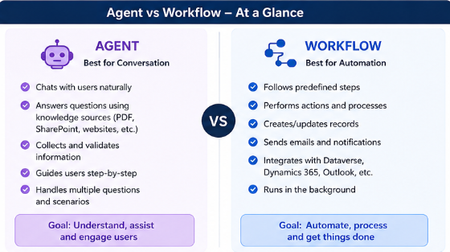
Hey everyone! 👋 Raise your hand if this has happened to you... You open Copilot Studio for the first time, you're excited, you're ready to build and then the very first screen asks you: "What would you like to build?" [ Agent ] [ Workflow ] And your brain just goes blank. 😅 Which one? What's the difference? Does it even matter which I pick? I've been there. I picked randomly, built halfway through, and then realized I probably chose the wrong one. So I put together this quick breakdown to save you that frustration! The One-Line Answer Agent = Conversation. Workflow = Automation. That's the core of it. But let me unpack what that actually means in practice. Here's a Visual That Makes It Click Let's Break It Down Simply 🤖 Choose an Agent when... Your tool needs to talk to people and actually understand what they're saying. An Agent is like a smart assistant that: Chats with users in a natural, back-and-forth way Pulls answers from your knowledge sources like PDFs, SharePoint, or websites Asks follow-up questions to collect and validate information Guides users through a process step by step Handles all kinds of different questions without breaking Its whole goal? Understand, assist, and engage the person in front of it. Real example: A customer types "I need help with my invoice" - the Agent reads that, asks the right follow-up questions, and helps them resolve it without any human stepping in. ⚙️ Choose a Workflow when... You need something to run in the background and get things done - no conversation needed. A Workflow is like a reliable robot that: Follows a fixed set of predefined steps every single time Performs actions and processes automatically Creates or updates records in your systems Sends emails and notifications at the right moment Connects with Dataverse, Dynamics 365, Outlook, and more Just runs — quietly, consistently, without anyone needing to interact with it Its whole goal? Automate, process, and get things done. Real example: When a new employee is added to the system → automatically create their accounts, send a welcome email, and notify their manager. No one has to lift a finger. The Simplest Way to Decide Ask yourself just one question: Does someone need to have a conversation with it? Yes → Build an Agent No → Build a Workflow That single question will get you to the right answer 90% of the time. The Mistake Most Beginners Make A lot of us (myself included!) jump straight to building an Agent because it sounds more exciting and powerful. But if your process is just a series of fixed steps with no real conversation involved, a Workflow will do the job faster, cleaner, and more reliably. You don't have to choose just one forever. A really powerful pattern is having your Agent handle the conversation and then trigger a Workflow to do the heavy lifting in the background. Best of both worlds! 🙌 Quick Recap Agent Workflow Best for Conversation Automation Talks to users? Yes No Follows fixed steps? Not always Always Runs in background? No Yes Connects to systems? Can Yes, natively Hope this clears things up! Drop your questions below especially if you have a specific use case you're trying to figure out. Happy to help you work out which one fits. 😊1.3KViews2likes1CommentBuild Automated Agents, Workflows, and Apps - New in Copilot Studio
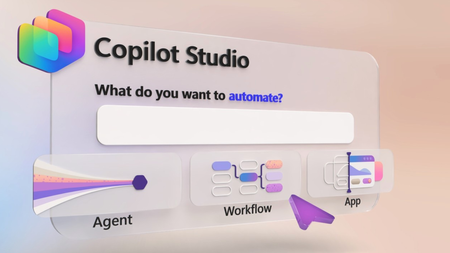
Describe the agent you need and generate its instructions and reusable skills, choose the model, connect MCP tools and specialist agents, then test its quality at scale with Evaluations. Trigger workflows from incoming email, classify submissions, hand work to your agents, and pause for human review on the decisions that need it. Track timing and paths for every step in the Activity tab. Then generate a full stack app on your Dataverse data so your team can filter, review, and approve every bid from one shared view. Jack Rowbotham, Copilot Studio Senior Product Manager, shares how to automate a procurement process for bids from multiple vendors, using agents that reason, route, and recommend. Describe the agent you need. Copilot Studio helps build it. See how it turns the requirements you provide into an agent, mapping out the instructions and creating reusable skills along the way. Start here. Test, refine, repeat. Run structured test sets with Evaluations in Copilot Studio, import your own test cases or generate them with AI, and compare results as you improve your agent. See how it works. Agents provide reasoning. Workflows provide consistency. Apps provide structure. Bring all three together in Copilot Studio to build end-to-end business solutions. Check it out. 👥 Who it’s for: IT admins, Power Platform makers, solution architects, and developers building agentic solutions, plus operations and procurement teams automating reviews and approvals. ⏱️ Chapters: 00:00 Build agents, workflows, and apps in one place 01:04 Automate a multi-vendor bid review end to end 02:18 Build an agent from a prompt 03:28 Add models, MCP tools, and specialist agents 04:13 Test the bid agent in Preview 05:05 Evaluations 05:59 Automated workflows 07:42 Track every run in the Activity tab 08:13 Build an app from a prompt 09:10 Approve bids from the team app 09:37 Get started with Copilot Studio Copilot Studio brings agents, workflows, and apps together in one place, all running on the GitHub Copilot harness. In this video, a supplier email triggers a workflow, a bid evaluation agent checks the bid against tender requirements, and the procurement team makes the final call in a shared app. Describe the agent you want, including the requirements to assess, the logic to apply, and the live data source to connect to. Copilot Studio reasons over your prompt, maps out its build steps, and generates the agent’s name, instructions, and skills for requirement coverage and evidence verification. Connect Work IQ for supplier emails and the Dataverse MCP server for bid data, keep Claude Sonnet as the reasoning model, ground the agent in an RFP example PDF, and add a Supplier Risk specialist agent. Test the agent in the Preview tab and watch its chain of thought as it flags gaps in certification, cold-chain handling, and insurance minimums. Then run Evaluations with your own conversations, auto-generated tests, or a CSV file. Here, 18 test cases met the evaluation criteria 89% of the time. In the Workflows tab, drag in an Outlook “When a new email arrives” trigger, a Classify step for RFP submissions, a Get Attachment connector, and an Agent step running the Bid Evaluation Agent. An if/else Human Review step brings in a person on flagged bids, and the Researcher agent and a recommendation agent finish the job before results land in Dataverse. Finish in Apps by describing a Bid Management App connected to your Dataverse table, or to sources like SharePoint through connectors. Apply company branding with a follow-up prompt, then filter bids that need human review and approve decisions from the app. Try it for yourself at copilotstudio.microsoft.com. Subscribe to Microsoft Mechanics for more videos like this. 🔗 Related links: — Get started with Copilot Studio: https://copilotstudio.microsoft.com Unfamiliar with Microsoft Mechanics? Microsoft’s Official Video Series for IT — Subscribe: https://www.youtube.com/c/MicrosoftMechanicsSeries — Microsoft Tech Community: https://techcommunity.microsoft.com/t5/microsoft-mechanics-blog/bg-p/MicrosoftMechanicsBlog — Podcast: https://microsoftmechanics.libsyn.com/podcast Join us on social: — https://twitter.com/MSFTMechanics — https://www.linkedin.com/company/microsoft-mechanics/ — https://www.instagram.com/msftmechanics/ — https://www.tiktok.com/@msftmechanics Video Transcript: -If you want to build agents that go beyond the standard chat interface that can work autonomously following your defined workflows, connecting to other agents and tools, and presenting information with new interactive app experiences, today, I’ll show you how Copilot Studio helps you do just that and more, and it’s even easier than you may think. Copilot Studio gives you what you need to build end-to-end solutions with agents, workflows, and apps in one place, without having to write a single line of code. You can build individual agents with your chosen model, expert skills, tools, including prebuilt connectors, APIs, and MCPs to your existing systems, as well as incorporating specialized knowledge, other agents, and memory, all now using the powerful GitHub Copilot harness under the covers. -You can integrate them with your defined multi-step workflows, which provide the correct path for consistency, and bring in other skilled agents or people as needed. And finally, build full-stack app experiences using natural language, so you can describe what you want and let AI generate the app for you. Now, to make this real, I’ll walk you through an agentic solution that accepts and reviews work bids from multiple vendors and then routes them for human approval. -Here’s what the process looks like in Copilot Studio. First, a supplier email arrives and automatically triggers a workflow. The workflow classifies the submission, retrieves the supporting documents, and passes everything to the bid evaluation agent. That agent then reviews the bid against the tender requirements, validates the evidence, and identifies any potential issues. If a decision requires human judgment, the workflow pauses and brings in the appropriate reviewer. A Microsoft Copilot Researcher agent can then gather the additional context and the recommendation agent then combines the findings into a final recommendation. It then passes status information to a data source connected to our app frontend, and this app will give the procurement team a shared place to track every bid, review those exceptions, and make decisions to move work forward. So, the workflow lays out all of the steps, the decisions, agent handoffs, and outcomes. -And in the next few minutes, I’ll retrace the simple steps to creating this agentic solution. We have multiple agents working together, so I’ll start by building our bid evaluation agent, which is our primary reasoning engine for this process. I’m in Copilot Studio, and all I need to do is describe the agent I want to build. -So here, I’ll tell it to create a Bid Evaluation Agent for the procurement team. Then I’ll tell it how to assess the bidding requirements, the logic it needs to incorporate, and even the live data source it needs to connect to. It needs to evaluate the request for proposal sent via email and then compare supplier responses against the requirements, and even provide a pass or fail verdict and a final recommendation. -So I’ll submit my detailed prompt and let it get to work. And you can see that it’s reasoning over everything I’ve asked it to do. It then maps out the process it will take through the steps you can see in the upper right. It looks over the information I pointed it to, and starts building out the agent. It’s also automatically creating skills as reusable instructions in this case so that the requirement coverage and the evidence verification will stay consistent. And these skills can also be reused across other agents or your teams in the future. -Now, with this agent complete, let’s look at what it’s created. We can see that it’s generated an agent name and detailed instructions automatically. And here, you can see the two skills that were added, where you can also upload your own skills or even create more with AI by simply describing what you want. It’s connected to tools already like Work IQ in this case for the Supplier Submission Emails and the Dataverse MCP with our Procurement and Bid Data to take action. -Here, too, you can also add more tools, like MCPs for both Microsoft and non-Microsoft data and services. And I can choose the model that best fits the task. In this case, I’ll keep Claude Sonnet as a good reasoning model. I can ground it in the knowledge across different online services. For this agent, I want to give it an RFP example, and I can even drag in the files from my local device like this PDF and attach that to the agent. -Additionally, I can bring in specialist agents for additional expertise, like this one for assessing Supplier Risk, which I’ll connect to now. I also have the option to maintain memory throughout an interaction and use that in future sessions. So, now, I’ve created my main agent. I’m ready to test it out in Copilot Studio. This time, starting from the agent’s Preview tab, I have an example email in my clipboard that I’m going to paste in and manually attach the work bid. -From there, I just need to submit it to trigger the evaluation process. We can see that the agent evaluates each requirement, reviews the supporting evidence, and identifies the gaps. We can even watch the chain-of-thought, and in this case, it flags that the supplier does not have the sufficient certification for medicine manufacturing. It also doesn’t meet the requirements for cold-chain handling. And its insurance does not meet the minimum requirements. Agentic processes like this one can take several minutes to complete, so to save a little time, I’ll skip ahead to the Final Recommendation. You’ll see that it recommends a human review and not to shortlist the supplier until it addresses the issues that I mentioned before, and it provides the specific details about this recommendation in the summary. -So, that was the result of a single preview run, and we can also test the agent quality at scale using Evaluations in Copilot Studio. Instead of spot-checking, I can now run structured tests against the agent and measure the performance over time. You can bring in your own conversations as test cases or use Copilot Studio to automatically generate 10 tests based on how you’ve built the agent. In this case, I’ve got the test cases ready, and I’ll simply pull them in as a CSV file. You see that this one contains 18 test cases containing sample requests. -Now, I’ll just give this evaluation a name, and then start it. Then it will run those and evaluate the general quality of the responses. They run sequentially, and you can click into each of them for details after they run. In reality, these 18 tests took just over 22 minutes to run, so I’ll jump straight into the results. You’ll see that these evaluations met our criteria 89% of the time. And scrolling down the individual test results, you can also see the outcome for each. -Now, with our agent working, I’ll create the automated workflow that does the work before and after the agent. I’m back in Copilot Studio in the Workflows tab, and adding steps is as easy as dragging in and dropping what you want onto the canvas. By default, the start trigger is set to Manual, but I want to change this process to trigger off an incoming email instead, so I’ll change the trigger type to Connector, then choose Outlook, and then When a new email arrives. This is set to an individual email account, but it could be a dedicated RFP intake account along with other parameters. -Then I’ll add a Classify step to evaluate the nature of the email using its subject and message body. I’ll just enter one here for RFP, but I can define multiple categories as well. At that point for the RFP path, I’ll add another step to get the attachment itself, where I’ll use the Connector again as the type and search for Get Attachment, and there it is. The attachment will be used as it processes the subsequent steps. That’s where our Bidding Evaluation Agent comes in to analyze the email attachment with the bid. -And so I’ll add an Agent step, then using the dropdown, I’ll choose the Bid Evaluation Agent that we just built. And from there, you’ll continue this process for all the branches of the workflow until it’s complete. I’ve added the rest of the steps to save a little bit of time. And you can see that I have a Human Review step added with an if/else decision. The agent can request human review when it flags that a bid needs attention from a person on the team before moving forward. Otherwise, it will proceed directly to the Researcher agent to gather additional information on the bid and bidder. -From there, it goes to the last agent in our workflow, which consumes all of the information from the previous steps, then assesses the bid and makes that final recommendation. It then creates a record as a new row in Dataverse, our backend data source for the process. Each step can be tested independently, making it easy to troubleshoot and iterate. -Now, to test this out, I’ve already started sending emails with attached bids, and we can see the results for each run. From the Activity tab in my workflow, you can see the timing per step and the path taken for an incoming RFP email. Clicking into any step will show its details, and here for our agent, we can see what it did along with its structured output. Looks like this one needed a human review. And once the reviewer took action, the process continued until the final recommendation was posted in Dataverse. Everything we’ve looked at so far runs as an automated process behind the scenes. That said, an app is where the people can view and find the details for each bid. Let’s build that. This time from Copilot Studio, I’ll start in Apps. Using natural language, I just need to describe the experience I want. -In this case, I want a Bid Management App to oversee multiple bids as they’re processed so that the team can track each bid with its details. I’m asking it to connect to my Dataverse table, and I could connect it to other data locations and types like SharePoint using connectors. Below that, you’ll see that I’ve described the app screens I wanted to make. And I’ll kick this off. This is another long-running process that can take several minutes, so I’ll skip ahead to the first iteration of my app. It’s already looking pretty good, a nice summary tiles at the top and the details per bid. I can use the additional prompts to refine the app, for example, updating it to my company branding. And in just a few moments, it applies the visual branding to match our company apps, and it’s ready to be tested. -In fact, I can switch over to the experience that the other people on the procurement team would see and use. I have a complete view of the Bid Queue, like we saw in the preview with the suppliers, the status, and the recommendation. I can easily filter down to the bids that need human review. And clicking into any one of these bids shows additional details and the actions I can take. From here, I can make a decision and decide whether to Approve, which I’ll do in this case. And then save to confirm. And everything is working end to end. -So, that’s agents, workflows, and apps working together in Copilot Studio. To get started, head to copilotstudio.microsoft.com and keep watching Microsoft Mechanics for the latest tech updates. Thanks for watching.1.3KViews0likes0CommentsLeveraging Copilot Studio to Create Powerful Web Focused Bots for Designated Roles
In the ever-evolving landscape of digital transformation, tools that simplify complex processes and empower users with minimal coding expertise are becoming increasingly essential. One such groundbreaking tool is Copilot Studio, a versatile platform that enables the creation of web-focused bots designed for specific roles within an organization. By leveraging the power of generative AI, Copilot Studio not only streamlines the development process but also enhances the capabilities of these bots, making them indispensable assets in the modern workplace.Student Devs: Build AI Agents, Compete for $55K in Prizes
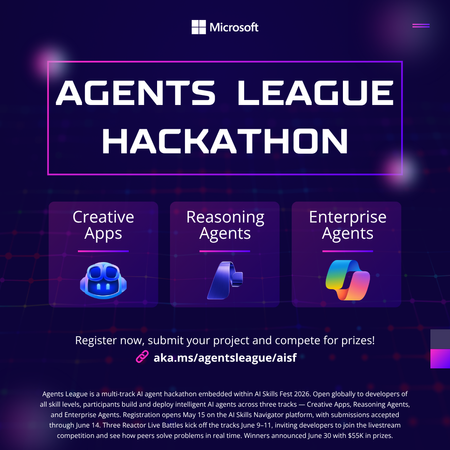
Student Devs: Build AI Agents, Compete for $55K in Prizes 🎮 AI Skills Fest • June 4–14, 2026 • Free to Enter $55K Prize Pool 3 Challenge Tracks 10 Days of Hacking Free To Enter Whether you're a first-year CS student or a final-year senior with a portfolio full of projects, Agents League is the best way to gain hands-on experience with agentic AI this summer and walk away with real skills employers are hiring for right now. What You'll Actually Learn Forget passive tutorials. Agents League is project-based learning at full speed. By the end of the hackathon, you'll have built a working AI agent and gained practical experience with the tools shaping the future of software development. 🤖 AI-Assisted Development Use GitHub Copilot to accelerate your coding workflow — from scaffolding to debugging — the way professional developers do today. 🧩 Multi-Step Reasoning Build agents with Microsoft Foundry that can plan, reason, and execute complex tasks — the core of agentic AI. 🏢 Enterprise AI Patterns Learn to build production-ready agents that integrate with Microsoft 365 and Copilot Studio — skills that translate directly to industry jobs. 🔧 Prompt Engineering Design effective prompts and orchestration flows that make AI agents reliable and useful in the real world. 📦 GitHub Workflows Submit your project through GitHub — practising version control, README writing, and open-source collaboration. 🎯 Competitive Problem-Solving Work under real constraints with deadlines, judging criteria, and peer competition — just like industry hackathons and sprints. Pick Your Track (or Try All Three) Agents League has three challenge tracks, each using different Microsoft AI tools. Choose based on your interests or stretch yourself by competing in multiple tracks. Track 01. Creative Apps Build an innovative application with AI-assisted development. This track rewards creativity, dream big and let GitHub Copilot help you bring ideas to life faster than ever. Tool: GitHub Copilot Track 02. Reasoning Agents Create intelligent agents that solve complex problems through multi-step reasoning. Think: agents that can research, plan, and act. This is the cutting edge of AI. Tool: Microsoft Foundry Track 03. Enterprise Agents Build knowledge agents that integrate with Microsoft 365 Copilot. Learn how businesses are deploying AI today and add enterprise AI to your skillset. Tool: Copilot Studio • M365 Opportunities You Won't Want to Miss Agents League isn't just a competition, it's a launchpad. Here's what's in it for you beyond the code: 💰 Win from a $55,000 USD Prize Pool Prizes are awarded across all three tracks smaller teams and solo hackers have a real shot. 📺 Watch Live Coding Battles at Microsoft Reactor See industry experts go head-to-head building AI agents live. Learn advanced techniques you can apply immediately to your own project. 🎓 Free Learning Resources on Microsoft Learn Access curated learning paths and the AI Skills Navigator, structured content designed to get you from zero to submission-ready. 🌍 Join a Global Developer Community Connect with thousands of developers on the Agents League Discord. Find teammates, ask questions, and build your professional network. 📂 Build Your Portfolio with a Real Project Every submission lives on GitHub. Walk away with a polished, public project that demonstrates your AI skills to future employers and grad schools. 🏆 Gain Recognition from Microsoft and the Community Top projects get visibility across the Microsoft developer ecosystem. Stand out from the crowd in internship and job applications. Key Dates to Remember Event Date Hacking Period Opens June 4, 2026 Registration Deadline June 12, 2026 — 12:00 PM PT Submission Deadline June 14, 2026 — 11:59 PM PT How to Get Started (Right Now) You don't have to wait until June 4th to start preparing. Here's your pre-hackathon game plan: Register for the hackathon it's free and open to everyone. Pick a track that matches your interests or curiosity. Explore the learning resources on Microsoft Learn and the AI Skills Navigator. Join the Discord community to find teammates and get early tips. Watch the Reactor event series for live coding battles and expert walkthroughs. Set up your GitHub repo and start experimenting before the hacking window opens. Helpful Links Register for Agents League Free entry, sign up now Microsoft Reactor Events Live coding battles & workshops AI Skills Fest The broader event Microsoft Learn Free learning paths The Arena Awaits 🏆 Ten days. Three tracks. $55K in prizes. Whether you go solo or squad up, this is your chance to build something real with AI and have a blast doing it. Register Now It's Free | Watch Reactor Events Agents League is part of AI Skills Fest and is open to the public at no cost. Review the Hackathon Rules and Regulations and the Microsoft Event Code of Conduct before participating.1.1KViews0likes0CommentsInside the AB-620 Beta Exam: A Real-World Experience
I recently had a different kind of certification experience and wanted to share it with the community. After completing multiple certifications across the Microsoft ecosystem, I decided to take my first beta exam: AB-620 – Microsoft Certified: AI Agent Builder Associate. I registered early using the beta promo code (AB620Sunny26), which provided 80% off, reducing the cost from $165 USD to about $33 USD (valid for exams booked on or before May 12, 2026). What makes beta exams unique? This was not a typical certification experience. Beta exams are released before general availability, which means: There are limited or no preparation resources (no practice tests, minimal guidance) Some questions may feel ambiguous or still being refined The exam often includes more questions than the final version However, there are strong advantages: You can earn the certification earlier than the general public The certification holds the same value as the live exam You help improve exam quality through feedback (Microsoft reviews all beta comments) The discount and exam voucher make it very cost-effective It validates real-world experience, not just theoretical knowledge Important considerations There are a few trade-offs to be aware of: Results are delayed - typically 10–12 weeks You only get one attempt during the beta period The exam scope may feel broader or less predictable Who should take this exam? If you already have hands-on experience with: Azure Microsoft 365 Copilot Copilot Studio Power Platform …then this beta exam is a great opportunity to validate your skills early. You can find more details here: https://learn.microsoft.com/en-us/credentials/certifications/ai-agent-builder-associate/ I’ve now completed the exam and am currently in the waiting phase. According to Microsoft: "You'll receive your score about 10 days after the exam goes live - approximately 10–12 weeks after the beta period begins." Final thought If you are confident in your practical experience and comfortable navigating uncertainty, I would definitely encourage you to consider beta exams. They are a great way to stay ahead and contribute to the certification ecosystem.1.1KViews3likes2Comments