copilot studio
116 Topics
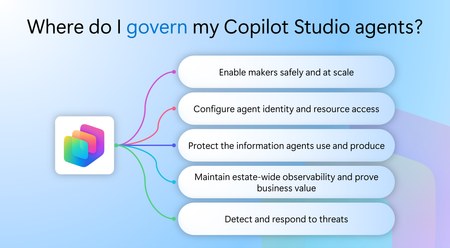
Where do I govern my Copilot Studio agents?
Copilot Studio agents are becoming more action-oriented and autonomous, and taking on more complex work. With agent user accounts, supported Copilot Studio agents can have their own Microsoft 365 account, directory profile, and org-chart relationship, and join Teams and Outlook with scoped permissions. Makers see a digital teammate; admins see a new actor whose access, data use, cost, and behavior must be governed. Microsoft reports that 29% of employees have used unsanctioned AI agents for work, and 32% of surveyed organizations' data security incidents involve generative AI tools. How can admins enable agents safely without slowing makers down? For IT teams, this creates a series of connected governance outcomes they need to achieve: Enable makers safely and at scale Configure agent identity and resource access Protect the information agents use and produce Maintain estate-wide observability and prove business value Detect and respond to threats Each outcome has a lead, but no outcome stops where the next begins. Together, they help IT leaders organize their teams and give practitioners a clear view of the outcomes and controls they own. This blog walks through each governance outcome: who owns it, the challenges involved, and the Microsoft products that support end-to-end, layered governance. Enable makers safely and at scale Organizations need room for makers to experiment without allowing agents to sprawl. A single shared environment is difficult to govern consistently. On the other hand, requiring a separate approval for every early idea can slow adoption. The first governance job is to establish a path from personal development to broader deployment. The Power Platform admin leads the environment strategy. The desired outcome is an administrated place to build, with consistent controls and clear requirements for moving an agent into team or production use. In the Power Platform admin center, environment routing can give makers personal developer environments instead of placing everyone in the default environment. Environment groups and rules apply settings consistently across those environments, including advanced connector policies that allow only approved connectors and actions and block everything else by default. Sharing controls limit how agents are distributed and contain agent user account risk: an agent can only act through what its environment allows, so a least-privilege allowlist limits its reach even if its permissions expand. Maker-facing guidance makes these boundaries clear at the point of creation, and these controls continue to apply as agents move into wider use. Configure agent identity and resource access As agents connect to systems and take actions, IT needs to know which identity is being used and what that identity can access. Permissions appropriate for an initial use case may become excessive as an agent gains new capabilities or connections. Agent user accounts make this question more visible, but identity and access governance applies more broadly. The identity and access admin leads this job in Microsoft Entra. The desired outcome is that agent identities are identifiable, resource access is appropriately scoped, and access conditions and permissions can be reviewed as an agent’s use changes. Microsoft Entra Agent ID provides capabilities to manage agent identities. Conditional Access for agents helps apply access conditions to supported agent access patterns. Identity admins need to distinguish between an agent identity, an agent acting on behalf of a user, and an agent user account: these patterns do not use or govern access in identical ways. Entra’s identity controls complement the environment and connector boundaries established in the Power Platform admin center. Protect the information agents use and produce An agent may have legitimate access to information without every use or disclosure of that information being appropriate. As agents connect to more sources and produce outputs for more people, IT needs to understand where sensitive data is exposed and whether existing protections cover the agent’s interactions. The compliance admin and data security team lead this job in Microsoft Purview. Their desired outcome is to identify data risks, apply appropriate protections, and maintain visibility into how sensitive information is used across supported agent interactions. Those protections need to be reassessed as an agent’s sources, audience, or capabilities change. Microsoft Purview Data Security Posture Management helps identify AI-related data risks. Classification, sensitivity labels, data loss prevention, and audit provide additional protection and visibility for supported scenarios. Coverage differs by agent and interaction type, so admins should verify which controls apply and include agent instances in relevant policies where required. Copilot Studio data policies remain a complementary platform control over connections and capabilities; they do not replace information protection. This collective protection matters most for agents with user accounts. They don’t just act on behalf of a user or inherit delegated access; they have their own access and their own knowledge. AI agents can discover vulnerabilities faster than humans, making protection of underlying data more critical than ever. With their own access and permissions, agents with agent user accounts can introduce new risks of data oversharing and exfiltration. Maintain estate-wide observability and prove business value As agents spread across teams and platforms, IT needs an estate-wide view of what exists, who owns it, how it is used, which agents need attention, and whether spend is tied to value. The AI admin coordinates this view in Microsoft Agent 365, the observability platform for AI that provides a view of agents across the organization. The desired outcome is an agent estate IT can continuously observe and improve. Power Platform admins continue to manage environments for Copilot Studio and platform-specific controls. Copilot Studio agents appear in the agent registry in the Microsoft 365 admin center, alongside Microsoft and non-Microsoft agents, with usage insights on by default. The agent map shows how each agent connects to users and tools, so IT knows where to look first. From an agent’s details page, the AI admin reviews ownership, usage, and security signals, then routes findings to the right admin in Microsoft Entra, Microsoft Purview, or Microsoft Defender. Each admin acts in their own portal, with their existing permissions. With tool governance, IT controls which plugins, skills, and connectors are available, and to whom, while cost management tracks Copilot Credit spend, with spending policies and alerts. Agent 365 complements, rather than replaces, the controls in those products and the Power Platform admin center, while extending governance beyond Copilot Studio agents. Available information and actions vary by agent, publishing state, and tool type. The agent map in Microsoft Agent 365 shows how an agent connects to users and tools. Detect and respond to threats Preventive guardrails cannot resolve every risk before an agent is deployed. Once agents are running, they face threats that look different from traditional attacks. A jailbreak prompt can trick an agent into ignoring its instructions. A prompt injection hidden in an email, document, or web page can redirect an agent to leak data or take action nobody intended. A compromised or overly broad connected tool can be misused to reach systems the agent was never meant to touch, and an unusual spike in an agent’s activity can signal that it is being abused. IT needs to identify the affected agent, determine what happened, and act across the relevant controls. The security admin and Security Operations Center (SOC) analysts lead threat investigation and response, but they cannot do it alone. SOC analysts see the alert; IT knows the agent. When a jailbreak attempt or suspicious tool call is flagged, the AI admin connects the signal to the agent and its owner, so analysts know what the agent is for, what it can reach, and who to contact. From there, the teams investigate together: the SOC reconstructs what happened, the identity admin checks or restricts the agent’s permissions, the compliance admin assesses whether sensitive data was exposed, and the Power Platform admin changes connectors, sharing, or environment settings, or disables the agent. The desired outcome is a response path that does not depend on one admin having every tool or every form of expertise. Microsoft Defender provides agent security posture and threat investigation capabilities, with real-time protection for supported and configured scenarios. A finding in a broader agent-management view can prioritize attention, but specialist investigation and response remain with the security team. Findings should also inform future access, data-protection, and platform decisions. Learn more about enabling Defender security for AI agents. Put the governance framework to work For IT leaders, this guide is a starting point for organizing Copilot Studio governance across teams. Assign a lead for each outcome, then agree on the decisions that need input from other admins (for example: when an agent moves into production, gains access to a new resource, or reaches a wider audience). A regular review of agent ownership, access, data protection, usage, and risk can help teams identify gaps before they become operational issues. Working across several admin surfaces is intentional; each team gets the tools built for its role, and shared context and clear handoffs keep everyone moving toward the same outcome. When a governance question arises, begin with the outcome you need rather than the admin center you expect to use. An agent that appears in the inventory but has no clear owner calls for a different response from one whose permissions have expanded or whose outputs may contain sensitive information. With a strong governance framework, clear responsibilities, and effective delegation across admins, organizations can confidently prepare for a future where agents have a place on the org chart. Get started Ready to put layered governance in place? Start with the two admin experiences that anchor Copilot Studio’s layered governance : Power Platform admin center: Get started with the Power Platform admin center to set up environment routing, environment groups, and connector policies for your makers. Agent 365: Get started with Microsoft Agent 365 to gain estate-wide visibility, ownership, and governance across your agents.669Views0likes0CommentsPaper: How utilizing the Microsoft Copilot harness in Copilot Studio enabled complex task execution
Abstract: Copilot Studio's Standard harness is built for conversation: several isolated model calls per turn, a reply within seconds, and control handed back to the user as soon as a step needs input. Many business tasks are not simple Q&A. They run for many turns, touch thousands of records, and need code, files and retries along the way. We implemented the Microsoft Copilot harness: a single model-centered agentic loop running inside a secure container, with command line and file tools and a way to materialize large data sets on disk so the model can reason over them iteratively. This paper describes the two architectures and measures the difference. On the same evaluation tasks and the same models, the Microsoft Copilot harness makes 2 times more model calls per task, yet because of efficient caching (on average +40 pp), its cost-weighted token consumption falls 15 to 21% while its eval pass rate rises 10.8 points on GPT-5.5 Chat and 22.1 points on Opus 4.8 and per-call latency falls 10% to 36%. In production, Microsoft Copilot harness agents run longer tasks with more tool calls, use the container's built-in tools in more than half of turns, and keep working after a failed tool call 84% to 91% of the time where the Standard harness does so under 7% of the time. On a business process benchmark the Microsoft Copilot harness scored 65% against 36% for a leading competitor, and hill climbing tool behavior in production, one tool at a time, moved the Excel Online connector's success rate from 85.6% to 96.3% with one telemetry-driven tuning change and no maker action. Read the blog here Read the full paper by clicking the PDF attachment below.1.7KViews0likes0CommentsIntroducing the Power Platform Admin Plugin in Cowork: Agentic Governance with Natural Language
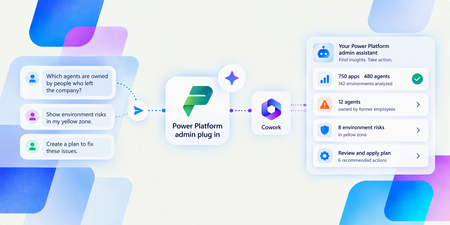
Explore agentic Power Platform governance with the Power Platform admin plugin in Copilot Cowork. Ask questions about your tenant and turn governance insights into customized reports, dashboards, and apps.1.8KViews1like2Comments
Copilot Studio agents problems connecting to Sharepoint knowledge source
Hello, Since last week users in my tenant are experimenting issues regarding the connection between copilot studio agents and Sharepoint. The agents are not able to extract information from Sharepoint sites, printing there is not information in the Sharepoint site regarding the user's question when that information is in Sharepoint. These agents used to work well till last week. Does have been any update in Microsoft 365 services that can be affecting these agents ability to retrieve information from Sharepoint?3.5KViews3likes25CommentsCopilot Studio agent behaves differently in Teams and the test pane
Hello, We have built a topic-based agent in Microsoft Copilot Studio that uses SharePoint as a knowledge source and is published to Microsoft Teams. We are seeing the following behavior: The agent sometimes stops responding in Teams. To make it respond again, we need to use commands such as: /debug clearstate /debug clearhistory /debug conversationid 3. One of our topics contains a Question node asking whether the user’s query was resolved. 4. The question and its options appear correctly in the Copilot Studio evaluation/test pane. 5. However, the same question never appears when the agent is used in Teams. Has anyone experienced similar behavior? Any troubleshooting guidance would be helpful.185Views0likes2CommentsCopilot Studio custom MCP connector: server-verifiable identity of the calling agent?
I am evaluating a Copilot Studio agent calling a custom MCP connector with delegated Entra authentication and client federation. The private pilot uses a synthetic catalogue. In my published PALO Framework, the governance model binds the admitted identity, time-bound mandate and exact proposed action before execution: https://paloframework.org/PALO_AIGovernance.html . The point I want to clarify is how far that identity binding can go for the originating Copilot agent. I read the Microsoft guidance on agent identities: https://learn.microsoft.com/en-us/microsoft-copilot-studio/govern-agents-identities-overview . An Agent ID in the registry and a connector client identity are different evidence. In our documented pilot, the delegated token admission and the Copilot tool trace are checked separately; I do not treat the connector client ID alone as cryptographic proof of the originating agent. For this custom-connector path, is there a supported claim or signed attestation that a remote MCP server can validate to bind each call to the specific Copilot Studio agent? I would appreciate the documented validation rules and whether the test pane and published channels differ. If this is not supported on this path, which supported isolation pattern would you use for separate agent mandates? This is a design question from an evaluation pilot, not a production capability claim.131Views0likes1Comment
Seeking Guidance: Microsoft Copilot Integration with Apache Superset via MCP
Seeking Guidance: Microsoft Copilot Integration with Apache Superset via MCP Hi everyone, We are using Apache Superset 6.1.0 with PostgreSQL and ClickHouse datasets and exploring integration with Microsoft Copilot through Superset's MCP server. Our objective is to allow users to ask questions in natural language and receive text-based answers, tabular results, and AI-generated charts or dashboards based on our existing data. I would appreciate guidance on the following: Integration feasibility: Can Microsoft Copilot Studio connect to Superset's MCP server and support this use case? Capabilities and performance: Can it handle natural-language queries, data retrieval, chart generation, and dashboard creation effectively? Licensing: Which Microsoft plan is suitable for this use case? Would a trial or pay-as-you-go option be sufficient for a proof of concept? Costs: What are the estimated licensing, message-consumption, and Azure infrastructure costs for a small POC and production deployment? Security: Can we enforce authenticated access and read-only permissions while protecting our PostgreSQL and ClickHouse data? Our initial goal is to validate the integration through a small proof of concept before committing to a paid plan. If anyone has implemented a similar integration, I would appreciate your recommendations, practical experience, and estimated costs. Thank you!103Views0likes1Comment
GitHub Copilot Harness + Work IQ + Business Data
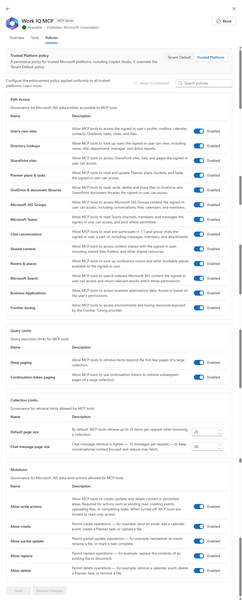
Hello, I have been trying to use the latest Work IQ MCP from an agent build using Copilot Studio (GHCP Harness). The MCP is able to answer questions to provide details about a dataverse record when i provide the record ID, when i try to ask for questions that require the agent to list/search, it fails with the error "Path is not in the policy allowlist." when trying to perform a post request to the do_action tool. I double checked: Work IQ enabled on Power Platform environment Business Apps in M365 allowed for my user account MDA has required config enabled Semantic index created for MDA Work IQ MCP Policy under M365 and all operations are enabled: 6. Confirmed checked that i have enabled read/write on the Work IQ MCP inside my agent (just in case Post request is considered a write) Any clue what is going wrong or if there are missing configuration somewhere that i need to check?123Views0likes1Comment
Architecting Multi-Agent Systems in Copilot Studio: Orchestration, Delegation, and Handoffs
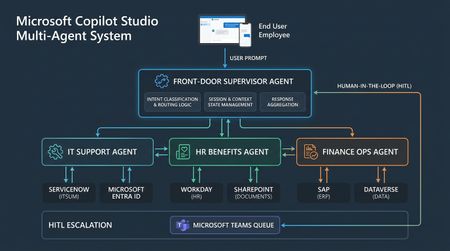
Executive Summary As enterprise conversational AI matures, organizations quickly run into the "Monolithic Agent Dilemma": a single bot tasked with answering IT questions, navigating HR benefits, generating financial forecasts, and resetting passwords quickly becomes unmanageable. Maintenance turns brittle, topic trigger collisions skyrocket, and system prompts balloon beyond effective context windows. The industry solution is Multi-Agent Architecture—decoupling monolithic agents into specialized, bounded worker agents governed by an intelligent supervisor agent. In this article, we break down how to architect, build, and deploy an enterprise-grade multi-agent ecosystem using Microsoft Copilot Studio, complete with orchestration patterns, state-passing best practices, and graceful human-in-the-loop (HITL) escalations. 1. The Architectural Shift: Monolith vs. Multi-Agent In traditional chatbot design, all logic resides in a single container. In a multi-agent system, agents mimic a real-world enterprise organizational chart with a Front-Door Supervisor Agent, specialized Worker Agents (IT, HR, Finance), and human escalation queues. Why Multi-Agent Wins for Enterprise: Separation of Concerns: HR teams maintain HR topics and knowledge; IT teams maintain infrastructure playbooks without cross-team deployment collisions. Isolated Context Windows: Worker agents only receive instructions and data relevant to their domain, reducing hallucination risks. Granular Security and DLP: IT agents can access privileged admin connectors, while HR agents operate under zero-trust privacy boundaries. Independent Versioning and ALM: Teams deploy updates to their specific agent solution without redeploying the entire company bot. 2. Core Architectural Roles: The Supervisor & Worker Agents The Supervisor Agent (The Front-Door Concierge) Acts as the primary endpoint interacting with end users across Microsoft Teams, web portals, or M365 Copilot. Greeting and persona consistency. Ambiguity clarification and intent routing. Shared state and session tracking. Handoff management and post-execution response synthesis. Worker Agents (Domain Specialists) Focused task-solvers that execute deterministic workflows or specialized generative actions: Identity and Access Agent: Handles Entra ID group requests, MFA resets, and licensing checks. Travel and Expense Agent: Inspects corporate travel policy, checks receipts, and posts expense reports. Knowledge Agent: Connects to specific Graph connectors and Azure AI Search indexes with targeted grounding. 3. Communication & Delegation Patterns Pattern 1: Direct Sub-Agent Invocation (Agent-as-a-Tool) How it Works: The supervisor agent registers worker agents as callable tools or custom actions via OpenAPI or Power Automate. Best Used For: Fast, single-turn tasks where worker agents return structured data to the supervisor. Pattern 2: Bot-to-Bot Protocol / Skills How it Works: The supervisor connects to worker agents registered as Bot Framework Skills using Direct Line or App Registrations. Best Used For: Long-running multi-turn dialogs where the worker temporarily takes over the conversation canvas. Pattern 3: Event-Driven Orchestration via Dataverse How it Works: Tasks are logged to an audit table in Dataverse; background agents pick up requests asynchronously and notify the user via Adaptive Cards. Best Used For: Asynchronous workflows requiring multi-approver sign-off or external job completion. 4. State & Context Passing: Avoiding the "Amnesia Problem" The biggest challenge in multi-agent handoffs is loss of context. If a user reports a specific VPN error code, transferring them to the IT Agent with a blank state causes the bot to ask the user to repeat themselves. Solution: Context Packet Schema When transferring between the Supervisor and Worker Agent, serialize and pass a structured JSON Context Payload: json { "sessionId": "conv-98421-m365", "initiator": { "userId": "user_aad_guid_12345", "upn": "email address removed for privacy reasons", "department": "Engineering", "locale": "en-US" }, "intent": { "domain": "IT_Support", "subCategory": "VPN_Diagnostics", "confidence": 0.94 }, "extractedEntities": { "errorCode": "800", "clientOs": "Windows 11 Enterprise", "initialQuery": "My VPN is failing with error 800, can you help me fix it?" } } Implementing in Copilot Studio: In the Supervisor Agent, capture global variables (such as Global.UserContext and Global.ExtractedProblem). When calling the Worker Action or Skill, map these global variables into the worker's Input Arguments. In the Worker Agent, configure the topic to check incoming arguments: if errorCode is already populated, skip intake questions and begin diagnostics immediately. 5. Designing Graceful Fallbacks & Human-in-the-Loop (HITL) Multi-agent systems require a fault-tolerant escalation pipeline when automated resolution confidence falls below threshold. Best Practices for Human Escalation: Warm Handoffs Only: Never dump a cold transfer. Always attach the transcript, attempted diagnostic steps, and error codes. Microsoft Teams Shared Channels: For internal support, dispatch escalation Adaptive Cards into a private Support Teams channel where engineers can claim the ticket with one click. Omnichannel for Customer Service: Utilize Copilot Studio's native integration with Dynamics 365 Omnichannel to pass live chats with full routing rules. 6. Security, DLP, and Governance Guardrails Data Loss Prevention (DLP) Isolation: Assign worker agents to dedicated Power Platform environments based on their data classification tier. General environments handle read-only FAQ and public knowledge; high-privilege environments handle Active Directory changes and ERP transactions. Prompt Injection Resilience: The Supervisor agent must sanitize freeform inputs before passing them into sub-agent prompts. Audit Trails: Log every agent-to-agent delegation event in Dataverse with execution timestamps, latency, and token consumption metrics. 7. Implementation Checklist Audit Your Current Bot: Identify topics with high trigger overlap and cluster them by business domain. Define the Supervisor Contract: Standardize a JSON schema for user identity, intent, and parameter passing. Build Your First Worker Agent: Start with a high-volume, bounded domain like IT Service Desk or Password Management. Implement Tool Calling: Register the worker agent as a callable action inside your front-door supervisor. Test Edge Cases: Validate that multi-turn dialogs maintain context and unknown intents gracefully route back to human triage. Join the Discussion Have you implemented multi-agent architectures in your tenant? How are you handling state transfer and DLP across specialized bots? Share your thoughts and architectural questions in the comments below!158Views0likes0Comments